AI Based Operating System: Architecture, Models, and Governance
Learn how an AI based operating system connects models, workflows, and governance so creative teams can scale compliant AI production.
Creative AI is no longer a side experiment. Marketing teams use it for campaign variations, art departments use it for concept exploration, game studios use it for asset ideation, and application teams are asked to connect it all without creating security, compliance, or quality problems.
That is why the idea of an AI based operating system is becoming important. It is not a replacement for Windows, macOS, or Linux. In an enterprise context, it is the control layer that makes AI usable at scale. It connects models, prompts, workflows, assets, approvals, policies, and integrations so teams can create faster without losing control.
For creative organizations, this matters because isolated AI tools rarely survive the jump from experimentation to production. A single prompt may generate an impressive image, video, or 3D concept. But production requires repeatability, brand consistency, rights awareness, team review, model selection, auditability, and integration with existing pipelines.
An AI based operating system solves that larger problem. It gives the organization a way to define how AI should run, not just which model to use.
What an AI based operating system actually means
An AI based operating system is best understood as a governed orchestration layer for AI work. It sits between people, applications, AI models, data sources, creative tools, and enterprise systems.
Instead of every team choosing separate tools, uploading assets manually, writing prompts from scratch, and managing outputs in disconnected folders, an AI operating layer centralizes the rules and workflow logic. It can coordinate which models are used, what context is available, who can approve work, where outputs are stored, and how compliance requirements are enforced.
In creative production, this usually includes five capabilities:
- Model orchestration across image, video, 3D, audio, language, and vision models
- Workflow automation for repeatable creative processes, reviews, and approvals
- Context management for brand identity, product data, visual references, and mood boards
- Governance controls for access, usage rules, audit trails, and compliance
- Integration with creative and enterprise systems such as DCC tools, DAM, PIM, and APIs
The goal is not to make every creative decision automatic. The goal is to make AI predictable, controllable, and useful inside real production environments.
The core architecture of an AI based operating system
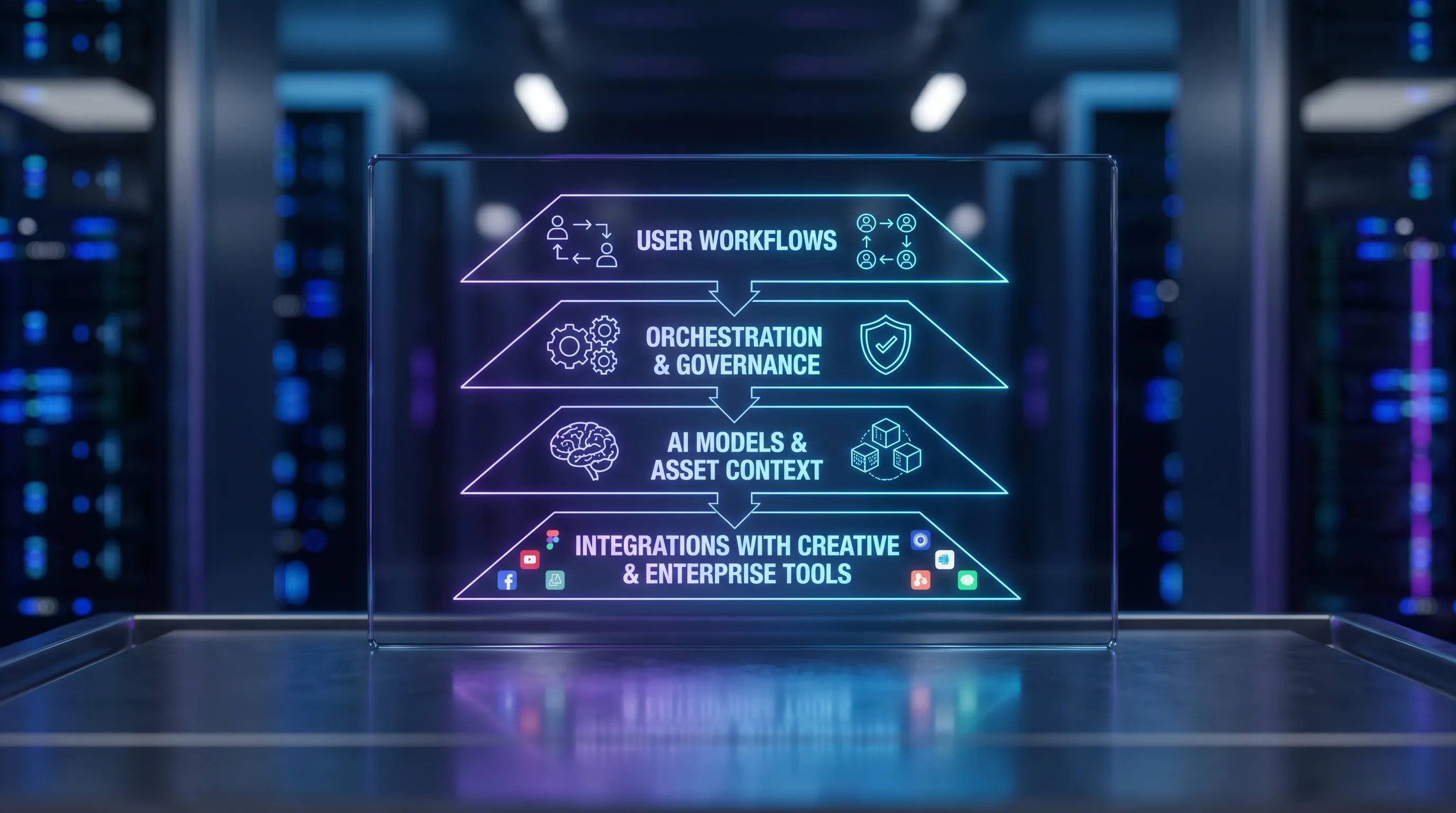
The architecture of an AI operating system typically combines a user layer, an orchestration layer, a model layer, a context and asset layer, a governance layer, and an integration layer. Each layer has a different responsibility, but the value comes from how they work together.
| Architecture layer | What it does | Why it matters |
|---|---|---|
| User and workflow layer | Gives teams interfaces for briefs, generation, review, annotation, and approvals | Makes AI accessible to marketers, artists, producers, and developers |
| Orchestration layer | Routes requests, applies templates, chains steps, and coordinates models | Turns isolated prompts into repeatable production workflows |
| Model layer | Connects to multiple AI models for text, image, video, 3D, audio, and analysis | Allows teams to choose the right model for the task instead of relying on one system |
| Context and asset layer | Stores approved references, mood boards, product assets, metadata, and project memory | Improves consistency across campaigns, studios, and production teams |
| Governance layer | Enforces permissions, policies, compliance rules, auditability, and review gates | Reduces operational, legal, brand, and security risk |
| Integration layer | Connects with DCC tools, PIM, DAM, pipeline systems, and internal applications | Keeps AI inside the production stack instead of creating another silo |
This architecture is especially relevant for enterprise creative teams because AI work is rarely a single step. A campaign visual may start with a brand brief, use product imagery from a PIM, reference a seasonal mood board, generate multiple creative territories, pass through art direction review, move into retouching, and end in a DAM for distribution.
Without an operating layer, every handoff becomes manual. With one, the process can be orchestrated, documented, and repeated.
How the orchestration layer works
The orchestration layer is the engine of an AI based operating system. It interprets intent, applies rules, selects models, manages context, and coordinates the workflow from request to output.
A typical creative workflow might look like this:
- A user submits a brief for a product image, game asset concept, campaign video, or 3D variation.
- The system applies a generation blueprint that defines format, style rules, required references, and approval steps.
- Relevant context is retrieved, such as mood boards, brand guidelines, product attributes, previous approved assets, or project notes.
- The system selects one or more models based on the task, required output type, quality needs, latency, cost, and compliance constraints.
- Outputs are generated, checked, annotated, reviewed, and either approved, revised, or rejected.
- Approved assets and metadata are stored or pushed into connected systems.
The important point is that orchestration is not just automation. It is controlled automation. It allows organizations to standardize the parts of creative AI that should be repeatable while preserving human judgment where it matters most.
For example, a CMO may care about brand consistency and campaign speed. An art director may care about visual fidelity and creative intent. An application manager may care about integration, access control, and reliability. A game developer may care about iteration speed, asset formats, and pipeline compatibility. The orchestration layer needs to support all of these priorities without forcing every role into the same interface.
Model architecture: one model is not enough
Many early AI workflows were built around a single model. That can work for experimentation, but it becomes limiting in production. Different models perform better for different tasks. A model that is strong at photorealistic images may not be the best choice for 3D asset ideation. A video model may be fast but less controllable. A language model may be excellent for briefs and metadata but unsuitable for rights-sensitive visual decisions without additional checks.
A mature AI based operating system therefore needs a multi-model architecture. This means it can coordinate several model types and route work based on the creative and operational requirements of the task.
| Model category | Common creative use cases | Governance question to ask |
|---|---|---|
| Large language models | Brief generation, prompt assistance, metadata, creative variants, production notes | What data can the model access, and is sensitive context protected? |
| Image generation models | Campaign visuals, product concepts, style exploration, storyboards | Are brand rules, rights constraints, and approval steps enforced? |
| Video generation models | Motion concepts, social video drafts, cinematic previsualization | Are outputs reviewed for brand safety, accuracy, and usage rights? |
| 3D generation and reconstruction models | Game asset concepts, product visualization, environment prototyping | Can outputs fit the required production pipeline and quality standards? |
| Audio models | Voice concepts, sound design exploration, localization drafts | Are voice, licensing, and consent policies respected? |
| Vision and analysis models | Asset tagging, quality checks, similarity search, compliance review | Are automated decisions explainable enough for the workflow? |
| Embedding and retrieval models | Search, context retrieval, mood board matching, asset recommendations | Is the retrieved context approved, current, and relevant? |
This multi-model approach also reduces lock-in. If one model becomes too expensive, unavailable, non-compliant, or technically inferior for a task, the operating system can route to another model or keep multiple options available.
For enterprise teams, model strategy should be treated as a portfolio decision. The question is not which AI model is best overall. The better question is which model is best for this task, under these constraints, with this level of risk.
Context memory: the difference between generic output and production-ready work
AI models are powerful, but they do not automatically understand a studio, brand, product line, campaign, or game world. They need context.
In creative production, context may include:
- Mood boards and visual references
- Brand guidelines and forbidden styles
- Product data, attributes, and photography
- Approved campaign assets
- Character, environment, or world-building references
- Previous generations and reviewer feedback
- Regional, legal, or market-specific requirements
A strong AI operating layer manages this context so teams do not have to rebuild it for every prompt. It also helps prevent uncontrolled context drift, where different teams generate assets that look unrelated because they used different references or prompt structures.
This is where generation blueprints become valuable. A blueprint can define the recurring structure of a creative task, including the required inputs, context sources, model preferences, output specifications, and approval flow. For example, a product campaign blueprint might always pull approved product data, apply a seasonal mood board, generate a fixed number of visual directions, and require art director approval before export.
In Virtuall, this concept is reflected through features such as generation blueprints, studio context memory with mood boards, team collaboration workflows, asset management, and pipeline tracking. The purpose is to help creative teams move from one-off prompting to repeatable, governed production.
Governance: the control plane for enterprise AI
Governance is what separates production AI from uncontrolled experimentation. It defines who can use AI, which models can be used, what data can be included, how outputs are reviewed, and how activity is tracked.
For enterprise teams, governance is no longer optional. AI risk management is now a board-level and regulatory concern. The NIST AI Risk Management Framework provides a widely referenced structure for mapping, measuring, managing, and governing AI risks. The EU AI Act has also pushed organizations to think more formally about obligations, documentation, transparency, and risk categories. For organizations building a management system around AI, ISO/IEC 42001 is another important reference.
In a creative AI environment, governance should cover at least four areas.
| Governance area | What to control | Why it matters |
|---|---|---|
| Access and permissions | Who can generate, approve, export, or connect models and assets | Prevents uncontrolled usage and protects sensitive projects |
| Data and context | Which briefs, product data, references, and files can be used by AI systems | Reduces confidentiality, privacy, and IP exposure |
| Model and workflow policy | Which models are allowed for which tasks, markets, or asset types | Helps align creative AI usage with risk and compliance requirements |
| Output review and audit | How outputs are checked, approved, documented, and stored | Creates traceability and supports accountability |
Governance should not feel like a blocker. When designed well, it makes AI faster because teams know what is allowed. Instead of waiting for legal, IT, and brand teams to review every experiment manually, approved workflows can be built into the operating system.
Security and compliance considerations
An AI based operating system often touches sensitive information: unreleased products, campaign concepts, customer data, proprietary assets, character designs, product imagery, and internal brand strategies. That makes security architecture essential.
Key considerations include data residency, inference location, permission boundaries, audit logs, model access policies, and secure integrations. For European organizations or global companies with European operations, EU-based infrastructure and inference can be especially important when evaluating creative AI platforms.
Security teams should also consider risks specific to generative AI, such as prompt injection, data leakage through prompts, unsafe tool use, and insecure plugin connections. The OWASP Top 10 for Large Language Model Applications is a useful reference for understanding common LLM application risks.
Creative teams should also think about provenance and content authenticity. Standards such as C2PA are helping the industry define ways to attach verifiable content credentials to digital media. While adoption varies by workflow and platform, provenance is becoming more relevant as AI-generated content enters commercial production.
What governance looks like in a creative workflow
Governance becomes practical when it is embedded into the workflow instead of added at the end. A controlled creative AI process might include approved templates, restricted model choices, mandatory reviewer roles, output labeling, and asset version history.
For example, a global brand might allow marketing teams to generate social media concepts freely inside an approved campaign blueprint, but require art director approval before any asset is exported. A game studio might allow concept artists to generate environment references, while blocking the use of unreleased character IP in external models. A product team might permit AI-assisted imagery only when the workflow pulls from approved PIM data and stores final assets in the DAM.
These controls can feel restrictive if applied manually. Inside an AI operating system, they become part of the production path. The user gets clarity, the business gets control, and IT gets a more manageable architecture.
Evaluation: measuring model and workflow performance
Creative AI systems should be evaluated continuously. A model that performed well six months ago may no longer be the best option. A workflow that works for one campaign type may fail for another. A governance rule that made sense during a pilot may become too restrictive in production.
Evaluation should combine quantitative and qualitative signals. In creative environments, human review remains essential because visual quality, brand fit, art direction, and emotional impact cannot be reduced to a single automated score.
Useful evaluation dimensions include:
- Output quality and fidelity to the brief
- Brand consistency and style alignment
- Production usability of the generated asset
- Review and revision time
- Cost per approved output
- Model latency and reliability
- Policy compliance and audit completeness
- User adoption across teams
The point is not to measure AI in isolation. The point is to measure whether AI improves the full creative production system.
Implementation roadmap for enterprise teams
Rolling out an AI based operating system is not just a technical deployment. It is an operating model change. The best implementations usually start with focused workflows, clear governance, and measurable outcomes.
| Phase | Main objective | Practical output |
|---|---|---|
| Discovery | Identify high-value creative workflows and current AI usage | Prioritized use cases and risk map |
| Governance design | Define roles, policies, model rules, data boundaries, and approval gates | AI usage framework and workflow requirements |
| Architecture planning | Map integrations with creative tools, DAM, PIM, pipeline systems, and APIs | Technical architecture and integration plan |
| Pilot workflow | Test one or two production-relevant workflows with real users | Validated blueprint, feedback, and performance metrics |
| Scale and optimize | Expand to more teams, models, formats, and regions | Reusable operating model for creative AI production |
A good first use case is specific enough to control but important enough to matter. Examples include campaign concept generation, product image variation, 3D asset ideation, storyboard exploration, or AI-assisted asset tagging. Avoid starting with a vague mandate to use AI everywhere. That usually creates tool sprawl instead of operational maturity.
Common mistakes to avoid
The most common mistake is treating AI adoption as a model selection problem. Models matter, but they are only one part of the system. Without governance, context, workflow design, and integrations, even the best model can produce inconsistent or unusable results.
Another mistake is separating creative teams from IT and compliance teams too early. Creative leaders understand quality and intent. Application managers understand systems, security, and integration. Legal and compliance teams understand risk. AI production needs all of them involved from the start.
A third mistake is over-automating creative judgment. AI can accelerate exploration, variation, and production tasks, but creative direction still needs human ownership. The most effective systems keep humans in the loop where taste, strategy, legal interpretation, and brand judgment are required.
Finally, many organizations underestimate asset management. AI can generate large volumes of content quickly. Without versioning, metadata, approval status, and storage discipline, teams can end up with more confusion, not more productivity.
How Virtuall fits this operating model
The Creative AI OS is built around the idea that creative AI needs an operating system, not just another generation tool. It helps studios and enterprise teams control, orchestrate, and scale AI-powered content creation across image, video, 3D, and audio workflows.
Its Creative AI OS includes governance controls, workflow orchestration, generation blueprints, studio context memory with mood boards, collaboration features for review and approvals, content annotation, asset management, pipeline tracking, and integrations through plugins and API. Virtuall also supports EU-based infrastructure and inference for organizations that need stronger compliance alignment.
Nyx, Virtuall’s intelligence layer, orchestrates multiple industry-leading AI models and helps keep intent and context across studios and teams. For organizations trying to move from scattered AI experiments to controlled creative production, that orchestration and governance layer is the core value.
Frequently Asked Questions
Is an AI based operating system the same as a traditional operating system? No. In this context, it does not replace a device operating system. It is an enterprise control and orchestration layer that manages AI models, workflows, context, assets, governance, and integrations.
Why do creative teams need an AI operating system instead of separate AI tools? Separate tools can be useful for experimentation, but they often create inconsistent outputs, unclear rights management, fragmented assets, and weak auditability. An AI operating system helps teams scale AI with repeatable workflows and shared governance.
What models should an AI based operating system support? For creative production, it should be able to coordinate models for text, image, video, 3D, audio, vision, embeddings, and retrieval. The exact model mix depends on the organization’s workflows, quality expectations, compliance needs, and integration requirements.
How does governance improve creative AI workflows? Governance defines who can use AI, which data and models are allowed, what review steps are required, and how outputs are tracked. When embedded into workflows, it reduces risk while helping teams move faster with clearer rules.
What should enterprises evaluate before adopting an AI based operating system? Key evaluation areas include security, compliance, model orchestration, workflow flexibility, creative tool integrations, asset management, approval workflows, auditability, data residency, and the ability to support real production outputs.
Move from AI experiments to governed creative production
If your team is generating images, videos, 3D assets, or campaign concepts with disconnected tools, the next challenge is not more experimentation. It is control, consistency, and scale.
Virtuall gives creative and enterprise teams a Creative AI OS for orchestrating models, managing workflows, preserving studio context, and applying governance across production. Whether you are a CMO looking for brand-safe scale, an art director protecting creative intent, an application manager connecting systems, or a game developer accelerating asset workflows, Virtuall helps bring AI into production with structure and control.