AI-Driven Enterprise Search for Creative Asset Libraries
Learn how AI-driven enterprise search helps creative teams find, govern, and reuse assets across image, video, and 3D libraries.
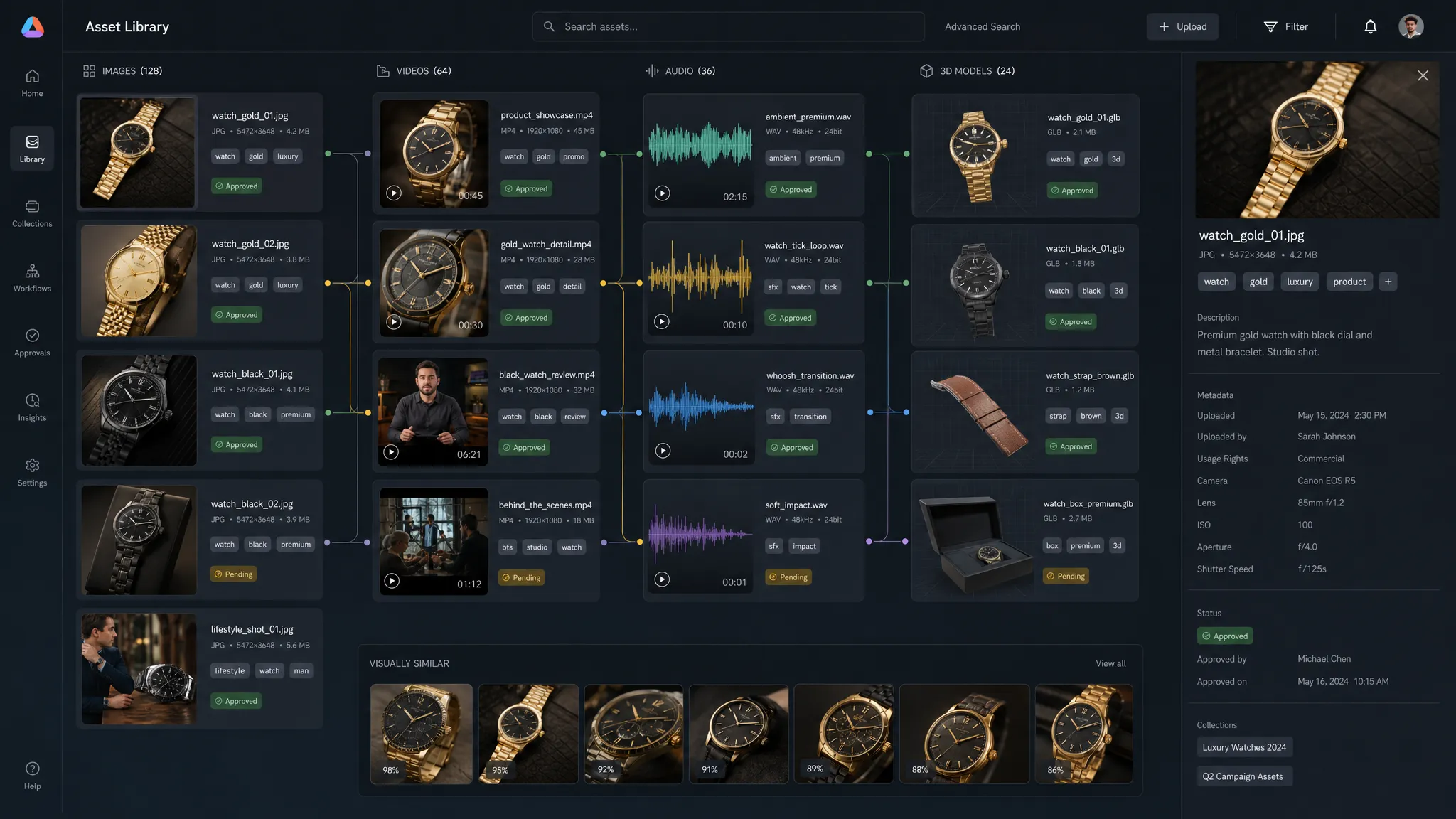
Creative asset libraries have become one of the most valuable knowledge bases inside modern studios, marketing departments, and game teams. They hold campaign visuals, product renders, video cuts, 3D models, approved references, character studies, sound assets, mood boards, style explorations, and thousands of “almost right” variations that may be useful later.
The problem is that most teams can only find a fraction of what they have.
Traditional enterprise search depends heavily on filenames, folder structures, and manual metadata. That works when a library is small and well maintained. It breaks when teams generate large volumes of AI-assisted content, localize campaigns across markets, iterate on 3D assets, or move work between DAMs, PIMs, DCC tools, and production trackers.
AI-driven enterprise search changes the role of the asset library. Instead of being a static archive, it becomes a living creative memory, one that understands visual content, context, usage rights, approvals, versions, and intent.
For enterprise creative teams, this is not just a productivity upgrade. It is a governance, brand consistency, and production-readiness issue.
What AI-driven enterprise search means for creative asset libraries
In a creative context, AI-driven enterprise search is the ability to search across assets using meaning, visual similarity, metadata, permissions, and workflow context, not just exact keywords.
A user should be able to ask for “approved spring campaign images with a warm luxury tone,” “3D vehicle models used in the latest trailer,” or “all product shots similar to this reference but cleared for EMEA social ads.” The system should understand the query, retrieve relevant assets, respect access controls, and surface the right version with the right usage context.
That requires several layers working together:
- Semantic search that understands concepts, not only words.
- Multimodal search across images, video, 3D, audio, text, and metadata.
- Governance rules that filter results by rights, approval status, market, brand, and security permissions.
- Context memory that connects assets to projects, mood boards, campaigns, teams, and creative intent.
- Workflow integration so search results can move directly into review, generation, editing, or publishing pipelines.
This is why creative asset search is different from general enterprise search. A legal team may search documents. A creative team searches visual intent, style, production state, licensing constraints, and reusable components across many media types.
Why keyword search fails as creative libraries scale
Most creative libraries were built around human organization: folders, filenames, tags, collections, and project codes. These systems are useful, but they rely on consistency. At enterprise scale, consistency is hard to maintain.
One art director may tag an image as “cinematic.” Another may call the same look “moody.” A product team may use SKUs, while a marketing team searches by campaign theme. A game developer may think in terms of props, rigs, environments, and LODs, while a CMO wants to know which assets are approved for a region or channel.
AI-generated assets add another layer of complexity. A single prompt can produce dozens of variations. Teams need to know which ones were approved, which model or workflow created them, which references were used, and whether the output is safe to reuse.
| Search challenge | Why it happens | Business impact |
|---|---|---|
| Inconsistent naming | Teams use different vocabulary across regions, tools, and disciplines | Valuable assets are recreated instead of reused |
| Missing metadata | Manual tagging is slow and often skipped under deadline pressure | Search results are incomplete or unreliable |
| Visual ambiguity | Creative teams search for mood, composition, style, and similarity | Keyword search cannot capture visual intent |
| Version confusion | Multiple rounds, variants, and outputs exist for the same concept | Teams may use outdated or unapproved assets |
| Rights uncertainty | Licensing, market, talent, and usage restrictions are stored separately | Higher legal and brand risk |
| Tool fragmentation | Assets live across DAMs, PIMs, DCC tools, shared drives, and production systems | Search becomes a manual investigation |
The outcome is familiar: duplicated work, slower reviews, inconsistent campaigns, and creative teams spending time hunting instead of making.
The core capabilities of AI-driven creative asset search
A strong AI search layer for creative assets should do more than return similar files. It should help people understand whether an asset is relevant, usable, current, and compliant.
Multimodal understanding
Creative assets are rarely just one type of data. A video contains frames, audio, captions, transcripts, shots, talent, products, locations, and visual style. A 3D model includes geometry, materials, rigging, textures, scale, topology, and dependencies. A product render may connect to a SKU, a market, a campaign, and a retouching workflow.
AI-driven search should index both the asset itself and the surrounding information. For example, an art director might search by uploading a reference image, while an application manager may search by approval status, API source, or system of record. Both queries should work.
Semantic and visual similarity search
Semantic search helps users find assets even when they do not know the exact tag. Visual similarity search helps them find assets that look alike, share a composition, match a mood, or belong to a design family.
This is particularly important for brand consistency. If a campaign has a defined visual system, teams should be able to find assets aligned with that system without manually browsing hundreds of folders.
Rights, approvals, and policy-aware results
Enterprise creative search must be permission-aware. A powerful search tool that surfaces restricted or unapproved assets creates risk.
Search results should reflect governance rules such as:
- Who is allowed to access the asset.
- Whether the asset is approved, in review, archived, or blocked.
- Where it can be used geographically.
- Which channels, formats, and campaigns it is cleared for.
- Whether AI-generated content needs additional review.
- Which source files, prompts, models, or references were involved.
This is where enterprise AI search overlaps with AI governance. The NIST AI Risk Management Framework emphasizes the importance of mapping, measuring, managing, and governing AI risks. For creative operations, those principles translate into traceable workflows, controlled access, and clear accountability.
Context-aware retrieval
The best creative search experiences understand context. A query from a game developer looking for “damaged sci-fi corridor assets” is different from a CMO searching for “brand-safe futuristic visuals for a product launch.” The words may overlap, but the intent is not the same.
Context-aware systems can use project information, team roles, previous selections, mood boards, and production rules to refine results. This makes search feel less like a database query and more like a creative assistant that understands the work.
How AI search improves creative operations
The value of AI-driven enterprise search is easiest to see when mapped to real creative roles.
| Role | What they need from search | How AI-driven search helps |
|---|---|---|
| CMO | Campaign reuse, brand consistency, market readiness, performance visibility | Finds approved assets by region, channel, message, and brand style |
| Art Director | Mood, composition, references, variants, visual continuity | Retrieves visually similar assets and approved creative directions |
| Application Manager | System interoperability, permissions, auditability, data quality | Connects tools while enforcing governance and access rules |
| Game Developer | 3D models, textures, rigs, props, environments, dependencies | Finds reusable production assets by technical and visual attributes |
For marketing organizations, the immediate benefit is speed. Teams can locate approved visuals faster and reduce unnecessary reshoots, redesigns, or regenerated content. For studios, the benefit is continuity. Teams can preserve creative intent across departments and production stages. For game teams, it can reduce duplicate asset creation and help developers reuse the right files with the right technical constraints.
From search box to creative operating layer
The most important shift is that enterprise search is no longer only about retrieval. In AI-powered creative environments, search becomes part of the production operating layer.
A user finds a reference asset, checks its approval status, sees related variants, sends it into a review workflow, uses it as context for a new generation, and stores the resulting output with lineage and metadata. That entire loop depends on search, but it also depends on orchestration.
This is where a Creative AI OS becomes relevant. Virtuall’s Creative AI OS is designed to help teams control, orchestrate, and scale AI-powered content creation across image, video, audio, and 3D workflows, with governance and compliance built into the operating model. In that environment, search is not isolated from creation. It connects to generation blueprints, studio context memory, review workflows, approvals, asset management, pipeline tracking, and integrations with creative tools.
For enterprise teams, this matters because AI search without workflow control can create a new kind of chaos. People may find more assets, but still lack confidence in which assets are approved, which workflows produced them, or what rules apply next.
Governance is the difference between useful search and risky search
AI search can make every asset easier to find. That is powerful, but it also increases exposure if governance is weak.
A creative library may include early concepts, rejected designs, licensed references, talent-restricted images, market-specific variants, sensitive product launches, or AI generations that require human review. If search ignores those constraints, the organization may move faster in the wrong direction.
Enterprise-grade creative search should be designed around policy from the start. That includes role-based access, approval states, audit logs, metadata standards, and clear rules for AI-generated or AI-assisted assets.
The regulatory environment is also maturing. The EU AI Act creates a broader framework for AI governance in the European Union, and organizations operating across regions increasingly need traceability, oversight, and risk-aware AI processes. Creative teams should not wait until compliance becomes an afterthought. Search, governance, and production workflows should evolve together.
Provenance is another important area. Standards such as C2PA are helping the industry think about content credentials and the origin of digital media. While not every asset library will implement provenance in the same way, the direction is clear: teams need better visibility into where content came from, how it changed, and whether it is safe to use.
A practical implementation model
Rolling out AI-driven enterprise search does not require replacing every creative system at once. In most organizations, the better path is to connect existing systems, improve metadata progressively, and apply governance where risk is highest.
A practical rollout can follow five stages.
- Map the asset ecosystem: Identify where creative assets live, including DAM, PIM, MAM, shared drives, DCC tools, production trackers, and AI generation platforms. Document who owns each system and which assets are business-critical.
- Define search intents by role: Interview CMOs, art directors, producers, application managers, and developers to understand how they actually search. Capture the language they use, the filters they need, and the decisions they make after finding an asset.
- Normalize metadata and permissions: Establish a shared taxonomy for campaign, brand, market, channel, asset type, approval status, rights, and technical attributes. Prioritize metadata that reduces risk and speeds production.
- Add AI indexing and enrichment: Use multimodal AI to extract visual concepts, similarity signals, transcripts, object labels, style descriptors, and relationships between assets. Keep human review for critical metadata such as rights and approvals.
- Connect search to workflows: Make search actionable by linking results to review, approval, generation, editing, export, and publishing steps. The goal is not only to find assets, but to move them safely through production.
The implementation should be iterative. Start with a high-value library, such as approved campaign assets, hero product visuals, or reusable 3D models. Measure impact, refine governance, then expand to more asset types and teams.
What to measure after launch
AI search should be evaluated by business outcomes, not only by technical relevance scores. If teams find assets faster but still recreate work, use the wrong versions, or bypass approval workflows, the system has not solved the real problem.
Useful metrics include:
| Metric | What it tells you |
|---|---|
| Search success rate | Whether users find what they need without manual escalation |
| Time to asset retrieval | How quickly teams locate usable assets |
| Asset reuse rate | Whether the library is reducing duplicate creation |
| Approval compliance | Whether teams use approved assets and follow review rules |
| Metadata completeness | Whether assets have the information needed for confident use |
| Duplicate asset reduction | Whether similar or redundant assets are being consolidated |
| User adoption by role | Whether search works for creative, technical, and business users |
Qualitative feedback matters too. Ask users whether results feel creatively relevant, whether filters reflect real production constraints, and whether they trust the system enough to use it under deadline pressure.
Vendor questions for enterprise teams
When evaluating AI-driven enterprise search for creative asset libraries, the strongest questions are not only about model quality. They are about control, integration, and operational fit.
Ask whether the system can search across image, video, audio, and 3D formats. Ask how it handles permissions, approvals, regional usage rights, and audit trails. Ask whether it integrates with your DAM, PIM, DCC, and production systems. Ask how metadata is generated, reviewed, corrected, and preserved. Ask whether AI-generated assets can be traced back to prompts, blueprints, model choices, references, and approval history.
Most importantly, ask how the search layer supports the next action. Enterprise creative teams do not search for the sake of searching. They search to approve, adapt, localize, generate, publish, archive, or reuse.
The future: search as creative memory
The next generation of creative asset libraries will not be passive archives. They will become creative memory systems.
A creative memory system remembers what a team made, why it was made, which rules applied, which assets were approved, which references shaped the work, and which outputs performed well or remained production-ready. It can help a team avoid repeating mistakes, preserve brand systems, and accelerate new production without losing control.
In AI-powered workflows, this memory becomes even more important. When teams generate content through multiple models and workflows, they need consistent intent and context across the studio. Virtuall describes Nyx as the intelligence layer of its Creative AI OS, orchestrating multiple AI models while keeping intent and context across studios and teams. That kind of orchestration points to where enterprise search is heading: not just finding files, but connecting creative knowledge to controlled production.
For enterprises, the strategic question is simple. Can your teams find the right asset, understand whether it is safe to use, and turn it into the next production-ready output without losing governance?
If the answer is no, AI-driven search is no longer a nice-to-have. It is becoming core creative infrastructure.
Frequently Asked Questions
What is AI-driven enterprise search for creative asset libraries? AI-driven enterprise search uses AI to find creative assets by meaning, visual similarity, metadata, workflow context, and governance rules. It helps teams search across images, video, audio, 3D models, and related production information.
How is AI search different from a traditional DAM search? Traditional DAM search often depends on filenames, tags, and manual metadata. AI search can understand visual content, semantic meaning, asset relationships, and natural language queries, while still using DAM metadata and permissions.
Does AI-driven search replace metadata? No. AI can enrich and suggest metadata, but enterprise teams still need structured fields for rights, approvals, markets, channels, versions, and ownership. The best systems combine AI enrichment with governed metadata standards.
Why does governance matter in creative asset search? Governance ensures users only find and use assets that match their permissions, approval status, licensing rules, and compliance requirements. Without governance, better search can increase the risk of misusing restricted or unapproved content.
Can AI-driven search support 3D and game production assets? Yes, if the system is designed for multimodal asset libraries. For game teams, useful search should include visual similarity, technical metadata, dependencies, versions, and production status for models, textures, rigs, environments, and related files.
Turn your asset library into a controlled creative engine
If your creative teams are producing more content than your systems can organize, search is only part of the answer. You also need governance, orchestration, context, and workflows that carry assets from discovery to production.
Virtuall helps teams operate creative AI across image, video, audio, and 3D workflows with enterprise-grade control. Explore how the Creative AI OS from Virtuall can help your studio make asset discovery, generation, review, and reuse work together.