AI for Game Development: A Practical Guide for Creative Teams
AI for game development guide for creative teams: use cases, workflows, governance, and metrics to scale production safely.
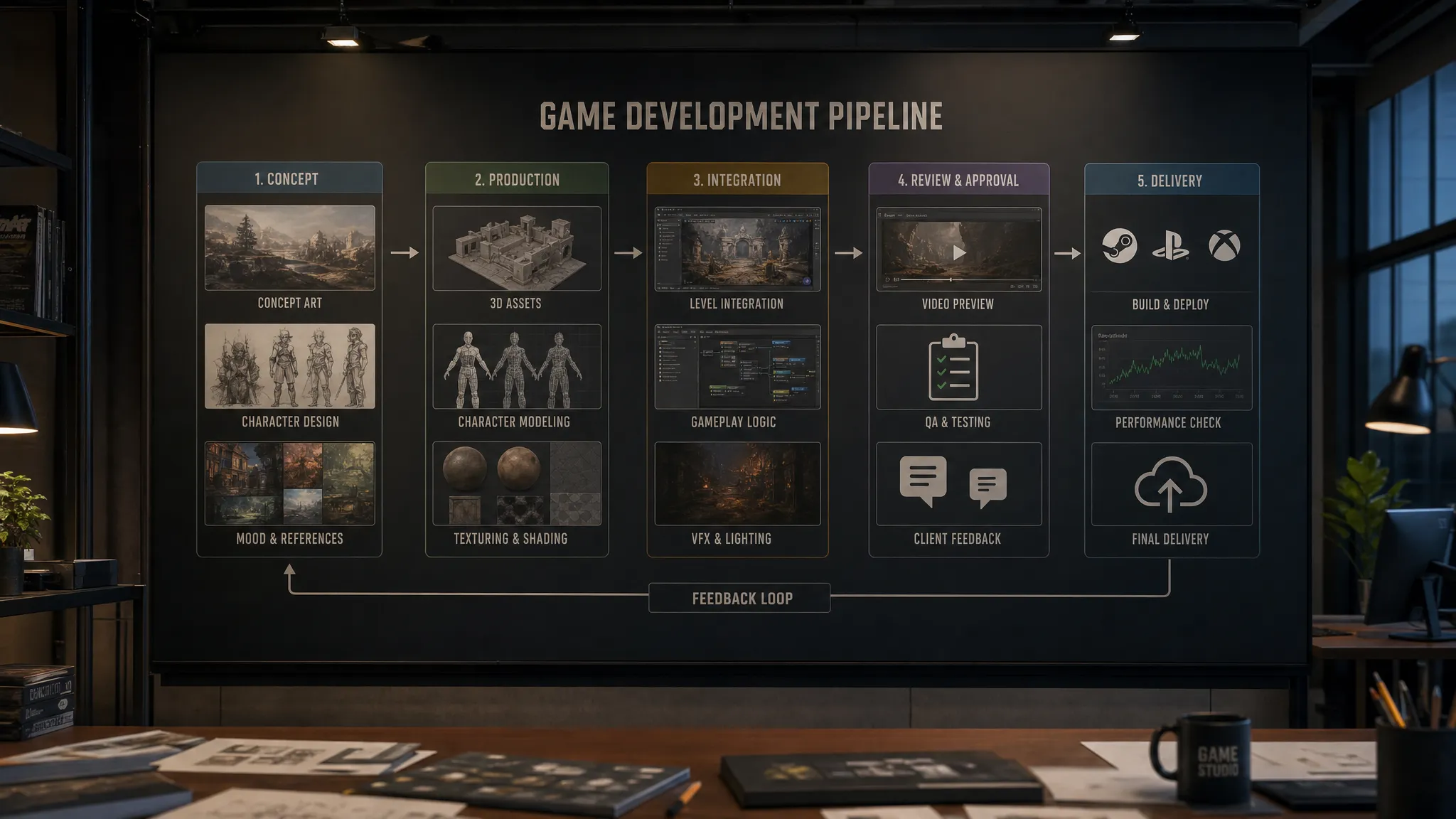
Creative teams are under pressure from every direction: larger content demands, shorter production cycles, more platforms, more live updates, and higher expectations from players. AI for game development is not a magic replacement for artists, designers, or developers. Used well, it is a production multiplier that helps teams explore faster, reuse context, automate repetitive tasks, and bring more consistency to creative output.
The challenge is that most studios do not need another isolated AI tool. They need a controlled way to make AI useful inside real pipelines, with approvals, asset tracking, IP safeguards, style consistency, and repeatable workflows. That is where AI becomes less of an experiment and more of an operating model for creative production.
This guide breaks down how game studios and creative teams can use AI practically, from concept development to production pipelines, while keeping human direction, governance, and quality control at the center.
What AI can realistically do in game development
AI is already useful across many parts of game creation, especially where teams need rapid ideation, variation, adaptation, or content transformation. The most valuable applications are usually not fully automated game creation. They are specific workflows where AI reduces manual friction while preserving creative direction.
For example, an art team might use AI to generate concept variations from an approved mood board, then route the strongest options through review. A marketing team might produce campaign key art variants for different platforms. A 3D team might use AI-assisted generation to accelerate early asset exploration before refinement in traditional DCC tools. A production team might use AI to standardize briefs, create references, and keep asset metadata aligned.
According to the 2024 GDC State of the Game Industry report, many developers were already seeing generative AI appear in studio workflows, while also raising concerns about ethics, copyright, and job impact. That tension is important. The opportunity is real, but so is the need for responsible implementation.
The practical question is not, “Can AI make a game?” The better question is, “Where can AI help our team move faster without losing control of quality, rights, style, or production standards?”
The best use cases for AI in game development
AI works best when it is attached to a clear creative or operational outcome. Below are practical areas where game teams can apply AI without disrupting the entire production pipeline.
Concept art and visual exploration
Concept teams can use AI to explore environments, props, characters, factions, vehicles, costumes, lighting moods, and visual themes. This is especially useful during early pre-production, when the goal is to compare directions quickly rather than finalize assets.
The key is to avoid random prompting. Instead, teams should work from approved creative inputs: art direction notes, reference boards, franchise rules, color palettes, material language, and gameplay constraints. AI-generated outputs should become discussion material, not instant canon.
A mature workflow may include generation blueprints for recurring needs such as “fantasy weapon exploration,” “sci-fi corridor mood studies,” or “NPC costume variants.” These templates help teams produce consistent results without rewriting prompts from scratch each time.
3D asset ideation and production support
AI for game development is increasingly relevant to 3D pipelines, but expectations need to be realistic. AI-assisted 3D can help with early form exploration, variations, references, and in some cases base asset generation. Final production assets still need technical validation for topology, scale, rigging, UVs, materials, naming conventions, engine compatibility, and performance budgets.
This is where governance matters. A creative AI workflow should record how an asset was generated, which references were used, who approved it, and what needs to happen before engine implementation. AI can speed up the front of the pipeline, but the studio still needs a clear bridge into production tools and asset management systems.
Environment and level art support
Environment teams can use AI to explore biomes, architectural styles, set dressing, lighting references, weather variations, and worldbuilding details. For large worlds, AI can also help produce variations around a defined visual system, such as different district identities within the same city or regional material differences across a fantasy map.
The most useful outputs are often not final textures or models, but aligned references that reduce ambiguity. When a level artist receives a clear visual direction, approved mood references, and style-consistent object ideas, production becomes faster and review cycles become easier.
Character, costume, and prop variation
AI can help teams generate options for silhouettes, outfits, accessories, weapons, props, and cosmetic items. This is valuable for games with large item economies, character customization, seasonal content, or live service updates.
However, character work is also one of the areas where IP, identity, and brand consistency risks are highest. Teams should define strict rules for prohibited references, likeness restrictions, franchise constraints, cultural review, and approval authority. AI can produce many options, but human art direction must decide what belongs in the world.
Marketing and transmedia content
Game studios often need enormous volumes of non-game assets: store images, social posts, trailer frames, ad variants, event visuals, pitch decks, influencer kits, localization visuals, and community updates. AI can help adapt approved creative into multiple formats while keeping the visual identity consistent.
For CMOs and publishing teams, this is one of the strongest business cases. The goal is not to replace brand craft. It is to reduce the bottleneck between approved creative strategy and high-volume execution across channels.
Video, animation, and prototyping
AI video can help teams create mood films, animatics, pitch visuals, feature explainers, and early cinematic references. For internal communication, this can be powerful. A short AI-assisted video can communicate tone, camera language, world mood, or combat fantasy faster than a written brief.
For production use, teams still need careful review. Frame consistency, character identity, motion accuracy, and legal provenance remain critical. AI video is often most useful as a previsualization and iteration tool, then later as part of controlled marketing or creative content workflows.
Audio and voice workflow support
AI can support temporary voice lines, sound direction references, localization planning, and audio mood exploration. Studios should be especially careful with voice rights, performer consent, union rules, and regional legal requirements. Temporary AI voice can be useful during prototyping, but final use requires a rights-aware process.
The same principle applies across all creative outputs: use AI where it improves speed and clarity, but keep rights, consent, and approvals visible.
How to build an AI-ready game development workflow
The most successful studios do not start by giving every team a different tool and hoping for the best. They design a repeatable workflow that connects AI generation to creative standards, human review, and production systems.
A practical workflow usually includes five stages.
| Stage | Goal | Example output | Key control |
|---|---|---|---|
| Brief | Define intent, constraints, and success criteria | Art direction brief, gameplay context, platform needs | Approved creative input |
| Generate | Produce options using controlled AI workflows | Concepts, variants, references, 3D drafts, video previews | Model and prompt governance |
| Review | Compare outputs against quality, style, and rights criteria | Comments, annotations, approvals, rejections | Human creative approval |
| Refine | Move selected work toward production standards | Edited assets, cleaned files, technical specs | Pipeline validation |
| Publish or handoff | Deliver to DAM, engine, DCC, campaign, or stakeholder | Approved production asset or reference package | Traceability and metadata |
This structure makes AI accountable. It also helps application managers and IT leaders understand where AI fits into the studio stack instead of becoming a shadow workflow.
Start with the creative brief
AI output quality depends heavily on input quality. In a game studio, a good AI brief should include more than a prompt. It should capture the purpose of the asset, the game context, the audience, technical constraints, art direction, references, and review criteria.
For example, “generate a futuristic vehicle” is too vague. A production-oriented brief would specify faction, gameplay role, scale, camera distance, material language, world region, forbidden motifs, approved references, and whether the output is for concept exploration or final marketing.
Use shared context, not isolated prompts
One of the biggest problems with AI tools is context loss. A prompt may work once, but the knowledge behind it disappears into chat history, personal files, or individual accounts. This creates inconsistency across teams.
For creative organizations, shared context is essential. Mood boards, visual rules, brand systems, approved assets, and previous decisions should inform future generations. This helps different teams produce work that feels like it belongs to the same game world.
Virtuall addresses this through studio context memory with mood boards, generation blueprints, and Nyx, the intelligence layer of the Creative AI OS. Nyx orchestrates multiple AI models while preserving intent and context across studios and teams. For enterprise teams, this is the difference between scattered AI experiments and a coordinated production system.
Build reusable generation blueprints
A generation blueprint is a repeatable template for a specific type of creative task. It can define the input format, creative constraints, model settings, expected output type, naming rules, and review path.
Useful blueprint examples for game studios include:
- Character outfit variation from approved faction rules
- Environment mood exploration based on biome and lighting direction
- Prop concept generation from gameplay function and material library
- Marketing key visual adaptation for platform-specific formats
- 3D asset exploration with scale, style, and category constraints
Blueprints reduce variability and help teams learn what works. They also make AI workflows easier to govern, because the studio can approve the process rather than manually reinventing it every time.
Connect AI to review and approval workflows
Creative work becomes production work only when it has been reviewed. AI does not remove the need for approvals. It increases the importance of approvals because teams can generate more options faster than before.
A strong review workflow should capture comments, annotations, decisions, version history, and approval status. It should also distinguish between “inspiration,” “internal reference,” “production candidate,” and “approved for use.” Without those distinctions, teams risk confusion about what can actually enter the game or campaign.
For art directors, this protects quality. For producers, it improves visibility. For legal and compliance teams, it creates traceability.
Integrate with the production stack
AI workflows should not live outside the systems the studio already uses. Game teams depend on DCC tools, asset managers, DAMs, PIMs, game engines, task trackers, and review tools. If AI outputs are not connected to those systems, teams waste time downloading, renaming, reuploading, and manually tracking files.
Virtuall is designed to integrate with creative tools through plugins and API connections, including DCC, PIM, and DAM environments. For enterprise studios, this integration layer is critical because the value of AI increases when it fits into existing production operations.
Governance: the difference between AI experimentation and AI at scale
The more people use AI, the more governance matters. A small group of artists experimenting with references is one thing. A global studio generating thousands of assets across teams, tools, vendors, and regions is another.
Governance does not mean slowing creativity down. Good governance gives teams clear boundaries so they can move faster with confidence.
Key risks to manage
Studios should define policies for several areas before scaling AI usage:
- IP and copyright: What training data, references, and outputs are acceptable?
- Brand and franchise consistency: Which visual rules are mandatory?
- Data privacy: What internal assets, unreleased concepts, or partner materials can be used?
- Model access: Which models are approved for which workflows?
- Human review: Who can approve an AI-assisted asset for production or publication?
- Traceability: How are inputs, outputs, versions, and decisions recorded?
- Regional compliance: Which legal or infrastructure requirements apply to the studio?
The U.S. Copyright Office has published ongoing material around copyright and AI, and the European Union has moved forward with the AI Act regulatory framework. Even when rules differ by region, the direction is clear: organizations need more transparency, accountability, and control over AI systems.
For enterprise creative teams, this makes governance a strategic capability rather than an administrative burden.
Use approved models and controlled inference
Many studios begin with public tools because they are easy to access. The problem is that public tool usage can create uncertainty around data handling, output rights, version consistency, and auditability.
An enterprise approach should define which models can be used for which tasks, what data can be sent to those models, where inference happens, and how results are stored. The Creative AI OS supports multi-model content generation and EU-based infrastructure and inference, giving teams a controlled environment for image, video, 3D, and audio workflows.
Keep humans in the loop
AI can assist with ideation, generation, transformation, and organization. It should not silently decide what becomes part of the game world. Human review is essential for art direction, gameplay fit, cultural sensitivity, legal risk, and brand integrity.
A practical rule is simple: AI can generate options, but accountable humans approve decisions.
Measuring success: what to track
AI pilots often fail because teams only measure excitement. A better approach is to define operational metrics before the pilot starts. The right metrics depend on the workflow, but they should connect to speed, quality, consistency, and control.
| Metric | What it tells you | Example use |
|---|---|---|
| Time to first usable option | Speed of creative exploration | Concept art, campaign visuals, pitch assets |
| Review cycle count | Whether AI is improving or creating rework | Art direction, marketing adaptation |
| Approval rate | How often outputs meet studio standards | Blueprint quality, model fit |
| Cost per approved asset | Production efficiency | High-volume content workflows |
| Asset traceability | Governance maturity | Compliance, legal review, production handoff |
| Style consistency score | Creative alignment | Franchise assets, live service content |
Quality should remain part of the measurement model. If AI produces more assets but creates more review burden, the workflow is not working yet. If AI helps teams produce more approved assets with fewer revisions and better traceability, it is becoming operationally valuable.
A practical rollout plan for game studios
The safest way to adopt AI for game development is to start with focused, measurable workflows rather than broad, uncontrolled adoption.
Phase 1: Identify high-value, low-risk workflows
Start with workflows where AI can help but the risk of direct production misuse is low. Good candidates include internal concept exploration, mood references, marketing layout variations, pitch visuals, and non-final 3D ideation.
Avoid beginning with workflows involving sensitive IP, celebrity likeness, final character art, final voice, or public-facing assets unless governance is already mature.
Phase 2: Define policies and approved tools
Before scaling, define what teams are allowed to do. Policies should cover accepted use cases, prohibited use cases, approved models, reference rules, data handling, review requirements, and publication criteria.
This is also the stage where application managers should evaluate how AI connects to identity management, asset systems, creative tools, and compliance requirements.
Phase 3: Create reusable blueprints
Once the studio has validated a workflow, turn it into a reusable blueprint. A blueprint helps the same process work across multiple teams, projects, or brands. It also makes onboarding easier because users start from an approved workflow rather than an empty prompt box.
Phase 4: Connect review, asset management, and pipeline tracking
AI output should move through the same kind of operational discipline as other creative work. Teams need approval status, versioning, annotation, ownership, metadata, and destination tracking. This is especially important when AI-generated work becomes part of a larger production package.
Phase 5: Scale with governance and reporting
Once the workflow is proven, expand to more teams and asset types. Track adoption, approval rates, quality feedback, and compliance signals. Use the data to improve blueprints, model selection, and review processes.
The NIST AI Risk Management Framework is a useful reference for organizations thinking about AI risk in a structured way. Game studios do not need to turn creative production into bureaucracy, but they do need a repeatable way to identify, measure, and manage risk.
What creative leaders should ask before adopting AI
For CMOs, art directors, and studio leads, AI adoption should be evaluated as a creative operating model, not just a tool purchase. Before expanding AI usage, ask these questions:
- Can we keep our game’s visual identity consistent across teams and tools?
- Do we know which models are being used and for what purpose?
- Can we trace the inputs, outputs, edits, and approvals behind an asset?
- Can we prevent sensitive or unreleased material from being used in unsafe ways?
- Can AI-generated work move into our existing DCC, DAM, PIM, and production systems?
- Do our teams have clear rules for what is exploratory, internal, production-ready, or publishable?
If the answer to these questions is unclear, the studio may still benefit from AI, but it is not ready to scale AI safely.
Why a Creative AI OS matters
Point tools can be useful for individual tasks. The difficulty appears when a studio has many teams using many models for many outputs across many projects. At that point, the problem is no longer generation alone. It becomes orchestration.
A Creative AI OS provides a controlled layer for how AI runs across the studio. For game development teams, that means creative context, approved workflows, model orchestration, team collaboration, asset management, pipeline tracking, and compliance can work together instead of being scattered across disconnected apps.
The Creative AI OS is built for this operating model. It helps teams orchestrate AI-powered content creation across image, video, 3D, and audio while maintaining governance, review workflows, approvals, annotations, production tracking, and enterprise-grade compliance. With Nyx as the intelligence layer, teams can preserve intent and context while using multiple industry-leading AI models through controlled workflows.
For creative teams, this means AI becomes less chaotic and more usable. For enterprise leaders, it means AI adoption can be aligned with brand standards, legal requirements, and production goals.
Frequently Asked Questions
How is AI used in game development today? AI is commonly used for concept exploration, visual references, asset variation, marketing content, prototyping, workflow automation, and production support. In mature studios, it is connected to review, approval, and asset management rather than used as a standalone experiment.
Can AI create production-ready game assets? AI can help create or accelerate assets, but production readiness depends on the asset type and pipeline requirements. Game assets often need human refinement, technical validation, optimization, rights review, and approval before they can be used in-engine or published.
Is AI for game development safe for enterprise studios? It can be safe when governed properly. Studios should define approved tools, model usage rules, data policies, review requirements, and traceability standards. Enterprise teams should avoid uncontrolled use of public tools for sensitive or unreleased materials.
Will AI replace game artists or developers? AI is better understood as an assistant for exploration, variation, and workflow acceleration. Human teams remain responsible for art direction, gameplay fit, storytelling, technical quality, ethics, and final approval.
What should a studio pilot first? Start with high-value, lower-risk workflows such as mood exploration, internal concept references, marketing variants, or pitch materials. Once the process is proven, expand into more complex workflows with stronger governance and pipeline integration.
Build a creative AI pipeline your studio can trust
AI for game development becomes most valuable when it is controlled, repeatable, and connected to real production. The studios that benefit most will not be the ones that generate the most images or videos. They will be the ones that turn AI into a governed creative system, with clear context, approved workflows, human review, and traceable assets.
If your team is ready to move beyond scattered AI experimentation, Virtuall provides the Creative AI OS to orchestrate image, video, 3D, and audio workflows at scale. Define the rules, preserve studio context, collaborate across teams, and bring AI-generated content into production with governance built in.