How to Improve AI Output Across Teams and Tools
Improve AI output across teams with better context, governance, workflows, and model orchestration for production-ready creative work.
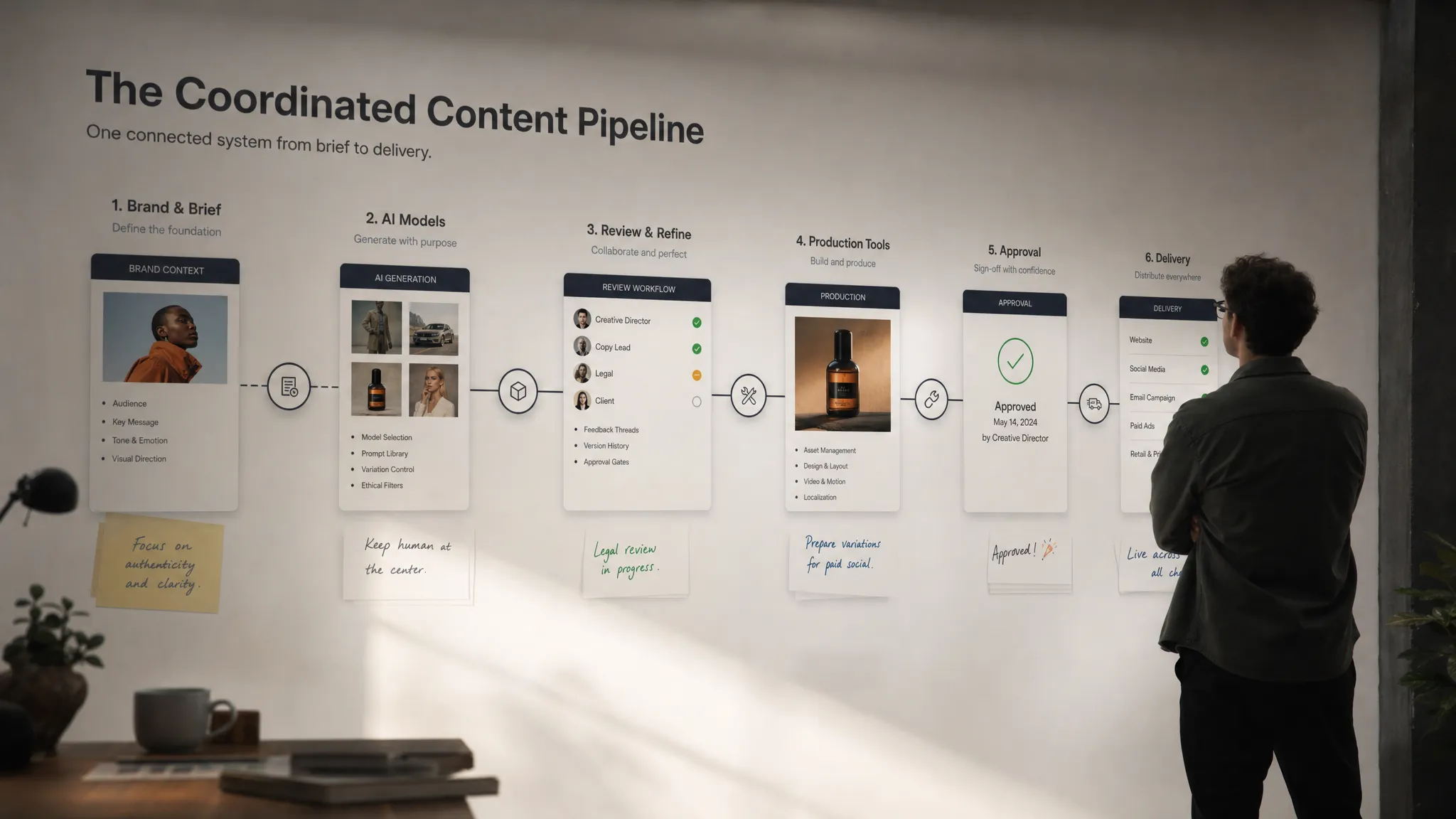
AI can generate impressive creative assets in seconds, but enterprise teams quickly discover a harder problem: getting consistently good results across people, prompts, models, approval paths, and production tools. One art director may get a strong concept image, while another team produces assets that miss the brand mood. A game team may generate useful 3D variations, but the files still need manual cleanup before they fit the pipeline. A marketing team may move fast, but application managers may worry about compliance, rights, and tool sprawl.
Improving AI output is not just about writing better prompts. It requires an operating model for creative AI: shared context, clear rules, model orchestration, review workflows, and integrations that connect generation to the systems where work actually gets shipped.
For CMOs, art directors, application managers, and game developers, the goal is the same: make AI output more reliable, more brand-safe, and more production-ready without slowing teams down.
Why AI output breaks down across teams
Most AI quality problems are not caused by a single bad model. They come from fragmented creative operations. Teams use different tools, private prompt libraries, local file folders, and informal approval habits. Context gets lost between the brief, the prompt, the generated asset, the review comment, and the final export.
As generative AI adoption grows, this becomes a management problem as much as a creative one. The NIST AI Risk Management Framework emphasizes governance, measurement, and risk management as core practices for responsible AI. In creative production, those same principles help teams improve consistency, traceability, and control.
Here is where AI output often deteriorates:
| Common issue | What it looks like | Better operating practice |
|---|---|---|
| Siloed prompting | Each person uses their own prompt style and quality bar | Shared generation blueprints and reusable templates |
| Lost creative context | Outputs ignore brand mood, references, or campaign direction | Centralized mood boards, briefs, and studio memory |
| Tool fragmentation | Teams jump between disconnected image, video, and 3D tools | A workflow orchestration layer across models and tools |
| Inconsistent approvals | Review happens in chats, emails, or separate documents | Structured review workflows with annotations and approvals |
| Compliance uncertainty | Teams are unsure what inputs, models, or assets are allowed | Governance rules, permissions, and auditable processes |
| Production mismatch | Outputs look good but do not fit file, format, or pipeline needs | Output specifications connected to creative and technical workflows |
The lesson is simple: better AI output comes from better systems around the model.
Define what “good” means before generating more
The fastest way to improve AI output is to stop treating quality as subjective after the asset is generated. Teams need shared criteria before generation begins.
For a marketing team, strong output may mean on-brand visuals, campaign consistency, correct product representation, and fast localization. For a game studio, it may mean assets that match the art direction, respect topology constraints, and move cleanly into the 3D pipeline. For an application manager, quality may include permissions, model usage policies, traceability, and infrastructure requirements.
A practical quality definition should cover six dimensions:
- Creative fit: The asset matches the intended mood, audience, campaign, or game world.
- Brand consistency: Colors, composition, tone, product details, and visual language align with guidelines.
- Technical usability: Files meet the format, resolution, scale, naming, and pipeline requirements.
- Repeatability: Another team member can reproduce a similar quality level using the same process.
- Compliance readiness: Inputs, outputs, and model choices follow internal and external rules.
- Review traceability: Decisions, comments, versions, and approvals are easy to find.
This turns AI quality from “I like it” into an operational standard. It also helps teams evaluate tools more clearly. A tool that creates a beautiful one-off image may not be enough if it cannot support workflow governance, team collaboration, or production handoff.
Centralize creative context so every team starts from the same source
AI models respond to context. If the context changes from person to person, the output will change too. That is why enterprise creative teams need a shared source of truth for briefs, references, constraints, product details, and brand rules.
In practice, this means moving beyond isolated prompt documents. Teams need a living creative context that can travel across workflows. Mood boards, approved references, campaign direction, character sheets, product attributes, and negative examples should be accessible inside the generation process, not buried in a separate folder.
For art directors, this reduces the need to repeatedly explain the same visual direction. For CMOs, it protects brand consistency across regions and agencies. For game developers, it helps ensure that AI-generated concepts, textures, video sequences, or 3D assets fit the world being built.
Virtuall approaches this through studio context memory, including mood boards, and Nyx, its intelligence layer for orchestrating models while keeping intent and context across studios and teams. The important principle is that context should not reset every time someone opens a new AI tool.
Turn strong prompts into repeatable generation blueprints
Prompts are useful, but prompt copy-pasting does not scale well. It creates hidden variation: one person edits a phrase, another changes the order, someone else forgets a key constraint. Over time, AI output becomes inconsistent even when teams believe they are following the same direction.
Generation blueprints solve this by turning successful prompt patterns into reusable templates. A blueprint can define the goal, required inputs, style direction, model settings, output format, review criteria, and compliance rules for a specific type of asset.
Examples include:
- A campaign concept blueprint for first-round visual exploration.
- A product image variation blueprint for ecommerce or retail teams.
- A character mood exploration blueprint for game concept artists.
- A 3D asset ideation blueprint with art direction and pipeline constraints.
- A video storyboard blueprint for social, advertising, or cinematic teams.
Blueprints do not remove creativity. They remove avoidable inconsistency. Teams still make creative decisions, but they start from a shared structure that reflects what has already worked.
For enterprise teams, this is especially important because AI production often spans many roles. A CMO wants brand consistency. An art director wants creative control. An application manager wants governance. A developer wants assets that can move through the pipeline. Blueprints help all of those priorities coexist.
Orchestrate multiple models instead of relying on one tool
No single AI model is best for every creative task. One model may be excellent for photorealistic product imagery, another for stylized concepts, another for video motion, another for 3D generation or audio. Improving AI output often means selecting the right model for the job, then coordinating those models inside a predictable workflow.
This is where orchestration becomes valuable. Instead of forcing every team into one generation tool, an orchestration layer can route tasks across different models and preserve the intent of the work. It can also help teams compare outputs, standardize steps, and maintain governance controls across the process.
For example, a creative workflow might start with image exploration, move into video variations, generate 3D references, and then pass approved assets into a DAM, PIM, DCC, or game production pipeline. If every step happens in a separate tool with separate context, quality drops and operational risk rises.
A Creative AI OS such as Virtuall is designed for this kind of orchestration across image, video, 3D, audio, workflows, and creative tools. The key point is not to generate more assets everywhere. The key point is to coordinate generation so that each asset has context, ownership, status, and a path to production.
Build governance into the creative workflow
Governance is often misunderstood as a blocker. In reality, good AI governance improves output because it gives teams confidence about what they can create, use, review, and publish.
The ISO/IEC 42001 standard provides a management system framework for organizations working with AI. While not specific to creative production, it reflects a broader shift: AI needs defined responsibilities, controls, monitoring, and continuous improvement.
For creative teams, governance should answer practical questions:
- Which AI models are approved for which types of work?
- What source materials can be uploaded or referenced?
- Who can generate, edit, approve, export, or publish assets?
- Which projects require legal, brand, or senior creative approval?
- How are outputs stored, versioned, and traced?
- What infrastructure or regional requirements apply, especially for regulated industries or EU-based teams?
When these rules live outside the workflow, people forget them or work around them. When they are built into the workflow, teams move faster because the guardrails are clear.
Virtuall includes AI governance controls, compliance support, and EU-based infrastructure and inference. For enterprise organizations, this helps align creative acceleration with the operational requirements expected by legal, IT, security, and brand leadership.
Create review loops that improve the next generation
AI output improves when feedback is structured. If comments are scattered across Slack threads, PDFs, email chains, and screenshots, the system cannot learn from what the team approved or rejected. Even if the AI model does not train directly on your feedback, your organization can still improve by capturing decisions in a reusable way.
A strong review workflow should make it easy to annotate assets, compare versions, approve work, reject off-brand options, and understand why a direction was selected. This is especially important for teams producing high volumes of image, video, and 3D content.
The review process should not only ask, “Is this good?” It should ask more specific questions:
| Review question | Why it matters |
|---|---|
| Does the output match the brief? | Prevents impressive but irrelevant generations |
| Does it follow brand or art direction? | Protects consistency across teams and campaigns |
| Is it technically usable? | Reduces cleanup before production handoff |
| Are there compliance concerns? | Helps avoid risky inputs, outputs, or usage scenarios |
| What should be reused next time? | Turns successful work into better blueprints |
Over time, review data becomes a creative operations asset. It reveals which blueprints work, which models perform best for certain tasks, and where teams need better context or clearer rules.
Connect AI generation to the tools teams already use
AI output becomes valuable when it reaches the next step of production. If assets stay trapped in generation tools, teams spend too much time downloading, renaming, reformatting, reuploading, and explaining context again.
Enterprise creative stacks often include DAM systems, PIM platforms, DCC tools, game engines, project management tools, and approval systems. The more AI production connects to that stack, the easier it is to keep quality consistent.
For application managers, integrations are not a technical afterthought. They are central to adoption. A creative AI program will struggle if it creates a parallel workflow that conflicts with established asset management, security, or production processes.
A connected workflow can help teams maintain:
- Asset lineage from brief to generation to approval.
- Consistent metadata, naming, and version history.
- Clear handoff from exploration to production.
- Better visibility into project status and bottlenecks.
- Fewer manual errors caused by moving files between systems.
The Creative AI OS supports integration with creative tools including DCC, PIM, and DAM environments through plugins and API. That matters because the strongest AI output is not just visually compelling. It is usable in the real systems where teams create, manage, and ship content.
Measure AI output quality with operational metrics
If you cannot measure output quality, you cannot improve it reliably. Creative judgment remains essential, but operational metrics help leaders see whether AI is truly improving productivity and consistency.
Useful metrics include both creative and production signals:
| Metric | What it tells you |
|---|---|
| Approval rate | How often generated assets meet the required standard |
| Revision cycles | How much cleanup or rework is needed before approval |
| Time to usable asset | How long it takes to move from brief to production-ready output |
| Blueprint reuse | Whether teams are standardizing successful workflows |
| Model performance by use case | Which models perform best for specific creative tasks |
| Compliance exceptions | Where teams are hitting policy, rights, or process issues |
| Production handoff success | Whether outputs fit downstream tool and format requirements |
For CMOs, these metrics show whether AI is accelerating campaign production without weakening brand consistency. For art directors, they reveal where creative control is improving or slipping. For application managers, they show whether governance and integrations are working. For game developers, they help distinguish between inspiring concepts and assets that are actually pipeline-friendly.
The most mature teams treat AI output as a managed production capability, not a collection of experiments.
A practical framework to improve AI output
To bring these ideas together, teams can use a simple operating framework.
First, define the output standard. Clarify what “production-ready” means for each asset type, audience, channel, and workflow. A social campaign visual, a product render, a game prop, and a video concept will not share the same quality criteria.
Second, centralize context. Make sure briefs, mood boards, brand rules, references, and constraints are available inside the generation process. The goal is to reduce context loss between teams and tools.
Third, standardize repeatable work with blueprints. Convert successful prompts and process patterns into reusable generation templates. This helps new users produce stronger outputs faster while giving experienced creators a stable foundation.
Fourth, orchestrate models and workflows. Route tasks to the best model or tool for the job while preserving intent, permissions, and review status across the pipeline.
Fifth, govern the process. Define which models, inputs, roles, infrastructure, and approval paths are allowed. Governance should be embedded in how teams work, not documented somewhere they rarely check.
Sixth, connect AI to production systems. Integrate generation with DAM, PIM, DCC, and other creative tools so assets do not lose metadata, context, or version history.
Finally, measure and improve. Track approval rates, rework, handoff success, and blueprint performance. Use those insights to refine context, templates, and governance over time.
Frequently Asked Questions
What is the fastest way to improve AI output across a team? Start by standardizing context and repeatable workflows. Shared briefs, mood boards, brand rules, and generation blueprints usually improve consistency faster than asking every user to become a prompt expert.
Do better prompts always lead to better AI output? Better prompts help, but they are not enough at scale. Teams also need model orchestration, governance, review workflows, and integrations with production tools to make outputs consistent and usable.
How can enterprises control AI output quality without slowing creative teams down? Build guardrails into the workflow. Approved models, permissions, templates, and review steps help teams move quickly while staying aligned with brand, compliance, and production requirements.
Why does AI output vary so much between tools? Different models are optimized for different tasks, styles, and formats. Output also changes when context, settings, source materials, or prompt structures vary. Orchestration helps teams use the right model while keeping the workflow consistent.
What makes AI output production-ready? Production-ready output is not only visually strong. It must match the brief, follow brand or art direction, meet technical requirements, pass review, and fit the downstream workflow where it will be edited, managed, or published.
Make AI output a managed creative capability
The teams that get the best AI output are not simply the teams with the newest tools. They are the teams that operationalize creative AI with shared context, reusable blueprints, governance, collaboration, and production integrations.
That is the role of a Creative AI OS. Virtuall helps studios and enterprise teams control, orchestrate, and scale AI-powered content creation across image, video, 3D, and audio workflows while supporting governance, compliance, review, asset management, and integrations.
If your organization is ready to move from scattered AI experiments to consistent, production-ready creative workflows, explore Virtuall and see how a Creative AI OS can improve AI output across teams and tools.