Most Powerful AI Models for Creative Production Today
Compare the most powerful AI models for creative production, from text and image to video, 3D, audio, and enterprise governance.
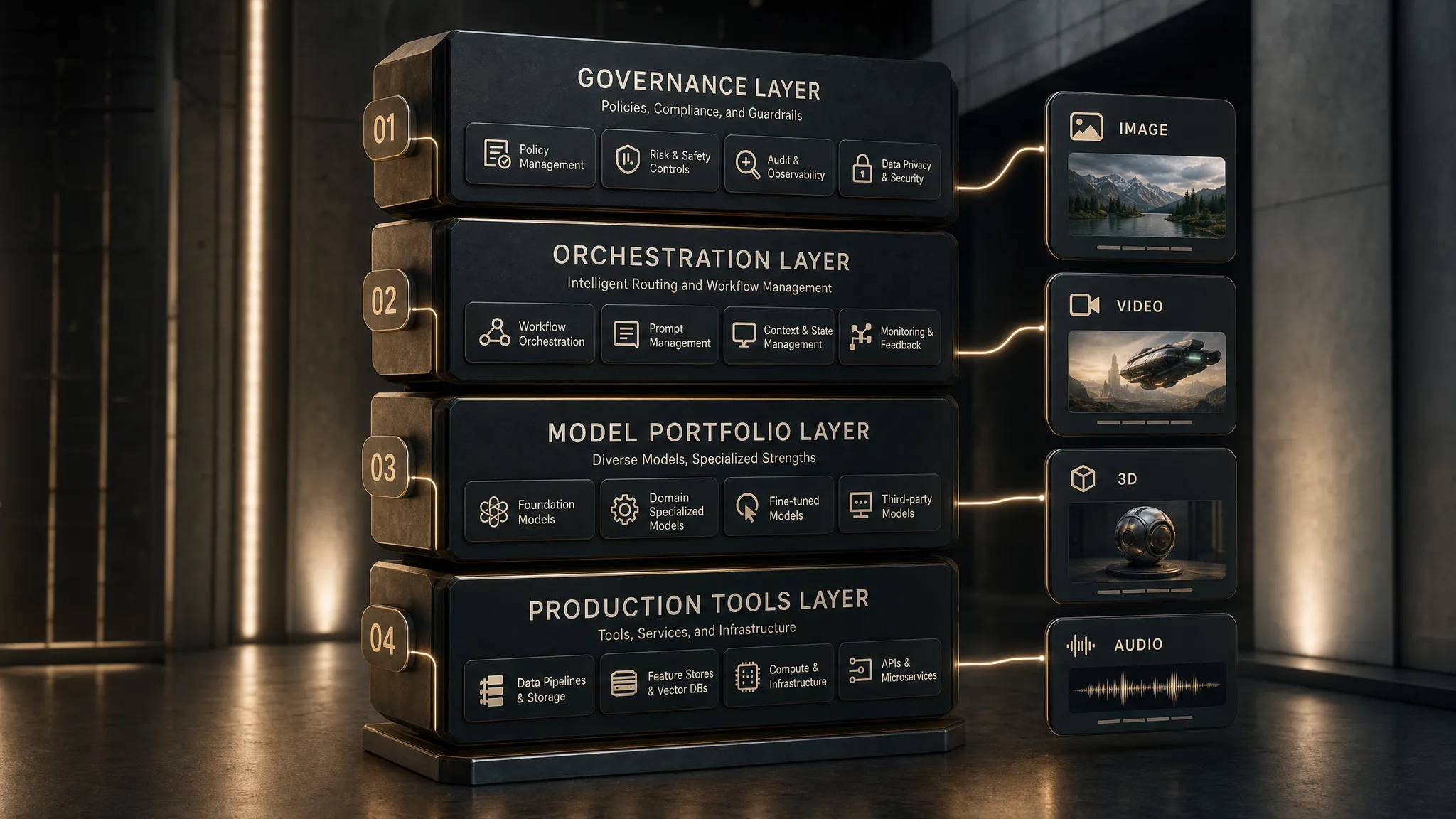
In creative production, the phrase most powerful AI can be misleading. The strongest model on a public benchmark may still fail a launch if it cannot follow brand rules, protect source material, produce editable outputs, or hand work back into a studio pipeline.
For enterprise teams, AI power is practical. A powerful creative model helps a CMO launch more variants without losing brand consistency. It helps an art director explore without sacrificing taste. It helps an application manager integrate AI without creating shadow IT. It helps a game developer move from concept to usable 3D or video references faster.
The right answer is rarely one model. The most powerful AI setup for creative production today is a governed portfolio of models, orchestrated through a workflow layer that preserves context, routes tasks intelligently, and keeps humans in control.
What most powerful AI means in creative production
The Stanford AI Index is a useful reminder that model capabilities, costs, and adoption are changing fast. That speed makes static rankings fragile. A model that leads in reasoning may not be best for character consistency. A beautiful image model may not be suitable for enterprise use if its licensing, API access, or review controls are unclear.
In production, power should be judged across several dimensions:
- Creative quality: Can the model produce work that meets the taste level of the brand, game, campaign, or studio?
- Controllability: Can teams steer composition, style, camera, pacing, character identity, product accuracy, and brand constraints?
- Context retention: Can the model understand the brief, brand book, mood board, asset references, product data, and prior approvals?
- Repeatability: Can it generate consistent outputs across batches, markets, formats, and teams?
- Editability: Can the output be adjusted in professional tools, not just exported as a flat result?
- Rights and compliance: Are data handling, usage rights, model policies, and provenance acceptable for enterprise work?
- Integration fit: Can it connect to DAM, PIM, DCC, review, approval, and publishing systems?
- Operational economics: Is the quality worth the cost, latency, compute, and review effort?
Some names below are model families, while others are platforms exposing multiple models. Procurement and technical teams should always verify the current version, availability, data policy, security posture, API access, and license terms before production deployment.
The strongest model categories to evaluate
Creative production is now multimodal. A campaign, game, product launch, or branded content pipeline may touch text, imagery, video, audio, 3D assets, metadata, localization, and compliance review. The model portfolio should reflect that reality.
| Creative production need | Model families and platforms to evaluate | Where they are powerful | Production watchout |
|---|---|---|---|
| Creative reasoning and planning | GPT-4o, Claude 3.5 Sonnet, Gemini 1.5, Llama 3, Mistral-class models | Brief analysis, concept routes, scripts, prompt generation, QA, localization | They can sound confident while missing brand, legal, or product details |
| Image generation and editing | Midjourney, DALL·E 3, Adobe Firefly, Stable Diffusion, Ideogram, Recraft-style tools | Concept art, campaign visuals, product ideation, mood boards, social variants | Consistency, rights, typography, product accuracy, and editability vary widely |
| Video generation | Runway, Pika, OpenAI Sora, Luma-style video models | Previsualization, animatics, social clips, campaign boards, motion references | Temporal consistency, brand safety, product accuracy, and final delivery specs need review |
| 3D generation and reconstruction | TripoSR-style models, Meshy-style tools, NeRF and Gaussian splatting workflows, diffusion-assisted textures | Fast prototypes, props, environment references, scan-to-3D, early game asset exploration | Mesh topology, UVs, rigging, polycount, scale, and engine readiness often need cleanup |
| Audio, voice, and music | ElevenLabs-style voice models, Suno and Udio-style music models, Stable Audio-style generation | Scratch voiceover, localization drafts, music sketches, sound concepts | Consent, likeness rights, commercial licensing, and regional rules are critical |
The goal is not to pick every tool on the market. The goal is to build a controlled model portfolio that matches your creative use cases and risk tolerance.
Text and multimodal models: the creative operating brain
Large language models and multimodal models are often the brain of the creative pipeline. They turn a brief into creative territories, shot lists, prompts, campaign matrices, review checklists, localization variants, and production notes.
OpenAI's GPT-4o brought strong multimodal capability into a fast general-purpose model that can work across text, image, and audio interactions. For creative teams, that makes it useful for interpreting references, drafting prompts, summarizing feedback, and assisting with cross-format ideation.
Anthropic's Claude 3.5 Sonnet is often evaluated for high-quality writing, analysis, and visual reasoning. It can be valuable when teams need to process long creative briefs, compare concepts, refine scripts, or maintain a precise editorial tone.
Google's Gemini 1.5 is notable for long-context use cases. In production, long context matters when the model must interpret a large brand book, product catalog, campaign plan, localization requirements, or technical documentation.
Open and deployable models such as Llama 3 and Mistral-class models can be attractive when enterprises want more control over deployment, customization, data locality, or cost. They may require more internal engineering and evaluation, but they can fit well into governed environments where full dependency on a closed model is not desirable.
For creative production, these models are most powerful when they are connected to approved context. A general-purpose model without brand memory is only a clever assistant. A model with access to approved product claims, visual rules, prior campaign learnings, mood boards, and review history becomes far more useful.
Image models: from visual exploration to controlled production
Image models are often the most visible part of creative AI adoption. They are also where expectations can become unrealistic. A model may produce a beautiful image, but production requires more than beauty.
Midjourney is widely recognized for strong aesthetics, art direction exploration, cinematic compositions, and fast concepting. It can be excellent for mood development and visual routes, especially at the early stages of a campaign or game art direction process.
DALL·E 3 is often evaluated for prompt adherence and general image generation workflows, especially where teams are already using OpenAI tools. It can be useful for controlled ideation, image variations, and concept development.
Adobe Firefly is important for enterprise creative teams because Adobe positions it around commercially usable creative workflows and integration with professional design tools. For organizations already operating inside Adobe Creative Cloud, this ecosystem fit can matter as much as raw image quality.
Stable Diffusion and related open image models remain important because they can support custom workflows, specialized controls, image-to-image generation, inpainting, ControlNet-style guidance, LoRA-style customization, and private deployment patterns. For studios with technical AI talent, this can provide a high degree of control.
For an art director or brand team, the key questions are not only which image model looks best. Better questions include whether the model can preserve a character, product silhouette, material finish, lighting system, package design, or regional campaign rule across many outputs.
Image generation becomes production-ready when it is paired with approved references, style controls, review workflows, and asset management. Without those controls, teams can generate many attractive images that never make it into production.
Video models: powerful for motion, still maturing for final delivery
Video generation has advanced quickly, but it remains one of the most difficult areas to operationalize. The model must handle time, motion, identity, physics, camera language, continuity, lighting, and often audio or text overlays.
OpenAI's Sora showed how far text-to-video quality could go in terms of scene richness and temporal coherence. Runway Gen-3 Alpha also pushed professional video generation and controllable motion workflows forward. Pika and Luma-style tools have helped make short-form AI video more accessible for creative exploration.
In enterprise production, video models are especially useful for:
- Mood films and campaign previsualization
- Animatics for pitches and internal approvals
- Social video concepts and variant exploration
- Product motion studies before expensive shoots
- Game cinematic references and environmental movement tests
The biggest caution is consistency. A product can shift shape between frames. A logo can distort. A character can drift. Text can be unreliable. Camera motion can be impressive but hard to reproduce exactly. For regulated brands, luxury products, entertainment IP, and game worlds, these issues matter.
The practical approach is to treat AI video as a powerful pre-production and iteration engine first. Some outputs may be final-ready after human editing and QA, but enterprise teams should build review gates for product accuracy, brand safety, claims, likeness, music rights, and technical delivery specs.
3D models: high potential, but production quality is the real test
For game developers, virtual production teams, retail visualization groups, and product companies, 3D generation is one of the most exciting categories. It is also one of the most demanding.
A 3D preview that looks good in a browser is not the same as a production asset. Game and real-time teams need clean topology, predictable scale, UVs, PBR materials, optimized polycounts, LODs, collision considerations, rigging compatibility, and engine-ready exports. E-commerce and product visualization teams need dimensional accuracy, material fidelity, and variant control.
Current 3D AI workflows are powerful for early-stage use cases such as concept meshes, background props, environment exploration, scan cleanup, texture ideation, and blocking. NeRF and Gaussian splatting workflows can also help capture spaces or objects for reference and visualization, although they may not replace traditional mesh pipelines in every case.
For studios, the most practical question is whether AI accelerates the handoff from concept to production, not whether it eliminates the 3D artist. In many cases, the best outcome is a faster first pass that a skilled artist can retopologize, texture, rig, and optimize.
Audio, voice, and music models: useful, sensitive, and highly regulated
Audio models can speed up ideation across voiceover, localization, sound design, and music. They are valuable in the early stages of production because they let teams hear a concept before booking talent, licensing music, or commissioning final sound.
Voice models can help with scratch narration, placeholder dialogue, internal previews, accessibility drafts, and localization testing. Music models can help teams explore mood, tempo, genre, and transitions before moving to licensed or custom composition.
This category requires strict governance. Voice cloning raises consent and likeness issues. Music generation raises questions about training data, commercial rights, derivative style, and regional licensing. For enterprise use, teams should avoid informal experimentation with recognizable voices, artists, celebrities, employees, customers, or minors unless legal and consent controls are in place.
A powerful audio model is not only realistic. It is usable under a clear rights framework.
An enterprise scorecard for choosing AI models
The most powerful AI model for a creative team is the one that passes the production scorecard. Benchmarks are useful, but your own content, brand rules, compliance requirements, and pipeline constraints matter more.
| Evaluation criterion | Why it matters | Questions to ask before production use |
|---|---|---|
| Creative fidelity | Determines whether outputs meet the taste level of the studio | Does the model understand our visual language, tone, pacing, and audience? |
| Brand control | Prevents off-brand or inconsistent work at scale | Can we apply approved mood boards, style references, templates, and product rules? |
| Repeatability | Makes AI usable across campaigns, markets, and teams | Can we reproduce a look, character, product, or layout reliably? |
| Data and IP posture | Reduces legal and procurement risk | What happens to prompts, assets, references, and generated outputs? |
| Compliance controls | Protects regulated claims, restricted content, and sensitive assets | Can policies be enforced before generation and before publishing? |
| Integration | Determines whether the model fits the real production pipeline | Can it connect to DAM, PIM, DCC, review, approval, and publishing tools? |
| Editability | Reduces rework and improves handoff to artists | Are outputs layered, masked, structured, or exportable into professional formats? |
| Observability | Helps teams manage cost, quality, and accountability | Can usage, approvals, versions, and pipeline status be tracked? |
A strong evaluation process should include real briefs, real brand assets, real product constraints, and real reviewers. Synthetic tests are useful, but they do not reveal every production risk.
A model portfolio beats a single model winner
The anti-pattern is simple: a team subscribes to several AI tools, individuals generate assets in isolation, prompts live in chat histories, approvals happen in scattered messages, and nobody knows which output is safe to reuse.
The better pattern is orchestration. Instead of asking which single model is the most powerful AI model, ask which model should handle each step of the workflow.
| Workflow layer | What it does | Why it matters |
|---|---|---|
| Governance | Defines who can use which models, assets, references, and content types | Keeps AI use aligned with legal, brand, and security policies |
| Context | Stores approved mood boards, brand rules, product data, and creative intent | Prevents teams from starting from zero every time |
| Orchestration | Routes tasks to the right model or model chain | Lets teams use best-fit models without workflow chaos |
| Generation blueprints | Turns repeatable creative patterns into templates | Improves consistency across markets, channels, and teams |
| Review and approval | Adds human checkpoints, annotations, and decision history | Keeps creative control and accountability in the process |
| Asset and pipeline management | Tracks outputs, versions, handoffs, and production status | Helps AI-generated work become usable production material |
This is where an operating layer becomes essential. Creative teams do not only need access to models. They need control over how models are used.
Where Virtuall fits in the creative AI stack
The Creative AI OS is built for teams that want to operate creative AI at scale, not just experiment with isolated tools. As a Creative AI OS, Virtuall helps studios and enterprises control, orchestrate, and scale AI-powered content creation across image, video, 3D, and audio workflows.
For enterprise teams evaluating the most powerful AI models, the value is not only model access. It is governance, context, repeatability, and production integration.
The Creative AI OS supports AI governance controls, workflow orchestration, multi-model content generation, generation blueprints, studio context memory through mood boards, team collaboration, review workflows, approvals, content annotation, asset management, pipeline tracking, and integrations through plugins and API.
Nyx, the intelligence layer of the Creative AI OS, orchestrates multiple industry-leading AI models and keeps intent and context across studios and teams. That matters because creative production is rarely a one-shot generation task. It is a sequence of decisions, revisions, approvals, and handoffs.
For a CMO, this means AI can scale content without losing brand governance. For an art director, it means model power can be shaped by creative intent. For an application manager, it means AI adoption can connect to enterprise systems instead of becoming another unmanaged toolset. For a game developer, it means image, video, and 3D workflows can be coordinated within a broader production pipeline.
How different roles should evaluate powerful AI models
| Role | What to prioritize | What to avoid |
|---|---|---|
| CMO | Brand consistency, campaign variation, localization, compliance, measurable throughput | Uncontrolled asset creation with unclear rights or review history |
| Art Director | Taste, style control, reference fidelity, iteration speed, creative review workflows | Beautiful but inconsistent outputs that cannot be directed or repeated |
| Application Manager | Security, integrations, identity controls, data policy, API reliability, governance | Shadow AI tools that bypass procurement, IT, or compliance |
| Game Developer | Usable 3D handoff, concept speed, engine compatibility, asset versioning, pipeline fit | Treating generated meshes as final without topology, UV, rigging, or optimization checks |
The best model choice depends on the job. A CMO may value governed content variation. An art director may value style precision. A game team may value mesh cleanup time. An application manager may value API reliability and data controls. A good creative AI strategy respects all four perspectives.
Practical recommendations for production teams
Start with a narrow set of high-value workflows. Do not begin by giving every user access to every model. Choose use cases where AI can clearly accelerate production, such as campaign variant ideation, mood board expansion, product scene exploration, storyboards, localization drafts, or 3D prop prototyping.
Create approved generation blueprints for repeatable work. A blueprint can define the brief structure, references, format, model settings, review gates, and output requirements. This is how teams move from one-off prompting to operational consistency.
Separate experimentation from production. Innovation spaces are useful, but production workflows need permissions, asset tracking, compliance checks, and approval history. The same model can be safe in one context and risky in another.
Finally, measure outcomes that matter to the business. Track whether AI reduces cycle time, increases variant coverage, improves localization throughput, lowers rework, or helps teams explore more creative routes before committing budget.
Frequently Asked Questions
What is the most powerful AI model for creative production? There is no single winner for every workflow. The most powerful AI setup is usually a governed portfolio that combines reasoning models, image models, video models, 3D tools, audio models, and an orchestration layer.
Are closed AI models better than open models? Not always. Closed models can offer strong quality and managed APIs, while open or deployable models can offer more control, customization, and data governance. The right choice depends on security, cost, quality, and integration needs.
Can AI-generated content be production-ready? Yes, but only in the right workflow. Outputs need review for brand accuracy, rights, technical specs, editability, and compliance. Many AI outputs are best used as first passes, references, or structured drafts before final human production.
How should enterprises handle AI compliance in creative workflows? Enterprises should define model access rules, data usage policies, review gates, approval workflows, and asset provenance. Sensitive content, likeness rights, regulated claims, and unreleased products need stricter controls.
Do creative teams need multiple AI models? Usually, yes. Text, image, video, 3D, and audio workflows require different capabilities. A multi-model strategy lets teams use the best-fit model for each task while maintaining central governance and consistency.
Turn powerful AI models into a controlled production system
The most powerful AI models are only valuable when teams can use them safely, consistently, and at scale. Creative production needs more than prompts. It needs governance, orchestration, context, review, approvals, and integration with the tools teams already use.
If your organization is ready to move from AI experimentation to AI-powered creative operations, explore Virtuall. Virtuall helps studios and enterprise teams operate creative AI across image, video, 3D, and audio workflows with the control needed for production.