Production AI: How Creative Teams Move From Tests to Scale
Learn how production AI helps creative teams move from pilots to governed, scalable workflows for images, video, 3D, and campaigns.

Creative AI has moved past the novelty stage. Most teams have tested image generators, video tools, prompt libraries, or 3D asset experiments. The hard part now is not proving that AI can create something impressive. The hard part is building production AI: a controlled, repeatable, compliant way to use AI inside real creative pipelines.
For enterprise studios, marketing organizations, game teams, and content operations leaders, this shift matters. A promising test can be run by one art director in an afternoon. A production system must work across brands, territories, asset types, legal requirements, approval chains, and tool stacks.
That is where many AI initiatives stall. The outputs look good, but they are inconsistent. Teams use different tools. Prompts live in private documents. Legal teams do not have enough visibility. Assets are hard to track. The same concept has to be regenerated from scratch because context was lost.
Moving from tests to scale requires a different operating model. It is less about “which AI tool should we try?” and more about “how should creative AI run across the organization?”
What Production AI Means for Creative Teams
Production AI is the use of AI in repeatable, governed, measurable creative workflows that deliver assets ready for real-world use. In a creative context, that can include campaign images, product visuals, video variations, 3D models, audio elements, game assets, localization content, concept art, or visual development.
The defining difference is operational maturity. A test proves possibility. Production AI proves reliability.
A creative AI test might involve one designer generating 30 mood images for a concept review. A production AI workflow might involve generating hundreds of on-brand product visuals across markets, routing them through review, storing approved assets in a DAM, documenting model usage, and ensuring the output meets compliance standards.
| Dimension | AI test | Production AI |
|---|---|---|
| Ownership | Individual or small team | Cross-functional operating model |
| Process | Ad hoc prompting | Structured workflows and blueprints |
| Quality | Subjective review | Defined creative and technical standards |
| Governance | Limited or manual | Built-in policies, permissions, and auditability |
| Context | Stored in prompts or chats | Shared brand, style, and project memory |
| Tooling | Standalone AI apps | Integrated with creative, DAM, PIM, and production systems |
| Output | Experimental | Production-ready or production-supported |
Production AI does not remove creative judgment. It gives creative judgment a system that can scale.
Why AI Experiments Often Fail to Scale
Many organizations have already seen the “pilot trap.” A small group gets exciting results, leadership sees potential, and then the initiative struggles when it reaches real production constraints.
The reasons are usually practical, not philosophical.
First, creative work depends on context. A brand campaign, game environment, product launch, or cinematic concept has a visual language that cannot be reduced to one prompt. Teams need shared references, mood boards, style rules, product data, historical decisions, and approval context. Without that memory, outputs drift.
Second, AI tools are fragmented. One team uses an image model, another uses a video model, another experiments with 3D generation, and another stores outputs locally. This creates tool sprawl, duplicated work, inconsistent standards, and avoidable security risks.
Third, governance is often added too late. Once teams are already using multiple tools, it becomes difficult to answer basic questions: Which model generated this asset? Was the source material approved? Who reviewed it? Can it be used commercially? Does it comply with regional requirements?
Finally, production requires integration. Creative teams do not work in a vacuum. They rely on DCC tools, DAM systems, PIM platforms, review workflows, project trackers, and brand asset libraries. If AI sits outside that ecosystem, it becomes another disconnected layer instead of a production accelerator.
The Production AI Maturity Ladder
A useful way to plan the move to scale is to treat creative AI as a maturity journey. Not every organization needs to jump to full automation immediately. In fact, the safest and most effective path is usually incremental.
| Stage | What it looks like | Main risk | What to build next |
|---|---|---|---|
| Experimentation | Individuals test tools and prompts | Inconsistent output and unclear ownership | Shared use cases and evaluation criteria |
| Team adoption | Small teams use AI for ideation or asset variation | Prompt drift and tool fragmentation | Repeatable workflows and approved templates |
| Controlled production | AI is used in defined workflows with review | Bottlenecks in approvals and tracking | Governance, asset management, and integrations |
| Scaled orchestration | AI runs across brands, teams, and formats | Complexity across models, rights, and systems | Central operating layer and performance measurement |
| Enterprise AI operations | AI is embedded into creative production infrastructure | Maintaining consistency as usage expands | Continuous optimization, compliance, and model strategy |
The goal is not to automate every creative task. The goal is to identify where AI can improve speed, variation, quality, localization, or asset coverage while preserving creative direction and business control.
How to Move From AI Tests to Production AI
Scaling creative AI requires both creative leadership and operational discipline. The following framework can help teams move from isolated tests to production-ready workflows.
Choose Use Cases That Have Production Value
The best first use cases are not always the flashiest. They are the ones where AI can improve an existing production bottleneck.
For a CMO, that might mean producing campaign variations faster across channels and regions. For an art director, it might mean exploring more visual territories before final selection. For a game developer, it might mean accelerating early asset ideation or environment variation. For an application manager, it might mean reducing tool sprawl and creating a governed way to connect AI to existing systems.
Good production AI use cases usually have four traits: frequent demand, clear quality criteria, measurable time savings, and a repeatable workflow.
| Use case | Why it scales well | Typical success metric |
|---|---|---|
| Campaign visual variation | Many assets share a common creative direction | Faster versioning and localization |
| Product imagery adaptation | Outputs can follow product and brand rules | Reduced manual retouching or reshoots |
| Concept exploration | AI expands creative options early | More concepts reviewed per cycle |
| Game asset ideation | Teams need many variations before production | Faster pre-production and iteration |
| Social and performance creative | High volume and rapid refresh cycles | More testable variants per campaign |
| 3D reference and prototyping | Early shapes and environments can be explored quickly | Shorter concept-to-review cycles |
A practical rule: if the workflow cannot be described clearly, it is probably not ready to scale. Start with a process that already exists, then use AI to improve it.
Define Governance Before Usage Expands
Governance is not a blocker. Done well, it is what allows teams to move faster with confidence.
Creative leaders need policies for who can use which AI capabilities, what source materials are allowed, which models are approved, how outputs are reviewed, and where assets are stored. Enterprise teams also need auditability, especially when AI-generated content may be used in commercial campaigns, product pages, games, or brand environments.
This is increasingly important in regulated markets. The EU AI Act establishes a legal framework for AI systems in the European Union, while the NIST AI Risk Management Framework provides guidance for mapping, measuring, managing, and governing AI risk. Organizations that want a formal management system can also look at ISO/IEC 42001, the international standard for AI management systems.
For creative AI, governance should be specific enough to guide daily work. A generic AI policy is useful, but production teams need operational rules inside the workflow.
| Governance area | Key question |
|---|---|
| Access control | Who can generate, approve, export, or publish assets? |
| Model policy | Which models are approved for which asset types? |
| Source material | What references, brand assets, or product data can be used? |
| Review | Who signs off on creative, legal, brand, and technical quality? |
| Traceability | Can the team see how an asset was created and approved? |
| Regional compliance | Are data, inference, and usage aligned with market requirements? |
When governance is embedded into the production system, teams spend less time asking permission and more time creating within clear boundaries.
Turn Creative Direction Into Reusable Blueprints
Prompting alone does not scale. A prompt can capture an idea, but a production workflow needs repeatable structure.
This is where generation blueprints, templates, or standardized creative workflows become important. A blueprint can define the input requirements, model selection, style references, output format, review steps, and approval criteria for a specific asset type.
For example, a campaign localization blueprint might include the master creative direction, approved product visuals, composition rules, market-specific copy constraints, required aspect ratios, and review checkpoints. A game environment concept blueprint might include genre references, lighting rules, camera angles, scale constraints, and export expectations for downstream artists.
Blueprints help teams avoid rebuilding the same workflow every time. They also make AI usage easier to evaluate because outputs are generated through a consistent process.
Preserve Studio Context Across Teams
Creative teams do not only need automation. They need continuity.
In many AI tests, context disappears between sessions. A designer creates a strong direction, but another team member cannot reproduce it. A campaign mood board inspires great results, but the next batch loses the tone. A game team generates promising character concepts, but the style changes when a different tool is used.
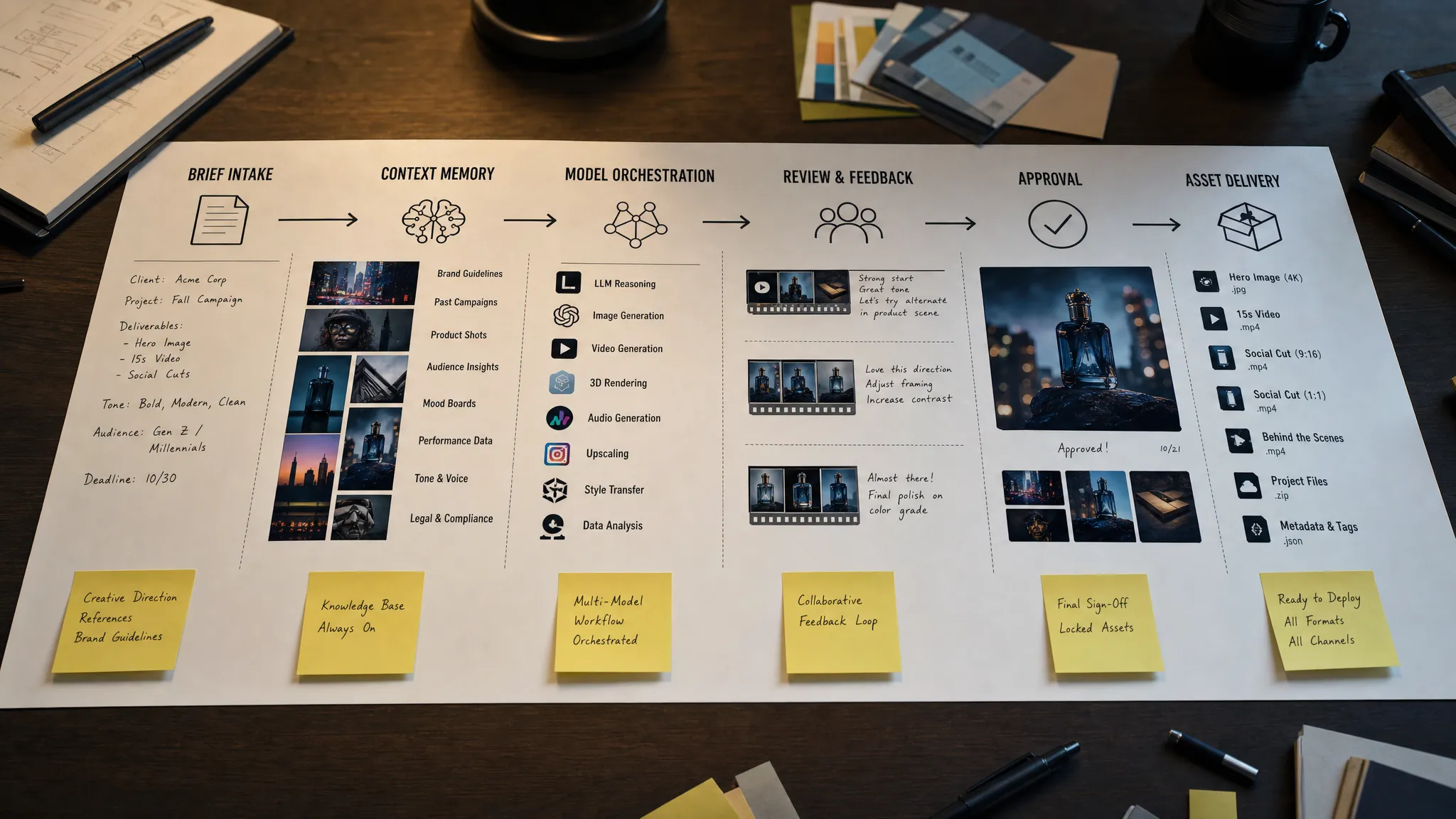
Production AI needs a way to preserve intent, references, decisions, and style context across teams and projects. This can include mood boards, approved assets, brand guidelines, product data, prompt patterns, review notes, and previous generation history.
For enterprise teams, this shared context is especially important because creative production rarely happens in one place. Marketing, e-commerce, agencies, game artists, legal teams, regional teams, and external partners may all interact with the same creative system.
A strong context layer makes AI feel less like a blank canvas every time and more like a studio assistant that understands the project.
Orchestrate Multiple Models Instead of Betting on One
No single AI model is best for every creative task. One model may be strong for photorealistic imagery, another for stylized concepts, another for video motion, another for audio, and another for 3D generation or asset transformation.
Production AI should therefore be model-flexible. Teams need the ability to route tasks to the right model while keeping a consistent workflow, governance layer, and creative context.
This matters because the AI model landscape changes quickly. A tool that is best-in-class today may not be the best choice six months from now. If a workflow depends entirely on one model or vendor interface, the organization becomes fragile.
A production AI operating layer helps teams separate creative process from model selection. The team defines the intent, rules, references, and output requirements. The system can then orchestrate the right models for the job.
Integrate AI Into Existing Creative Systems
Creative teams already have infrastructure. They manage product information in PIM systems, store assets in DAM platforms, create in DCC tools, review work in collaboration software, and track production through project systems.
If AI outputs are generated outside those systems, teams face manual downloads, unclear file names, duplicated assets, missing approvals, and version confusion.
Production AI should connect to the tools teams already use. That can include plugins, APIs, or workflow integrations that allow AI-generated assets to move through the same production pipeline as traditional assets.
For application managers, this is a central requirement. AI should not create a shadow IT environment. It should be governed, connected, and maintainable.
Build Review and Approval Into the Workflow
AI can increase output volume dramatically. Without structured review, that volume becomes noise.
Production AI workflows need clear checkpoints. Art directors need to assess creative quality. Brand teams need to verify consistency. Legal and compliance teams may need to review usage. Technical teams may need to validate file formats, resolution, topology, metadata, or production readiness.
The review process should not be an afterthought at the end. It should be part of the workflow, with annotations, approvals, rejection reasons, and revision history captured along the way.
This improves quality, but it also creates a learning loop. When teams can see why certain outputs were approved or rejected, they can improve blueprints, prompts, model routing, and source materials.
What Each Stakeholder Needs From Production AI
Scaling AI is a cross-functional effort. Each stakeholder has different priorities, and a successful operating model should address all of them.
| Role | Main priority | What production AI should provide |
|---|---|---|
| CMO | Brand consistency, speed, campaign performance | Scalable content workflows with governance and measurable output |
| Art Director | Creative quality and control | Shared context, visual references, review tools, and predictable results |
| Application Manager | Security, integration, maintainability | Centralized controls, APIs, plugins, permissions, and auditability |
| Game Developer | Iteration speed and production fit | Multi-format generation, asset variation, 3D support, and pipeline alignment |
This alignment is important because AI can easily become a departmental initiative. Marketing may focus on speed, creative teams may focus on quality, IT may focus on control, and legal may focus on risk. Production AI brings those concerns into one operating model.
Measuring Production AI Success
Creative AI should not only be measured by how impressive an output looks in a demo. At production scale, success should be connected to business, creative, and operational outcomes.
Useful metrics include cycle time, approval rate, asset reuse, cost per asset, number of approved variants, localization speed, revision volume, and compliance coverage. For game teams, metrics may also include concept iteration speed, asset handoff quality, and reduction in pre-production bottlenecks.
| Metric | What it tells you |
|---|---|
| Time from brief to first review | Whether AI is accelerating early creative exploration |
| Time from approved concept to final asset | Whether AI is improving production throughput |
| Approval rate | Whether outputs meet quality and brand expectations |
| Revision count | Whether blueprints and context are accurate enough |
| Asset reuse rate | Whether outputs are organized and findable |
| Model usage by workflow | Whether teams are choosing the right tools for each task |
| Compliance completion | Whether required reviews and metadata are captured |
The goal is not to reduce creativity to a spreadsheet. The goal is to understand where AI is actually improving production and where the workflow still needs work.
Common Mistakes to Avoid
The move to production AI becomes easier when teams avoid a few predictable mistakes.
One mistake is scaling tools before scaling process. Giving everyone access to AI without defining workflows usually creates inconsistency, not productivity.
Another mistake is treating governance as a final review step. If risk controls only happen after assets are generated, teams waste time fixing preventable issues. Governance should shape the workflow from the beginning.
A third mistake is ignoring asset management. AI can generate huge volumes of material, but volume without organization quickly becomes clutter. Approved assets, rejected assets, source references, and final files need clear metadata and storage rules.
The final mistake is assuming creative teams will adopt AI just because it is available. Adoption depends on trust. Teams need to know that AI will protect their creative direction, fit their existing tools, and help them deliver better work, not just more work.
Where Virtuall Fits in a Production AI Strategy
The Creative AI OS is built for teams that need to operate creative AI at scale, not just experiment with isolated tools. As a Creative AI operating system, Virtuall helps studios and enterprises control, orchestrate, and scale AI-powered content creation across image, video, audio, and 3D workflows.
The platform is designed around the operational requirements discussed in this article: AI governance controls, workflow orchestration, multi-model generation, reusable generation blueprints, studio context memory through mood boards, collaboration tools for review and approvals, asset management, pipeline tracking, and integration with creative systems such as DCC, PIM, and DAM platforms through plugins and API.
Virtuall also includes Nyx, the intelligence layer of the Creative AI OS. Nyx orchestrates multiple industry-leading AI models and helps maintain intent and context across studios and teams. For organizations operating in Europe or serving regulated enterprise environments, Virtuall’s EU-based infrastructure and inference can also support compliance-focused AI operations.
In short, The Creative AI OS gives creative teams a controlled environment for moving from AI experiments to production AI workflows.
Frequently Asked Questions
What is production AI? Production AI is the use of AI in repeatable, governed, measurable workflows that support real business or creative output. For creative teams, it means using AI for assets, campaigns, video, 3D, or game content in a way that is consistent, traceable, and ready for production pipelines.
How is production AI different from generative AI testing? Generative AI testing is usually exploratory and limited to individuals or small teams. Production AI includes workflow orchestration, approvals, asset management, governance, integrations, and quality standards so AI can be used reliably at scale.
Do creative teams still need human review when using production AI? Yes. Human creative direction remains essential. Production AI should support art directors, marketers, game teams, and reviewers by accelerating generation and variation while keeping approvals and quality control in the workflow.
What should enterprises prioritize before scaling creative AI? Enterprises should prioritize use case selection, governance rules, shared creative context, approved model workflows, review processes, asset management, and integration with existing creative systems.
Can production AI support both marketing and game development workflows? Yes, if the operating model supports multiple formats and production contexts. Marketing teams may use it for campaign and product content, while game teams may use it for concept exploration, 3D prototyping, visual development, and asset variation.
Move From AI Tests to Scalable Creative Production
AI experiments can inspire a team. Production AI can transform how that team creates, reviews, manages, and delivers content.
If your organization is ready to move beyond isolated tools and build governed creative AI workflows across image, video, audio, and 3D, Virtuall provides the operating layer to make that possible. You define the rules, preserve creative context, orchestrate models, and keep production moving with control.
Explore how Virtuall can help your studio or enterprise operate creative AI at scale.