EU AI Compliance for Creative Teams: What to Document Now
EU AI compliance for creative teams: document use cases, tools, data rules, logging, approvals, and labeling so your AI workflow is audit-ready in 2026.
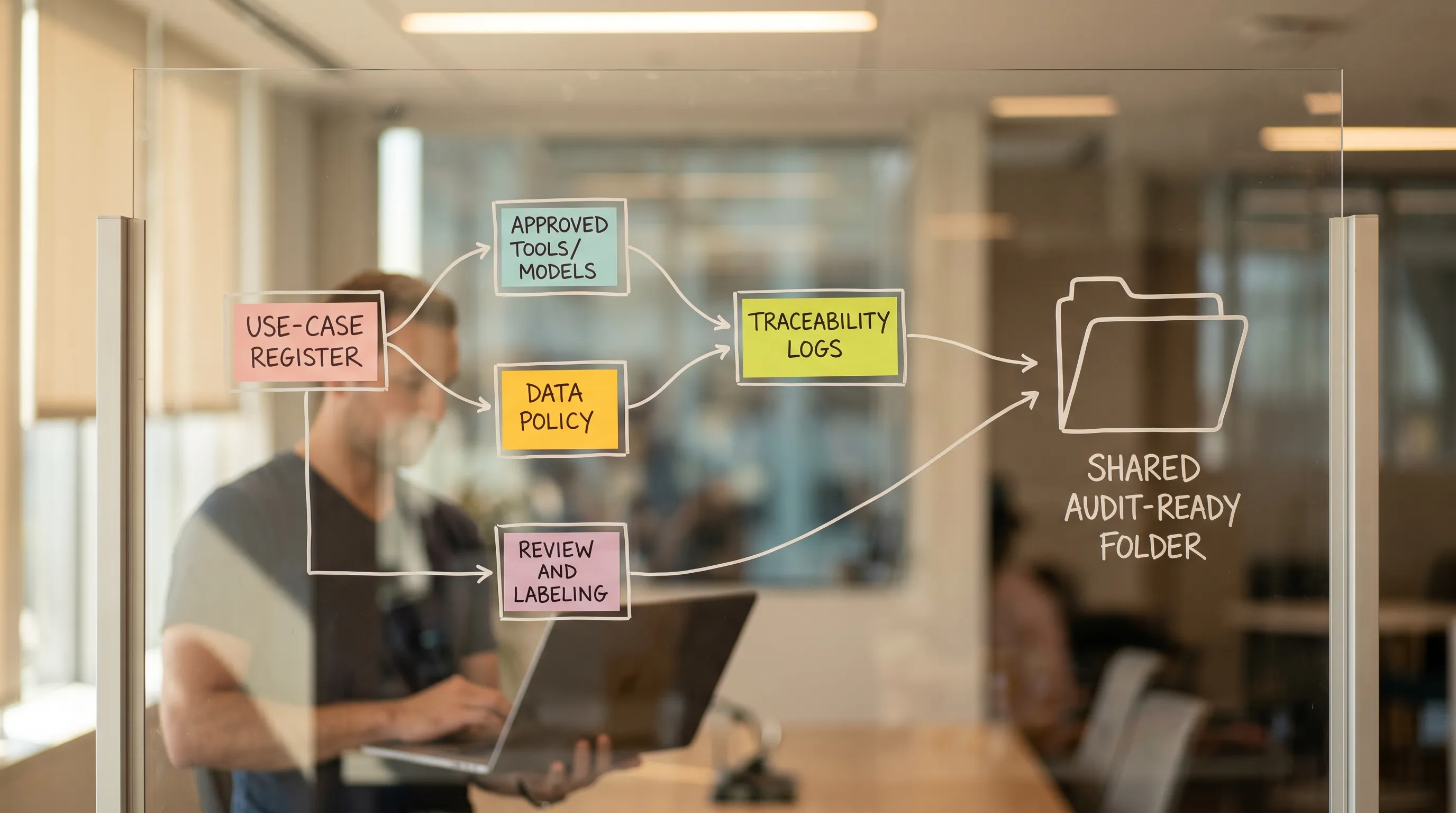
EU regulation is moving from “principles” to “proof.” For creative teams using generative AI, that shift changes the day-to-day: it is no longer enough to say you use AI responsibly, you need to be able to show what you use, why you use it, what data touches it, and how outputs are reviewed and labeled.
This article focuses on the documentation you can start (or fix) immediately so your studio, marketing org, or game team is prepared for EU AI compliance requests from legal, procurement, clients, and regulators.
First, what “EU AI compliance” means for creative teams
Most creative teams are not building foundation models. You are typically a “deployer” (you use AI tools inside business processes) and you might also be a “provider” if you ship AI features to customers or publish an AI-enabled product workflow.
In practice, your documentation needs to cover overlapping obligations and risks:
- EU AI Act: risk-based requirements (plus specific transparency expectations for certain synthetic media use cases). Even if your use is not “high-risk,” governance and traceability are becoming table stakes.
- GDPR and privacy: personal data in prompts, training, fine-tuning, asset libraries, or generated outputs.
- Copyright and licensing: training data assurances from vendors, your rights to use generated outputs, and the provenance of inputs.
- Security and confidentiality: trade secrets, unreleased product designs, scripts, and campaign plans.
- Brand and consumer protection: misleading synthetic media, disclosure expectations, and claims substantiation.
The core idea is simple: treat AI like a production system, not a side tool. Documentation is the bridge between experimentation and enterprise-grade operation.
The documentation stack: what you should be able to produce on request
If an enterprise client, auditor, or internal risk team asks “how are you using AI,” you want a short, consistent package that answers:
- What AI tools and models are in use, by whom, for which tasks?
- What data is allowed or forbidden?
- How do you prevent sensitive leakage?
- How do you review and approve outputs before publication or integration?
- How do you label or disclose synthetic content when required?
- How do you handle incidents and user complaints?
Below is a practical set of documents that cover those questions without forcing a heavy compliance program.
1) An AI Use-Case Register (your single source of truth)
This is the most important artifact, because it makes everything else scannable.
For each use case, capture:
- Use-case name and owner (one accountable person)
- Business purpose (what outcome you need, not “we use model X”)
- Where it runs (tool(s), plugins, API, internal apps)
- Input types (brand assets, mood boards, customer data, UGC, scripts, 3D meshes)
- Output types (images, video, 3D, audio, copy) and where outputs go (DAM, PIM, game build, campaign pipeline)
- Risk notes (privacy, IP, misleading media, safety)
- Required review (who approves, what must be checked)
- Logging and retention (what is stored, for how long, where)
If you want a lightweight but effective way to structure this, the deliverables and “AI register” approach described in this guide to AI discussion tools and team rules is a solid starting point for getting alignment and avoiding tool chaos.
2) An Approved Tools and Models List (plus “how it’s approved”)
Creative teams often fail compliance because tool adoption is organic: a free browser tool here, a personal account there, an unreviewed plugin connected to a production asset library.
Document:
- Approved vendors/tools (including account type, region, and whether enterprise terms apply)
- Approved model families (even if accessed through a platform)
- Disallowed tools (and why)
- Approval workflow (who reviews new tools, what criteria are required)
Procurement and security will ask for this early, and your team will benefit because it reduces rework and inconsistent outputs.
3) A Data Policy that creative people can actually follow
A “do not share sensitive data” statement is not enough. What works is a data classification policy with examples that match creative workflows.
Your policy should define at least three classes:
- Public or publishable
- Internal confidential
- Restricted (personal data, client secrets, unreleased product, source files, contracts)
Then add: what is allowed in prompts, what can be uploaded to AI tools, and what must never leave internal storage.
Make it practical with examples:
- “Allowed: approved brand guidelines PDF, licensed stock references, internal mood boards marked ‘shareable’.”
- “Not allowed: unannounced product renders, customer lists, unreleased gameplay footage, actor contracts.”
This single page prevents most accidental violations.
4) A DPIA or risk assessment template for AI-assisted workflows
You do not need to run a full legal exercise for every experiment, but you do need a repeatable risk screen. In GDPR terms, some uses will require a Data Protection Impact Assessment (DPIA). In AI Act terms, some uses may eventually fall into higher scrutiny categories depending on context.
Create a template that captures:
- Whether personal data is processed (including in images, voice, or metadata)
- Lawful basis and data minimization choices
- Whether outputs could impact people (for example, synthetic likeness, voice cloning, targeted persuasion)
- Human review requirements
- Controls (masking, redaction, approvals, restricted access)
If you are a studio serving multiple brands or territories, this template becomes a reusable accelerator.
5) Traceability: prompt, input, output, and decision logs
For creative, the question is not “did the model produce the same answer twice,” but “can we prove how we got this asset?”
You want to be able to reconstruct:
- Which tool or model generated the asset
- Which source inputs were used (and whether they were licensed)
- Who initiated the generation and who approved it
- What post-production occurred (edits, compositing, upscaling)
- Where the asset was published or shipped
You can keep this simple: store generation metadata with the asset (in your DAM or asset manager) and keep review notes attached to the same record.
6) A transparency and labeling policy for synthetic media
Creative teams increasingly generate content that audiences may interpret as real. Even when not strictly required in every scenario, having a documented policy reduces legal and reputational risk.
Document:
- When you label content as AI-generated or AI-assisted
- How labeling works across channels (ads, social, landing pages, in-game assets, behind-the-scenes)
- Special rules for sensitive cases (real people, minors, political content, medical claims)
- Who approves exceptions
This is particularly important for CMOs and brand teams, because the failure mode is public.
7) An IP and licensing memo (inputs, outputs, and vendor terms)
Your legal team will care about two directions:
- Input rights: Do you have the right to use a reference image, concept art, soundtrack stem, or 3D kitbash as an AI input?
- Output rights: Under your tool and model terms, do you get commercial usage rights, and what restrictions exist?
Document the minimum:
- Approved input sources (owned, commissioned with rights, licensed libraries)
- Prohibited inputs (third-party IP, competitor assets, unlicensed character likeness)
- Vendor contract pointers (where output rights are defined)
If you work with external agencies, include a clause checklist for who owns AI-assisted outputs and what records must be delivered with final assets.
8) A human review and approval workflow (with quality gates)
Compliance is not only “what tool was used,” it is also how decisions are made.
Document your review gates for different asset risk levels:
- Low risk: internal ideation boards
- Medium risk: campaign creatives before publish
- High risk: content featuring real people, sensitive topics, regulated claims, or client confidential materials
For each gate, capture:
- Reviewer role (art director, brand, legal, security)
- What they check (IP, privacy, brand, factual claims)
- Where approvals are recorded
This is where enterprise teams often win or lose audits, because an auditor can accept experimentation if approvals are controlled.
9) An incident and takedown playbook
You need a one-page plan for when something goes wrong:
- Sensitive data leaked into a prompt
- A generated asset resembles a real person
- A client disputes rights or provenance
- A platform flags synthetic media or deceptive content
Document:
- Who to notify (legal, security, comms)
- How to freeze publishing and revoke access
- How to locate affected assets via logs
- How to remediate and prevent recurrence
10) AI literacy and training records
By 2026, many organizations are expected (and increasingly asked by clients) to demonstrate that staff are trained on AI risks and proper use. Keep records of:
- Training dates and attendance
- Policy acknowledgements
- Tool-specific onboarding (what is allowed, what is forbidden)
This is low effort and high value, especially when you operate across multiple studios or external partners.
A practical “what to document now” checklist (with owners)
Use this table to drive action in the next 2 to 4 weeks.
| Document | Minimum content | Typical owner | Review cadence |
|---|---|---|---|
| AI Use-Case Register | Purpose, tool/model, inputs/outputs, risks, approvals, logging | App Manager or Ops | Monthly |
| Approved Tools/Models List | What is allowed, what is blocked, approval criteria | Security + IT + Creative Ops | Quarterly |
| Data Policy for AI | Data classes, allowed prompt content, prohibited uploads | Security/Privacy | Quarterly |
| Risk Screen or DPIA Template | Personal data check, impact notes, mitigations | Privacy/Legal | Per use case |
| Traceability/Logging Standard | What metadata to store with each asset and where | Creative Ops + IT | Quarterly |
| Transparency/Labeling Policy | When and how to disclose synthetic media | Brand + Legal | Quarterly |
| IP & Licensing Memo | Approved sources, vendor term pointers, agency clauses | Legal/Procurement | Semiannual |
| Review and Approval Workflow | Gates, reviewers, sign-off location | Art Direction + Brand | Quarterly |
| Incident Playbook | Triage, notification, takedown, remediation | Security + Legal | Semiannual |
| Training Records | Curriculum, attendance, acknowledgements | HR/Ops | Ongoing |
How this maps to creative operations (image, video, and 3D)
Documentation is easiest to maintain when it follows the pipeline.
- Pre-production: use-case definition, approved references, mood boards, licensing checks.
- Generation: tool/model choice, prompt standards, restricted data controls.
- Review: annotations, approvals, and decisions stored with the asset.
- Delivery: publishing rules, labeling, export formats, client handoff packets.
- Post-release: monitoring issues, responding to claims, keeping an audit trail.
This is why many enterprise teams move from scattered AI tools to an operating layer that can standardize workflows, governance, and metadata across multiple models and formats.
Where a Creative AI OS helps (without adding compliance drag)
If you are trying to operationalize AI across a studio, the main problem is not model quality. It is consistency, control, and traceability.
A platform approach such as Virtuall (a Creative AI operating system) is designed around those operational needs: governance controls, workflow orchestration, generation templates (blueprints), collaboration and approvals, asset management, and pipeline tracking, with EU-based infrastructure options. In practice, that kind of system can make it easier to:
- Standardize “what good looks like” through reusable generation blueprints.
- Keep context aligned across teams (for example, mood boards and studio context memory).
- Centralize review workflows so approvals are recorded and repeatable.
- Reduce shadow AI usage by providing an approved, production-ready path.
The goal is not paperwork. The goal is to make compliance a byproduct of doing work in a controlled pipeline.
Frequently Asked Questions
Does the EU AI Act apply to creative teams using generative AI? Yes, in many cases. Even if you are not building models, you may be a deployer using AI in business processes, and you will be expected to manage risk, transparency, and governance.
What is the single most important document to create first? An AI Use-Case Register. It gives you a map of where AI is used, which tools are involved, what data is touched, and which approvals and logs you need.
Do we need to log prompts and outputs for every generation? You should at least log enough metadata to reconstruct how a production asset was created (tool/model, inputs, owner, approvals, output version). The exact level depends on sensitivity and risk.
How do we handle personal data in creative AI workflows? Start with a data classification policy and a risk screen that flags personal data early. For higher-risk uses, involve privacy counsel and consider a DPIA.
What should we do about AI-generated content that could mislead audiences? Maintain a transparency and labeling policy that defines when you disclose AI-generated or AI-assisted media, who approves it, and how it is applied across channels.
Build an audit-ready creative AI workflow
If your team is scaling image, video, and 3D generation, the fastest path to EU AI compliance is to document your pipeline and then run AI through that pipeline consistently.
Virtuall helps enterprises operationalize creative AI with governance controls, orchestration across multiple models, collaboration and approvals, and production-focused asset workflows. Explore Virtuall at virtuall.pro to see how a Creative AI OS can support compliant, studio-quality output at scale.