Create Game Assets With AI That Meet Technical Specs
Create game assets with AI that meet technical specs, from poly budgets and PBR maps to QA checks, governance and engine handoff.
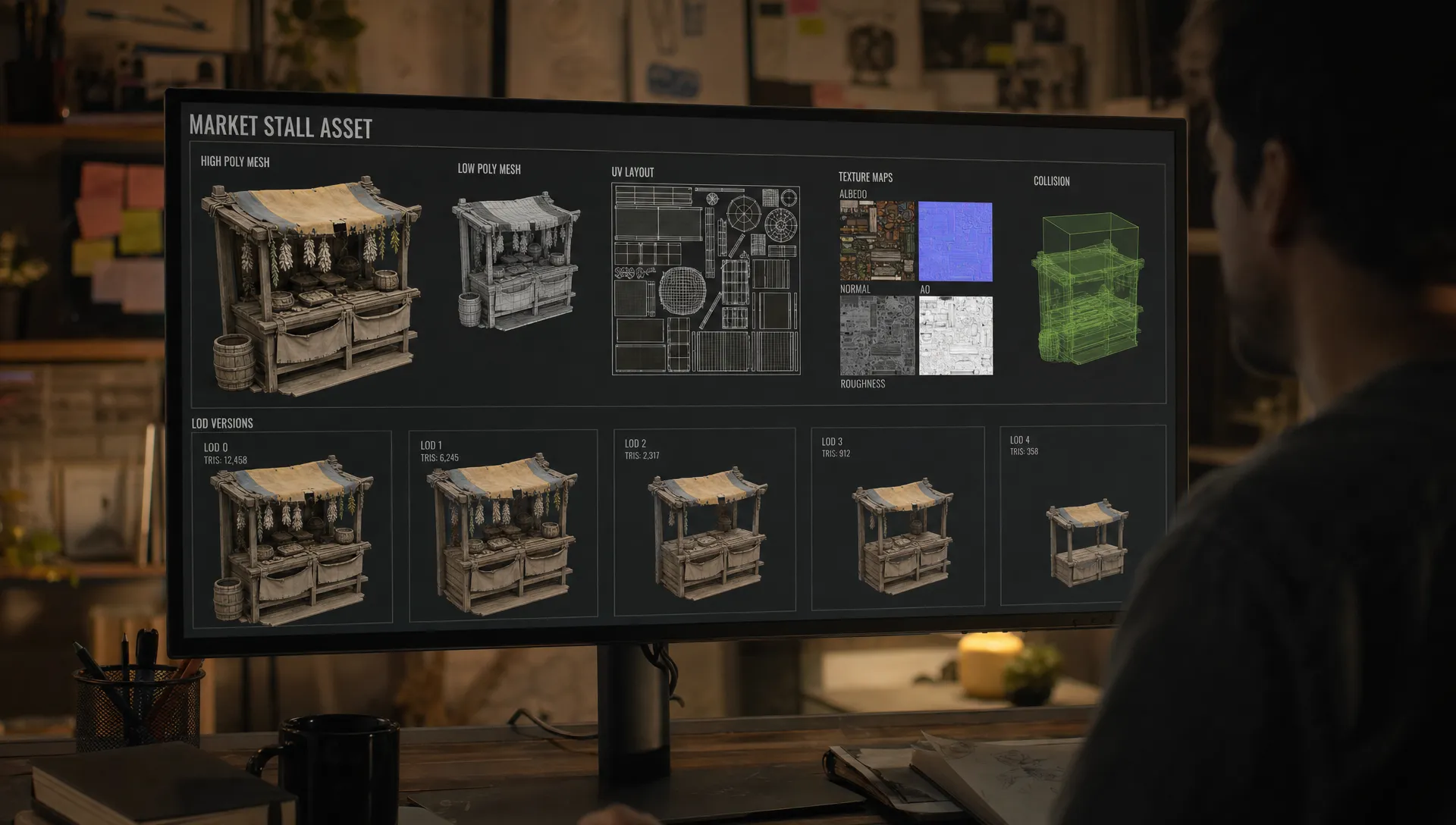
AI can now produce a convincing shield, creature, vehicle or modular wall section in minutes. Shipping that asset inside a real game is a different problem. A beautiful output can still fail because the mesh is too dense, the pivot is wrong, the UVs overlap, the textures blow the memory budget or the file cannot move cleanly into Unity, Unreal or a proprietary engine.
To create game assets with AI that meet technical specs, start with the same discipline you would use for any production pipeline: define the constraints before generation, guide the AI with reusable context, validate the output against measurable gates and keep a record of what was approved. The prompt is only one part of the system.
For enterprise teams, this matters even more. A one-off asset can be repaired manually. A content pipeline that generates hundreds or thousands of assets needs rules, ownership, versioning and governance so every output can survive review, import and runtime testing.
What technical specs mean for AI game assets
An AI asset meets technical specs when it satisfies the requirements of the game, engine, platform and studio pipeline. That includes visual direction, but it also includes the less glamorous details that make an asset usable in production.
| Spec area | What to define before generation | Why it matters |
|---|---|---|
| Geometry | Triangle budget, topology expectations, silhouette priority, mesh separation | Keeps performance predictable and makes the asset editable |
| Scale and pivot | Unit system, origin point, orientation, snap rules | Prevents import issues and broken placement in engine |
| UVs and textures | UV set count, texel density, texture resolution, map types | Controls memory use and supports consistent material quality |
| Materials | Shader type, PBR workflow, material slot limit, channel packing | Reduces draw calls and avoids rework by technical artists |
| Runtime setup | LODs, collision, sockets, skeleton, animation requirements | Makes the asset usable in gameplay rather than just viewable |
| Packaging | File format, naming convention, folder structure, metadata | Helps teams track, version and hand off assets reliably |
| Compliance | Reference rights, approved models, provenance, review status | Reduces legal, brand and security risk |
A technical spec does not need to be long, but it does need to be explicit. If a prompt says stylized sci-fi crate, an AI model may generate something attractive. If the asset contract says stylized sci-fi crate, 1 meter wide, centered bottom pivot, maximum two material slots, 2K PBR texture set, LOD0 under the agreed triangle budget and collision proxy required, the whole team has a clear target.
Start with an asset contract, not a prompt
The most common mistake in AI asset creation is beginning with the visual prompt and hoping the technical requirements can be fixed later. That approach works for exploration, but it creates hidden production debt when assets need to be rigged, optimized, localized, versioned or passed to another department.
A better starting point is an asset contract. This is a short production brief that defines what the asset must be, where it will be used and how it will be accepted. It can live in a task tracker, DAM, PIM, DCC plugin or AI workflow system, but the structure should stay consistent across the studio.
A practical asset contract should capture:
- Asset name, category and owner
- Target engine, platform and camera distance
- Gameplay purpose and interaction requirements
- Visual references approved for use
- Geometry, texture, material and rigging limits
- Required exports, naming rules and metadata
- Reviewers, approval status and compliance notes
This contract becomes the source of truth for the AI workflow. It informs the prompt, model choice, generation blueprint, DCC cleanup, QA checks and final import settings. It also gives producers and art directors a way to compare outputs against requirements without relying on subjective impressions alone.
Translate specs into AI generation instructions
AI systems respond best when creative direction and technical constraints are written together. The goal is not to overload the prompt with every possible rule. The goal is to give the model enough context to produce an output that is closer to the target, then use validation to enforce the parts the model cannot guarantee.
A useful generation instruction usually includes the asset role, visual style, gameplay context, camera distance, scale, material expectations and hard exclusions. For example:
Create a stylized medieval market stall for a third-person fantasy RPG. It should be readable from a medium camera distance, use chunky wooden forms, simple cloth shapes and warm hand-painted materials. Keep the silhouette clear from the front and side. Design it as a static environment prop with a centered bottom pivot, two material groups maximum and enough separation between wood, cloth and small props for later cleanup. Avoid tiny fragile details, dense ornamentation and realistic modern hardware.
This kind of instruction helps steer the AI toward production intent. It does not replace a technical artist. If the model outputs a mesh, the asset still needs topology checks, UV inspection, material setup and import testing. If the model outputs concept images, those images need to feed a controlled 3D creation process.
When visual consistency is the main risk, pair the spec sheet with an AI-ready style system. Virtuall covers that topic separately in its guide to creating AI game assets that match your art style, which is especially useful for teams that need multiple creators and models to stay aligned.
Choose the right AI path for the asset type
Different asset categories need different AI workflows. A prop, modular kit, terrain material, character skin and animated creature should not all pass through the same process.
| Asset type | Best AI use | Human or technical pass required |
|---|---|---|
| Static props | Concept variation, text-to-3D, image-to-3D, texture ideation | Retopology, UVs, LODs, collision and material cleanup |
| Modular environments | Shape exploration, kit variation, surface design | Grid snapping, seam testing, pivots and scale consistency |
| Characters | Concepting, costume variation, face or accessory exploration | Production topology, rigging, skinning, blendshapes and animation tests |
| Materials | Pattern generation, PBR map ideation, texture variants | Tile testing, channel packing, shader setup and resolution control |
| UI and icons | Ideation, style variation, icon family generation | Pixel review, safe zones, atlas rules and accessibility checks |
For 3D assets, the format choice also matters. The Khronos Group glTF 2.0 specification is widely used for efficient 3D transmission, while many game pipelines still rely on FBX for DCC and engine interchange. Unreal and Unity both expose import settings that affect scale, normals, materials and animation handling, so the asset contract should identify the expected path before generation begins.
If you want a broader walkthrough of mesh creation, optimization and engine integration, Virtuall also has an AI-powered creation guide for 3D assets for games. This article focuses more narrowly on the technical gates that keep AI-generated assets production-safe.
A production workflow for spec-compliant AI assets
Lock the target environment
Before anyone generates an asset, define the target environment. A mobile stylized game, a console racing title and a high-end cinematic Unreal project have very different budgets. The same sword, barrel or NPC accessory may need different triangle counts, texture sizes and shader complexity depending on how close the player gets and how often the asset appears on screen.
The target environment should include the engine version, render pipeline, platform targets, camera distance, lighting assumptions and asset density. This keeps the AI brief realistic. It also helps application managers and technical artists connect creative AI outputs to existing build, asset management and review systems.
Generate within approved creative context
AI generation should happen inside approved context, not from random references collected by each artist. Use rights-clean mood boards, brand-approved art direction, style bibles and previous production assets where the studio has permission to do so.
This is where reusable generation blueprints become valuable. Instead of asking every artist to remember the same prompt structure, a blueprint can encode the accepted pattern for a category such as mobile prop, hero weapon, background building or UI icon. In Virtuall, generation blueprints and studio context memory are designed to help teams keep intent and context consistent across image, video, audio and 3D generation workflows.
Refine topology and silhouette
AI-generated meshes often look convincing from a distance but contain irregular topology, unnecessary internal faces, uneven density or artifacts that make them difficult to edit. For game production, the mesh needs to support the asset’s purpose.
For static props, prioritize a clean silhouette, stable normals and efficient surface density. For animated assets, topology must support deformation around joints, facial movement or cloth-like motion. For modular kits, the edges that meet other pieces matter more than decorative complexity in areas the player rarely sees.
A common workflow is to use the AI output as a high-resolution reference or base mesh, then retopologize, decimate selectively, bake details into normal maps and rebuild the areas that need clean control. This preserves creative speed without pushing unstable geometry into the game.
Build materials to budget
Textures are often where AI assets quietly break technical specs. An asset may look good in a preview render because it uses high-resolution images, too many maps or lighting baked into the base color. In engine, that can create memory problems or inconsistent results under dynamic lighting.
Define the material workflow before generation. For PBR assets, specify the expected maps such as base color, normal, roughness, metallic and ambient occlusion where needed. Confirm texture sizes, color space, channel packing and whether the material must tile. Set a maximum number of material slots because every extra slot can increase runtime cost and complicate batching.
Add LODs, collision and gameplay metadata
A game-ready asset usually needs more than a visible mesh. It may need LODs, collision volumes, sockets, attachment points, navigation settings, destructible states or gameplay tags. AI generation rarely creates these correctly without a downstream process.
Treat these as acceptance criteria. A prop is not ready because it looks finished. It is ready when it imports at the correct scale, sits on the ground plane, uses the expected pivot, has collision appropriate for gameplay, includes LODs if required and passes runtime tests in the target scene.
Technical QA checklist before engine handoff
A strong AI asset workflow has validation gates. Some checks can be automated through scripts, DCC tools or engine import tests. Others require review by an art director, technical artist or gameplay owner.
| QA area | Pass criteria | Typical reviewer |
|---|---|---|
| Scale and orientation | Asset imports at the expected size, faces the correct direction and uses the approved pivot | Technical artist |
| Mesh quality | No broken normals, hidden dense geometry, non-manifold issues or unwanted internal faces | 3D artist or technical artist |
| Budget compliance | Triangle count, material slots and texture sizes stay within the asset contract | Technical artist |
| UVs and materials | UVs are clean, maps are assigned correctly and textures follow the shader workflow | Material artist or technical artist |
| Runtime setup | LODs, collision, sockets and animation data work in the target engine | Game developer |
| Visual approval | Silhouette, style, readability and gameplay clarity match the brief | Art director |
| Compliance | References, model usage and generated outputs follow studio policy | Producer, legal or governance owner |
For Unity projects, the official Model Import Settings documentation is a useful reference for import behavior. For Unreal projects, Epic’s FBX Static Mesh Pipeline documentation explains common static mesh import expectations. Your studio may have different proprietary rules, but the principle is the same: validate the asset against the pipeline, not just the preview image.
Common AI asset failures and how to fix them
AI reduces blank-page time, but it also introduces repeatable failure patterns. Naming them makes them easier to prevent.
| Failure | Likely cause | Fix |
|---|---|---|
| The asset looks good but is too heavy | Generation optimized for visual detail, not runtime budget | Retopologize, bake detail into maps and set triangle limits in the asset contract |
| The style is inconsistent across a batch | Each creator used different references or prompt wording | Use approved mood boards, reusable blueprints and art director review gates |
| The pivot or scale is wrong | Technical requirements were added after generation | Include units, orientation and pivot rules before generation, then validate on import |
| Materials are hard to use in engine | Too many texture maps, baked lighting or unclear shader assumptions | Define the PBR workflow, texture size and material slot limit up front |
| Modular pieces do not snap together | AI generated each piece as an isolated object | Use grid rules, shared dimensions and seam tests during review |
| Compliance status is unclear | References, prompts or model choices were not tracked | Log provenance, approved sources and review status as part of the asset record |
These failures are not reasons to avoid AI. They are reasons to operationalize it. When the same issues appear across a team, the fix is rarely a better single prompt. The fix is usually a better workflow.
How enterprise studios can scale AI asset production
A solo creator can inspect every file manually. Enterprise teams need repeatability across departments, vendors, regions and tools. That requires governance around how AI is used, which models are allowed, what references are approved, who can generate what and how outputs move into production.
A scalable AI asset pipeline should include a few core controls:
- Approved generation blueprints for common asset categories
- Model access rules based on project, region or content type
- Shared studio context such as mood boards, art direction and technical specs
- Review workflows with annotations, approvals and rejection reasons
- Asset management and pipeline tracking for generated and finalized files
- Integration with DCC tools, DAM systems, PIM systems and game production tooling
- Compliance records for references, prompts, outputs and inference location
This is the difference between using AI as a creative toy and operating it as part of a production system. The Creative AI OS is built around that operating model: AI governance controls, workflow orchestration, multi-model generation, team collaboration, asset management, pipeline tracking and EU-based infrastructure and inference. Its intelligence layer, Nyx, orchestrates multiple industry-leading AI models while keeping intent and context across studios and teams.
For CMOs and art directors, this means brand and style control can be built into the workflow. For application managers, it means AI can connect to the tools and systems the studio already uses. For game developers, it means generated assets arrive with fewer surprises at import time.
A practical spec template for AI game assets
Use a template like this before the first generation pass. Keep it short enough that teams will actually fill it in, but specific enough to prevent ambiguity.
Asset name:
Asset category:
Game area or level:
Target engine and platform:
Camera distance:
Gameplay function:
Approved visual references:
Style notes:
Scale and pivot rules:
Triangle or mesh budget:
Texture budget and required maps:
Material slot limit:
LOD requirements:
Collision requirements:
Rigging or animation requirements:
Export format:
Naming convention:
Compliance notes:
Review owner:
Acceptance criteria:
The acceptance criteria are the most important part. They define what done means. Without them, AI generation tends to drift toward visual appeal. With them, the workflow can balance creativity, performance and governance.
Frequently Asked Questions
Can AI create game-ready assets directly? Sometimes AI can produce a strong starting point, but most production assets still need technical cleanup. Retopology, UV work, material setup, collision, LODs, rigging and engine import checks are often required before the asset is truly game-ready.
What specs should I give AI when creating game assets? Provide the asset role, target engine, platform, camera distance, scale, pivot, triangle budget, texture budget, material workflow, LOD needs, collision needs and approved references. The more production context the AI has, the less rework your team will face later.
Which file format is best for AI-generated game assets? It depends on your pipeline. FBX is common in many DCC-to-engine workflows, while glTF is widely used for efficient 3D transmission and web-based workflows. The best choice is the one your engine, tools and asset management process can validate reliably.
How do studios keep AI-generated assets compliant? Compliance depends on using approved models, rights-clean references, controlled prompts, review workflows and provenance records. Enterprise teams should also define where inference happens, who can access generation tools and how outputs are approved before production use.
Does AI replace technical artists in asset production? No. AI can accelerate ideation, variation and first-pass generation, but technical artists remain critical for topology, optimization, materials, engine setup and pipeline reliability. In strong workflows, AI removes repetitive production friction rather than removing technical ownership.
Turn AI asset generation into a controlled production pipeline
Creating game assets with AI is valuable when the output can move through the same technical gates as any other production asset. That requires clear specs, reusable workflows, review discipline and governance across the tools your team already uses.
If your studio wants to scale AI-powered content creation across image, video, audio and 3D without losing control of quality or compliance, Virtuall provides a Creative AI OS for orchestrating models, workflows, reviews, assets and production context in one governed environment.