How to Create AI Game Assets That Match Your Art Style
Learn how to create AI game assets that match your art style with style bibles, references, generation blueprints, QA, and governance.
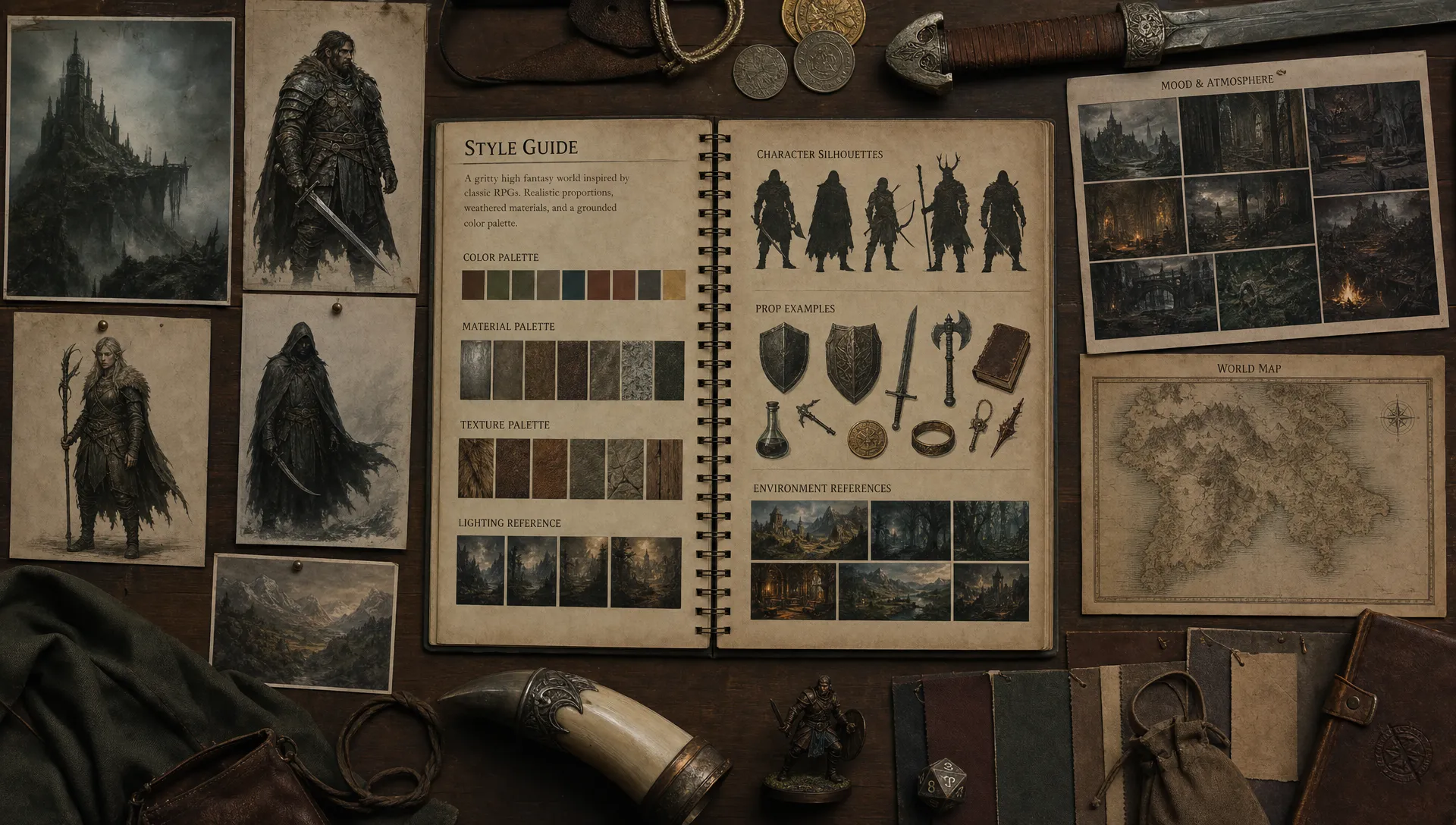
Creating AI game assets that match your art style is not a one-prompt problem. It is an art direction system problem.
AI can produce impressive characters, props, textures, backgrounds, and 3D concepts in minutes. But production teams rarely need one impressive output. They need hundreds or thousands of assets that feel like they belong in the same world, respect technical constraints, and can move through review without constant rework.
That is where many AI workflows break down. One artist gets a great result, another uses a slightly different prompt, a third switches models, and the game’s visual identity starts to fragment. The solution is to treat AI asset creation like any other production pipeline: define the style, encode it into repeatable rules, review against clear criteria, and preserve context across teams.
This guide explains how to create style-consistent AI game assets for real production environments, from early concept exploration to engine-ready delivery.
Why AI game assets often drift from the intended style
Generative models are designed to create plausible outputs based on patterns they have learned. That makes them powerful for ideation, but it also means they tend to average, embellish, or reinterpret your direction unless you give them enough structure.
Style drift usually comes from a few predictable causes: vague prompts, inconsistent reference images, different model choices, missing negative examples, and weak review criteria. A prompt like stylized fantasy weapon might generate something attractive, but it does not tell the model whether your game uses chunky silhouettes, muted metals, hand-painted edges, low-detail forms, exaggerated proportions, or a specific lighting language.
The more people involved, the harder this becomes. Enterprise studios and distributed teams need shared rules, not isolated prompt tricks. A reliable workflow turns art direction into a controlled creative operating model, so AI can explore within your game’s style instead of inventing a new one every time.
Start with a style bible that AI can understand
Before generating assets, translate your art direction into concrete visual rules. A traditional style bible is already useful for human artists, but AI needs a version that is especially explicit. The goal is to describe what should stay consistent across every asset, even when the subject changes.
Your AI-ready style bible should define the visual DNA of the game. This includes shape language, proportions, material treatment, color palettes, lighting rules, detail density, camera perspective, and what should never appear. If you are building a cozy farming game, for example, your rules might prioritize rounded silhouettes, warm palettes, soft ambient lighting, low-contrast textures, and simplified functional details. If you are building a tactical sci-fi shooter, the rules may emphasize hard-surface geometry, modular forms, high-readability silhouettes, cool lighting, and controlled wear patterns.
| Style dimension | Decisions to document | Why it matters for AI generation |
|---|---|---|
| Shape language | Rounded, angular, modular, organic, asymmetrical | Keeps silhouettes consistent across characters, props, and environments |
| Proportions | Realistic, exaggerated, chibi, heroic, elongated | Prevents outputs from shifting into another genre or age rating |
| Palette | Core colors, accent colors, forbidden colors | Makes batches feel unified even when generated separately |
| Materials | Hand-painted wood, brushed metal, clay, cloth, stone | Helps texture and surface details match the world |
| Detail density | Minimal, medium, ornate, noisy, clean | Avoids assets that look over-rendered or underdeveloped |
| Lighting | Flat, cinematic, soft, high-contrast, ambient | Reduces inconsistency between concept art and production assets |
| World logic | Technology level, culture, wear, function, scale | Ensures each asset feels believable in the game universe |
If your team is still defining the relationship between human taste and AI production, Virtuall’s playbook for art directors working with AI and human creativity is a useful companion to this process.
Build a rights-clean reference library
References are one of the strongest ways to keep AI game assets on style, but they need to be selected carefully. A rights-clean reference library should include assets your studio owns, licensed materials that allow the intended use, internal concept art, approved mood boards, and examples created specifically for style alignment.
Separate your references by function. Hero references show the ideal style. Variation references show the acceptable range. Material references define surfaces and texture behavior. Negative references show what to avoid. This last category is often overlooked, yet it can dramatically improve consistency because it gives artists and reviewers a shared vocabulary for rejection.
For enterprise teams, reference governance is not optional. Track where references come from, who approved them, which projects they belong to, and whether they can be used for prompting, training, fine-tuning, or only human inspiration. The U.S. Copyright Office’s AI initiative is a helpful starting point for understanding how authorship, human contribution, and AI-generated outputs are being discussed in policy and law. It is not a substitute for legal advice, but it reinforces why provenance and human creative control matter.
A strong reference system gives AI the context it needs while protecting the studio from avoidable IP and compliance risks.
Convert art direction into reusable generation blueprints
Once your style rules and references are ready, turn them into generation blueprints. A generation blueprint is a repeatable template that defines how a certain type of asset should be generated, reviewed, and prepared for production.
A good blueprint does more than store a prompt. It captures the asset type, design purpose, visual constraints, technical requirements, approved references, negative constraints, output formats, and review criteria. This makes it easier for multiple artists, producers, and vendors to create assets that follow the same rules.
A practical blueprint can include:
- Asset category, such as character, prop, weapon, texture, UI icon, environment element, or 3D model
- Gameplay function, such as readable enemy unit, collectible item, background decoration, or modular building part
- Style anchors, such as silhouette rules, palette, material behavior, line quality, and detail density
- World constraints, such as faction, biome, culture, era, scale, and wear level
- Technical constraints, such as target resolution, texture type, polygon budget, file naming, or engine requirements
- Negative rules, such as no photorealism, no ornate filigree, no modern plastics, or no horror elements
- Review criteria, such as style match, readability, production readiness, and compliance status
In a Creative AI OS such as Virtuall, these repeatable rules can live as generation blueprints, supported by studio context memory through mood boards and shared production context. That helps teams avoid rebuilding the same prompt logic for every new batch.
Use model controls, not just style words
Words are only one layer of control. To create AI game assets that match a specific art style, use every control your workflow supports: reference images, mood boards, sketch inputs, masks, depth maps, pose references, seed control, fine-tuned models, or controlled variation settings.
The best control method depends on the asset. A character concept may need silhouette sketches and faction references. A prop may need orthographic views and material references. A texture may need seamless tiling constraints and map outputs. A 3D model may need mesh cleanup, topology review, UV work, and engine checks.
The key is to separate constants from variables. Constants are the style rules that should not change, such as palette, proportions, material treatment, and level of detail. Variables are what you want to explore, such as item shape, ornament placement, faction variation, or damage level. When every generation changes both constants and variables, it becomes impossible to know what caused a good or bad result.
Match the workflow to the asset type
Different game assets need different AI workflows. A single prompt strategy will not work equally well for a hero character, a seamless texture, a modular wall piece, and a UI icon.
| Asset type | Best style anchors | Production checks |
|---|---|---|
| Characters | Silhouette sheets, pose references, faction palettes, anatomy rules | Readability, proportion consistency, equipment logic, animation feasibility |
| Props and weapons | Shape language, material references, scale guides, use-case notes | Function, scale, surface treatment, collision and pickup readability |
| Environments | Biome mood boards, lighting rules, modular kit references | Composition, perspective, navigation readability, repetition control |
| Textures and materials | Surface references, tiling rules, wear patterns, color limits | Seamlessness, map consistency, texel density, shader compatibility |
| 3D assets | Turnarounds, concept art, mesh constraints, material guides | Topology, UVs, LODs, pivots, normals, engine import quality |
| UI icons | Grid rules, line weight, palette, icon metaphor system | Legibility, scale, contrast, localization constraints |
| Video or motion assets | Animation references, timing notes, camera rules | Motion consistency, frame continuity, export specs, approval status |
For material-specific workflows, Virtuall’s guide to AI texture generation in 3D art and game design covers how AI can support seamless materials and surface creation. If your focus is mesh production, the AI-powered guide to 3D assets for games goes deeper into modeling, optimization, and engine integration.
Write prompts around constraints, not adjectives
Adjectives are useful, but they are not enough. Words like beautiful, cinematic, stylized, high quality, and detailed are too broad to preserve a specific art style. They often push the model toward generic polish rather than your game’s visual identity.
A stronger prompt describes the asset’s role, form, material, constraints, and world logic. Instead of asking for a stylized fantasy sword, describe the sword’s silhouette, function, faction, material treatment, level of wear, and relationship to your existing art direction.
A useful prompt structure is:
Create [asset type] for [game world and gameplay function].
Use [shape language], [proportion rules], and [palette].
Materials should look like [approved material treatment].
Detail density should be [level] with [specific detail rules].
The asset must fit [faction, biome, culture, or era].
Avoid [negative style traits and forbidden elements].
Output should support [production requirement].
For example, a stronger prop prompt might say:
Create a small healing potion bottle for a cozy fantasy farming RPG. Use rounded shapes, a squat silhouette, warm amber glass, a cork stopper, and a simple hand-painted label. Keep details large and readable at small scale. The object should feel handmade by a village herbalist, not ornate or royal. Avoid sharp spikes, dark horror styling, metallic sci-fi parts, photorealistic reflections, and dense decorative patterns.
This type of prompt gives the model less room to invent a competing style. It also gives reviewers clearer criteria for accepting or rejecting the output.
Generate in controlled batches and compare against references
Style matching improves when generation is treated as a controlled experiment. Instead of generating dozens of unrelated outputs, create small batches where only one or two variables change. Keep the same style anchors, references, model settings, and production constraints wherever possible.
After each batch, compare outputs against your hero references and negative references. Do not only ask which image looks best. Ask which one best serves the game. A visually impressive asset can still be wrong if it changes the lighting language, introduces a new material style, breaks silhouette rules, or feels too detailed for the rest of the world.
Useful review questions include:
- Does the asset read clearly at gameplay distance?
- Does it use the same shape language as the approved references?
- Are the colors and materials consistent with the world?
- Does the detail level match neighboring assets?
- Is the asset technically feasible for the target platform and engine?
- Could the output create IP, brand, or compliance concerns?
Where supported, seeds and versioned settings can help teams reproduce or refine successful directions. Just as importantly, failed outputs should be documented. A rejected batch can become valuable negative guidance for future generation.
Create a style QA scorecard
A style QA scorecard makes review less subjective. It does not replace the art director’s judgment, but it helps teams communicate why an asset passes, needs revision, or should be discarded.
| QA criterion | What reviewers check | Common fail signal |
|---|---|---|
| Silhouette | Shape language, readability, scale | Asset looks like it belongs to another genre |
| Palette | Core colors, accent colors, contrast | Colors feel disconnected from the approved mood board |
| Materials | Surface treatment, roughness, wear, texture logic | Metal, cloth, wood, or stone behave inconsistently |
| Detail density | Amount and size of visual information | Output is too noisy, too plain, or over-rendered |
| World fit | Faction, biome, culture, technology level | Asset tells the wrong story about the game universe |
| Technical readiness | Resolution, topology, UVs, file structure, engine import | Asset looks good in isolation but breaks in production |
| Compliance | Reference provenance, model usage, approval status | Asset cannot be traced or cleared for use |
For high-volume production, this scorecard can be embedded in review workflows so feedback stays attached to the asset. That is especially important when multiple teams are creating content across images, video, audio, and 3D.
Keep human art direction at the center
AI can accelerate exploration, but it should not become the art director. The art director’s role is to define taste, decide what belongs in the world, and protect the game’s identity across every asset. AI is most valuable when it expands options within those boundaries.
This is also where team collaboration matters. Artists should be able to annotate outputs, compare variants, request revisions, and approve assets through a shared workflow. Producers and application managers need visibility into status, dependencies, and compliance. Game developers need assets that are not only visually aligned but also usable in the engine.
A mature AI workflow does not remove human craft. It focuses human craft where it has the most impact: creative direction, selection, refinement, optimization, and final integration.
Prepare assets for production, not just presentation
A style-matched asset is not finished until it can survive the production pipeline. Many AI outputs look strong in a presentation board but require cleanup before they are usable in a game.
For 2D assets, check resolution, alpha edges, sprite boundaries, color profile, compression behavior, and readability at final in-game size. For textures, verify seamless tiling, map consistency, texel density, and shader compatibility. For 3D assets, review topology, UVs, normal maps, LODs, pivots, scale, collision, naming conventions, and import behavior in the target engine.
The closer your generation blueprint is to production requirements, the less manual correction you will need later. This is where AI asset creation becomes part of a real pipeline rather than a detached ideation exercise.
Govern the workflow before you scale
The biggest risk in AI-assisted game production is not that one asset looks wrong. It is that an entire studio starts generating content without shared rules, traceability, or approval paths.
Governance should answer practical questions. Which models are approved? Which references can be used? Which teams can generate what types of assets? How are outputs reviewed? Where are prompts, references, versions, and approvals stored? How are assets transferred into the DAM, PIM, DCC tools, or engine pipeline?
The Creative AI OS is built for this operating model. As a Creative AI OS, it helps studios control and orchestrate AI-powered content creation across images, video, audio, and 3D. Teams can define governance controls, use generation blueprints, preserve context with mood boards, collaborate through review workflows and annotations, manage assets, track pipelines, and connect to creative tools through plugins and API. Nyx, Virtuall’s intelligence layer, orchestrates multiple AI models while helping preserve intent and context across teams.
For enterprise teams, this kind of structure is what turns AI from a collection of experiments into a scalable production capability.
A practical workflow for style-matched AI game assets
Use this process as a starting point for your next AI-assisted asset pipeline:
- Define the game’s visual DNA in an AI-ready style bible.
- Build a rights-clean reference library with hero, variation, material, and negative examples.
- Create generation blueprints for each asset category.
- Select model controls that match the asset type, such as references, sketches, masks, or mood boards.
- Generate small controlled batches with limited variables.
- Review outputs against a style QA scorecard.
- Refine approved assets with human art direction and technical cleanup.
- Store prompts, references, versions, approvals, and production files in a governed system.
- Import assets into the engine and validate readability, performance, and consistency.
- Update the blueprint with lessons from review so the next batch gets better.
This workflow keeps AI creative, but not chaotic. It gives artists room to explore while giving studios the control needed to maintain a coherent game world.
Frequently Asked Questions
What are AI game assets? AI game assets are game production elements created or assisted by generative AI, such as concept art, props, characters, textures, 3D models, UI icons, backgrounds, animations, or marketing visuals. In production, they still need art direction, review, cleanup, and technical validation.
How do I make AI game assets match my art style? Start with a clear style bible, use approved references, create reusable generation blueprints, control variables during generation, and review every output with a style QA scorecard. Consistency comes from repeatable rules, not just better prompts.
Can I train or fine-tune an AI model on my studio’s game art? Often yes, if your studio owns the rights and the model or platform terms allow that use. You should confirm licensing, data usage, confidentiality, and compliance requirements before training or fine-tuning on internal artwork.
Do AI-generated assets need human cleanup? In most production workflows, yes. AI can accelerate concepting and asset creation, but artists and technical teams usually need to refine topology, textures, readability, file structure, engine compatibility, and final art direction.
What is the biggest mistake teams make with AI game assets? The biggest mistake is starting with tools before defining the style system. Without shared references, constraints, review criteria, and governance, AI outputs can quickly drift away from the intended game identity.
Create style-consistent AI game assets with Virtuall
If your studio is ready to move beyond isolated AI experiments, Virtuall helps you operate creative AI at scale. Define the rules, orchestrate workflows, preserve studio context, collaborate on reviews, manage assets, and keep production aligned across image, video, audio, and 3D.
With the right operating system behind your creative process, AI game assets can become faster to produce, easier to govern, and more consistent with the art style your players will recognize.