Standardize AI Generation Tools Without Stifling Teams
Learn how to standardize AI generation tools with governance, shared context and flexible workflows that keep creative teams moving.
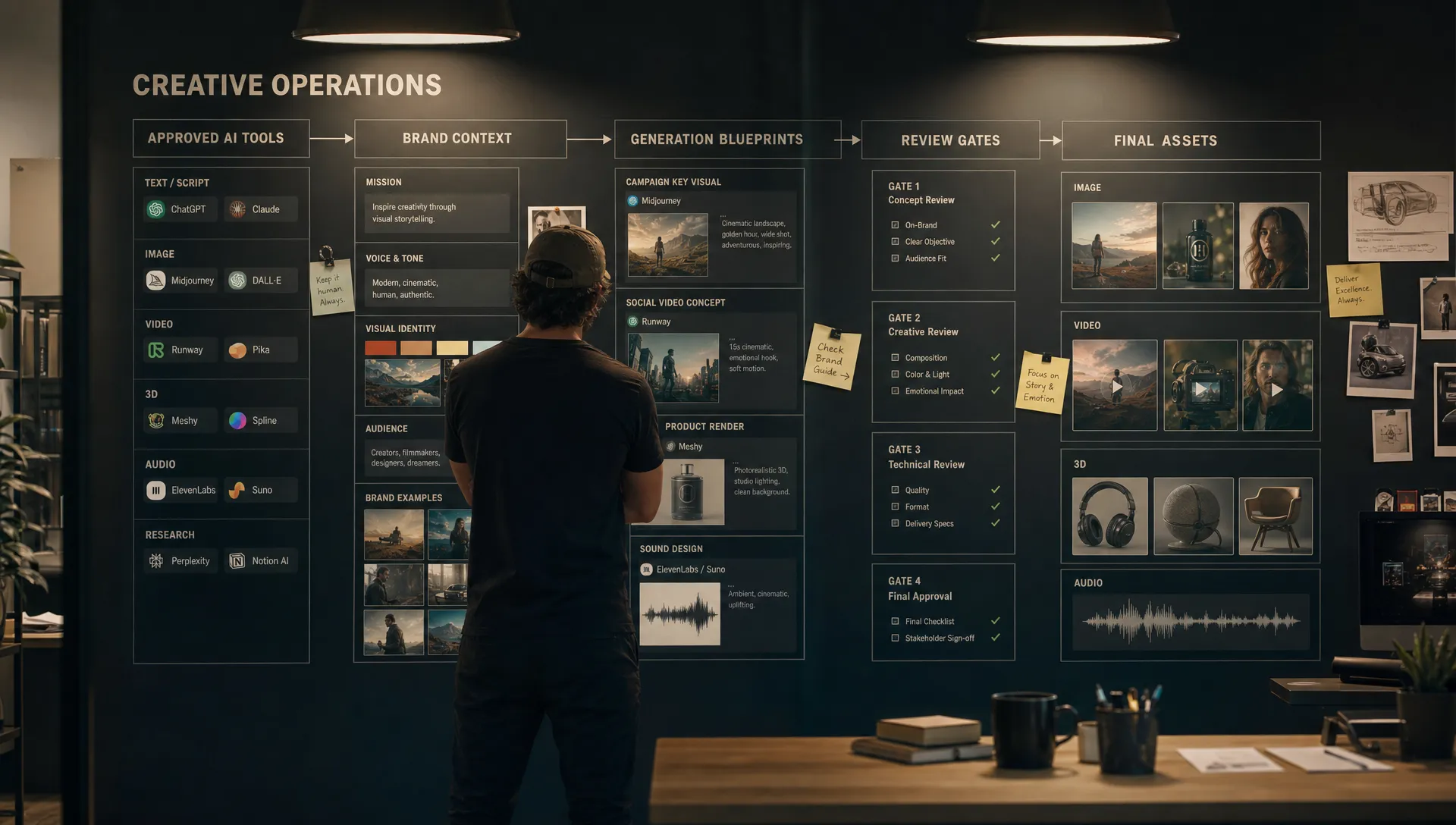
Enterprise creative teams rarely struggle because they lack AI generation tools. They struggle because every team adopts them differently. One group uses a public image model for concept exploration, another uses a 3D workflow for early assets, a third experiments with video generation for campaign variants and nobody is sure which outputs can move into production.
The instinctive response is to lock everything down. Pick one tool, write strict rules and require every team to follow the same path. That can reduce risk, but it often creates a new problem: talented teams stop experimenting, workarounds appear and AI becomes another slow enterprise system instead of a creative accelerator.
The better goal is to standardize AI generation tools without standardizing creative thinking. For CMOs, art directors, application managers and game developers, that means building a shared operating model: approved access, reusable context, workflow controls, review gates and enough flexibility for teams to choose the right model or method for the job.
Standardization Should Create Freedom Inside Clear Boundaries
Creative standardization gets a bad reputation when it feels like restriction. In AI workflows, the opposite should be true. Good standards remove ambiguity, so teams can spend less time asking “Can we use this?” and more time making useful work.
A campaign team should not need to negotiate legal terms every time it tests a new image model. A game art team should not need to rebuild the same prompt structure for every environment exploration. An application manager should not have to discover unofficial tools after assets have already entered a production pipeline.
Standardization works when it answers predictable questions in advance:
- Which AI generation tools are approved for which use cases?
- What data, references and assets can teams use safely?
- Which outputs require human review before they move forward?
- How is creative context preserved across tools and teams?
- Where do generated assets live, and how are they tracked?
The point is not to make every team use the same prompt, model or workflow. The point is to create a trusted system where experimentation can happen without creating brand drift, compliance gaps or production chaos.
What to Standardize and What to Leave Flexible
The most effective enterprise AI programs draw a clear line between the non-negotiable parts of the system and the creative choices that should remain local to each team. A CMO may care most about brand consistency and campaign governance. An art director may need control over visual language. A game developer may need output that fits engine constraints. An application manager may need security, access management and integration stability.
A practical standardization model looks like this:
| Layer | What to standardize | What to keep flexible |
|---|---|---|
| Tool access | Approved tools, user permissions, vendor review and usage policies | Which approved tool a team uses for a specific creative task |
| Creative context | Brand rules, mood boards, reference libraries, product information and forbidden inputs | Local campaign references, style exploration and concept directions |
| Workflow | Required stages, review gates, approvals and asset handoff rules | How teams iterate before submitting work for review |
| Model use | Which model categories are allowed for image, video, audio and 3D workflows | Model selection inside an approved set based on output quality and use case |
| Output standards | File requirements, metadata, naming conventions and production readiness criteria | Composition, style variations, narrative choices and creative treatments |
| Governance | Risk levels, auditability, compliance rules and escalation paths | Low-risk ideation methods and team-specific experimentation spaces |
This split is the difference between a living creative system and a rigid checklist. Standards should protect the organization, but they should also make it easier for skilled teams to do better work.
Start With Use Cases, Not Vendor Names
Many companies begin by asking, “Which AI tools should we allow?” That question matters, but it comes too early. A better first step is to map the work that teams are already trying to do with AI.
For an enterprise creative organization, common use cases might include concept art, product imagery, campaign localization, video storyboards, 3D ideation, texture exploration, packaging variants, audio drafts or social asset adaptation. Each use case has different risk levels, review needs and production requirements.
A public-facing product image, for example, needs stricter brand, rights and approval controls than an internal mood board. A 3D concept mesh used for early ideation has different requirements than a production asset moving into a game build or ecommerce pipeline.
Once use cases are clear, tools can be assessed against real workflow requirements rather than hype. If you are still at the catalog stage, Virtuall’s guide on building a list of AI tools without creating chaos offers a useful way to organize tools by purpose, ownership and approval status.
Build Governance by Risk Level
Not every AI output needs the same controls. Treating all generation work as high risk slows teams down. Treating everything as low risk creates exposure. A tiered model gives teams a clear path.
| Risk level | Example use case | Required controls | Creative freedom |
|---|---|---|---|
| Low | Internal ideation, mood exploration, rough storyboard frames | Approved tools, safe input rules and basic storage guidance | Broad exploration across styles and directions |
| Medium | Internal presentation assets, draft campaign routes, non-final product concepts | Shared context, review workflow, source tracking and team approval | Flexible iteration within brand and project guidelines |
| High | Public campaign assets, product visuals, customer-facing video, final 3D content | Formal approval, rights review, metadata, audit trail and production handoff controls | Creative decisions remain open, but outputs must meet defined acceptance criteria |
This approach aligns with the way mature AI governance frameworks think about risk. The NIST AI Risk Management Framework emphasizes governance, mapping, measuring and managing AI risks rather than relying on a single static policy. For creative teams, that translates into a simple operating principle: increase control as the output gets closer to customers, regulated environments or production systems.
Give Teams Shared Creative Context
A major reason AI outputs vary wildly across teams is that each person feeds the model a different version of the brand, the audience or the intended style. Even when people use the same AI generation tools, they may get inconsistent results because the context is scattered across PDFs, Slack threads, DAM folders, decks and personal prompt notes.
Standardization should solve this at the context layer. Instead of forcing teams to write prompts from scratch, give them shared creative inputs they can reuse and adapt. These might include brand principles, approved visual references, product attributes, campaign mood boards, audience segments, negative prompts, lighting preferences, composition rules or examples of unacceptable output.
For art directors, this protects visual intent. For CMOs, it reduces brand drift. For application managers, it creates a more manageable system of record. For game developers, it helps align AI-assisted outputs with worldbuilding, art direction and pipeline constraints.
This is where the difference between a tool and an operating system becomes visible. A standalone generator produces outputs. A creative AI operating layer preserves intent, context and workflow memory across teams. Virtuall explores this challenge in more detail in its article on improving AI output across teams and tools.
Turn Repeatable Work Into Generation Blueprints
Teams should not have to reinvent every AI workflow. If a studio often creates campaign key visual variations, product background concepts or 3D environment explorations, those workflows can become reusable blueprints.
A generation blueprint is more than a saved prompt. It can define the brief structure, context inputs, model routing, review steps, output requirements and approval path for a repeatable task. The creative team still decides the concept, tone and final direction. The blueprint simply prevents each project from starting with an empty page.
This matters because enterprise AI adoption often fails in the gap between experimentation and repeatability. A brilliant one-off result does not help much if nobody can reproduce the workflow, understand what context was used or adapt it for another market, product line or asset format.
Generation blueprints also help teams compare outputs more fairly. When the brief, context and acceptance criteria are consistent, teams can evaluate whether a model is genuinely better for the job rather than guessing based on isolated experiments.
Standardize the Handoff, Not Just the Prompt
Prompt quality matters, but production teams usually feel the pain later in the workflow. An AI-generated image may look impressive, but can it be approved? Can it be found again? Does the team know which references were used? Is it connected to the right campaign, product or build? Does it meet the technical requirements for the next tool in the pipeline?
Standardizing the handoff is often more valuable than standardizing the prompt. For enterprise teams, a complete handoff can include metadata, usage status, rights notes, version history, review comments, linked source context and final file specifications.
This is especially important when AI generation tools feed downstream systems such as DCC tools, PIM platforms, DAM systems, game engines, ecommerce workflows or campaign management environments. Without clean handoff rules, AI becomes a source of asset sprawl. Teams create more content, but operations become harder to control.
A useful handoff standard answers three questions: what is this asset, where can it be used and what must happen before it goes live? If those answers are embedded in the workflow, teams can move faster with less operational risk.
Let Teams Choose Within an Approved Model Strategy
Standardizing AI generation tools does not require a single-model strategy. In fact, a single model may be the wrong answer for organizations working across image, video, audio and 3D. Different models perform better for different creative tasks, and the market changes quickly.
The enterprise need is not “one model for everyone.” It is controlled access to the right models, with clear rules for when and how they can be used.
A practical model strategy might define approved options by content type, risk level, data sensitivity and output destination. Teams can then choose within a governed menu instead of improvising with unknown tools. This gives application managers better control and gives creative teams room to select what actually works.
For game studios, this flexibility is essential. Concept art, texture ideation, animation references, 3D asset exploration and localization support do not have identical requirements. The same is true for enterprise marketing teams working across brand campaigns, product content and regional adaptation.
Assign Ownership Across Creative, Technical and Compliance Teams
AI standardization cannot live with one department alone. If it is owned only by IT, the system may be safe but creatively unusable. If it is owned only by creative teams, governance and integration may lag. If legal or compliance only appear at the end, teams may discover problems too late.
A shared ownership model keeps standards practical.
| Role | Primary responsibility | What they should prevent |
|---|---|---|
| CMO or brand leader | Brand consistency, campaign governance and business outcomes | AI content that scales volume while weakening brand trust |
| Art director or creative lead | Visual quality, taste, references and acceptance criteria | Generic outputs that meet policy but miss the creative intent |
| Application manager | Tool access, integrations, security and lifecycle management | Shadow AI tools, fragmented permissions and unsupported workflows |
| Game developer or technical artist | Engine fit, asset usability, performance constraints and production handoff | AI assets that look promising but fail in the build or pipeline |
| Legal or compliance partner | Usage rights, data rules, policy alignment and escalation paths | Outputs that create IP, privacy or regulatory exposure |
The ownership model should be visible to users. Teams need to know who approves a new tool, who updates a blueprint, who resolves model access issues and who signs off on public-facing AI content.
Roll Out Standards in Phases
A heavy rollout can make AI governance feel like bureaucracy. A phased approach gives teams time to adapt and gives leaders better evidence before scaling.
- Observe current behavior: Identify which AI generation tools teams already use, what they use them for and where risk or duplication appears.
- Define minimum viable standards: Start with approved use cases, safe input rules, basic review gates and where generated assets should be stored.
- Pilot with one or two workflows: Choose workflows with clear value, such as campaign variation, internal concepting or 3D pre-production exploration.
- Convert successful patterns into blueprints: Turn repeatable prompts, context packs, model choices and review steps into reusable workflows.
- Scale through integrations and measurement: Connect the system to existing creative tools and track whether standards improve quality, speed and compliance.
This is also the moment to decide whether your organization needs an operating layer rather than more point solutions. For a broader rollout perspective, Virtuall’s scalable AI checklist for multi-team, multi-tool rollouts covers the governance and workflow questions that tend to appear as adoption expands.
Measure Whether Standardization Is Helping or Hurting
If teams experience standards as friction, they will avoid them. Measurement helps leaders see whether the system is improving creative operations or simply adding steps.
Useful metrics should combine creative quality, operational efficiency and governance outcomes.
| Metric | What it reveals | How to interpret it |
|---|---|---|
| Rework rate | How often AI outputs require major revision before approval | High rework may signal weak context, unclear briefs or the wrong model choice |
| Approval cycle time | How long assets take to move from generation to signoff | Longer cycles may mean review gates are too heavy or responsibilities are unclear |
| Tool adoption by approved use case | Whether teams are using governed tools for intended workflows | Low adoption may indicate the approved setup does not match real creative needs |
| Output consistency | Whether assets align across campaigns, products or teams | Inconsistent output often points to missing shared context or weak blueprints |
| Compliance exceptions | How often teams trigger policy, rights or data concerns | Recurring exceptions show where standards need better training or automation |
| Asset reuse | Whether generated assets and workflows can be found and adapted | Low reuse suggests poor metadata, storage or workflow visibility |
The goal is not perfect control. The goal is a system that produces better work with fewer surprises. If standards reduce risk but slow every project, they need refinement. If standards increase speed but create review gaps, they need stronger gates at the right points.
Make Standards Feel Like Creative Infrastructure
The language matters. “Policy” can sound like a brake. “Infrastructure” feels like support. Creative teams adopt standards more readily when those standards help them produce better work, protect their decisions and reduce repetitive setup.
A strong AI standardization program gives teams practical advantages: faster starts, clearer briefs, reusable context, easier approvals, fewer tool debates and more reliable production handoffs. It also gives leadership a clearer view of what AI is doing across the organization.
That balance is the heart of modern creative AI operations. Enterprises do not need uncontrolled experimentation, and they do not need rigid uniformity. They need a governed environment where teams can safely explore, adapt and deliver.
Frequently Asked Questions
Should enterprises standardize on one AI generation tool? Usually not. A single tool may simplify procurement, but it can limit quality and flexibility across image, video, audio and 3D workflows. Most enterprise teams benefit from a governed model strategy with approved tools for specific use cases.
What should be standardized first? Start with use cases, safe input rules, approved tool access, shared creative context and review gates for public-facing outputs. These foundations reduce the biggest risks without blocking low-risk experimentation.
How do you keep AI standards from limiting creativity? Separate fixed rules from creative choices. Standardize governance, context, handoffs and approval paths, but leave room for teams to explore concepts, styles, model options and iteration methods inside approved boundaries.
Who should own AI generation tool standards? Ownership should be shared across creative leadership, application management, technical teams and compliance partners. One group can coordinate the program, but standards only work when the people responsible for brand, workflow, security and production all contribute.
How often should AI tool standards be updated? Review standards regularly, especially when new models, regulations, production needs or brand requirements change. In fast-moving creative environments, quarterly reviews are often more useful than annual policy updates.
Operate AI Generation Tools With Control and Creative Flexibility
Standardization should not make teams less creative. It should give them a safer, clearer and more scalable way to use AI in real production workflows.
Virtuall is a Creative AI OS built for teams that need to orchestrate AI-powered content creation across image, video, audio and 3D while maintaining governance, workflow control and compliance. With AI governance controls, generation blueprints, studio context memory, review workflows, asset management, integrations and Nyx as the intelligence layer for multi-model orchestration, Virtuall helps creative organizations scale AI without losing control of quality, context or production readiness.