How Azure OpenAI Models Fit Enterprise Creative Work
Learn how Azure OpenAI models support enterprise creative work, from governance and workflow orchestration to brand-safe production at scale.
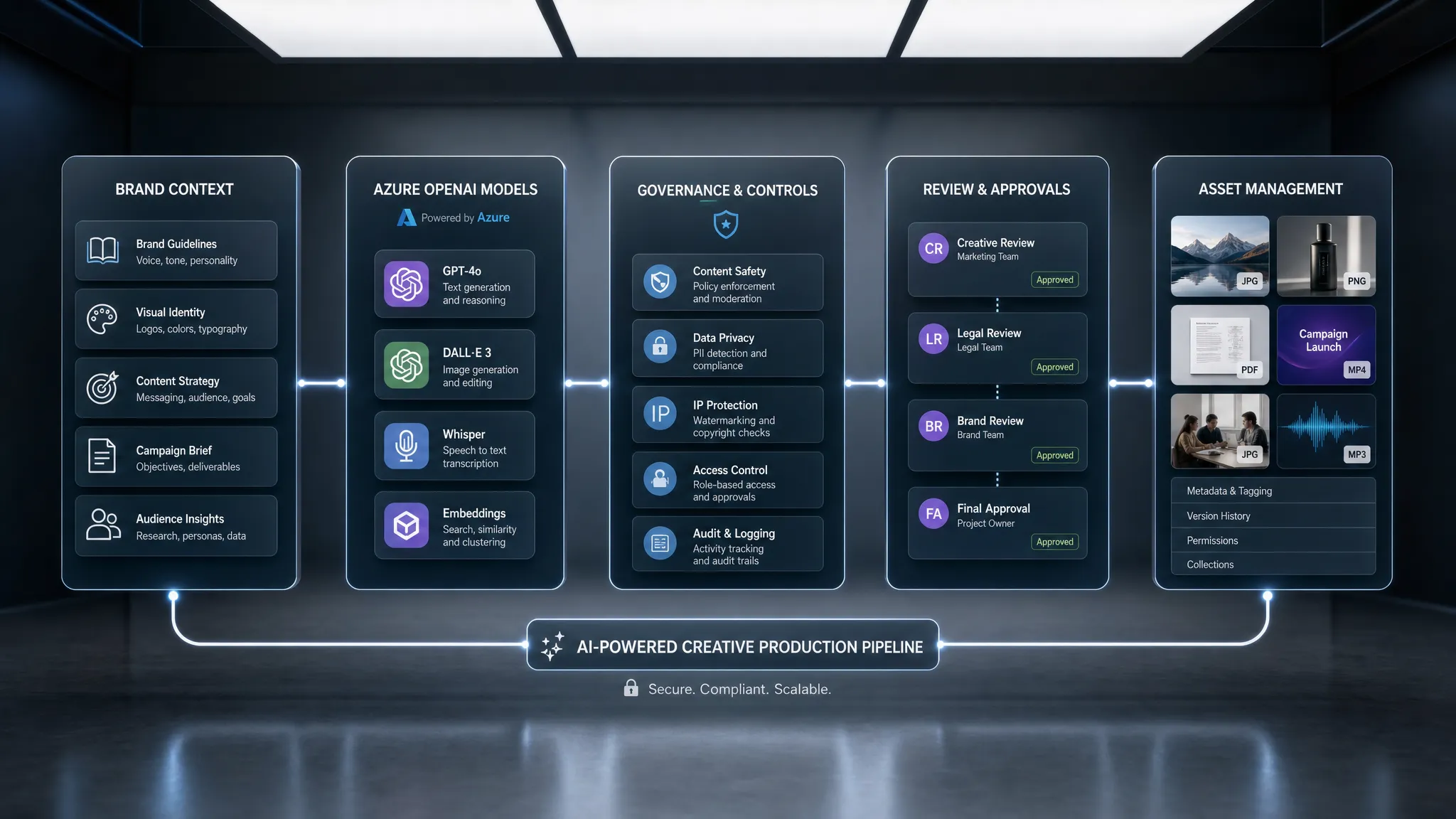
Enterprise creative teams are no longer asking whether AI can generate content. They are asking a harder question: how can AI be used predictably across brands, markets, studios, agencies, and production pipelines without losing control?
That is where Azure OpenAI models become especially relevant. They give enterprises access to advanced generative AI capabilities through Microsoft Azure, an environment many IT, security, procurement, and application teams already understand. For creative organizations, this can make AI adoption easier to approve, easier to govern, and easier to connect to existing enterprise systems.
But there is an important distinction. Azure OpenAI models are not, by themselves, a complete creative production system. They are powerful model capabilities. To turn them into repeatable creative operations, teams still need orchestration, brand context, approvals, asset management, compliance controls, and integration with tools such as DAM, PIM, DCC, and review platforms.
In other words, Azure OpenAI can be a strong foundation. The enterprise value appears when that foundation is connected to the way creative work actually happens.
Why Azure OpenAI Models Matter for Enterprise Creative Teams
For many studios, marketing organizations, and game teams, the first wave of generative AI adoption happened informally. Designers tested image tools, marketers experimented with copy assistants, and developers built quick prototypes. That phase was useful, but it also created risk: inconsistent outputs, unclear asset rights, unmanaged prompts, duplicated work, and limited visibility for IT or compliance teams.
Azure OpenAI models help address part of that problem by offering access to OpenAI capabilities through Azure. According to the Azure OpenAI Service overview, the service provides access to models for tasks such as content generation, summarization, image understanding, semantic search, and code generation through Azure APIs and tooling.
For enterprise creative work, this matters because AI adoption usually needs to satisfy several groups at once. CMOs want faster content production without weakening brand equity. Art directors want creative range without losing intent. Application managers need security, lifecycle management, and integration. Game developers need tools that can support production without breaking pipelines.
Azure is often already part of the enterprise technology stack, which can simplify conversations around identity, procurement, monitoring, and governance. Still, model access is only one part of the operating model. The bigger question is how those models are deployed inside creative workflows.
What Azure OpenAI Models Can Contribute to Creative Work
The Azure OpenAI model catalog changes over time, and availability depends on region, subscription, deployment type, and Microsoft updates. Enterprises should always validate current model availability, pricing, rate limits, data residency, and usage policies before standardizing a workflow.
At a practical level, the model capabilities most relevant to creative teams usually fall into a few categories.
| Model capability | Creative value | Enterprise consideration |
|---|---|---|
| GPT-class language and multimodal models | Brief writing, concept expansion, campaign localization, creative QA, structured reasoning, image understanding where supported | Requires brand context, prompt governance, human review, and output validation |
| Image generation models such as DALL·E where available | Visual ideation, mood exploration, concept references, campaign variants | Requires rights review, brand safety checks, and approval workflows |
| Embedding models | Semantic asset search, similarity matching, brief-to-asset retrieval, knowledge base search | Requires careful handling of metadata, access control, and source quality |
| Structured outputs and tool use capabilities | Automated handoffs, creative briefs in defined formats, integration with asset systems and workflow tools | Requires schema validation, logging, and fallback processes |
| Reasoning-oriented models where available | More complex planning, critique, comparison, and decision-support tasks | Best used with clear evaluation criteria and traceable decision paths |
This is why Azure OpenAI models can support both creative generation and creative operations. A campaign team may use a model to generate localized headline options. A studio may use embeddings to search a large visual asset library. A game team may use language models to explore lore, item descriptions, dialogue variants, or localization drafts. An application team may expose approved AI capabilities inside internal tools.
The common thread is not just generation. It is controlled reuse of intelligence across the creative process.
The Enterprise Fit: Foundation Layer, Not Full Workflow Layer
Azure OpenAI models fit best when enterprises see them as a foundation layer within a broader creative AI architecture.
A model can generate options, summarize references, classify content, or transform text. It does not automatically know your latest campaign platform, approved brand claims, banned visual themes, preferred art direction, product taxonomy, licensing restrictions, or review process. It also does not automatically decide which assets should be stored, routed, annotated, approved, or retired.
That context has to live somewhere. For enterprise creative teams, it should not live only in individual prompts or personal chat histories. It should be captured as reusable workflow logic, shared studio memory, governance rules, and production pipelines.
This is the difference between using AI as a tool and operating AI as a system.
| Stakeholder | What they need from AI | How Azure OpenAI models fit |
|---|---|---|
| CMO | Brand-safe content velocity across channels, regions, and campaigns | Supports copy, ideation, localization, analysis, and repeatable content generation when governed |
| Art Director | More exploration without losing creative intent or visual consistency | Supports concepting, critique, reference interpretation, and controlled variation when paired with context memory |
| Application Manager | Secure, manageable AI services that fit enterprise architecture | Provides Azure-based model access that can be integrated through APIs and governed through enterprise processes |
| Game Developer | Faster production support for narrative, assets, worlds, and live content | Supports ideation, dialogue, item descriptions, localization, documentation, and pipeline automation |
For example, an art director may want to generate variants from a mood board. A language model can interpret the creative brief, but a production workflow also needs reference assets, constraints, approvals, naming conventions, output formats, and traceability. That requires orchestration beyond the model call.
Governance Comes Before Scale
Creative AI governance is not only about blocking unsafe outputs. It is about defining how AI may be used, by whom, for which assets, under which brand and legal constraints, with which review steps.
Microsoft documents that Azure OpenAI includes content filtering concepts designed to detect and prevent certain categories of harmful content. The Azure OpenAI content filtering documentation is a useful reference for teams designing responsible AI controls. Microsoft also publishes information on Azure OpenAI data privacy, including how prompts, completions, embeddings, and training data are handled under the service terms.
Those controls are important, but enterprise creative governance usually needs to go further. A global brand may need to prevent unapproved claims in product copy. A studio may need to restrict generation based on licensed IP. A game company may need to keep unreleased characters, environments, or story arcs within approved teams. A retailer may need to ensure that AI-generated product visuals match real-world product data.
A practical governance model should answer questions like these:
| Governance question | Why it matters in creative production |
|---|---|
| Which teams can use which models? | Prevents uncontrolled access and aligns capabilities with role, project, and risk level |
| What data can be used as input? | Protects confidential briefs, unreleased assets, customer data, and licensed content |
| Which outputs require approval? | Keeps humans responsible for brand, legal, quality, and cultural decisions |
| How are prompts and outputs logged? | Creates auditability and supports continuous improvement |
| Where are assets stored after generation? | Prevents asset sprawl and supports reuse, rights management, and lifecycle control |
| What happens when a model fails or produces unsuitable content? | Creates fallback paths instead of leaving teams to improvise |
Frameworks such as the NIST AI Risk Management Framework can also help enterprise teams think systematically about AI risk, measurement, governance, and accountability.
The goal is not to slow creative teams down. The goal is to make AI safe enough, consistent enough, and useful enough to scale.
From Prompt Experiments to Production Workflows
The biggest mistake enterprises make with generative AI is treating prompts as the workflow. A prompt can be useful, but it is not a durable operating model.
In a production environment, a creative workflow has inputs, rules, stages, owners, outputs, approvals, and destinations. AI should be inserted into that workflow with the same discipline as any other production technology.
A campaign localization workflow, for instance, may include a master brief, product claims, brand tone, regional restrictions, approved terminology, channel formats, market reviewers, and final publishing destinations. Azure OpenAI models can help generate and adapt content inside that process, but the workflow needs to preserve the context and enforce the rules.
This is where generation blueprints become valuable. A blueprint can define the repeatable structure of a creative AI task: what context is required, which model or model chain is used, what constraints apply, what format the output should follow, who reviews it, and where the result is stored.
For art teams, a blueprint may define how to create controlled visual variations from a campaign mood board. For game teams, it may define how to generate item descriptions that respect lore, rarity tiers, and localization constraints. For enterprise marketing teams, it may define how to generate paid social variants that remain within brand voice and legal requirements.
The model generates. The blueprint keeps the work repeatable.
Where Azure OpenAI Models Help Most in Creative Operations
Azure OpenAI models can support many creative use cases, but the strongest enterprise use cases usually share three traits: they are repetitive, context-dependent, and reviewable.
Campaign and brand content
Marketing teams can use Azure OpenAI models to generate first drafts, adapt messaging across audiences, summarize campaign research, test variations of headlines, and produce structured creative briefs. The important enterprise requirement is consistency. Outputs should reflect approved positioning, product claims, terminology, and tone.
This is especially useful for CMOs managing multi-market content production. AI can help accelerate variation, but governance ensures that scale does not become fragmentation.
Creative direction and visual ideation
Art directors can use AI to explore concepts, interpret references, compare creative routes, and generate controlled variations. Image generation capabilities may support early-stage ideation, while multimodal models can help analyze visual references and translate creative intent into structured direction.
However, visual AI should not operate in isolation. Creative teams need mood boards, reference libraries, style constraints, review notes, and final asset traceability. Without that context, outputs may look impressive but fail to fit the production brief.
Asset search and reuse
Embedding models are particularly useful for semantic search. Instead of relying only on filenames or manual tags, teams can search based on meaning, visual concepts, campaign themes, or product attributes. This can help reduce duplicated work and increase reuse of approved assets.
For large enterprises, asset reuse is not just a productivity benefit. It can reduce legal risk, improve consistency, and help teams get more value from existing DAM and content libraries.
Game production support
Game studios can use language models for worldbuilding support, quest text drafts, item naming, character bios, localization variants, documentation, and internal tooling. AI can also help summarize playtest feedback or create structured production notes.
For 3D asset creation, Azure OpenAI models may support the surrounding workflow, such as generating briefs, interpreting references, or preparing metadata. Actual 3D generation and production-ready 3D outputs often require specialized tools and models. That is why a multi-model orchestration layer becomes important for game developers who need text, image, video, audio, and 3D capabilities to work together.
Review, compliance, and quality checks
Generative AI can also support the less glamorous parts of creative production: checking whether copy follows tone guidelines, identifying missing metadata, summarizing reviewer comments, comparing outputs against a brief, or flagging potential policy issues for human review.
These use cases are often easier to operationalize than fully automated generation because they keep humans clearly in control while improving throughput.
Why Multi-Model Orchestration Matters
Enterprise creative work rarely depends on a single model. A single campaign may involve text, product data, reference images, 3D renders, video edits, audio, localization, and channel-specific formatting. A game production workflow may move from narrative concepts to concept art, 3D assets, animation references, promotional content, and community updates.
Azure OpenAI models can be an important part of that ecosystem, especially for language, reasoning, multimodal understanding, embeddings, and image generation where available. But creative production at scale often needs several model types, several tools, and several review paths.
That is where orchestration becomes the key enterprise capability. Orchestration decides which model is used for which task, how context is passed between steps, how outputs are validated, and how work moves into the next system.
A useful creative AI architecture usually includes these layers:
| Layer | Purpose | What must be controlled |
|---|---|---|
| Studio context layer | Stores brand rules, mood boards, references, project memory, and creative intent | Access, freshness, source quality, and reuse |
| Model orchestration layer | Routes tasks to the right model or model chain | Model selection, fallback logic, cost, and latency |
| Governance layer | Defines rules, permissions, approvals, and audit trails | Compliance, usage policies, human accountability |
| Workflow layer | Turns generation into repeatable production processes | Inputs, stages, owners, outputs, and review status |
| Asset layer | Stores, annotates, tracks, and distributes generated or approved assets | Metadata, rights, versions, and lifecycle |
| Integration layer | Connects AI workflows to DCC, DAM, PIM, and other enterprise tools | APIs, plugins, permissions, and data mapping |
This is also where an operating system approach to creative AI becomes more practical than a collection of disconnected tools.
How Virtuall Extends the Value of Azure OpenAI Models
The Creative AI OS is designed as a Creative AI operating system for studios and teams that need to operate AI-powered content creation at scale. Instead of treating each model as a separate tool, Virtuall helps teams control, orchestrate, and scale AI workflows across image, video, audio, and 3D formats.
In an enterprise environment, Azure OpenAI models can serve as part of the model foundation, while The Creative AI OS provides the operational layer around them. That includes AI governance controls, workflow orchestration, generation blueprints, studio context memory through mood boards, collaboration tools, review workflows, approvals, content annotation, asset management, and pipeline tracking.
Virtuall also supports integration with creative tools and enterprise systems such as DCC, PIM, and DAM through plugins and API. For organizations with European infrastructure requirements, Virtuall offers EU-based infrastructure and inference as part of its compliance-oriented approach.
Nyx, the intelligence layer of the Creative AI OS, is built to orchestrate multiple industry-leading AI models while keeping intent and context across studios and teams. This matters because enterprise creativity is rarely a one-step generation task. The same creative intent may need to travel from a mood board to a concept image, from a product record to a campaign asset, or from a game design document to a production-ready 3D workflow.
Azure OpenAI models provide intelligence. Virtuall helps make that intelligence operational, governed, and usable inside real creative production.
What to Evaluate Before Standardizing on Azure OpenAI for Creative Work
Before moving from pilots to production, enterprises should evaluate both model performance and operating readiness. A model that performs well in a demo may still fail in production if the workflow around it is weak.
Start with a narrow set of high-value use cases. Good candidates are workflows with clear inputs, measurable outputs, repeatable tasks, and human review. Examples include campaign variant generation, creative brief drafting, visual reference analysis, metadata enrichment, semantic asset search, or localization support.
Then test the full workflow, not only the prompt. Evaluate how users access the tool, how context is provided, how outputs are reviewed, how assets are stored, and how exceptions are handled.
Key evaluation criteria include:
- Output quality: Does the model produce work that meets the creative brief and quality bar?
- Brand consistency: Does the workflow preserve tone, visual direction, product truth, and approved claims?
- Governance: Can the organization control access, inputs, outputs, approvals, and audit trails?
- Integration: Can AI-generated work move into existing DAM, PIM, DCC, and production systems?
- Cost and latency: Can the workflow scale economically for real production volumes?
- User adoption: Does the tool make creative teams faster without forcing them into unnatural processes?
The best AI initiatives are not the ones with the most impressive isolated outputs. They are the ones that creative teams actually use, compliance teams can approve, and application teams can support.
A Practical Roadmap for Enterprise Adoption
Enterprises do not need to transform every creative workflow at once. A staged rollout is usually more effective.
- Select one or two production-relevant use cases: Choose workflows with clear business value, such as campaign adaptation, asset search, or creative review support.
- Define the rules before scaling: Document who can use AI, what data can be used, what outputs require approval, and which systems store final assets.
- Build a trusted context layer: Gather brand guidelines, mood boards, product data, legal constraints, and approved references in a form the workflow can use.
- Create reusable generation blueprints: Turn successful workflows into templates that teams can repeat consistently.
- Connect to existing tools: Integrate AI workflows with DAM, PIM, DCC, review, and production systems wherever possible.
- Measure and refine continuously: Track quality, speed, reuse, approval rates, cost, and user feedback.
This roadmap helps teams avoid two common extremes: uncontrolled experimentation on one side and overcentralized AI programs that never reach creative users on the other.
The Bottom Line
Azure OpenAI models fit enterprise creative work when they are treated as part of a governed, orchestrated creative AI system. They can help teams generate, analyze, summarize, search, and transform creative content with the advantages of an enterprise cloud environment.
But models alone do not solve production. They need context, permissions, workflow logic, review paths, asset management, and integration with the tools creative teams already use.
For CMOs, the opportunity is scalable brand consistency. For art directors, it is faster exploration with preserved intent. For application managers, it is controlled AI adoption. For game developers, it is a way to connect generative intelligence to real production pipelines.
The future of enterprise creative AI will not be defined by one model. It will be defined by how well organizations can operate many models, many teams, and many creative workflows with control.
Frequently Asked Questions
Are Azure OpenAI models enough for enterprise creative production? Not by themselves. They provide powerful AI capabilities, but enterprise creative production also needs governance, workflow orchestration, approvals, asset management, context memory, and integrations with creative systems.
Which creative tasks are best suited to Azure OpenAI models? Strong use cases include creative brief drafting, campaign copy variations, localization support, semantic asset search, visual reference analysis where supported, metadata enrichment, and review assistance.
Can Azure OpenAI models generate production-ready 3D or video assets? Azure OpenAI models can support parts of those workflows, such as briefs, references, metadata, and reasoning. Production-ready 3D and video workflows often require specialized models and tools, which is why multi-model orchestration is important.
How should enterprises handle compliance for creative AI? Compliance should include access control, approved input sources, human review, prompt and output logging, content policies, asset rights, and regional infrastructure requirements. Model-level safety controls are useful, but they are not the whole governance system.
How does Virtuall work with model services like Azure OpenAI? Virtuall acts as a Creative AI operating system that can orchestrate models, preserve studio context, manage workflows, support approvals, track assets, and connect AI generation to creative and enterprise tools.
Bring Azure OpenAI Into Governed Creative Production
If your team is exploring Azure OpenAI models for creative work, the next step is not just choosing a model. It is designing the operating layer that makes AI reliable across teams, tools, and production standards.
Virtuall helps enterprises operate creative AI at scale with governance controls, workflow orchestration, generation blueprints, studio context memory, collaboration, asset management, pipeline tracking, and multi-model content generation across image, video, audio, and 3D.
Use Azure OpenAI models as part of your AI foundation. Use Virtuall to turn that foundation into a controlled, compliant, production-ready creative system.