Metadata Standards for AI-Generated 3D Assets
Build metadata standards for AI-generated 3D assets that preserve provenance, rights, QA status and engine readiness across enterprise pipelines.
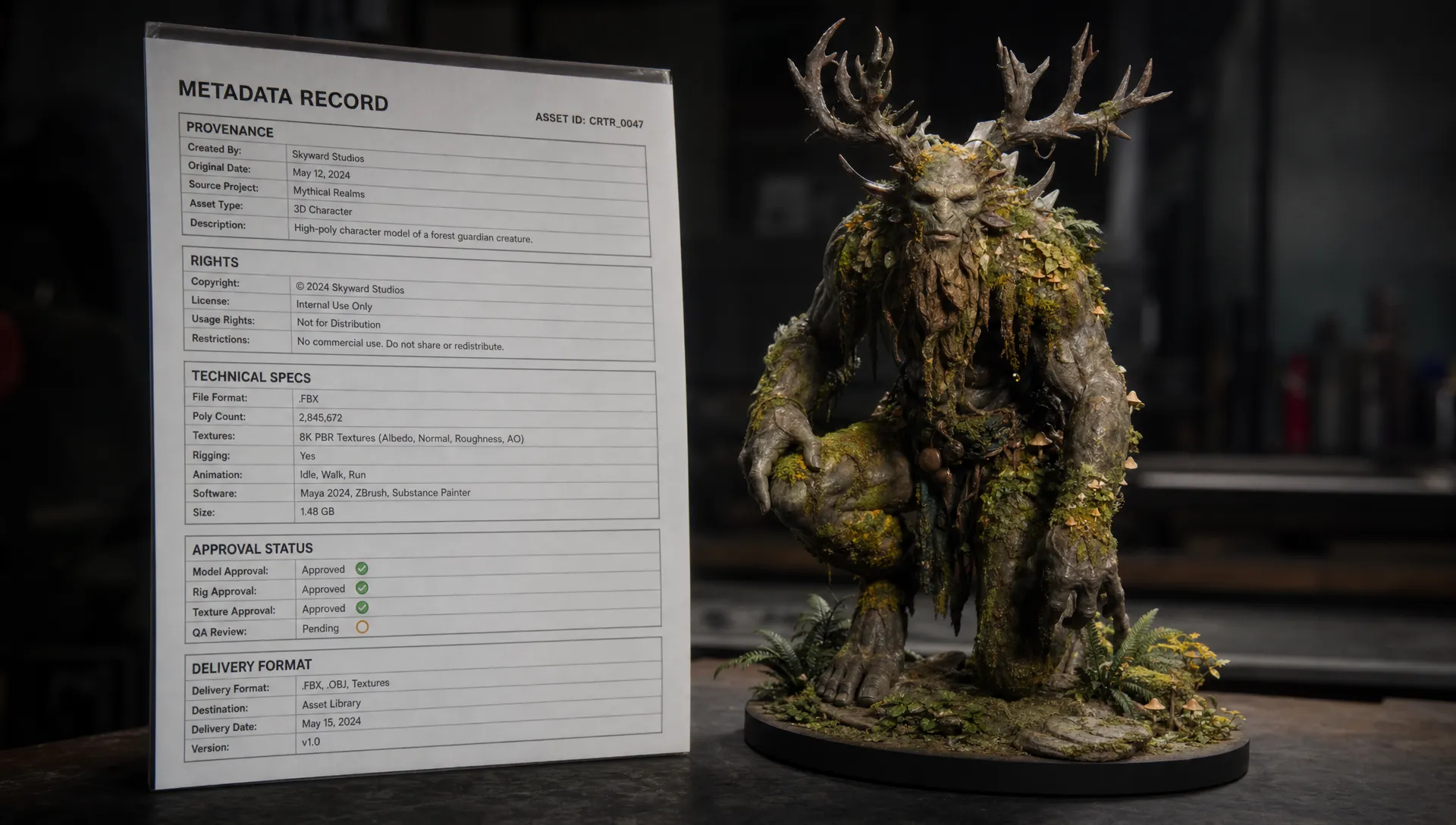
AI-generated 3D assets can move from prompt to prototype in minutes, but enterprise teams still need to know what an asset is, where it came from, who can use it, whether it has been approved and how it should behave inside a production pipeline. That is where metadata becomes more than housekeeping. It becomes the control layer that lets art, marketing, legal, IT and engineering teams trust what they are shipping.
For studios operating creative AI at scale, metadata standards for AI-generated 3D assets should cover both traditional 3D production data and AI-specific context. A mesh with a clean topology is useful. A mesh with clear provenance, rights status, generation parameters, technical constraints and approval history is production-ready.
Why metadata standards for AI-generated 3D assets matter in production
Metadata answers operational questions that a filename never can. Is this prop approved for a game build? Was the original prompt based on a licensed reference? Which model generated the first version? Does this asset meet the polygon budget for mobile? Can the marketing team reuse it in a campaign render?
In small experiments, those answers may live in chat messages or individual folders. At enterprise scale, that breaks quickly. Assets move between AI generation tools, DCC software, game engines, DAM platforms, PIM systems, review tools and localization workflows. Every handoff is a chance for context to disappear.
A metadata standard reduces that risk by defining required fields, naming rules, ownership, validation checks and sync behavior across systems. It also supports AI governance because policies can be enforced against structured data instead of vague manual notes.
For CMOs, metadata protects brand consistency and rights usage. For art directors, it preserves creative intent. For application managers, it keeps integrations reliable. For game developers, it helps verify performance targets before an asset reaches the engine.
The standards landscape: use what exists, then close the AI gaps
There is no single universal standard that covers every need of AI-generated 3D production. The practical approach is to combine established 3D, provenance, rights and asset management conventions, then add internal fields for generation lineage and approval workflows.
| Standard or convention | What it helps with | Where it fits in an AI 3D pipeline |
|---|---|---|
| glTF 2.0 | Efficient 3D delivery, JSON-based structure, extensions and extras | Web, real-time previews, asset interchange and lightweight delivery |
| OpenUSD | Scene composition, variants, layering and production-scale interchange | Film, animation, VFX, digital twins and complex 3D scenes |
| XMP | Embedded descriptive metadata across many creative file types | Authoring information, creator data, rights notes and asset descriptions |
| C2PA | Content provenance and authenticity manifests | Tracking assertions about creation, edits and AI involvement, often through manifests or sidecar workflows for 3D assets |
| IPTC, Dublin Core and schema.org concepts | Descriptive fields such as title, creator, subject and rights | Search, cataloging, publishing and DAM interoperability |
| SPDX and license vocabularies | License identifiers and software-style rights clarity | Reusable license fields, especially when assets include code, scripts or open components |
The key is not to force one standard to do everything. glTF and USD can carry technical and scene-level metadata, but they are not complete governance systems. C2PA is valuable for provenance, but 3D workflows often need additional production fields. DAM metadata helps search and lifecycle management, but may not capture generation parameters unless you extend it.
Core metadata categories every 3D asset should carry
A strong schema separates metadata into categories. That makes it easier to assign owners, set required fields and decide which systems must store which data.
| Metadata category | Example fields | Primary owner | Why it matters |
|---|---|---|---|
| Identity | Asset ID, asset name, version, parent asset IDs, collection, campaign or project | Asset operations | Prevents duplicates and supports traceability |
| Taxonomy | Asset type, object class, genre, style, product line, character or environment tag | Art direction and DAM teams | Improves search, reuse and reporting |
| Technical specs | File format, polygon count, vertex count, texture resolution, UV status, scale, units, up axis, rig status | Technical art or engineering | Confirms readiness for target platforms |
| AI provenance | Model provider, model name, model version, generation date, generation blueprint, seed, prompt reference, source inputs | AI operations and creative leads | Supports repeatability, review and audit |
| Rights and compliance | License, source reference rights, restricted uses, commercial approval, territory, expiration date | Legal and brand governance | Reduces usage risk |
| Review status | Draft, in review, approved, rejected, deprecated, approver, approval date | Producers and art directors | Controls what can move downstream |
| Distribution | Target engine, channel, market, LOD package, export preset, delivery date | Production and application teams | Ensures the right variant reaches the right destination |
Traditional 3D metadata often stops at technical fields. AI-generated 3D assets need additional evidence around how they were generated, what source material influenced them and which rules allowed the output to proceed.
AI provenance: the part traditional asset metadata misses
AI provenance should make the asset’s origin explainable without exposing confidential creative strategy. In practice, many enterprises store a sanitized prompt, a prompt hash or a prompt reference rather than the full raw prompt in every downstream file. The full prompt can remain in a governed system with access controls.
Useful AI provenance fields include the generation model, version, provider, date, user or service account, generation blueprint, seed, negative prompt reference and input assets. If image references, mood boards or previous 3D files influenced the output, those relationships should be captured as source asset links.
This is especially important for multi-model AI workflows. One asset may start as text-to-3D, move through image-based texture generation, receive AI-assisted retopology and then be refined manually in Blender, Maya or Houdini. Metadata should not flatten that chain into a single created by AI label. It should preserve enough lineage to show what changed at each stage.
Technical readiness metadata for game, commerce and spatial teams
Technical metadata turns a generated model into something a pipeline can validate. It should describe not only what the file contains, but whether it is fit for a specific destination.
| Technical field | Example value | Why it matters |
|---|---|---|
| Target platform | Mobile, console, web, AR, offline render | Sets performance expectations |
| Format | GLB, USDZ, FBX, OBJ | Determines compatibility and metadata preservation |
| Units and scale | Meters, centimeters, real-world scale confirmed | Prevents import and placement errors |
| Geometry | Triangle count, vertex count, non-manifold geometry flag | Supports engine and QA checks |
| Materials | PBR workflow, shader type, texture set completeness | Keeps rendering predictable |
| Textures | Resolution, color space, compression, UDIM use | Affects memory and visual quality |
| Rigging and animation | Skeleton present, blendshapes, animation clips | Helps character and prop workflows |
| LODs and collision | LOD count, collision mesh present, naming compliance | Supports real-time performance |
File format choices affect how much metadata survives between tools. For example, glTF is strong for real-time delivery and supports extensions, while USD is built for complex scene composition. If your team is still defining interchange rules, Virtuall’s practical guide to 3D file formats is a useful companion to this metadata discussion.
Rights, compliance and audit metadata
Rights metadata is where many AI 3D workflows become fragile. A generated asset may look original, but it can still be tied to restricted inputs, licensed reference images, brand-sensitive mood boards or model terms that limit usage.
A practical rights schema should identify source references, licenses, permitted use, restricted channels, territory, duration and whether commercial release is approved. It should also distinguish internal concept use from external publication. A concept model used during ideation may be acceptable in a closed studio review, while the same asset may need legal clearance before appearing in an ad campaign or shipped game.
Compliance metadata should also record who approved the asset and under which policy. If your organization uses EU-based infrastructure, internal AI policies or vendor-specific inference rules, metadata should identify the compliant workflow path rather than leaving reviewers to reconstruct it later.
C2PA-style provenance can help communicate authenticity and editing history, but enterprise teams still need internal governance fields that match their risk model. Provenance, rights and policy status should work together.
How to store metadata without breaking creative workflows
A good metadata standard respects how artists and developers actually work. If every field must be typed manually at export, the standard will fail. The goal is to capture as much metadata as possible automatically during generation, review, conversion and publishing.
Embedded metadata, sidecar files and platform records
Most studios need more than one storage pattern. Embedded metadata keeps context close to the asset. Sidecar files improve portability when formats cannot safely carry every field. Platform records provide the governed source of truth.
| Storage method | Best use | Limitation |
|---|---|---|
| Embedded file metadata | Basic identity, format-specific technical fields, lightweight creator data | May be stripped during export or unsupported by some tools |
| Sidecar JSON or XML | AI provenance, validation results, policy assertions and complex relationships | Can become detached if file movement is unmanaged |
| DAM or asset platform record | Approval state, rights status, taxonomy, version history and integrations | Requires reliable sync with creative tools |
| Pipeline database | Build status, engine import results, automated QA checks | Usually less accessible to non-technical teams |
The source of truth should be explicit. For example, approval status may live in the asset platform, while polygon count may be recalculated by the pipeline each time the mesh changes.
Make metadata capture automatic
Automation starts at the generation step. If a studio uses generation blueprints, templates or approved prompt structures, those rules can populate fields such as model version, blueprint ID, intended use, source collection and policy tier.
Review workflows should also write metadata automatically. When an art director approves a model, the approval date, approver, version and comments should become structured records. When a build system rejects an asset because of missing LODs or oversized textures, that result should be captured as QA metadata rather than hidden in a log file.
This is where a Creative AI OS becomes valuable. Virtuall is designed to help teams orchestrate AI workflows, define governance controls and coordinate production-ready outputs across image, video and 3D creation.
A minimum viable schema for enterprise teams
Teams often ask how much metadata is enough. The answer depends on risk, volume and workflow complexity, but a minimum viable schema should support discovery, provenance, rights clearance, technical validation and lifecycle control.
| Field | Required? | Example |
|---|---|---|
| asset_id | Yes | prop_chair_modern_000184 |
| asset_version | Yes | v003 |
| asset_type | Yes | prop, character, environment, product |
| project_or_collection | Yes | spring_campaign_2027 |
| generation_method | Yes | text-to-3D, image-to-3D, manual edit, hybrid |
| model_name_and_version | Yes for AI-generated versions | approved_model_x, version recorded at generation time |
| generation_blueprint_id | Recommended | furniture_pbr_lowpoly_v2 |
| prompt_reference_or_hash | Recommended | prompt_ref_8472 or hash value |
| source_asset_ids | Yes if references were used | moodboard_291, product_photo_522 |
| rights_status | Yes | internal only, commercial approved, restricted |
| technical_validation_status | Yes | passed, failed, not tested |
| approval_status | Yes | draft, approved, deprecated |
| target_format | Recommended | GLB, USD, FBX |
| target_platform | Recommended | web, Unreal, Unity, AR |
| retention_or_review_date | Recommended for governed environments | 2027-03-31 |
The schema should be strict where risk is high and flexible where creative exploration is expected. Concept work can tolerate lighter metadata if it remains in a controlled workspace. Approved assets that enter DAM, PIM, game builds or public campaigns need complete metadata.
Governance rules that turn metadata into enforceable practice
Metadata only works when teams act on it. A field that says rights_status is useful. A workflow that blocks unapproved rights_status values from export is better.
Governance rules can define which assets are allowed to move from generation to review, from review to master asset storage and from master storage to delivery systems. They can also quarantine assets that lack required metadata or that were generated using unapproved models.
For deeper guidance on controlling asset spread, see Virtuall’s article on how to govern AI-generated assets before they spread. The same principle applies to 3D: classify early, capture provenance early and prevent unmanaged copies from becoming the version everyone uses.
| Governance rule | Example enforcement |
|---|---|
| No export without asset ID and version | Export plugin blocks delivery until fields are present |
| No public campaign use without rights approval | DAM prevents publishing to campaign folders |
| No engine handoff without technical validation | Pipeline rejects assets that fail polygon, texture or LOD checks |
| No reuse of restricted references | Source asset relationship triggers legal review |
| No approved master without reviewer identity | Review workflow requires named approver and timestamp |
These rules should feel like guardrails, not bureaucracy. The best standards reduce rework because artists, producers and developers can see what is missing before a deadline.
Implementation roadmap for a studio metadata standard
A metadata program does not need to start with a giant committee or a year-long data model. It should start with the handoffs that cause the most pain.
- Audit the current asset journey from AI generation to final delivery and list where context is lost.
- Define a shared asset taxonomy that marketing, art, engineering and asset management teams can all use.
- Choose required fields for identity, provenance, rights, technical validation and approval status.
- Map each field to a source of truth, such as a generation workflow, DAM record, DCC plugin, review tool or pipeline database.
- Decide which fields are embedded in files, stored in sidecars or managed only in the platform record.
- Add validation rules at export, review and publishing gates.
- Review the schema quarterly as models, tools, file formats and legal requirements change.
Studios with centralized asset management will have an easier time keeping metadata consistent because approved masters, work-in-progress versions and delivery outputs can be separated cleanly. If your team is designing that operating model, Virtuall’s guide to centralized asset management for AI creative operations explains the broader asset control layer.
Common mistakes to avoid
The most common mistake is treating AI metadata as optional documentation. If provenance and rights are added only after final approval, teams may not remember which references, models or prompts shaped the asset.
| Mistake | Better practice |
|---|---|
| Storing prompts only in chat threads | Capture prompt references automatically at generation time |
| Using filenames as the main metadata system | Assign stable asset IDs and version fields |
| Allowing each team to invent tags | Maintain a shared taxonomy with controlled vocabularies |
| Assuming format conversion preserves metadata | Test exports and define sidecar or platform records where needed |
| Marking everything AI-generated without detail | Track generation method, model version, source inputs and human edits |
| Treating approval as a comment | Store approval state, approver, timestamp and policy context as structured data |
A second mistake is trying to capture everything from day one. Excessive fields create friction and reduce adoption. Start with the metadata that controls risk and handoff quality, then expand once automation is in place.
FAQ
What metadata is most important for AI-generated 3D assets? The most important fields are asset ID, version, asset type, generation method, model version, source references, rights status, technical validation status and approval status. These fields support discovery, provenance, compliance and production readiness.
Should AI prompts be stored inside 3D files? Not always. Some teams store a sanitized prompt, prompt reference or hash in the asset record, while the full prompt stays in a governed system with access controls. This protects confidential creative direction while preserving traceability.
Can glTF or USD store all the metadata an enterprise needs? They can store useful technical and custom metadata, but most enterprise workflows also need asset platform records, sidecar files or pipeline databases for rights, approvals, audit history and workflow state.
How do metadata standards help with AI governance? Structured metadata lets organizations enforce rules automatically. For example, an export can be blocked if rights status is missing, a generated asset used an unapproved model or technical validation failed.
Who should own the metadata schema? Ownership should be shared. Asset operations or platform teams can maintain the schema, but art direction, legal, marketing, IT and engineering should define the fields that affect their workflows.
Bring metadata into the creative AI operating layer
Metadata standards for AI-generated 3D assets are not just a cataloging exercise. They are how studios make creative AI repeatable, auditable and safe to scale.
Virtuall helps teams operate creative AI across images, video and 3D with governance controls, workflow orchestration, generation blueprints, studio context memory, review workflows and production-oriented asset management. If your team is moving from AI experiments to governed production, explore how Virtuall supports creative AI operations at scale.