Centralized Asset Management for AI Creative Operations
Learn how centralized asset management operations organize AI creative files, metadata, versions, permissions, and integrations at scale.
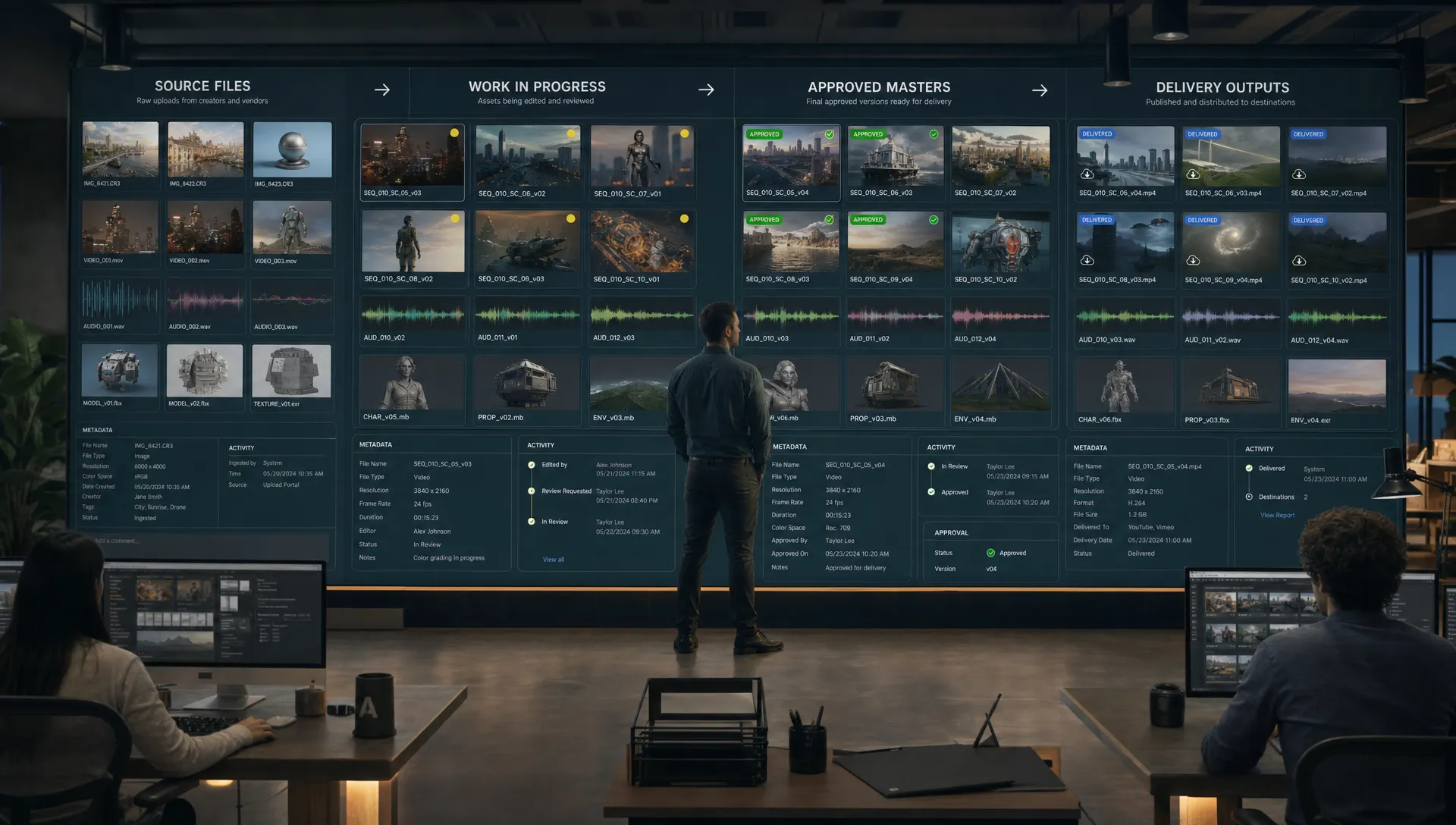
AI creative production changes the asset problem in two ways: it increases volume dramatically, and it makes every asset more dependent on context. A single campaign concept can produce hundreds of images, video variants, 3D outputs, prompt iterations, references, style studies, localized deliverables, and approval states. Without a centralized operating model, teams quickly lose track of what was generated, what is approved, what can be used commercially, and what must never leave the studio.
That is why centralized asset management operations are becoming a core discipline for AI-enabled creative teams. The goal is not simply to store files in one place. The goal is to create a controlled production system where assets, metadata, versions, permissions, previews, approvals, and downstream integrations work together.
For CMOs, this protects brand consistency and campaign velocity. For art directors, it preserves creative intent across large volumes of generated work. For application managers, it creates predictable governance and integration patterns. For game developers and 3D teams, it keeps complex source files, generated variants, and production-ready assets from collapsing into chaos.
What centralized asset management means in AI creative operations
Traditional asset management was designed around finished files. A team uploaded the approved campaign image, product render, video, or brand document, then used folders and tags to help people find it later. That model is no longer enough when creative work is generated, reviewed, regenerated, localized, and delivered across many formats.
In AI creative operations, the asset library must become an operational layer. It needs to understand what an asset is, where it came from, which model or workflow contributed to it, who approved it, what it can be used for, which outputs were delivered, and which downstream systems depend on it.
This is why many enterprise teams are rethinking the role of DAM in the AI era. A modern setup does not treat the asset repository as a passive archive. It treats asset management as part of the production workflow, connected to governance, generation, review, rights, and delivery. Virtuall explores this shift in more depth in its perspective on the new DAM in the age of creative AI.
A centralized model should answer practical questions quickly:
- Which source file or reference influenced this output?
- Is this asset a draft, a candidate, an approved master, or a delivery file?
- Who can edit, approve, export, or publish it?
- What usage rights, markets, channels, and expiration dates apply?
- Which downstream ecommerce, rendering, editing, or publishing system is using it?
If your team cannot answer those questions from the asset system itself, people will answer them through Slack threads, local folders, spreadsheets, or memory. That is where risk and rework begin.
The four-zone asset structure every AI creative team needs
Centralized asset management operations should begin with a clear separation of asset states. This is the foundation. If source files, work-in-progress assets, approved masters, and delivery outputs live in the same uncontrolled space, every downstream process becomes harder to govern.
A strong operational structure uses four asset zones.
| Asset zone | What belongs here | Primary owner | Core rule |
|---|---|---|---|
| Source files | Original photography, scans, licensed references, CAD files, 3D source models, brand guidelines, mood boards, approved prompts, rights documents | Creative operations, brand, legal, technical art | Preserve provenance and restrict edits |
| Work-in-progress assets | AI generations, prompt tests, intermediate renders, edit timelines, compositing files, review candidates, rejected variants | Creative teams, art directors, producers | Make iteration visible but prevent accidental publishing |
| Approved masters | Final approved image, video, 3D, audio, or design assets with verified metadata and usage rights | Brand, creative leadership, legal, production owner | Lock the asset and control derivative creation |
| Delivery outputs | Channel-specific files for ecommerce, ads, social, CMS, app stores, marketplaces, localization, game builds, or partner portals | Marketing operations, publishing, ecommerce, release teams | Track exactly where each output goes |
Source files: protect the origin layer
Source files are the controlled inputs that make creative work possible. In AI workflows, this includes more than raw photography or 3D files. It can include approved brand references, mood boards, product data, material references, licensed training inputs, human-created sketches, prompt recipes, and legal documentation.
The source zone should be treated as the truth layer. Most users should not overwrite source assets. Instead, they should create linked derivatives in the WIP zone. For example, a product CAD file used for a campaign render should remain intact, while generated render explorations should be stored separately with a relationship back to that CAD file.
This protects teams from a common AI production problem: beautiful outputs with unclear origins. If nobody can prove what input references, licenses, or model settings were used, the asset becomes difficult to approve at enterprise scale.
Work-in-progress assets: make iteration safe
WIP is where creative volume explodes. One brief might produce dozens of prompt variations, render passes, retouched images, upscaled candidates, video extensions, animation tests, or 3D texture experiments. The answer is not to restrict iteration. The answer is to isolate it.
A WIP zone should allow experimentation while preventing unapproved assets from leaking into campaigns, stores, game builds, or partner packages. This can be done with visible status labels, restricted export rights, watermark previews, review gates, and automatic expiration rules for abandoned generations.
The most important WIP principle is traceability. A WIP asset should carry enough information for someone to understand why it exists, what brief it belongs to, which source assets it used, who created it, and what decision was made.
Approved masters: create a locked production truth
Approved masters are the assets your organization trusts. They may become the basis for localizations, crops, edits, packaging variants, ecommerce imagery, trailer cuts, 3D exports, or campaign adaptations. Because of this, masters should not be casually edited.
A good rule is simple: never overwrite a master. Supersede it with a new approved version. That way, teams can preserve the record of what was live, what changed, who approved the change, and which downstream outputs need to be refreshed.
For AI-generated or AI-assisted assets, the approval package should include provenance, rights status, reviewer signoff, and any constraints on usage. If the asset is approved for paid social but not for out-of-home, that information must be machine-readable, not buried in a comment thread.
Delivery outputs: track the last mile
Delivery files are often treated as disposable exports, but they are operationally critical. These are the files that customers, players, retailers, partners, and platforms actually see. They may include resized images, localized videos, compressed 3D assets, marketplace packages, CMS-ready banners, or render outputs for a specific product SKU.
Each delivery output should remain linked to its approved master. That link allows teams to identify what must be regenerated when the master changes. It also helps application managers trace which downstream systems received which file.
Metadata standards: the backbone of scalable collaboration
Metadata is what turns a pile of creative files into an operational system. In AI workflows, metadata should cover creative context, technical details, rights, lineage, approval state, and delivery status.
Enterprise teams do not need to invent everything from scratch. Standards such as Dublin Core metadata terms can help define common descriptive fields, while initiatives such as C2PA are increasingly relevant for content provenance. The key is to adapt standards into a practical schema that creative teams will actually use.
A minimum viable metadata model for AI creative operations might include the following fields.
| Metadata category | Example fields | Why it matters |
|---|---|---|
| Identity | Asset ID, title, project, campaign, product SKU, franchise, collection | Prevents duplicate or ambiguous assets |
| Lifecycle status | Source, WIP, review, approved master, delivered, archived, restricted | Keeps teams from using the wrong asset state |
| Ownership | Creator, team, business owner, approver, legal reviewer | Clarifies accountability |
| Creative context | Brief ID, mood board, style direction, prompt intent, reference set | Preserves creative intent for future iterations |
| AI provenance | Model used, generation date, prompt version, seed if available, workflow blueprint | Supports auditability and repeatability |
| Rights and usage | License type, allowed channels, territories, expiration date, attribution, restrictions | Reduces legal and brand risk |
| Technical specs | Format, resolution, color profile, duration, polygon count, rig status, compression | Helps downstream teams use files correctly |
| Relationships | Source asset, parent version, derivative assets, delivery outputs | Builds lineage across the production chain |
| Localization | Market, language, cultural review status, regional restrictions | Supports global campaign operations |
The schema should be strict where risk is high and flexible where creative exploration is needed. For example, rights, lifecycle status, owner, and approval state should be mandatory before any asset can become an approved master. By contrast, exploratory WIP assets may require only project, creator, source relationship, and status until they move into formal review.
For AI-generated content, do not treat prompts as disposable. Prompt intent, negative prompts, model routing, generation blueprint, and review notes can be valuable operational metadata. They explain how a result was produced and help teams reproduce or adapt it without starting from zero.
Version control: manage creative lineage without slowing teams down
Creative version control is different from software version control, but it needs the same discipline. Teams must know what changed, why it changed, who changed it, and which version is approved for use.
A workable version control model should include three layers. First, the asset version, such as campaign image v03 or character texture v12. Second, the workflow version, such as the generation blueprint, render setup, or editing template used to create it. Third, the approval version, which records who signed off and under what conditions.
This matters because AI production often creates derivative chains. A product image might begin as a source render, then become an AI-enhanced lifestyle scene, then receive retouching, localization, cropping, and ecommerce formatting. If each step is detached from the previous one, the organization loses lineage.
A practical version control policy should define:
- When a new version is required rather than a minor edit
- Which users can create derivatives from approved masters
- How rejected versions are retained or archived
- How downstream outputs are flagged when a master is superseded
- How prompts, model settings, and workflow blueprints are linked to the asset record
The policy should be strict enough to protect the business, but not so heavy that creatives avoid the system. One effective approach is to automate version capture inside the workflow. If a generation, render, edit, or export is created through the approved pipeline, the system should assign the version, capture metadata, and preserve lineage automatically.
Permissions: control who can create, approve, export, and publish
Permissions are often treated as an IT configuration issue. In AI creative operations, they are a production control. The wrong permission model can allow unapproved concepts to enter a campaign, restricted assets to be exported, or licensed references to be reused outside their terms.
A mature permission model combines role-based access with asset-level rules. A junior designer may be able to generate WIP variations but not publish. An art director may approve creative quality but not rights clearance. Legal may restrict usage by market or channel. Ecommerce teams may export delivery files but not modify approved masters.
| Role | Typical access | Restricted action |
|---|---|---|
| Creative contributor | Create WIP assets, annotate, submit for review | Approve masters or publish delivery outputs |
| Art director | Review, compare, request changes, approve creative quality | Override legal restrictions |
| Brand or marketing owner | Approve campaign use, request variants, manage channel priorities | Modify source files without production process |
| Legal or rights manager | Validate rights, restrict usage, approve licensing conditions | Edit creative files |
| Application manager | Configure workflows, integrations, retention, permissions | Approve brand or legal use unless assigned |
| External partner | Access assigned briefs and delivery packages | Browse restricted libraries or source files |
For AI-generated assets, consider a quarantine state for any asset that lacks required provenance or rights metadata. This is especially useful when teams are experimenting quickly. Assets can exist, be reviewed, and even inspire new work, but they cannot move into approved masters or delivery outputs until required checks are complete. Virtuall’s guide on how to govern AI-generated assets before they spread covers this early-control mindset in more detail.
Searchable previews: make assets usable without exposing everything
Centralization only works if people can find what they need. Searchable previews are essential because many creative assets are too large, sensitive, or complex to download casually. This is especially true for high-resolution video, 3D files, raw production sets, and restricted campaign concepts.
A useful preview system should support visual thumbnails, video proxies, 3D turntables, frame contact sheets, audio previews, prompt summaries, rights indicators, and status badges. The goal is to let users evaluate an asset before they open or export it.
Search should also go beyond filenames. Creative teams think in visual and conceptual language: “winter lifestyle scene with red packaging,” “hero product on dark background,” “stylized sci-fi corridor,” or “approved social cut for France.” AI-assisted search can help interpret that language across metadata, image content, transcripts, annotations, and visual similarity. For a deeper look at this capability, see Virtuall’s article on AI-driven enterprise search for creative asset libraries.
Workflow examples: connecting asset management to downstream systems
Centralized asset management creates the most value when it connects to the systems where work continues. For enterprise teams, the asset layer should not be a dead end. It should feed ecommerce, publishing, rendering, editing, DAM, PIM, CMS, DCC tools, and production pipelines through governed integrations.
DAM to ecommerce and PIM
In a retail or consumer brand workflow, approved product visuals often need to flow into a PIM, ecommerce platform, marketplace feed, or retailer portal. The centralized asset system should know which approved master is associated with each SKU, what crops or formats are required, which markets are allowed, and when an image expires.
A practical flow might look like this: the creative team approves a master product image, the system generates channel-specific delivery outputs, metadata maps the file to SKU and market, and the PIM receives only assets that meet approval and rights conditions. If the approved master is superseded, dependent ecommerce outputs are flagged for regeneration.
This reduces manual downloads, local renaming, spreadsheet matching, and accidental use of outdated files.
DAM to rendering and 3D production
For game developers, product visualization teams, and 3D studios, centralized asset management must handle source complexity. A final asset may depend on mesh files, materials, textures, rigs, lighting setups, simulation caches, AI-generated texture variations, and rendered outputs.
The asset system should separate source 3D files from WIP experiments and approved runtime or render-ready assets. It should also preserve technical metadata such as polygon count, texture resolution, rig status, engine compatibility, and material version.
A rendering integration can then pull the correct approved scene, material set, or model version into a render farm, game engine, or DCC tool. Once rendering is complete, output frames or videos return to the delivery zone with lineage back to the source scene and approved master. This gives technical art teams and producers a reliable way to trace what was rendered and why.
DAM to editing and post-production
Video workflows are especially vulnerable to version confusion. Teams may manage scripts, selects, AI-generated shots, voice tracks, edit timelines, subtitles, color versions, legal notes, and localized cuts. If the approved hero video, social cut, and regional edits are stored without clear relationships, teams waste time validating what is current.
A centralized workflow should allow editors to access approved source clips, generate or import AI-assisted variants, submit review cuts, and package final masters. Delivery outputs can then be created for social, broadcast, ecommerce PDPs, internal sales enablement, or app stores, each with its own format requirements.
The key is to connect editing tools to asset status. A draft can be visible to reviewers, but only approved masters and delivery outputs should be available to publishing teams.
DAM to publishing, CMS, and campaign activation
Marketing teams need speed, but speed without controls creates brand and compliance risk. A centralized asset layer can connect approved assets to CMS pages, ad platforms, social publishing tools, email systems, and partner portals.
The publishing workflow should check status, rights, market, channel, expiration date, and brand approval before release. For example, a localized banner may be approved for the French ecommerce site but not for paid media. A campaign video may be approved for internal sales enablement before public launch. These rules need to travel with the asset.
This is where a Creative AI OS becomes valuable. The Creative AI OS is designed to help teams orchestrate AI-powered content creation across image, video, audio, and 3D while applying governance, workflow controls, collaboration, asset management, and integrations through plugins and API. Instead of relying on scattered tools, teams can define how creative AI runs across the studio.
Implementation roadmap for centralized asset management operations
A successful rollout does not begin with a giant migration. It begins with operational clarity. Start with the workflows where risk, volume, and business value are highest, such as ecommerce content, campaign localization, product rendering, or AI-generated social variants.
The following roadmap works well for enterprise teams:
- Map your asset lifecycle: Define the stages from brief, source collection, generation, WIP, review, approval, delivery, and archive.
- Create the four asset zones: Separate source files, WIP assets, approved masters, and delivery outputs before refining deeper taxonomy.
- Define mandatory metadata: Make rights, owner, status, source relationship, approval state, and usage constraints required before approval.
- Set permission rules: Decide who can create, review, approve, export, publish, and administer workflows.
- Automate version capture: Link generations, edits, renders, and exports to parent assets without requiring manual documentation.
- Connect downstream systems: Prioritize integrations with PIM, DAM, CMS, DCC, rendering, editing, or publishing tools that drive daily operations.
- Measure adoption and exceptions: Track how often users bypass the system, which metadata fields are missing, and where approvals slow down.
The best implementation is not the most complex one. It is the one that teams can follow under production pressure. Governance should feel like part of the workflow, not an extra administrative burden.
Common mistakes to avoid
The first mistake is centralizing storage without centralizing process. Moving files into one repository does not solve asset chaos if teams still approve work in chat, export locally, rename files manually, and publish outside controlled workflows.
The second mistake is overloading creative teams with metadata entry. Metadata is essential, but as much as possible should be captured automatically from workflow context, integrations, generation blueprints, file properties, review actions, and approval events.
The third mistake is treating AI-generated assets as normal files. They require additional attention to provenance, model usage, source references, prompt intent, and rights. Without this, legal and brand teams may slow down approval because they cannot verify how the asset was made.
The fourth mistake is ignoring previews. If users cannot quickly inspect assets, they will download copies, create local folders, and rebuild shadow libraries. Searchable previews are not a nice-to-have. They are a control mechanism.
Frequently Asked Questions
What is centralized asset management for AI creative operations? It is an operating model for organizing, governing, finding, approving, and delivering creative assets across AI-enabled production workflows. It goes beyond storage by connecting metadata, permissions, versions, provenance, approvals, and downstream integrations.
How should AI-generated assets be organized? Separate them by lifecycle state. Keep source files protected, store AI generations and experiments in a WIP zone, lock approved masters after review, and create delivery outputs for specific channels, markets, and systems.
What metadata is most important for AI creative assets? The most important fields are asset ID, owner, lifecycle status, source relationships, AI provenance, usage rights, approval state, version, technical specifications, and delivery destination. These fields help teams collaborate while reducing compliance and brand risk.
Can centralized asset management connect to existing DAM, PIM, CMS, and creative tools? Yes. In many enterprise environments, the centralized operational layer should connect to existing systems through plugins, APIs, and workflow integrations. The goal is to make approved assets and metadata flow into downstream tools without losing governance.
Operate creative AI with control and scale
Centralized asset management operations are becoming the foundation for production-ready AI creativity. When source files, WIP assets, approved masters, and delivery outputs are clearly separated, teams can move faster without losing control. When metadata, versioning, permissions, previews, and integrations work together, creative collaboration becomes scalable.
Virtuall helps studios and enterprise teams operate creative AI across image, video, audio, and 3D with governance, workflow orchestration, asset management, collaboration, and integration capabilities. With Nyx, the intelligence layer of the Creative AI OS, teams can orchestrate multiple AI models while keeping context and intent consistent across workflows.
If your organization is ready to move from scattered AI experiments to controlled creative production, explore how Virtuall can help you operate creative AI at scale.