Stock Images Adobe: Mastering Visuals for Compliant Creative Teams
Learn how to use stock images adobe licenses effectively, streamline workflows, and boost your visuals.

Every visual creative project starts with a choice: create, license, or generate. For enterprise teams, making the right decision is about more than just aesthetics—it's about compliance, efficiency, and brand integrity. Virtuall's Creative AI OS gives you a responsible and compliant way to generate unique visual assets. If you haven't generated anything already, you can try it for free.
Think of Adobe Stock as a massive, professionally curated library filled with high-quality, royalty-free photos, videos, illustrations, and even 3D models. Its real power comes from its deep integration within the Adobe Creative Cloud ecosystem, letting you find and license production-ready visuals right inside apps like Photoshop or Premiere Pro.

Why Adobe Stock Is a Go-To for Creative Teams
Sourcing the right visuals is a constant tug-of-war between timelines, budgets, and brand identity. It's a strategic decision that pits creating something from scratch against licensing existing assets or even generating new ones with AI.
This is where understanding your options becomes a competitive advantage. This guide breaks down how to get the most out of Adobe Stock, transforming its huge library from a simple resource into a core part of your team's workflow.
Building Your Visual Strategy
Every creative studio faces the same fundamental challenge: how do we get the visuals we need, fast? The choice really comes down to three paths.
- Original Content: Gives you total creative control and guarantees uniqueness. The downside? It demands a serious investment of time and money for photoshoots, illustrations, or 3D modelling.
- Stock Assets: A massive shortcut. You get instant access to professional-grade visuals, slashing production time and costs for more generic concepts, backgrounds, or supporting imagery.
- AI-Generated Content: This is where things get really interesting. AI delivers incredible speed and customisation, letting you rapidly test and create highly specific or imaginative ideas that simply don't exist in any stock library. If you want to see what's possible, check out our guide to AI-powered design tools.
A blended approach is where the smartest teams are heading. By combining the strengths of Adobe Stock for foundational imagery and VirtuallPRO for bespoke, AI-driven creation, you can build a flexible and scalable visual asset pipeline. This hybrid model delivers both efficiency and brand distinction, keeping you a step ahead of the competition.
So, What's Actually Inside the Adobe Stock Library?
To really get a handle on Adobe Stock images, you first need to appreciate the sheer scale of what’s on offer. Don't think of it as just another photo gallery. It’s more like a massive, professionally organised digital warehouse that plugs directly into the creative tools you already use every day in Adobe Creative Cloud.
That direct connection is what makes it so powerful. You're not just browsing a website; you're tapping into a deep well of creative assets without ever having to leave your project. The library is massive, holding well over 300 million assets, which means you’re almost guaranteed to find something that fits.
It's a Lot More Than Just Photos
While high-resolution photography is definitely a cornerstone, the library goes way beyond static images. Understanding the full range of what’s available is the key to unlocking its real value for your team’s projects.
The collection is intentionally broad, built to handle pretty much any creative demand a modern studio or agency might have. That variety is crucial when you're trying to build cohesive campaigns that work across different media.
Here’s a quick look at what you’ll find:
- Images: This covers everything from premium photos shot by pros to versatile vector illustrations you can scale up to any size without losing a pixel of quality.
- Videos: A huge collection of HD and 4K clips, ready-to-use motion graphics templates for apps like After Effects, and looping video backgrounds.
- 3D Assets: A growing library of top-notch 3D models, materials, and lighting setups, all optimised for Adobe Dimension and other 3D software.
- Audio: Royalty-free music tracks and sound effects from real artists, perfect for adding a professional audio layer to your video work.
- Templates: Professionally designed templates for Photoshop, Illustrator, InDesign, and Premiere Pro that help you kickstart projects and keep everything on-brand.
- Fonts: Full access to the sprawling Adobe Fonts library, which is already included with most Creative Cloud subscriptions.
A Curated, Commercially-Ready Collection
Every single asset that makes its way into the Adobe Stock library goes through a tough review. This isn't a free-for-all marketplace; it's a curated collection where quality and commercial safety are the top priorities.
Each image, video, and vector is vetted by Adobe's team. They check for high technical standards and, just as importantly, make sure it comes with all the necessary model and property releases for commercial use. For any business, this built-in compliance check is a huge deal, as it cuts down the legal risks of sourcing visuals.
This curation means you can confidently pull an asset straight into a client project, knowing it’s both professionally made and legally sound. For creative teams on tight deadlines with strict compliance rules, that kind of reliability isn't just a nice-to-have—it's essential. It turns the library from a simple repository into a trusted, enterprise-ready resource for high-stakes work.
How to Navigate Adobe Stock Licensing and Subscriptions
For any creative team, getting your head around Adobe Stock’s licensing isn’t just a formality—it’s essential for staying compliant and keeping your projects out of legal hot water. Getting this wrong can turn a simple stock asset into a massive liability, and nobody wants that.
Adobe structures its licenses and payment models to suit different scales and team needs. You’ve really got two main paths: signing up for a subscription or buying flexible credit packs.
Subscriptions Versus Credit Packs
Subscription plans are built for teams with a steady, ongoing need for assets. If your studio is constantly pumping out content, this is almost always the best value per image. You get a set number of downloads each month, perfect for busy marketing departments and agencies.
Credit packs, on the other hand, are all about flexibility. You buy a bundle of credits upfront and then spend them on whatever you need—standard photos, premium 4K video, or even those all-important Extended Licenses. This is the ideal setup for teams with unpredictable project cycles or those who occasionally need high-end assets not covered by a standard plan.
This flowchart gives you a simple way to think about which asset type to even look for in the first place, based on what you’re trying to achieve.
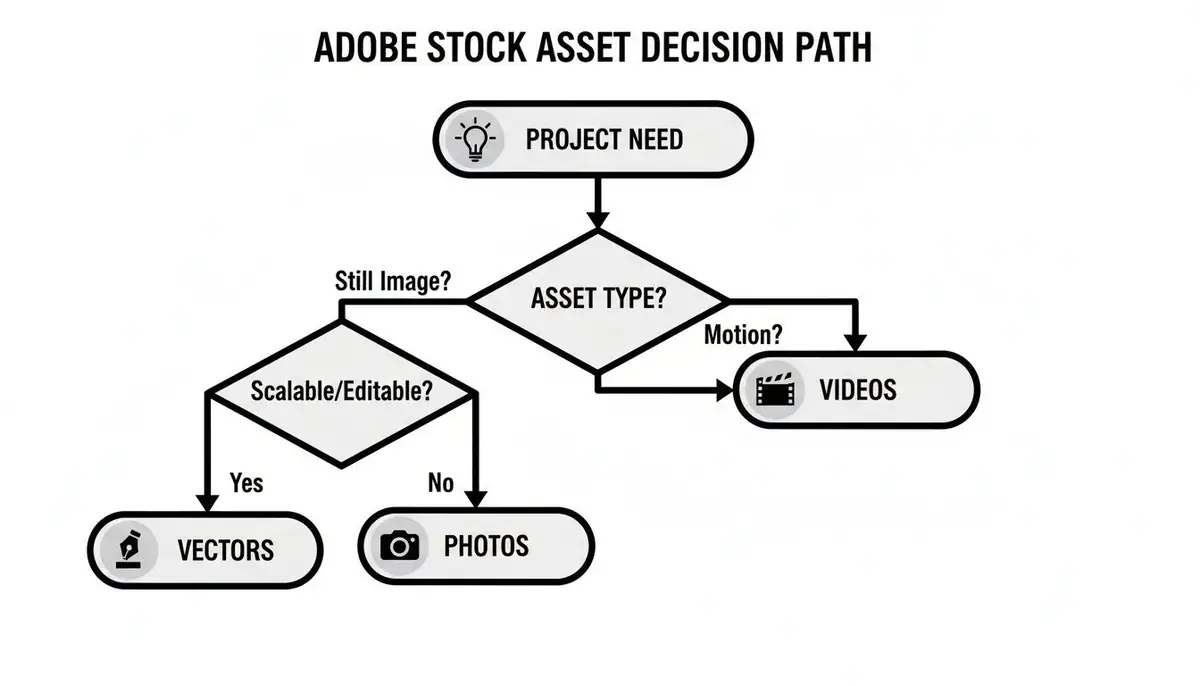
As you can see, a project’s core creative need points you straight toward photos, vectors, or videos, helping you kick off your search in the right direction from the very start.
Understanding the Different License Types
Beyond just how you pay, the real meat of the issue is what you're allowed to do with an asset. This is all determined by its license. Adobe Stock mainly uses a three-tiered system, and each one comes with very specific rules.
The golden rule is to match the license to your final use case. For instance, using an image with a Standard License on a t-shirt you plan to sell is a clear violation of the terms and can lead to some pretty serious penalties.
Let’s break down the main choices.
To make it even clearer, here’s a quick rundown of how the main commercial licenses stack up against each other.
Adobe Stock License Comparison
In short, think about your audience size and whether you're selling a product that features the asset. Your answer will point you directly to the right license.
Here's what each license really means in practice:
- Standard License: This is your default for most assets. It gives you rights for up to 500,000 copies or views, which makes it a perfect fit for websites, social media posts, email campaigns, and smaller print jobs.
- Enhanced License: Think of this as the Standard License with the training wheels off. It completely removes the 500,000-copy limit, making it the right call for big campaigns where your viewership or print run is going to blow past that cap.
- Extended License: This is the big one. It grants you the broadest rights, including using an asset in products you intend to sell. This is absolutely essential for things like merchandise, book covers, or digital templates where the stock asset is a core part of the product’s value.
Making sure you’ve got this sorted is a critical part of any creative workflow. When it comes to legally acquiring photos for your projects, whether for a book cover or a website, understanding the fine print on copyright protects both your work and your business. Choosing the right license from day one saves a world of headaches later on.
Integrating Adobe Stock into Your Creative Workflow
The real magic of Adobe Stock isn't just the sheer number of assets; it's how deeply it’s woven into the tools your team uses every single day. Instead of toggling between browser tabs and project files, you can find, preview, and license everything you need directly inside Photoshop, Illustrator, InDesign, and Premiere Pro.
This is the kind of workflow integration that actually makes a difference.

Picture this: you’re mocking up a new website layout. You can pull watermarked, low-res previews from Adobe Stock right into your Photoshop canvas, test out a dozen different options, and get client sign-off without spending a penny. Once the decision is made, you license the high-resolution version with a single click, and it instantly replaces the watermarked comp.
It’s a world away from the old, clunky method of downloading files from one site, importing them, and then painstakingly swapping low-res previews for the final purchased versions. This efficiency is critical, especially when crafting high-impact Meta ad creatives where speed and quality are everything.
A Serious Productivity Booster
For professional teams, this isn't just a minor convenience. It’s a genuine productivity multiplier that keeps creatives in their flow state. By keeping the entire asset sourcing process inside the creative application, Adobe eliminates the context-switching that kills momentum and eats up valuable time.
The efficiency gains are substantial. For enterprise teams building ads, gaming assets, or digital products, this tight integration materially cuts down sourcing time. In fact, global surveys show that using integrated stock versus manual downloads can save 20–30 minutes per visual. For a large studio producing hundreds of visuals every month, that translates into dozens of work-hours saved.
This streamlined workflow also simplifies asset management. When you license an asset, it’s automatically added to your Creative Cloud Libraries, making it instantly available across all your devices and applications. This centralised approach is a fundamental first step in building a coherent content strategy.
Ultimately, this tight coupling between the library and the tools is designed to make the creative process as frictionless as possible. It ensures finding the perfect asset accelerates your project rather than derailing it. If you're looking to take this a step further, our guide on how to organize digital assets can help your team achieve even greater efficiency.
Centralizing Assets with VirtuallPRO and Adobe Stock
Think of Adobe Stock as the supplier of high-quality raw materials for your creative projects. That's a great start, but where do you put everything once you have it?
That’s where the VirtuallPRO platform comes in. Our product acts as the modern, automated workshop where those materials are managed, transformed, and governed. Finding great stock images adobe offers is only half the battle; real efficiency comes from having a central command centre for every visual asset your team touches.
This is how our Creative AI OS elevates your whole workflow. It creates a single source of truth for all visual content, stopping the chaos of scattered files and version control nightmares that plague so many creative teams.

Unifying Your Creative Universe
Imagine a workspace where every asset, no matter where it came from, lives in one place. Your team can organise licensed Adobe Stock images right alongside your own company files, complex 3D models, and completely unique AI-generated visuals.
This unified environment breaks down the walls between different asset types and production stages. Instead of juggling multiple platforms—one for stock, another for project management, and a third for AI generation—everything is accessible within shared, secure workspaces.
A centralised system is the foundation for scaling up and staying compliant. It ensures every team member is working with the correct, approved versions of assets and that licensing information is always tracked—which is critical for any serious enterprise.
This approach doesn't just save time. It dramatically cuts down the risk of using an unlicensed or outdated image. For creative directors and project managers, this visibility gives them complete control over the entire life of an asset.
From Sourcing to Final Production
The VirtuallPRO platform is built to connect the dots in your creative pipeline. When you bring your licensed Adobe Stock assets into our system, you create a seamless flow from the moment you acquire an image to its final use.
Here’s what that looks like in practice:
- Organise Everything: Licensed photos and videos from Adobe Stock sit next to AI-generated images and in-house graphics, all tagged and easily searchable.
- Collaborate Directly: Team members can annotate, comment, and iterate directly on visuals, which makes feedback loops incredibly fast.
- Maintain Compliance: Track usage rights and license info for every single asset, ensuring your projects are always fully compliant.
- Build on Existing Work: Combine stock elements with AI-generated content to create something truly original, all within the same ecosystem.
By bringing everything under one roof, you move from just managing files to orchestrating a full creative production process. For teams aiming for top-tier operational excellence, exploring these digital asset management best practices is a crucial step toward a more efficient and secure workflow. This integrated strategy ensures every project is not just creative, but also scalable and impeccably governed from start to finish.
The Pros and Cons for Enterprise Creative Teams
So, is Adobe Stock the right move for your enterprise team? To figure that out, you need a clear-eyed look at what it does well and where it falls short. For many creative teams, it’s a game-changer for speed and output. But there are real trade-offs, especially when it comes to keeping your brand looking unique and managing costs at scale.
The biggest win is, without a doubt, workflow efficiency. As we’ve covered, the deep hook-in with Creative Cloud apps is a massive time-saver. Artists can find and license assets without ever leaving their design environment, which is a huge deal in any fast-paced studio.
Then there’s the sheer quality and variety of the library itself. Having millions of professionally vetted stock images adobe on tap means your team can find a visual for almost any brief, all backed by simple, commercially safe licenses that keep the legal team happy.
Weighing the Drawbacks
On the flip side, that convenience comes with a cost. The most obvious risk is ending up with a generic look. When thousands of companies are pulling from the same visual library, it gets tough to carve out a distinct brand identity. Nothing stings more than seeing your competitor use the same hero image in their campaign.
And this reliance on stock is only growing. The broader market for stock images and videos hit a value of US$5.28 billion in 2023 and is on track to reach US$7.94 billion by 2029. Adobe Stock is a massive player in this space, which just goes to show how dependent the industry is on these assets—and how easily visual trends can become oversaturated. You can explore more data on this expanding market to see the trends for yourself.
The big question for any brand is this: Does this asset make us look unique, or does it make us look like everyone else? Lean too hard on popular stock photos, and you risk making your brand feel completely forgettable.
Finding the Right Balance
Cost is the other elephant in the room. For large teams with a constant need for new assets, the numbers can add up fast. Subscriptions feel like a good deal at first, but scaling them across multiple departments can turn into a hefty recurring expense.
In the end, the smartest strategy is usually a blended one. Use Adobe Stock for what it’s great at: sourcing high-quality, foundational assets quickly. But then, pair those assets with unique, on-brand visuals you create yourself with a tool like VirtuallPRO. This hybrid model gives you the best of both worlds—the speed of stock and the originality of custom creation, making sure your brand actually stands out.
Common Questions About Using Adobe Stock
Even if you’ve been in the creative game for years, the ins and outs of Adobe Stock can still trip you up. Getting clear on the details is key to using the service with confidence and—most importantly—staying compliant. Let's tackle some of the most common questions that pop up.
Can I Still Use Adobe Stock Images After My Subscription Ends?
Yes, absolutely. This is a big one, but the answer is refreshingly simple.
Any asset you license, whether through a subscription plan or a credit pack, is yours to use forever under the terms of that original license. It’s a perpetual right, so you don't have to worry about your past projects suddenly becoming non-compliant if you decide to cancel. The license is tied to the asset when you download it, not to your subscription status.
What Is The Difference Between Adobe Stock and Royalty-Free Images?
This question creates a lot of confusion, but it doesn't need to. Think of it this way:
- Adobe Stock is the shop—the marketplace where you go to find millions of assets.
- Royalty-free is the legal agreement you get when you "buy" something there.
A royalty-free license means you pay a one-time fee to use an asset multiple times, in multiple projects, without having to pay extra royalties for each use. Almost everything on Adobe Stock falls under this model, which is what makes it so useful for everyday commercial work.
How Do I Avoid Using The Same Stock Image as a Competitor?
There's no way to technically stop another company from licensing the same image you did. It's the nature of stock. But you can absolutely make it your own.
The best strategy is to customise it heavily. Change the colours to match your brand palette, find a unique crop, or blend it into a larger composition with your own graphics and typography. Make it a component, not the entire creative.
For guaranteed originality, though, nothing beats creating something from scratch. This is where AI generation comes in. Using a platform to produce completely bespoke visuals ensures the image is perfectly aligned with your brief and, crucially, that no competitor will ever have the same one.
This is how you move from using generic assets to building a truly distinct visual identity.
Ready to move beyond the limitations of stock and create truly unique visuals? VirtuallPRO provides a unified workspace for AI-powered image, video, and 3D asset generation, giving your team the tools to build a distinct and scalable visual identity. Start generating for free today and see the difference.