Professional AI Image Generation for Production Teams
Learn how professional AI image generation helps production teams scale outputs with governance, brand consistency, and workflow control.
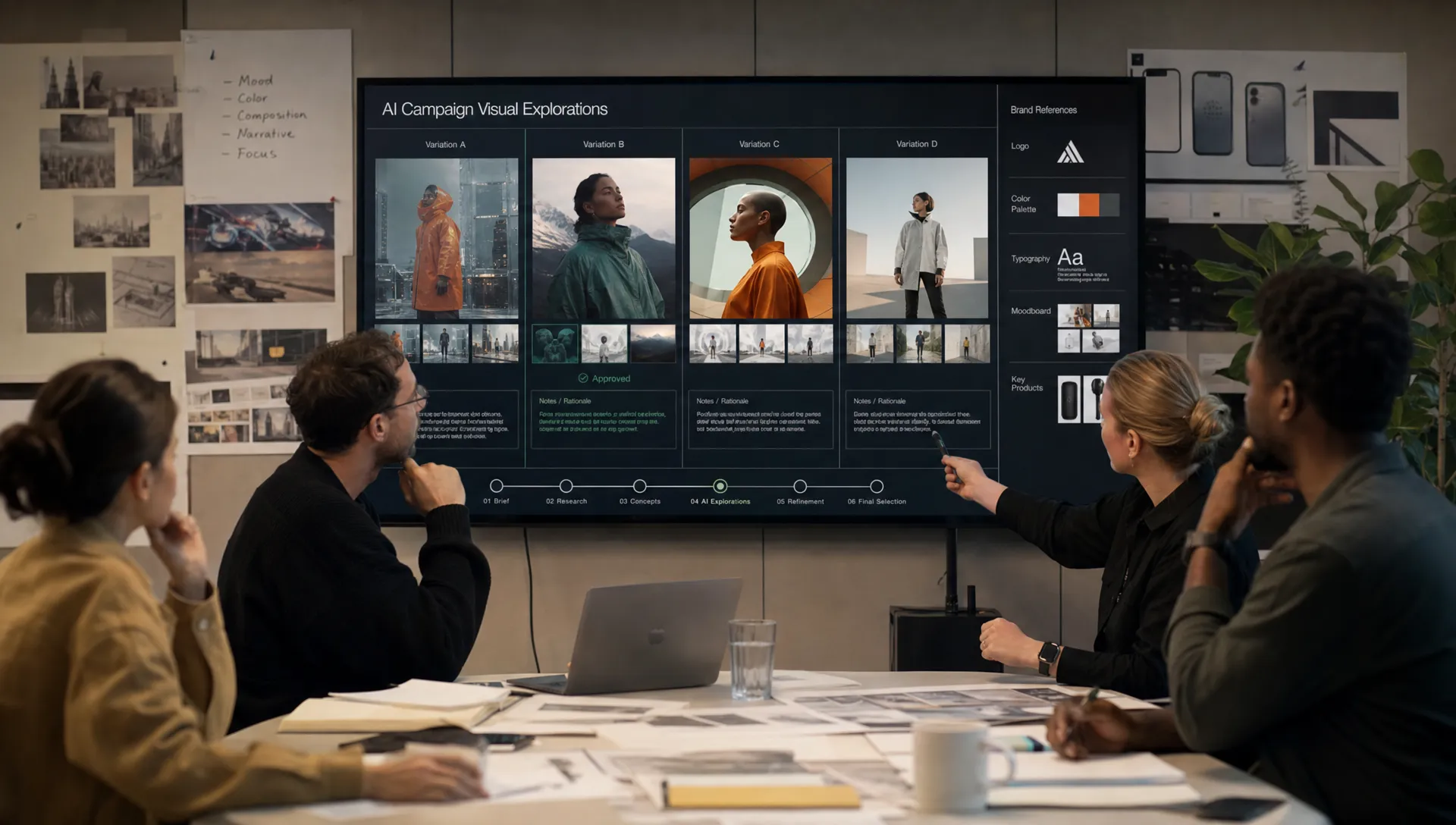
Professional AI image generation is no longer just a faster way to create concept art or social media visuals. For production teams, it is becoming a new operational layer: one that must connect creative direction, brand rules, model selection, approvals, rights management, and delivery requirements.
That shift matters. A marketing team can tolerate a few impressive experiments that never leave a mood board. A game studio, ecommerce team, or enterprise brand cannot. They need visual outputs that are consistent, reviewable, compliant, and ready to move through real production pipelines.
The challenge is that many AI image tools were designed for individuals. They help one person generate an image, but they do not automatically solve the harder problems of professional production: repeatability, governance, collaboration, version control, asset management, and integration with existing tools.
This guide breaks down what professional AI image generation should look like for production teams, what to control before scaling, and how a Creative AI OS approach can help studios move from experimentation to reliable output.
What professional AI image generation means in production
In a professional context, AI image generation is not simply text-to-image prompting. It is the controlled creation of visual assets through a managed workflow.
That workflow may include briefs, approved references, brand guidelines, generation templates, model routing, quality checks, legal review, retouching, metadata, and final handoff into a DAM, PIM, game engine, ecommerce system, or campaign toolkit.
For a CMO, the question is not “Can AI make a beautiful image?” It is “Can AI help us produce more campaign-ready visuals without weakening brand trust?”
For an art director, the question is not “Can I get a surprising result?” It is “Can I preserve creative intent across dozens or thousands of variations?”
For an application manager, the question is not “Which model is trending?” It is “How do we connect AI generation to the approved tools, access policies, and compliance requirements of the organization?”
For a game developer, the question is not “Can we create concept options quickly?” It is “Can this workflow support controlled iteration across environments, characters, props, textures, and production handoff?”
This is why production teams need more than a prompt box. They need a system.
Why consumer AI image tools break down at team scale
Individual AI image tools are useful for exploration. They are often fast, accessible, and excellent for ideation. But once multiple people start using them across departments, the operational cracks appear.
Prompts get copied into private documents. Reference images live in personal folders. Brand rules are interpreted differently by each user. Outputs are downloaded without consistent metadata. Review decisions happen in chat threads. Teams lose track of which model, prompt, reference, or approval path produced the final asset.
That is manageable for experimentation. It is risky for production.
If you are still comparing the tool landscape, a dedicated evaluation of the best image AI tools in 2026 can help clarify where standalone generators are useful and where production teams need a broader operating layer.
The core distinction is simple: consumer tools optimize for generation, while professional workflows optimize for repeatable production.
| Requirement | Individual AI image tool | Professional AI image generation system |
|---|---|---|
| Creative direction | Usually prompt-based and user-specific | Shared briefs, mood boards, references, and approved visual rules |
| Consistency | Depends on user skill and manual repetition | Templates, reusable generation blueprints, and controlled context |
| Governance | Limited or external to the tool | Model policies, permissions, approval flows, and auditability |
| Collaboration | Often informal | Review workflows, annotations, approvals, and shared workspaces |
| Asset management | Manual downloads and folder structures | Organized assets with metadata and production status |
| Integration | Often isolated | Connected to creative tools, DAM, PIM, DCC, APIs, or production systems |
| Compliance | Varies by provider and workflow | Designed around policy, infrastructure, inference location, and traceability |
A production-ready system does not remove creativity. It protects it from chaos.
The building blocks of a production-ready AI image workflow
A reliable professional AI image generation workflow usually includes five connected layers: intent, context, orchestration, review, and delivery.
1. Intent: turn creative direction into reusable rules
AI image generation becomes much more useful when the team can capture intent before anyone starts prompting.
That means translating the brief into reusable production logic. What is the campaign objective? Which audiences are being addressed? Which product details must remain accurate? What visual tone is approved? Which brand elements must never be altered? Which territories require localized variants?
When those rules remain trapped in a PDF or a kickoff call, every user interprets them differently. When they are embedded into reusable workflows, the team can generate faster while staying aligned.
This is where generation blueprints become valuable. A blueprint can act like a production template, helping teams standardize how certain asset types are created, reviewed, and delivered.
2. Context: preserve brand and studio memory
Great creative production depends on memory. Teams rely on mood boards, past campaigns, product references, art direction notes, visual language, and lessons learned from previous approvals.
AI workflows should not reset that context with every prompt. They should help teams preserve it.
For image generation, context may include:
- Approved visual territories for a brand or project
- Product reference images and material details
- Character, environment, or prop references for game development
- Photography direction, lighting preferences, and composition rules
- Negative constraints, such as visual elements to avoid
The goal is not to make every output identical. The goal is to create a shared creative memory that guides variation without losing coherence.
3. Orchestration: use the right model for the right task
No single AI model is best for every visual requirement. Some models are stronger at photorealistic product imagery. Others may be better for stylized concept art, composition exploration, texture ideas, or fast iteration.
Production teams benefit from multi-model orchestration because it allows them to route tasks based on the job to be done rather than forcing every workflow through one model.
For example, a team might use one model for early mood exploration, another for high-fidelity product scenes, and another tool for upscaling or image refinement. In a manual setup, that creates fragmentation. In an orchestrated setup, it becomes a managed production chain.
A Creative AI OS can help coordinate these workflows by connecting models, templates, team context, approvals, and output management in one operational layer. Virtuall describes this broader approach in its guide to mastering AI production with a Creative AI OS.
4. Review: make approvals part of the workflow
Review is where many AI image workflows slow down. The generation step is fast, but the decision-making process becomes messy.
Production teams need to know which image is current, who approved it, what changes were requested, which version was rejected, and whether an output is cleared for downstream use.
Approval workflows should be close to the asset, not scattered across email, chat, and presentation decks. Annotations, review stages, and decision history help teams avoid duplicated work and reduce uncertainty.
For enterprise teams, approval is also a governance mechanism. It ensures that outputs are checked against brand, legal, compliance, and production standards before they reach the market.
5. Delivery: connect AI output to the production pipeline
A generated image is rarely the final step. It may need retouching, resizing, localization, metadata tagging, legal review, or export into another system.
For ecommerce, the asset may need to move into a PIM or DAM. For gaming, it may inform 3D modeling, texture creation, or environment design. For marketing, it may need adaptation across paid media, email, landing pages, retail displays, and social formats.
Professional workflows should account for this handoff from the beginning. Otherwise, AI speeds up the first 10 percent of the process and leaves the remaining 90 percent unchanged.
Governance is not optional for professional AI image generation
Governance can sound like a brake on creativity, but in production environments it is what makes scale possible.
Without governance, teams face unclear model usage, inconsistent permissions, unmanaged reference material, uncertain rights, and outputs that may not meet brand or compliance standards. With governance, teams can define how AI is used, by whom, with which models, under which conditions, and through which approval paths.
This is especially important as AI regulation matures. The European Commission’s overview of the EU AI Act highlights the growing need for risk-based AI governance. While not every creative AI use case carries the same risk level, enterprise teams still need clear policies around data, transparency, accountability, and vendor selection.
The NIST AI Risk Management Framework is also useful for organizations building AI governance practices. It emphasizes trustworthy AI through mapping, measuring, managing, and governing AI risks, which aligns well with how production teams should evaluate creative AI workflows.
For image generation specifically, governance should cover several practical questions:
- Which models are approved for which use cases?
- What types of reference images can be uploaded?
- Are client assets, unreleased products, or confidential designs protected?
- Where does inference happen, and under which infrastructure requirements?
- Who can approve assets for external publication?
- How are prompts, versions, and outputs tracked?
- What human review is required before commercial use?
Copyright and authorship rules are also evolving. The U.S. Copyright Office AI initiative provides updates on how AI-generated material is being assessed in relation to copyright policy. Production teams should work with legal counsel to define review standards, especially for commercial campaigns, licensed IP, character work, product imagery, and client-facing assets.
The safest approach is not to avoid AI. It is to operationalize AI responsibly.
Where production teams get the most value
Professional AI image generation delivers the strongest return when it is applied to repeatable, high-volume, or iteration-heavy visual work.
Campaign concepting and creative exploration
AI can help teams explore visual directions before committing to expensive production. Instead of building a handful of mood boards manually, art directors can generate controlled territories around lighting, framing, audience, setting, seasonality, or campaign theme.
The key is to keep exploration connected to the brief. Otherwise, the team ends up with impressive images that do not solve the campaign problem.
Product and ecommerce visualization
For product teams, AI image generation can support scene exploration, merchandising concepts, lifestyle variations, and localized creative options. However, product accuracy must be governed carefully. If color, proportions, materials, logos, or packaging details matter, the workflow needs strong reference control and human review.
This is where production teams should distinguish between ideation assets and market-ready assets. Not every generated image should be treated as publishable without verification.
Game art and worldbuilding
Game teams can use AI image generation for early environment concepts, prop exploration, character mood, texture inspiration, and visual direction. The benefit is speed across many possible worlds, styles, and gameplay contexts.
The risk is inconsistency. If each artist uses a different model, prompt structure, and reference folder, the game’s visual language can drift. Shared context, approved references, and structured iteration help preserve a coherent art direction.
Localization and personalization
Enterprise marketing teams often need to adapt assets across markets, channels, audiences, and formats. AI can support faster localization and variation, but only if brand controls are in place.
A localized campaign image may need different backgrounds, talent representation, seasonal cues, product arrangements, or cultural details. Professional workflows help teams generate these variations while keeping the brand system intact.
Previsualization and stakeholder alignment
AI-generated imagery is also useful for aligning stakeholders before production investment. Teams can visualize campaign ideas, store concepts, packaging directions, event designs, or cinematic frames early enough to make better decisions.
The value here is not only speed. It is clearer communication. When stakeholders can react to visual options earlier, teams can reduce ambiguity and avoid costly rework later.
How to evaluate an AI image generation workflow for production
When selecting or designing a professional workflow, the best question is not “Which tool makes the best image?” The better question is “Which system helps our team produce approved visual assets reliably?”
Use this evaluation framework before scaling AI image generation across a studio or enterprise team.
| Evaluation area | What to look for | Why it matters |
|---|---|---|
| Governance | Permissions, model policies, compliance controls, review stages | Reduces legal, brand, and operational risk |
| Creative consistency | Shared context, mood boards, templates, reusable prompts or blueprints | Keeps outputs aligned across users and campaigns |
| Collaboration | Comments, annotations, approvals, version visibility | Prevents review chaos and duplicated work |
| Model flexibility | Ability to work across multiple image models and related media types | Avoids dependence on one model for every task |
| Asset management | Organized outputs, metadata, status tracking, handoff support | Makes generated assets usable in real production |
| Integrations | Connections to DCC, DAM, PIM, APIs, and creative tools | Keeps AI inside the production pipeline |
| Infrastructure | Data handling, inference location, enterprise requirements | Supports security and compliance expectations |
This is also why AI enterprise solutions should be evaluated against real studio operations rather than generic software checklists. Virtuall explores that operational perspective in more detail in its article on AI enterprise solutions for studio workflows.
The role of Virtuall in production-scale image generation
Virtuall is built around the idea that creative AI needs an operating system, not a loose collection of disconnected tools.
For production teams, that means AI image generation can be managed alongside broader creative workflows across image, video, 3D, and audio. Teams can define governance controls, orchestrate workflows, use generation blueprints, preserve studio context through mood boards, collaborate through review and approval processes, manage assets, and connect AI output with existing creative systems through plugins and APIs.
Virtuall’s intelligence layer, Nyx, is designed to orchestrate multiple industry-leading AI models while keeping intent and context across studios and teams. That is important because professional teams rarely want a single-model workflow. They want controlled access to the right capabilities, applied within the right production rules.
For enterprise organizations, the compliance dimension is equally important. The Creative AI OS supports EU-based infrastructure and inference, helping teams align AI production with stricter operational and governance requirements.
The practical result is a shift from isolated image generation to managed creative production. Teams can still experiment, but they do so within a system that supports consistency, accountability, and production handoff.
A practical rollout plan for production teams
The best way to adopt professional AI image generation is not to give every team unrestricted access on day one. Start with a focused workflow, prove value, and expand from there.
A strong rollout usually follows this sequence:
- Choose a high-value use case: Start with a workflow where iteration volume is high, risk is manageable, and success can be measured, such as concept exploration, campaign variants, or product scene ideation.
- Define the creative rules: Document brand constraints, reference requirements, output standards, and what must be reviewed by humans before use.
- Select approved models and workflows: Decide which models are appropriate for the use case and how they will be accessed, routed, and monitored.
- Build reusable blueprints: Turn successful workflows into templates so teams can repeat them without reinventing the process.
- Set review and approval stages: Make clear who can comment, request changes, approve assets, and release outputs into downstream systems.
- Track assets and outcomes: Measure not only generation speed, but also approval rate, rework reduction, consistency, and production handoff quality.
This approach helps teams avoid two common mistakes: treating AI as a toy that never reaches production, or scaling it too quickly without controls.
Common mistakes to avoid
The first mistake is relying on prompt craft alone. Skilled prompting matters, but it is not a production system. If the workflow depends entirely on individual prompt talent, it will be hard to scale across teams.
The second mistake is ignoring downstream work. A generated image still needs to fit the realities of asset management, resizing, localization, approval, and channel delivery. If those steps are not designed into the workflow, AI simply moves the bottleneck.
The third mistake is separating AI governance from creative operations. Policies written in isolation rarely survive contact with production deadlines. Governance should be embedded into the tools and workflows teams already use.
The fourth mistake is measuring only output volume. More images do not automatically mean better production. Track quality, approval speed, brand consistency, reuse, and reduction in manual rework.
The fifth mistake is assuming one model or vendor will solve every creative need. Professional teams benefit from flexibility, but that flexibility must be orchestrated through a controlled system.
Frequently Asked Questions
What is professional AI image generation? Professional AI image generation is the use of AI to create visual assets within a controlled production workflow. It includes creative direction, model selection, governance, review, approvals, asset management, and delivery into real production systems.
How is it different from using a standard AI image generator? A standard generator focuses on creating images. A professional workflow focuses on creating usable, consistent, approved assets at scale. The difference is less about the prompt box and more about governance, collaboration, repeatability, and integration.
Can AI-generated images be used in commercial production? They can be, but teams need clear policies for model usage, reference material, rights review, human approval, and jurisdiction-specific legal requirements. Commercial use should involve legal and brand review, especially for client work, product imagery, and licensed IP.
What teams benefit most from professional AI image generation? Marketing teams, ecommerce teams, game studios, creative agencies, product visualization teams, and enterprise content operations can all benefit when they need faster iteration, more variations, and controlled production workflows.
Does AI image generation replace art directors or designers? No. In professional production, AI is most valuable when it extends the team’s ability to explore, iterate, and scale. Art directors and designers remain essential for intent, taste, judgment, quality control, and final decision-making.
What should enterprises prioritize before scaling AI image generation? Enterprises should prioritize governance, approved workflows, data handling, model access, review processes, asset tracking, and integration with existing creative systems. Scaling without these foundations creates risk and inconsistency.
Move from AI image experiments to production-ready workflows
Professional AI image generation becomes valuable when it is treated as part of a production system, not as a standalone experiment.
If your team needs to scale visual creation while maintaining brand consistency, compliance, collaboration, and production control, The Creative AI OS provides a Creative AI OS designed for that challenge.
With Virtuall, studios and enterprise teams can orchestrate AI-powered content creation across image, video, 3D, and audio, define governance rules, preserve creative context, manage approvals, and connect outputs to existing production tools.
Explore how Virtuall can help your team operate creative AI at scale, with the control production work requires.