What SageMaker ML Governance Covers for Enterprise Teams
Learn what SageMaker ML Governance covers for enterprise teams, where it fits, and what creative AI workflows need beyond model controls.
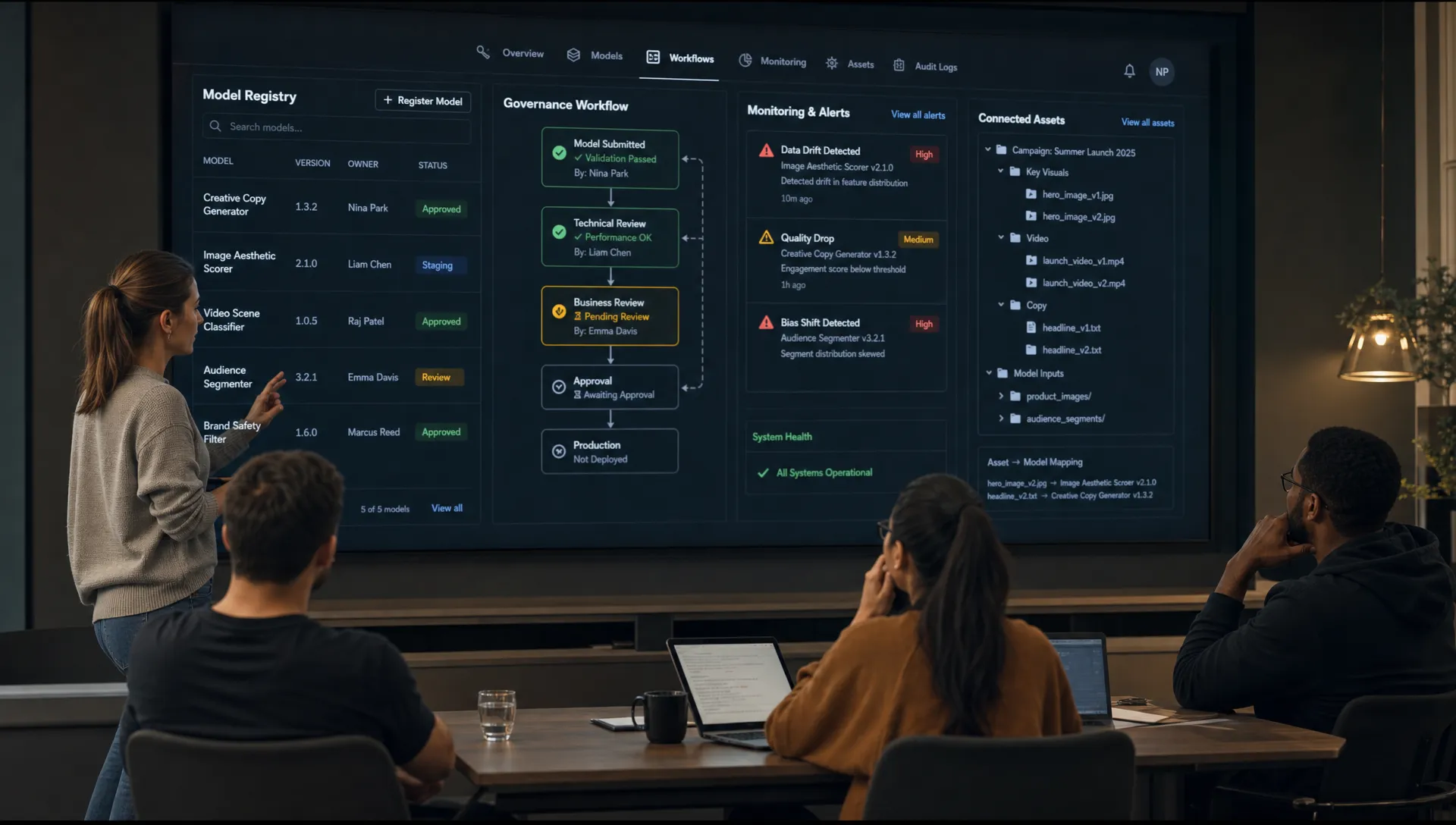
For enterprise teams, machine learning governance is no longer a nice-to-have layer around experimental models. It is becoming the operating discipline that determines who can build models, how models are approved, how risks are documented, and whether AI systems can be trusted in production.
That is where SageMaker ML Governance often enters the conversation. Amazon SageMaker AI provides a set of governance capabilities that help organizations manage model access, documentation, approvals, lineage, monitoring, and auditability across the ML lifecycle. For application managers, MLOps leaders, data science teams, and enterprise AI owners, it can be a strong foundation for controlling traditional ML and many generative AI workloads on AWS.
However, governance at the model layer is not the same as governance across a full creative production system. If your teams are generating campaign visuals, product imagery, 3D assets, video variants, or game content, you also need operational controls around creative intent, brand rules, asset reviews, usage rights, and workflow approvals.
This guide explains what SageMaker ML Governance covers, where it fits in an enterprise AI stack, and what creative teams may need beyond it.
Why enterprise teams need ML governance
Enterprise AI programs create value only when teams can move fast without losing control. Without governance, organizations often face the same problems: duplicated model work, unclear ownership, inconsistent approvals, limited documentation, poor visibility into production performance, and difficulty proving compliance when auditors or legal teams ask questions.
The NIST AI Risk Management Framework frames AI risk management around governance, mapping, measuring, and managing risk. In practice, enterprise teams need systems that make those principles operational. Policies alone are not enough. Teams need controls embedded in the tools where models are built, registered, reviewed, deployed, and monitored.
For creative and marketing organizations, the challenge is even broader. A model may be technically approved, but the output still needs to respect brand identity, regional campaign requirements, licensing rules, and human creative direction. This is why model governance and creative AI governance should be treated as complementary layers, not interchangeable terms.
What SageMaker ML Governance is designed to cover
SageMaker ML Governance is best understood as a collection of AWS capabilities that help teams control and document the ML lifecycle inside Amazon SageMaker AI. The Amazon SageMaker AI governance documentation covers tools for managing access, improving model visibility, documenting model behavior, and monitoring models after deployment.
For enterprise teams, the most relevant areas are access management, model documentation, model registration, approval workflows, lineage tracking, explainability, and production monitoring.
Access control and role management
A governance program starts with a basic question: who is allowed to do what?
SageMaker Role Manager helps administrators create and manage roles for common ML personas and activities. Instead of manually building every IAM role from scratch, teams can define permissions aligned with typical responsibilities, such as data preparation, model training, model deployment, or monitoring.
This matters in enterprise environments because ML work often spans several teams. A data scientist may need to run experiments but should not necessarily deploy directly into production. An MLOps engineer may need deployment rights but not unrestricted access to sensitive datasets. A compliance reviewer may need visibility into model documentation without the ability to modify model artifacts.
Role-based access does not eliminate the need for broader identity and security architecture, but it helps translate governance policy into operational permissions.
Model documentation and accountability
Model documentation is one of the most visible parts of ML governance. SageMaker Model Cards provide a structured way to document key information about a model, including intended use, risk considerations, training details, evaluation results, and limitations.
The value is not just administrative. A model card gives reviewers and downstream users a clearer understanding of what a model is meant to do, what it was tested against, and where caution is needed. For regulated or high-risk use cases, this documentation can become part of the evidence base for internal review.
In creative AI contexts, this principle is equally important. Teams need to know not only which model generated an asset, but also what prompt, template, reference material, style direction, approval path, and usage context were involved. SageMaker Model Cards can help at the model level, while creative production teams may need additional documentation around outputs and assets.
Model registry and approval workflows
SageMaker Model Registry gives teams a centralized catalog for model versions. It supports model package groups, versioning, metadata, and approval statuses such as pending manual approval, approved, or rejected.
For enterprise teams, this creates a clearer path from experimentation to production. Instead of deploying models from disconnected notebooks or ad hoc storage locations, teams can register candidate models, review them, and promote approved versions through controlled workflows.
This is especially valuable when multiple teams depend on the same model. Application managers can see which model version is approved for production. MLOps teams can manage deployment consistency. Compliance teams can review metadata and approval history. Data science teams can preserve a record of which model version was evaluated and why it was selected.
Lineage, reproducibility, and pipeline visibility
Governance is difficult when teams cannot reconstruct how a model was created. SageMaker supports lineage tracking across artifacts, training jobs, processing jobs, model packages, endpoints, and pipelines. Combined with SageMaker Pipelines, this helps teams understand the relationship between data, code, parameters, training runs, evaluation steps, and registered models.
For enterprise ML teams, lineage supports reproducibility and incident investigation. If model behavior changes, teams can trace back to the training job, dataset version, feature processing step, or pipeline execution involved. This is useful for both quality assurance and compliance.
Lineage is also relevant to creative AI, but the unit of control changes. In a creative workflow, teams may need lineage across prompts, reference assets, mood boards, model choices, generated variants, edits, approvals, and final exports. The ML lineage layer is essential, but it may not capture the full production history of a campaign asset or 3D deliverable.
Bias, explainability, and model monitoring
SageMaker Clarify and SageMaker Model Monitor address important governance questions around model behavior. Clarify can help with bias detection and explainability depending on the model type and use case. Model Monitor can help detect data quality issues, model quality drift, bias drift, and feature attribution drift when the right baselines and monitoring schedules are configured.
These capabilities are particularly important for models that influence decisions, recommendations, predictions, or user experiences. Enterprise teams can use them to detect degradation, identify potential risk, and trigger investigation before a model causes wider operational issues.
For generative and creative AI systems, monitoring can be more complex. Output quality may depend on subjective brand standards, prompt structure, model updates, regional requirements, and human review. Technical monitoring remains important, but it should be complemented with creative review workflows and policy checks tailored to the type of content being generated.
| Governance area | What SageMaker helps cover | Enterprise value |
|---|---|---|
| Access control | Role-based permissions through IAM and SageMaker Role Manager | Limits who can build, modify, deploy, or monitor ML resources |
| Model documentation | SageMaker Model Cards | Captures intended use, risks, evaluations, and limitations |
| Model cataloging | SageMaker Model Registry | Creates a controlled inventory of model versions and approval states |
| Lifecycle control | Pipelines, registry approvals, deployment workflows | Reduces ad hoc handoffs from experimentation to production |
| Lineage | Tracking across jobs, artifacts, models, and endpoints | Helps teams reproduce work and investigate incidents |
| Explainability and bias | SageMaker Clarify | Supports risk review for eligible models and use cases |
| Production monitoring | SageMaker Model Monitor and CloudWatch integrations | Detects drift, quality issues, and operational signals |
| Audit support | Metadata, logs, approvals, CloudTrail events | Provides evidence for internal controls and compliance reviews |
What SageMaker ML Governance does not fully solve by itself
SageMaker ML Governance is powerful, but it is not a complete enterprise AI operating model on its own. It focuses primarily on the ML lifecycle inside the SageMaker and AWS environment. Many enterprise AI risks live outside that boundary.
A model can be approved in a registry while the surrounding business process remains uncontrolled. A team can document a model card while prompts, reference assets, campaign rules, and output approvals are handled informally. A deployment can be monitored for drift while brand consistency and content rights are reviewed manually in disconnected tools.
For enterprise creative teams, common gaps include:
- Creative intent governance: SageMaker can document models, but creative teams also need to preserve campaign intent, art direction, mood boards, style references, and production requirements.
- Output-level review: Model approval does not guarantee every generated image, video, or 3D asset is usable, on-brand, compliant, or production-ready.
- Multi-model orchestration: Creative workflows may use several models across image, video, 3D, audio, and text. Governance must track how those models interact across a workflow.
- Asset and rights management: Teams need control over inputs, generated variants, edits, approvals, and final assets, including where they are stored and how they are reused.
- Creative tool integration: Production teams often work across DCC tools, PIM systems, DAM platforms, review tools, and custom pipelines. Governance must follow the workflow, not sit outside it.
This is the key distinction for enterprise leaders: SageMaker can govern important parts of the ML system, but creative AI at scale also requires governance of the production system.
How enterprise creative teams should think about the governance stack
A practical governance stack has multiple layers. Each layer answers a different question.
At the cloud and infrastructure layer, teams control identity, networking, encryption, logging, data access, and regional deployment choices. On AWS, this typically involves services such as IAM, CloudTrail, CloudWatch, KMS, VPC controls, and broader data governance services.
At the ML lifecycle layer, SageMaker helps govern model development, registration, approval, lineage, and monitoring. This is where SageMaker ML Governance is strongest.
At the creative operations layer, teams need to govern how AI is used to produce business assets. This includes who can generate content, which templates or generation blueprints are approved, which models can be used for specific asset types, what brand context should be preserved, how reviews and approvals happen, and how final outputs are managed.
This is where a Creative AI OS such as Virtuall fits into the conversation. The Creative AI OS is designed to help teams control, orchestrate, and scale AI-powered content creation across image, video, 3D, and audio workflows, with governance controls, workflow orchestration, generation blueprints, studio context memory, collaboration workflows, asset management, and integrations with creative tools through plugins and APIs.
The goal is not to replace model governance. The goal is to extend governance from the model lifecycle into the creative production lifecycle.
What different enterprise teams gain from governance
The value of governance depends on the role. A CMO, art director, application manager, and game developer will not evaluate SageMaker ML Governance through the same lens.
| Team or role | What they typically need | How SageMaker helps | What may be needed beyond SageMaker |
|---|---|---|---|
| CMO | Brand-safe AI adoption, campaign consistency, risk control | Provides visibility into approved models and governance evidence | Brand rules, creative approvals, asset-level compliance, usage controls |
| Art Director | Consistent visual intent and controllable outputs | Supports governed model versions and documentation | Mood boards, style memory, review workflows, annotations, generation blueprints |
| Application Manager | Secure integration and operational reliability | Supports access control, model registry, monitoring, and audit trails | Integration with DAM, PIM, DCC tools, and enterprise production workflows |
| Game Developer | Scalable asset generation and predictable pipelines | Helps manage model lifecycle and deployment controls | 3D asset workflows, pipeline tracking, approvals, and tool-specific integrations |
This role-based view is useful because enterprise AI governance fails when it is designed only for one function. Data science governance is necessary, but creative, marketing, legal, IT, and production stakeholders also need controls they can actually use.
A practical checklist for using SageMaker ML Governance
If your organization is evaluating SageMaker ML Governance, start with the controls that map directly to enterprise risk. The objective is not to document everything for its own sake. The objective is to create a repeatable path from AI experimentation to approved production use.
A simple starting checklist includes:
- Define ML personas and permissions before scaling access to SageMaker environments.
- Use Model Registry for model versioning, approval states, and production promotion.
- Create Model Cards for models that affect business decisions, customer experiences, or regulated processes.
- Track lineage through pipelines, artifacts, training jobs, and deployment events.
- Configure monitoring for production models where drift, quality degradation, or bias changes could create risk.
- Connect SageMaker governance evidence to broader audit processes, security logging, and enterprise compliance reviews.
- For creative AI, add output-level governance for prompts, templates, brand context, reviews, approvals, and final assets.
This final point is often where enterprise teams underestimate complexity. A governed model is not the same as a governed creative workflow. If AI is being used to generate production assets, the approval chain must include the model, the workflow, the people, and the asset.
Common mistakes to avoid
One common mistake is treating governance as a final review step. In high-performing teams, governance is built into the workflow from the beginning. Permissions, templates, documentation, approval states, and monitoring should be part of how teams create and deploy AI systems, not a separate checklist at the end.
Another mistake is assuming that model documentation solves output risk. Model Cards are valuable, but they do not automatically validate every generated asset. For a product campaign, an approved image model may still produce visuals that are off-brand, regionally inappropriate, or inconsistent with the art direction. Human review and workflow controls remain important.
A third mistake is fragmenting governance across too many disconnected tools. If model approvals live in one system, prompts in another, assets in another, and creative feedback in a fourth, teams will struggle to prove how an output was created and approved. Enterprise governance works best when context can travel across the workflow.
Frequently Asked Questions
What is SageMaker ML Governance? SageMaker ML Governance refers to Amazon SageMaker AI capabilities that help enterprise teams manage access, document models, register and approve model versions, track lineage, monitor production behavior, and support auditability across the ML lifecycle.
Does SageMaker replace an enterprise AI governance policy? No. SageMaker can operationalize important controls, but enterprises still need policies for risk ownership, data use, human review, compliance, security, procurement, and acceptable AI usage.
Is SageMaker ML Governance enough for generative AI? It can govern important parts of the model lifecycle, especially if models are built, deployed, or monitored in SageMaker. Generative AI teams often need additional controls for prompts, context, outputs, brand rules, rights management, and human approvals.
How does SageMaker Model Registry support governance? Model Registry provides a central place to manage model versions, metadata, and approval statuses. This helps teams control which models are candidates for production and which versions have been reviewed or rejected.
How should creative teams extend SageMaker governance? Creative teams should add workflow-level controls for generation blueprints, mood boards, review workflows, asset annotations, approvals, and integrations with production tools such as DAM, PIM, and DCC systems.
Govern creative AI beyond the model layer
SageMaker ML Governance gives enterprise teams a strong foundation for managing the ML lifecycle on AWS. It helps answer essential questions about access, documentation, model approval, lineage, monitoring, and audit readiness.
For creative AI at scale, the next step is connecting those controls to the way content is actually produced. Images, videos, 3D assets, and campaign materials need governance around context, workflows, approvals, tools, and final asset management.
Virtuall helps studios and enterprise teams operate creative AI with control across models, workflows, teams, and production assets. If your organization is moving from AI experimentation to governed creative production, explore how Virtuall can support your creative AI operating model.