Adobe Professional Acrobat for Creative Teams
Discover how Adobe Professional Acrobat transforms creative workflows. Our guide covers features, use cases, and integrations for design and dev teams.
For creative teams, managing feedback on 3D models, marketing visuals, or technical documents can quickly become chaotic. VirtuallPRO, our Creative AI OS, is designed to bring order to this process from the very beginning. It allows teams to generate and collaborate on visual assets in a unified, secure environment. If you haven't generated anything yet, you can try it for free and discover a more streamlined workflow. Once those assets are ready for final sign-off, a tool like Adobe Acrobat Pro becomes essential. It's built to tackle the critical review bottleneck, moving your team from messy email threads into clear, efficient approval cycles.
Beyond the PDF Reader: How Acrobat Pro Elevates Creative Workflows

It’s worth noting that for teams looking to unify the entire creative process, from initial concept to the final asset, an advanced Creative AI OS like VirtuallPRO can manage generation and collaboration long before you even export a PDF. If you're starting from scratch, you can try VirtuallPRO for free and see how it works in tandem with essential tools like Acrobat.
A Central Hub for Creative Assets
It helps to think of Acrobat Pro not as the end of your workflow, but as a critical intersection where creative assets meet business reality. It’s the space where a beautifully designed brochure gets its final once-over from the legal team, or where a 3D artist’s model is approved by a client. This is where final sign-offs happen securely, making it an indispensable tool for keeping projects moving forward.
This evolution from a passive reader into an active collaboration platform is what makes all the difference. For creative teams, juggling multiple file versions and chasing feedback across endless email chains is a recipe for costly mistakes and frustrating delays. Acrobat brings all those interactions together, right on the asset itself.
A Foundation for Modern Workflows
The software’s role has expanded hugely to keep up with the demands of global teams and complex projects. It’s now built to handle everything from minor text edits to legally binding e-signature protocols, ensuring your studio operates as a responsible and secure partner for any client. For many, optimising their creative workflow management software stack starts with integrating a powerful document tool like this.
And when your work needs to reach a global audience, maintaining design integrity is key. A great next step is to learn how to translate a PDF while preserving its original formatting.
In Denmark, for example, Adobe Acrobat Pro is a major player in a software market that's projected to hit US$4.13 billion by 2025. Its strong adoption among Danish medium-sized enterprises really highlights its adaptability, proving it’s just as valuable for smaller studios as it is for large corporations.
What Acrobat Pro Really Does for Creative Teams
To get a real sense of what Adobe Acrobat Pro brings to the table, you have to look past the generic feature lists. It’s not just a PDF viewer; it's a practical tool designed to jump in at critical moments in your creative workflow, saving precious time and cutting out the frustrating back-and-forth that kills momentum.
Think about this common scenario: an art director is doing a final check on a big presentation deck. They spot a tiny, but crucial, typo. The old way? Send the file back to the designer, who then has to fire up the original design software, make the change, re-export, and send it back. It's a momentum killer.
With Acrobat Pro's Advanced PDF Editing, that whole rigmarole is gone. The art director can just fix the typo directly in the PDF. What could have been a 30-minute detour becomes a two-minute fix. That’s the kind of efficiency that keeps fast-moving projects on track.
To help you visualise how these features map onto your team's daily tasks, here's a quick breakdown.
Acrobat Professional Features for Creative Roles
| Feature | Primary User Role | Key Benefit |
|---|---|---|
| Advanced PDF Editing | Art Director, Project Manager | Make last-minute text or image edits directly in the final file, avoiding the need to go back to the source design. |
| E-Signatures | Account Manager, Producer | Get client sign-off on contracts, SOWs, and final proofs in minutes with legally-binding digital signatures. |
| Review & Commenting | Designer, Copywriter, Client | Centralise all feedback from multiple stakeholders into a single, shared PDF, eliminating confusing email chains. |
| 3D PDF Export | 3D Artist, Game Developer | Embed interactive 3D models into a PDF, allowing clients to review and comment on them without needing special software. |
This table shows how Acrobat Pro isn't a one-size-fits-all tool, but rather a versatile toolkit where different team members can find specific features to solve their unique problems.
Cutting Through Approval Bottlenecks
Another huge headache for creative studios is the approval process. Printing contracts, getting them signed, scanning them, and then emailing them back is a soul-crushing, slow-motion dance.
Acrobat Pro completely overhauls this with its built-in E-Signatures. Client approvals, which used to take days of manual effort, become a secure, legally-binding digital step that’s over and done in minutes. It doesn't just speed up your project timelines; it also creates a clear, auditable paper trail of who signed what, and when.
For project managers and producers, this is a game-changer. It means moving from concept to signed-off asset much faster. When you pair this with its compliance features, it starts to look a lot like the kind of robust governance you'd find in platforms like VirtuallPRO, ensuring every stage is secure and accounted for.
And what about feedback on the creative work itself? It can easily turn into a messy swamp of conflicting email threads. Acrobat's Review and Commenting tools pull everything into one place. Everyone—from the copywriter to the legal team—can add their notes, highlights, and mark-ups directly onto the visual, all within a single, shared file. You get one source of truth for all feedback, which puts an end to the ambiguity for good.
Bringing the Third Dimension into the Conversation
For teams in game development, architecture, or product design, trying to explain complex ideas with flat, 2D images just doesn't cut it. Acrobat Pro tackles this head-on with its support for 3D PDFs.
This brilliant feature lets designers and developers embed interactive 3D models right into a PDF. Stakeholders can then twist, turn, and inspect the model from every conceivable angle, all without needing any specialised 3D software. This makes feedback so much more precise. Instead of trying to describe a specific part of a model in an email, a client can just point right to it.
The long-standing adoption of Acrobat Pro in Denmark underscores its importance in a software market predicted to hit US$4.13bn by 2025, where Danish companies famously prioritise high-quality, ethical tools. Since tracking began, Acrobat has consistently supported 25,449 Pro users around the world, showing just how embedded it is in professional workflows. You can read more about the booming PDF editor software market on einpresswire.com.
See Acrobat Professional in Your Daily Workflow
It's one thing to talk about features, but it's another to see how a tool actually fits into the organised chaos of a creative workflow. Let's move past the theory and look at a few real-world scenarios where Adobe Acrobat Pro can turn a messy, complicated task into something straightforward. These examples really show how a dedicated document tool plugs into the wider creative ecosystem.
This diagram breaks down the core loop of creative collaboration that Acrobat is built to handle.
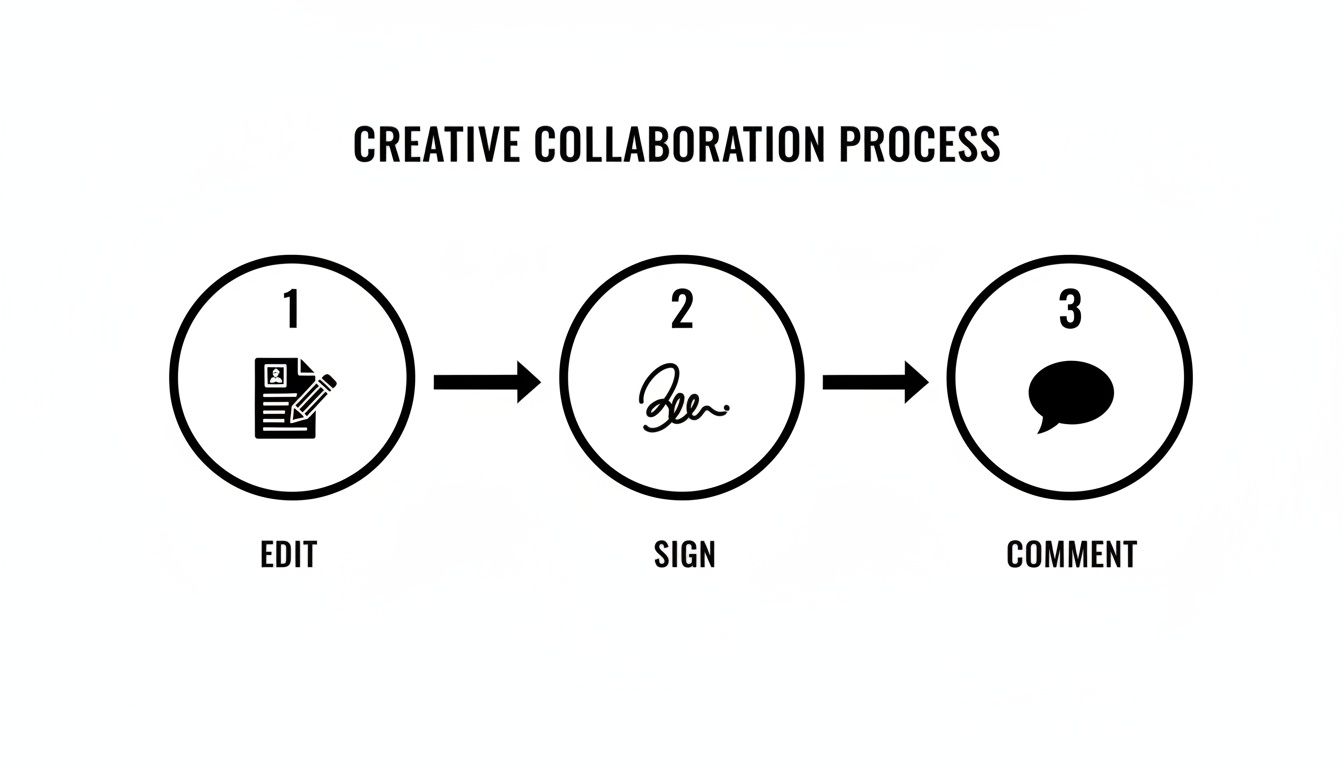
You can see the clear, repeatable process for getting creative assets finalised, moving from editing to signing and commenting.
The Game Development Pipeline
Picture a prop artist who's just finished a new in-game asset. In the past, they might have zipped up a chaotic folder: separate texture images, a plain text file with technical notes, and a dozen screenshots of the 3D model. This kind of hand-off is a nightmare for feedback and massively increases the risk of the dev team missing a crucial detail.
With Acrobat Pro, that artist can bundle everything into a single, organised PDF. They can embed an interactive 3D model, include the high-resolution texture maps, and add crystal-clear notes with technical specs right onto the document. The dev team gets one file with everything they need at a glance, making their review process drastically faster and more precise.
The Marketing Campaign Review
Think about a creative director prepping a new visual for a big campaign launch. The design needs sign-off from several teams: brand has to check for consistency, copywriters need to approve the tagline, and legal must ensure compliance. Trying to manage this over email is just asking for trouble, with conflicting notes and comments getting buried in long threads.
Instead, the director shares the visual as a PDF. Every stakeholder can drop their comments, suggestions, and required changes directly onto the file. The review tools create one consolidated feedback log, so you know every stakeholder’s input is captured in a single place. The whole process is transparent, efficient, and easy to track. While this is a great system, it’s worth exploring other real-time collaboration tools that can enhance this workflow even further.
This unified approach is essential for keeping projects moving. When feedback is clear and centralised, creative teams can iterate faster and with more confidence, knowing they have addressed all necessary points without chasing down scattered emails.
The Architectural Visualisation Workflow
An architect needs to get a client’s feedback on a new building design. Let's be honest, 2D blueprints can be tough for clients to properly visualise, often leading to misunderstandings and expensive revisions down the line. Sending over complex 3D files isn’t practical either, as most clients don't have the specialised software to open them.
The solution? Export the 3D building model into an interactive PDF using Acrobat Pro. The client can open this universal file on any computer and explore the model from every angle, zoom in on details, and get a true feel for the space. They can even add comments directly onto specific parts of the model, giving the architect immersive, actionable feedback that guides the next design iteration perfectly.
Choosing the Right Acrobat Plan for Your Team
Picking the right Adobe Acrobat Pro subscription is less about features and more about how your team actually works. It really boils down to your studio's size, who needs to manage the software, and of course, the budget. Adobe has a couple of tiers set up for this exact reason.
If you're a freelancer or a tiny studio, it's tempting to just grab an individual plan for everyone. But trust me, once you have more than a couple of people, juggling separate accounts becomes a real chore. This is where moving to a team plan makes a world of difference.
Team and Enterprise Licensing Benefits
The team plan is built from the ground up for collaboration. The biggest win here is the central admin console. It lets a single person—maybe your project manager or IT specialist—hand out, take back, and keep an eye on all your Acrobat licences from one place. This makes bringing a new artist on board a breeze and stops you from paying for seats you aren't even using.
For the bigger players, the enterprise plan takes things a step further with tighter security and control. You get features like Single Sign-On (SSO), which is a must-have for keeping sensitive project files and client data secure, especially when you're working with a large, fluctuating team.
The real advantage of team licensing is that it grows with you. As your studio takes on bigger projects and expands, you can add new licences without any hassle. Your tools scale up right alongside your business, which is critical for keeping things running smoothly and securely.
Planning for a Smooth Rollout
Before you sign on the dotted line, it's always a good idea to do a quick hardware check across the studio. The good news is that Adobe Acrobat Pro isn't a resource hog, so it runs well on most professional setups without slowing down your more demanding creative software.
- For Windows: You'll need Windows 10 or later, a 1.5 GHz processor, and at least 2 GB of RAM.
- For macOS: You're looking at macOS v11 or newer, running on either an Intel or Apple silicon chip, with a minimum of 2 GB of RAM.
These specs are pretty standard, so you can be confident the software won't get in the way of the real creative work.
The market for PDF editors is massive—valued at USD 2.52 billion and still climbing. In places like Denmark, this growth is fuelling the need for tools that help prop artists and producers keep budgets and project documents under one roof. It’s the same kind of controlled, scalable workflow that platforms like VirtuallPRO are designed to provide. You can find more details about the market for tools like Adobe Acrobat Pro at enlyft.com.
Protecting Your Creative Assets with Enterprise Security

For any serious studio or creative agency, protecting intellectual property isn't just a nice-to-have; it's everything. Your digital assets—from an unreleased game character to a confidential marketing plan—are the lifeblood of your business. This is precisely where Adobe Acrobat Professional proves its worth, offering serious security tools built for demanding corporate environments.
Think of Acrobat Pro as a digital vault for your most sensitive documents. It gives you multiple layers of defence, ensuring that only the right people can access, edit, or even see your work. This level of granular control is absolutely essential for keeping projects under wraps from concept to final delivery.
Fortifying Your Document Workflow
The most straightforward line of defence is password encryption. Slap a password on a PDF, and you’ve created an instant barrier to prying eyes. But for enterprise-level work, the real power lies in defining specific user permissions for every single document.
For instance, you might send a proposal to a client and let them view it, but completely block them from printing it or copying the text. This simple action lets you share work for review without worrying it will be scraped or passed around without your consent. When you're juggling hundreds of files, these permissions—combined with a solid marketing asset management software strategy—keep everything organised and secure.
A key feature for compliance is Acrobat's verifiable audit trail. Every signature, comment, and approval gets logged, creating a bulletproof history of the document's journey. For any organisation that needs to prove accountability, this is a non-negotiable tool.
Redaction and Document Integrity
What about when you’re dealing with highly sensitive data, like in contracts or internal reports? This is where redaction tools become indispensable. This feature lets you permanently black out specific text or images before sharing a file. And I mean permanently. It’s not just a black box placed on top; the tool actually scrubs the underlying data from the file, making it impossible to recover.
This commitment to data security is a huge reason why larger organisations trust Adobe Professional Acrobat for their critical workflows. To really dial in your company’s security posture, it's worth exploring advanced models like zero trust security principles to complement the tools you already use.
The Next Step in Your Creative Production with VirtuallPRO
Adobe Acrobat Pro is brilliant for locking down and distributing finished work. But what about everything that happens before you get to that final PDF? That chaotic, exciting, and crucial phase of creation is exactly where VirtuallPRO, our Creative AI OS, steps in.
VirtuallPRO is the workshop where the real magic happens—the initial concepts, the quick-fire iterations, and the collaborative back-and-forth. Our platform brings 3D model, image, and video generation together into one unified space. It’s all about getting your creative house in order long before you’re ready to package everything up for final review.
The Operating System for Creativity
Here’s a simple way to look at it: Acrobat is the master of the final document, but VirtuallPRO is the operating system for your entire creative journey. It’s the digital studio where raw ideas are hammered into shape. If you want to see it in action, you can try it for free.
Our shared workspaces and direct visual annotation tools are built to feed perfectly into an Acrobat workflow. Think of it as a powerful, end-to-end production line. You ideate, create, and refine in VirtuallPRO, then use Adobe Acrobat Pro for the final delivery and sign-off.
VirtuallPRO is designed from the ground up to be the responsible, compliant, and safe enterprise choice for the generative phase of your work. We give teams the tools to go from a blank canvas to a polished final asset faster, more efficiently, and with total creative control.
By bridging the gap between that first spark of an idea and the polished final document, you create a seamless and far more productive environment. It keeps everyone on the same page and lets your team focus on what they truly love: doing incredible creative work.
Got Questions? We've Got Answers
It's only natural to have a few questions when you're looking at adding a new tool to your team's arsenal. Let's clear up some of the most common queries we hear from creative studios about Adobe Acrobat Pro.
Is Acrobat Pro Part of Creative Cloud?
This one trips up a lot of people, so let's set the record straight. Yes, Adobe Acrobat Pro is included if you have the Creative Cloud All Apps plan. Adobe bundles it in because they know how essential it is for the complete creative process.
But, if your team is on a single-app subscription—say, just Photoshop or Illustrator—then Acrobat Pro is a separate purchase. It's always a good idea to double-check your Adobe account dashboard to see exactly what your current plan covers.
Think of the All Apps plan as the full toolbox; Acrobat is the versatile multi-tool you'll end up using for almost every project. Its inclusion shows just how central PDF workflows have become for creatives.
Can We Edit 3D Models Directly in an Acrobat PDF?
That's a great question, but the short answer is no. Adobe Acrobat Pro is a fantastic stage for showing off your 3D work, not the workshop where you build it. You can spin models around, zoom in on details, and leave precise comments—which is brilliant for client reviews and internal feedback.
The actual modelling and editing still happens in your primary 3D software, whether that's Blender, Maya, or 3ds Max. The workflow is simple: create and polish your model in your 3D tool, then export it into a PDF to share with stakeholders who don't need (or have) specialised software.
How Does Acrobat Deal with Version Control?
Keeping track of changes is a massive headache in any creative project, and Acrobat has a seriously powerful feature for this: "Compare Files." It's a lifesaver. You can take two versions of a PDF, and it will instantly highlight every single difference between them—we're talking every text tweak, colour shift, and image swap.
This gives you a crystal-clear visual audit trail. No more hunting for that one tiny change someone mentioned in an email three weeks ago. It shows you exactly what changed, making it easy to keep everyone accountable and avoid those costly, last-minute mistakes.
While Acrobat is the undisputed king of the final document, Virtuall is the collaborative engine for the entire creative journey before it. Bring your team's 3D, image, and video creation together in one place. Start creating for free on Virtuall.