Creativity and AI: Guardrails That Improve, Not Limit, Ideas
Creativity and AI can scale together. Learn guardrails that boost ideas, improve consistency, and reduce risk with practical workflows for teams.
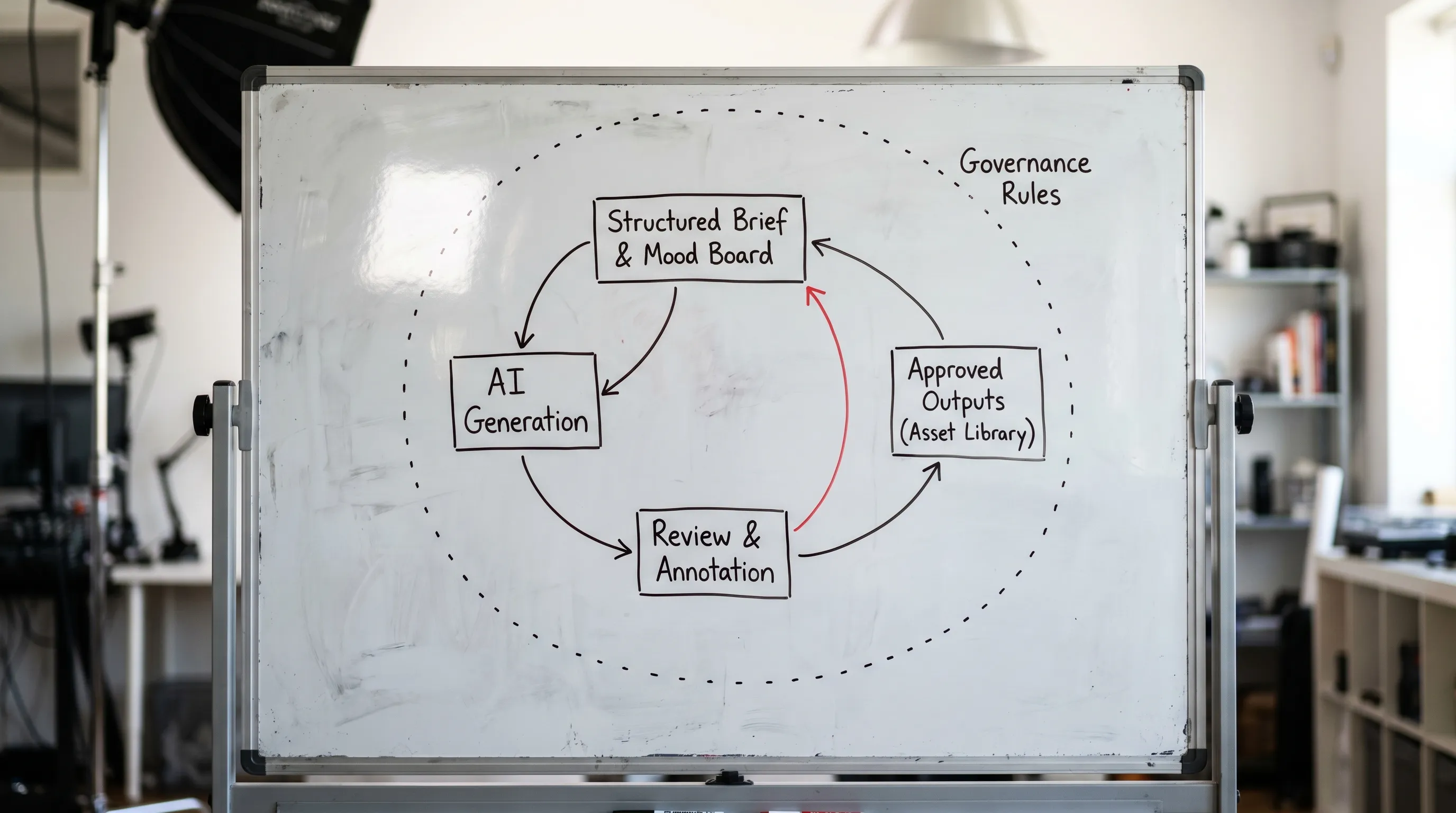
AI can widen the creative surface area of a team, but it also amplifies small inconsistencies. A loosely defined prompt, an unvetted model, or an unclear approval path can quickly turn “more ideas” into “more rework.” That is why the most effective teams treat creativity and AI as a system: you give people freedom where it matters, and you add guardrails where failure is costly.
In this article, you will learn what AI guardrails are, which ones actually improve ideation (instead of policing it), and how to implement them without slowing production.
What “guardrails” mean in creative AI (and why they help)
In enterprise creative work, guardrails are not about limiting imagination. They are about making constraints explicit so teams can move faster inside them.
Good guardrails do four things:
- Protect intent (brand, art direction, narrative continuity).
- Reduce ambiguity (everyone shares the same brief, references, and definitions).
- Prevent avoidable risk (rights, privacy, compliance, safety).
- Standardize quality (production-ready specs and repeatable outputs).
This is increasingly important as regulations and buyer expectations tighten. For example, the EU AI Act has a phased rollout of obligations, with different timelines depending on the system type, which pushes many organizations to formalize governance rather than rely on “best effort” usage. For practical background, see the European Commission overview of the AI Act.
The paradox: constraints can increase creative output
Creative teams already work with constraints: aspect ratios, file formats, platform rules, brand guidelines, technical budgets, localization requirements. AI introduces a new kind of constraint: probabilistic output. Without guardrails, you get variability where you do not want it (off-brand tone, inconsistent characters, mismatched lighting), and you lose variability where you do want it (interesting concepts, controlled exploration).
The goal is not “more control.” The goal is better allocation of freedom:
- Give wide freedom at the concept stage (explore styles, compositions, story beats).
- Tighten freedom as you approach production (approved models, locked specs, review gates, auditability).
The guardrails that improve, not limit, ideas
The guardrails below are the ones that most directly increase ideation quality and speed for CMOs, art directors, application managers, and game studios.
1) Intent guardrails: brief, references, and shared context
If you only add one guardrail, make it a structured brief.
A structured brief turns “make it premium” into reusable inputs:
- Audience and purpose
- Brand voice or art direction cues
- Mandatory elements and forbidden elements
- Reference set (mood boards, competitive examples, internal bests)
- What success looks like (KPIs, acceptance criteria)
When an AI system carries that context across iterations, teams stop re-explaining the same intent, and they can spend cycles on creative exploration. This is also where mood boards and “studio memory” become more than inspiration, they become a control layer for consistency.
2) Model guardrails: approved tools, versions, and use cases
Most organizations eventually reach the same pain point: different teams use different models and settings, so outputs cannot be compared, reproduced, or trusted.
Model guardrails typically include:
- Approved model list by use case (concept, production, localization, 3D, video)
- Version control (knowing which model produced what)
- Parameter bounds (for example, ranges that prevent excessive randomness when consistency matters)
- Risk tiering (stricter rules for regulated or high-visibility content)
This is a governance best practice aligned with broader risk management frameworks such as the NIST AI Risk Management Framework (useful even if you are not US-based).
3) Data and IP guardrails: what can be used, and what cannot
IP and rights are where “creative exploration” can become “enterprise liability.” Guardrails here help teams create more boldly because they know the boundaries.
Common components:
- Approved asset sources (libraries, licensed stock, internal shoots)
- Restrictions on sensitive data (personal data, unreleased product visuals, confidential scripts)
- Usage rules for inputs and outputs (what can be published, what requires legal review)
- Provenance expectations (keeping track of how assets were created and modified)
On provenance, the C2PA specification is a useful reference for how content credentials can be represented.
4) Workflow guardrails: reviews, approvals, and auditability
Guardrails are most effective when they are embedded into the workflow, not added as a last-minute checklist.
Examples that improve speed:
- Review stages that match how creative decisions are actually made (concept review vs production review)
- Lightweight annotation (why a variation was rejected, what to keep)
- Clear handoffs between creative, brand, legal, and product
- Audit logs for “who generated what, from which inputs” when required
This is where orchestration matters. The difference between “AI tools” and “AI in production” is often the workflow layer.
5) Output guardrails: “production-ready” requirements
Output guardrails reduce rework by making quality measurable. They translate taste into criteria.
Examples:
- Required formats, resolutions, color spaces, naming conventions
- Brand tone checks for copy
- Consistency checks for characters, products, environments
- Technical constraints for downstream pipelines (for example, content that must fit a specific template or channel spec)
These constraints do not reduce creativity, they prevent teams from falling in love with ideas that cannot ship.
A practical map: which guardrail solves which problem
| Guardrail type | Primary risk it reduces | How it improves creativity | Common failure mode |
|---|---|---|---|
| Intent (brief, mood board, style guide) | Misalignment and endless prompting | Faster iteration, more relevant variations | Vague language (“premium”, “modern”) with no references |
| Model governance (approved models, versions) | Inconsistent results, irreproducibility | Comparable outputs, stable baselines for experimentation | Teams “pick a model” per project with no record |
| Data and IP rules | Rights, privacy, confidential leakage | Safer exploration, fewer blocked releases | Rules exist, but are not visible at creation time |
| Workflow orchestration (review, approvals) | Slowdowns, unclear accountability | Shorter cycles, fewer last-minute escalations | Approvals bolted on outside the creation tools |
| Output specs and quality gates | Rework and pipeline breakage | Higher ship rate of AI-assisted concepts | Specs live in docs, not in the generation process |
How to implement AI guardrails without slowing teams
The anti-pattern is trying to “govern everything” on day one. The better approach is to ship a minimum viable governance layer, then expand.
Step 1: Decide where freedom is valuable, and where consistency is mandatory
For example:
- Concept exploration: maximize diversity, allow more randomness.
- Brand campaigns: enforce tone, typography rules, and asset usage.
- Product visuals: tighten accuracy, lighting, and compliance.
This is a creative decision as much as a risk decision.
Step 2: Convert tribal knowledge into reusable blueprints
If your best art directors already know how to prompt, reference, and refine, capture that as a template.
A strong blueprint typically includes:
- Inputs: brief fields, mood board references, product constraints
- Model choices and safe defaults
- Output specs
- Review checkpoints
Templates help junior creators produce senior-level consistency, and they reduce dependence on a few specialists.
Step 3: Embed governance into the workflow layer
Guardrails work when they are “in the path”:
- Approved models are selectable, non-approved models require justification.
- Restricted inputs are detected early.
- Review and approvals are part of the same flow as generation.
This is also where auditability becomes achievable without manual paperwork.
Step 4: Measure impact with creative-operational metrics
If you cannot show that guardrails improve throughput, you will lose adoption. Track both speed and quality.
| Metric | What it indicates | How to measure practically |
|---|---|---|
| Time from brief to approved concept | Cycle time | Median time across projects |
| Rework rate | Misalignment or low-quality generation | Number of rejected iterations per approved asset |
| Brand compliance pass rate | Consistency | % of assets passing brand review on first pass |
| Asset reuse rate | Scalability | How often approved elements are reused in new projects |
| Approval bottleneck time | Workflow friction | Time spent waiting per stage |
What this looks like for different enterprise stakeholders
For CMOs: guardrails protect brand while increasing creative volume
CMOs need more content across more channels, without brand drift. Intent guardrails and output specs help teams scale variations while preserving a consistent voice and visual identity.
For art directors: guardrails preserve taste and authorship
Art direction is not only a “style,” it is a sequence of decisions. Blueprints and review workflows make those decisions repeatable, so art directors can focus on higher-level exploration instead of policing basics.
For application managers: guardrails enable safe, supportable rollout
Approved model catalogs, versioning, and auditability reduce operational risk. They also simplify support, because issues are traceable and reproducible.
For a management-system view of AI governance, ISO/IEC 42001 is a useful reference point for how organizations structure AI management practices.
For game developers: guardrails reduce style drift across worlds and assets
Game production benefits from consistency across characters, props, environments, and UI. Intent guardrails plus pipeline tracking help teams keep continuity, especially when multiple vendors or distributed teams are involved.
Where Virtuall fits: guardrails as an operating system, not a policy document
Many teams start with documents (guidelines, approved tool lists, legal memos). The gap appears when those documents do not control what happens inside the creative workflow.
Virtuall is designed as a Creative AI operating system to help studios and enterprise teams control, orchestrate, and scale AI-powered creation across image, video, and 3D with governance and compliance in the loop. Based on the product information provided, Virtuall includes:
- AI governance controls
- Workflow orchestration
- Generation blueprints (templates)
- Studio context memory (mood boards)
- Collaboration features (review workflows, approvals, annotations)
- Asset management and pipeline tracking
- EU-based infrastructure and inference for compliance needs
- Integrations via plugins and API
- Nyx, an intelligence layer that orchestrates multiple models and keeps intent and context across teams
The key idea is straightforward: when guardrails are implemented where work happens, teams can move faster without sacrificing quality or compliance.
Frequently Asked Questions
Do AI guardrails reduce creativity? Not when designed correctly. They reduce avoidable uncertainty (brand drift, rights risk, inconsistent outputs) so teams can spend more cycles exploring ideas that can actually ship.
What is the first guardrail an enterprise team should implement? A structured brief plus shared references (mood boards, examples, “must include” constraints). It is the fastest way to improve output relevance and reduce iteration waste.
How do we keep multi-model workflows consistent? Use an approved model catalog by use case, track model versions, and standardize defaults. Consistency comes from reproducibility and shared baselines, not from forcing everyone into one tool.
How do guardrails help with compliance? They make it easier to enforce rules around data, IP, and review processes, and to maintain traceability when you need to explain how an asset was created.
Can small studios benefit from guardrails too? Yes. Even lightweight templates, basic review checkpoints, and an approved-tool list can reduce rework and keep output consistent across a small team.
Build guardrails that scale creative output
If you are trying to scale creative AI across teams, tools, and formats, the hard part is rarely “getting a model to generate.” The hard part is keeping intent, quality, and compliance consistent at production speed.
Explore Virtuall to see how a Creative AI OS can help you operationalize creativity and AI with governance controls, orchestration, blueprints, and studio memory: https://virtuall.pro