Enterprise AI Applications for Marketing, Design, and 3D
Explore enterprise AI applications for marketing, design, and 3D, with practical use cases, governance needs, and rollout guidance for creative teams.
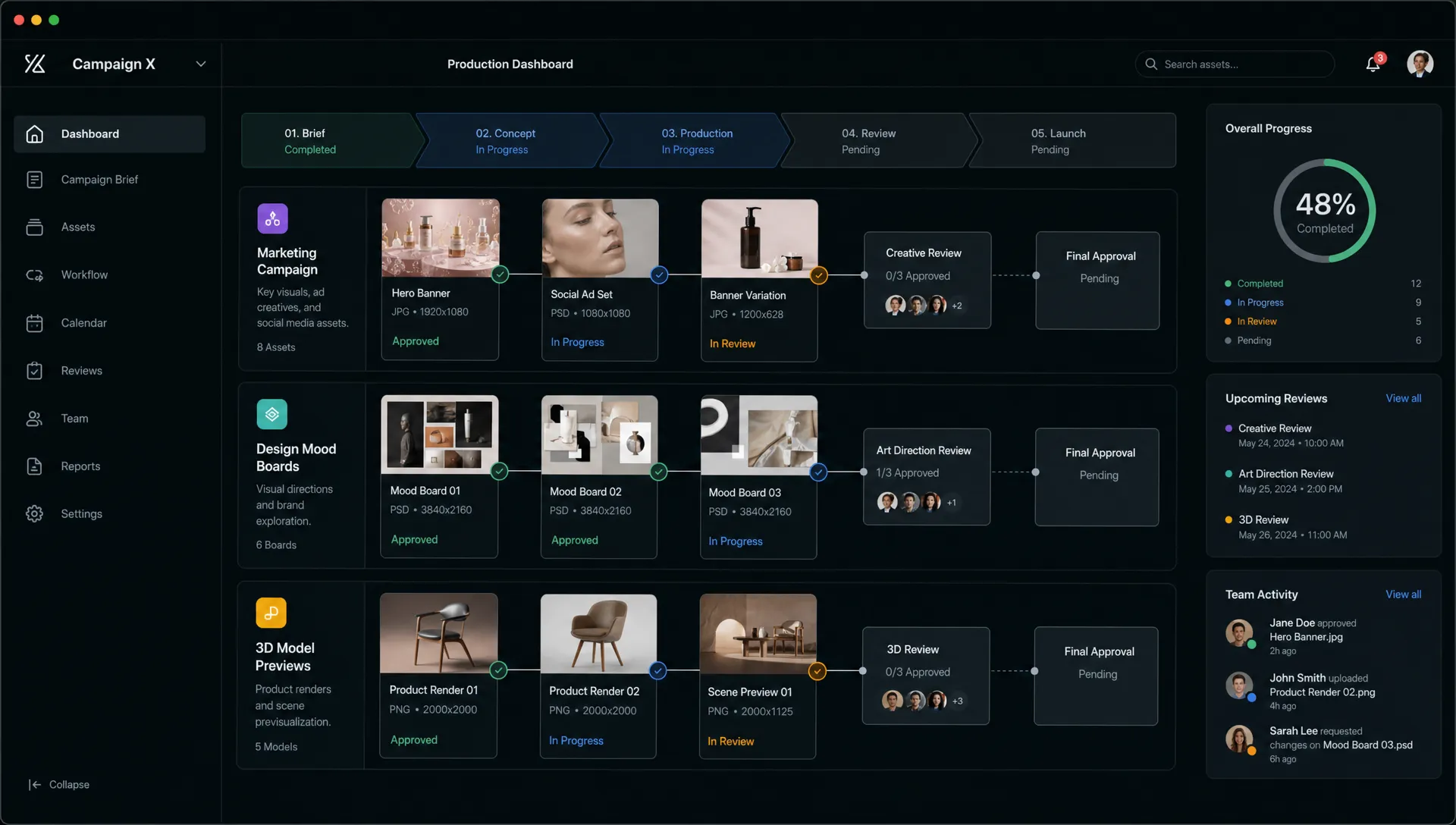
Enterprise AI applications are entering a more serious phase. The question is no longer whether AI can generate an image, draft campaign copy, or produce a 3D concept. The question is whether those outputs can be created consistently, reviewed properly, connected to existing systems, and trusted by enterprise teams.
For marketing, design, and 3D production, this distinction matters. A CMO needs speed without brand drift. An art director needs more creative range without losing taste and control. An application manager needs secure workflows that fit into existing tools. A game developer needs faster asset iteration without breaking the pipeline.
That is where enterprise AI applications become valuable: they turn generative AI from a collection of experiments into governed production workflows.
What makes an AI application enterprise-ready?
An enterprise AI application is not simply a chatbot, model API, or standalone generation tool. It is an AI-powered system designed to operate inside a business process, with controls for people, data, quality, compliance, and integration.
In creative production, that means AI must understand the brief, keep brand and visual context, orchestrate the right models, route work through reviews, and deliver assets that can move into downstream systems such as DAM, PIM, DCC tools, campaign platforms, or game pipelines.
This is the difference between “someone made a nice image” and “a team can produce 500 approved, on-brand asset variations for a product launch.”
| Enterprise capability | Why it matters for creative teams |
|---|---|
| Governance controls | Defines who can generate, approve, export, and publish AI-assisted content. |
| Workflow orchestration | Moves work from brief to generation, review, revision, approval, and delivery. |
| Context memory | Preserves brand rules, mood boards, visual direction, campaign context, and studio preferences. |
| Multi-model generation | Lets teams use the right AI model for image, video, audio, or 3D tasks instead of relying on one tool for everything. |
| Collaboration and review | Enables annotation, approvals, and stakeholder feedback inside the production flow. |
| Asset management | Keeps generated and approved outputs organized, traceable, and reusable. |
| Integrations | Connects AI workflows with creative tools, DAM, PIM, and enterprise systems. |
| Compliance and auditability | Helps teams document how assets were produced and reviewed. |
This is why many enterprises are moving from isolated AI tools toward operating layers for creative production. If you want a deeper look at this operational shift, Virtuall’s guide to enterprise AI in Creative Ops explains how governance, orchestration, and compliance fit together.
Enterprise AI applications in marketing
Marketing is often the first place enterprise AI shows visible impact because creative demand is high, channels multiply quickly, and campaigns need constant refreshes. According to McKinsey’s 2024 State of AI survey, 65% of respondents said their organizations were regularly using generative AI, almost double the share from ten months earlier. For marketing leaders, the opportunity is not only productivity. It is the ability to scale content while keeping it aligned with strategy.
A practical enterprise AI marketing application starts with campaign context. Instead of prompting from scratch, teams can work from approved product information, audience segments, brand guidelines, visual references, legal constraints, and channel requirements. AI can then support ideation, produce variants, and prepare assets for review.
Common marketing applications include campaign concepting, image and video variations, social creative adaptation, display ad resizing, localized visuals, product storytelling, and seasonal content refreshes. AI can also help teams test creative territories before committing production budgets to final shoots or 3D rendering.
For CMOs, the value is faster speed to market and more relevant content per audience. For brand and legal teams, the value comes from guardrails. A governed workflow can prevent unapproved prompts, unmanaged model use, and inconsistent exports. For application managers, the value is integration: AI should connect with the systems where product data, campaign assets, rights, and approvals already live.
Marketing AI becomes especially powerful when paired with performance learning. A team can use results from previous campaigns to guide the next creative batch, then produce controlled variations for different channels. The goal is not to replace strategy or creative judgment. It is to reduce the manual drag between strategy and execution.
For a broader marketing-specific perspective, Virtuall’s article on AI in modern marketing explores how creative production changes when teams need more assets across more channels.
Enterprise AI applications in design
Design teams often have a more nuanced relationship with AI. They do not need random output at scale. They need controlled exploration, stronger ideation, and faster movement from abstract direction to tangible options.
For art directors, enterprise AI applications can support early visual exploration without flattening the creative process. A team might begin with a mood board, product line, brand world, or seasonal campaign direction. AI can then generate controlled visual territories, reference compositions, material studies, color directions, or layout options that help the team make decisions earlier.
The critical word is controlled. If every designer uses a different tool, prompt style, model, and reference library, visual consistency quickly breaks down. Enterprise design applications need shared context: approved mood boards, brand assets, generation blueprints, and reusable workflows that keep creative intent intact.
Design use cases often include:
- Visual territory exploration for campaigns, products, and environments.
- Mood board expansion using approved references and brand context.
- Variant creation for layouts, compositions, colors, lighting, and styling.
- Review workflows where creative leads annotate, approve, or reject generations.
- Asset reuse across teams, product lines, campaigns, and regions.
This can change the rhythm of creative work. Instead of spending days preparing options manually, designers can generate a broader field of possibilities, then use their judgment to refine what is worth developing. The human role becomes more strategic, not less important.
The best enterprise AI applications for design also protect creative standards. They support review and approval flows, make asset provenance easier to track, and reduce the risk of off-brand work being exported without oversight.
Enterprise AI applications in 3D and game production
3D is one of the most promising areas for enterprise AI, but also one of the most demanding. A 2D image can look impressive in isolation. A 3D asset has to survive a pipeline. It may need correct scale, usable topology, optimized geometry, compatible materials, naming conventions, metadata, engine constraints, and approval from multiple stakeholders.
This is why enterprise AI applications for 3D should be evaluated differently from consumer-facing generation tools. The real value is not only “generate a model.” It is the ability to accelerate parts of a 3D workflow while respecting the production requirements of studios, brands, and technical teams.
For product visualization teams, AI can help generate early 3D concepts, material variations, lifestyle environments, lighting directions, and visual references for final production. For game developers, it can support ideation for props, environments, characters, skins, texture directions, and world-building references. For ecommerce and retail, AI-assisted 3D workflows can help teams create more product content without starting from zero every time.
The strongest applications tend to sit around the bottlenecks: concept iteration, variation, prototyping, reference creation, material exploration, and review preparation. Final assets still need quality control. In many enterprise settings, human artists and technical directors remain responsible for validating outputs before they enter production.
A useful enterprise 3D AI workflow might connect the creative brief, approved references, generated model or concept options, annotation from art direction, asset status, and handoff into a DCC or asset management system. That connection is what turns AI into production infrastructure.
| Function | Enterprise AI applications | Primary value | Required controls |
|---|---|---|---|
| Marketing | Campaign variants, product visuals, social assets, localized creative, video concepts | Faster campaign production and more channel coverage | Brand rules, approval flows, usage rights, channel specs |
| Design | Mood board expansion, visual exploration, layout variants, style studies | Broader creative exploration with less manual setup | Shared context, art direction review, asset traceability |
| 3D and games | Concept assets, material studies, prop ideas, environment references, product visualization | Faster iteration across complex asset pipelines | Technical validation, metadata, pipeline compatibility, IP review |
Governance is the adoption layer
Enterprise AI succeeds when teams can trust how it runs. That makes governance a core feature, not an afterthought.
The NIST AI Risk Management Framework organizes AI risk around governance, mapping, measurement, and management. For creative teams, those principles translate into practical questions: which models can be used, what data can be included, who approves outputs, how rights are reviewed, and where production decisions are recorded.
In Europe and for global enterprises operating in regulated environments, the EU AI Act also reinforces the need for responsible AI practices. Creative teams do not need every designer to become a policy expert, but they do need systems that make compliant behavior easier by default.
Governance for creative AI typically includes model access rules, permission controls, prompt and asset policies, human review requirements, export restrictions, approval history, and documentation of generated outputs. It also includes data residency and infrastructure decisions, especially when teams work with unreleased products, licensed characters, confidential campaigns, or proprietary 3D assets.
This is where a Creative AI OS becomes different from a set of disconnected tools. Virtuall, for example, is designed to help studios and enterprises control, orchestrate, and scale AI-powered content creation across image, video, audio, and 3D. Its governance controls, workflow orchestration, generation blueprints, studio context memory, review workflows, asset management, pipeline tracking, integrations, and EU-based infrastructure and inference are all aimed at the same problem: making creative AI usable in production.
For organizations moving beyond pilots, the challenge is no longer just access to AI. It is operating creative AI at scale across teams, tools, and approval chains.
How to choose the right first enterprise AI applications
The best first use case is usually not the flashiest one. It is the one with enough volume, structure, and business value to prove that AI can improve production without adding risk.
A good candidate is a workflow that already happens repeatedly, has clear inputs and outputs, and includes human review. Examples include adapting campaign visuals across channels, generating approved product image variations, creating mood board extensions, or producing 3D concept directions for a known asset category.
Use this simple readiness check before selecting a pilot:
| Readiness signal | Strong first candidate | Better to wait |
|---|---|---|
| Volume | The team repeats the task often and spends meaningful time on it. | The task is rare, highly bespoke, or hard to measure. |
| Context | Brand rules, references, source assets, and requirements already exist. | The team has unclear creative direction or incomplete inputs. |
| Review | A human approval process is already in place. | Outputs would go live without structured review. |
| Integration | The workflow can connect to existing DAM, PIM, DCC, or campaign systems. | AI output would sit outside the production pipeline. |
| Risk | Rights, compliance, and brand risks can be controlled. | The use case involves sensitive data without clear policies. |
| Measurement | Cycle time, rework, asset volume, or approval speed can be tracked. | Success depends only on subjective excitement. |
This kind of evaluation helps application managers and creative leaders avoid two common mistakes. The first is choosing a novelty use case that generates excitement but no operational value. The second is choosing a mission-critical workflow before governance and review are mature enough.
Start with a contained production workflow. Prove that teams can create, review, approve, and reuse AI-assisted assets safely. Then expand.
Build, buy, or adopt a Creative AI OS?
Enterprise teams often face a strategic decision: should they build internal AI applications, buy point solutions, or adopt a broader operating layer?
There is no universal answer. Model APIs can be useful for technical teams that need custom capabilities. Point tools can help individuals move faster in specific tasks. But marketing, design, and 3D workflows usually cross many systems and stakeholders. That is where an operating layer becomes more practical.
| Approach | Best fit | Main limitation |
|---|---|---|
| Direct model APIs | Teams with strong engineering resources and highly specific requirements. | Requires internal work for governance, UX, workflow, integrations, and review. |
| Standalone AI tools | Individuals or small teams solving narrow creative tasks. | Can create tool sprawl, inconsistent outputs, and weak enterprise oversight. |
| Creative AI OS | Studios and enterprises that need governed workflows across teams, tools, and content types. | Requires process alignment and clear rollout priorities. |
A Creative AI OS does not remove the need for creative direction, production expertise, or technical validation. It gives those functions a controlled place to operate AI. In Virtuall, Nyx acts as the intelligence layer that orchestrates multiple industry-leading AI models and helps preserve intent and context across studios and teams. That matters because enterprise creative work rarely fits into a single prompt or model.
A practical rollout roadmap
A successful rollout should feel less like a software experiment and more like a production improvement program.
- Map the creative workflow: Identify where briefs, references, source assets, reviews, approvals, and exports happen today.
- Select a high-value pilot: Choose one repeatable workflow such as campaign asset variation, design exploration, or 3D concept iteration.
- Define governance rules: Set policies for model access, data use, brand constraints, approval requirements, and export permissions.
- Create generation blueprints: Turn repeatable tasks into templates so teams do not reinvent prompts and settings each time.
- Connect existing systems: Integrate with the tools that already manage product data, assets, creative work, and downstream delivery.
- Measure production outcomes: Track cycle time, number of approved assets, revision loops, reuse rate, and compliance issues.
- Expand by workflow, not by hype: Add new teams and use cases once the first workflow proves value and control.
This approach keeps AI adoption practical. It also gives stakeholders a shared language. CMOs can look at output volume and speed. Art directors can look at quality and consistency. Application managers can look at integration and governance. Game developers and 3D teams can look at pipeline compatibility.
Frequently Asked Questions
What are enterprise AI applications? Enterprise AI applications are AI-powered systems designed to support real business workflows with governance, security, collaboration, integration, and measurable outcomes. In creative production, they help teams generate, review, manage, and deliver assets across marketing, design, video, audio, and 3D.
How are enterprise AI applications different from regular AI tools? Regular AI tools often focus on individual productivity or one-off generation. Enterprise AI applications are built for teams, approvals, compliance, asset management, and integration with existing systems. The difference is repeatability and control.
How can marketing teams use enterprise AI? Marketing teams can use enterprise AI for campaign ideation, creative variants, localized visuals, social and display assets, product storytelling, and video concepts. The most valuable workflows connect AI generation with brand rules, product data, reviews, and campaign delivery.
Can enterprise AI help 3D and game teams? Yes. Enterprise AI can support 3D and game teams with concept iteration, material exploration, environment references, prop ideas, product visualization, and asset variation. Final outputs still need human review and technical validation before production use.
What should enterprises prioritize before scaling creative AI? Enterprises should prioritize governance, workflow design, context management, human review, and integrations. Scaling AI without these foundations can create inconsistent assets, compliance risk, and disconnected production processes.
Turn creative AI into a production system
Enterprise AI applications deliver their real value when they are connected to the way creative teams actually work. Marketing, design, and 3D teams need more than generation. They need orchestration, governance, shared context, collaboration, and production-ready outputs.
If your organization is ready to move from AI experiments to governed creative production, Virtuall provides a Creative AI OS for operating AI across studios, workflows, tools, and content formats.