How to Build Production-Ready 3D Workflows With AI
Build production-ready 3D workflows with AI, from Meshy and Tripo generation to retopology, UVs, export formats, engines, and governance.
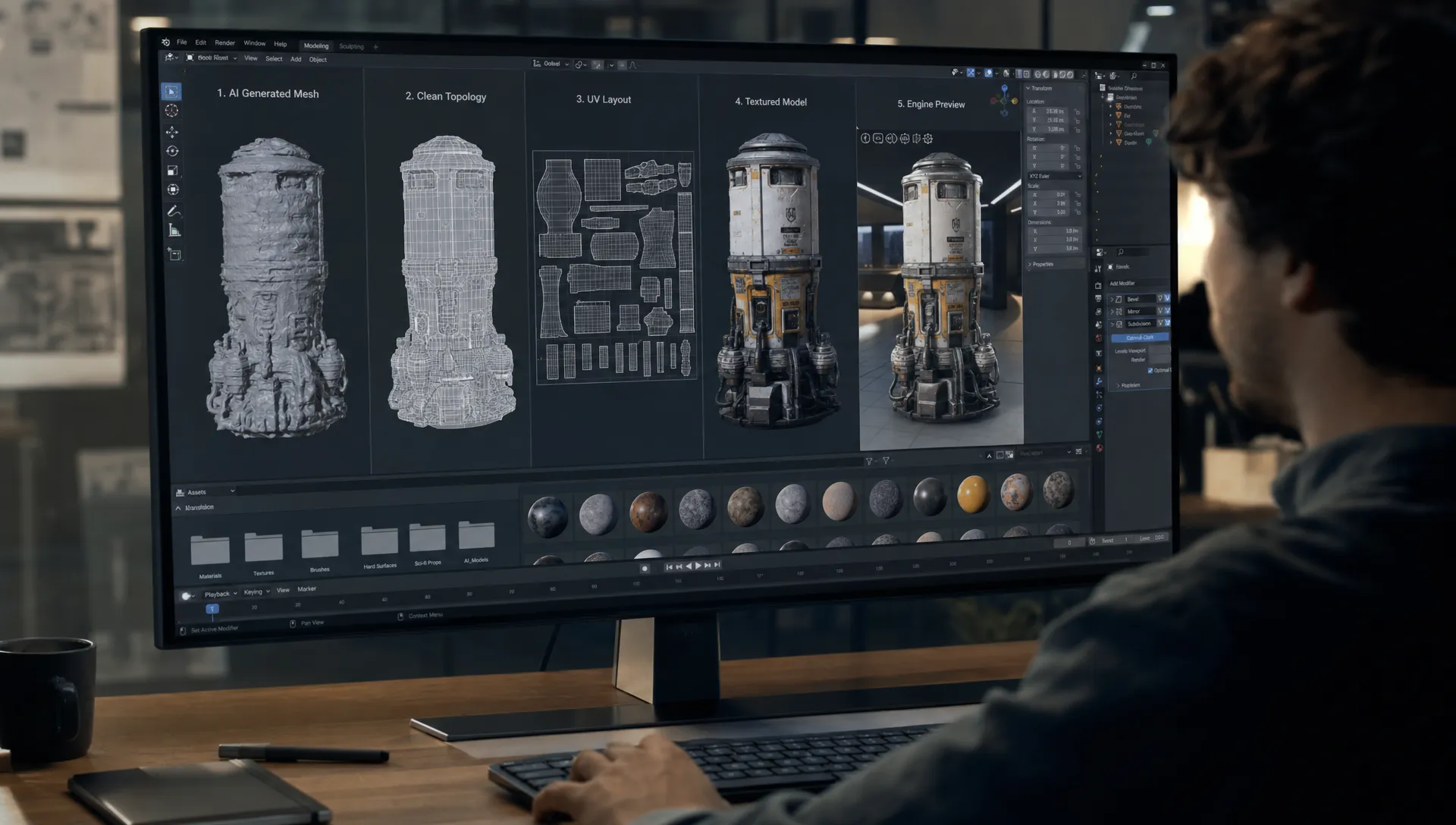
AI can generate impressive 3D assets in minutes, but a professional pipeline is judged by what happens after the first mesh appears. Can the asset be retopologized cleanly? Are UVs usable? Do textures survive the trip into Blender, Unity, Unreal Engine, a web viewer, or a slicer for 3D printing? Can the team approve, version, and reuse the asset without losing context?
That is the difference between a clever demo and production-ready 3D workflows.
Tools like Meshy and Tripo are valuable because they compress early ideation and asset creation. Virtuall becomes important when those AI steps need to operate inside a governed studio system, with repeatable blueprints, approvals, context memory, asset management, and model orchestration across teams. The goal is not to replace 3D discipline. The goal is to bring AI into the discipline of professional 3D production.
If your current 3D pipeline already feels fragmented, AI can either solve that problem or multiply it. We covered the broader collaboration challenge in this breakdown of why 3D production workflows are broken. This article focuses specifically on how to make AI-generated 3D assets usable in real pipelines.
What “production-ready” means for AI-generated 3D
A 3D asset is production-ready when it meets the technical and creative requirements of its destination. A beautiful preview render is not enough. For a game team, production-ready might mean optimized topology, correct scale, clean pivots, collision meshes, LODs, and PBR materials that behave predictably in Unreal Engine or Unity. For e-commerce, it might mean accurate product proportions, brand-approved materials, WebGL delivery, AR compatibility, and variant management. For 3D printing, it means watertight geometry, real-world scale, printable wall thickness, and a file format that a slicer can interpret reliably.
AI generation tools can accelerate the first 20 to 60 percent of the asset journey, depending on the use case. The final production layer still depends on validation, cleanup, retopology, UV work, texture checks, export rules, and approvals.
A useful way to define readiness is to separate the asset into five acceptance layers:
| Readiness layer | What to validate | Why it matters |
|---|---|---|
| Geometry | Shape fidelity, normals, manifold status, scale, pivots | Determines whether the asset can be edited, animated, rendered, printed, or imported cleanly |
| Topology | Polygon count, edge flow, quads versus triangles, deformation zones | Impacts animation, performance, subdivision, baking, and downstream cleanup |
| UVs | Layout, seams, texel density, overlap, UDIM strategy if needed | Controls texture quality, baking accuracy, and material consistency |
| Textures | PBR map completeness, resolution, color accuracy, naming | Ensures visual consistency across renderers, engines, and product views |
| Compatibility | Export format, engine import settings, material translation, file size | Prevents assets from breaking when they leave the generation tool |
The earlier you define these layers, the less time your team spends rescuing assets later.
Where Meshy, Tripo, and Virtuall fit in the AI 3D pipeline
Meshy, Tripo, and Virtuall do not play the same role. Treating them as interchangeable is a common mistake. Meshy and Tripo are useful for generation and iteration. The Creative AI OS is designed for orchestration, governance, context, and repeatability across a creative organization.
| Tool | Best fit | Specialized strength | Production consideration |
|---|---|---|---|
| Meshy | Text-to-3D and image-to-3D asset generation, concept props, textured draft models | Browser-based creation and fast visual exploration of textured meshes | Generated assets still need topology, UV, scale, and material validation before engine or print use |
| Tripo | Rapid prototyping, single-image or prompt-based 3D drafts, early game or product mockups | Speed, interactive iteration, and quick conversion of ideas into 3D forms | Best used with a cleanup stage for geometry fidelity, texture consistency, and target format checks |
| Virtuall | Enterprise creative AI operations across image, video, 3D, and other formats | Workflow orchestration, multi-model routing, generation blueprints, approvals, asset management, and governance | Requires teams to define rules, review gates, and output standards, which is exactly what makes scaling safer |
Meshy and Tripo are strongest when a team needs to move quickly from brief to visual 3D candidate. They are helpful for art directors testing silhouettes, game developers creating early props, and e-commerce teams exploring product visualization options before committing to manual modeling.
Virtuall is strongest when the question becomes: “How do we make this repeatable, compliant, reviewable, and consistent across many assets, teams, tools, and models?” With Nyx, Virtuall’s intelligence layer, teams can orchestrate multiple AI models while preserving intent and context across workflows. That matters when a studio wants AI outputs to align with brand rules, art direction, technical specifications, and approval processes.
Start with the destination, not the prompt
The most reliable AI 3D workflows begin by defining the destination environment before writing a prompt or uploading an image. A game-ready crate, a hero product model, a cinematic background prop, and a 3D printed collectible all need different geometry and export decisions.
For game development, define the engine, platform, target polygon budget, texture resolution, collision needs, LOD strategy, and whether the asset will deform. For e-commerce, define the viewer, product material standards, scale accuracy, SKU variation rules, and whether AR is required. For 3D printing, define physical dimensions, minimum wall thickness, tolerance, material, and slicer format.
This is where a workflow operating layer becomes valuable. In Virtuall, teams can design generation blueprints that capture creative intent and technical rules, rather than relying on every artist or developer to remember the same requirements manually. If your team is formalizing AI production beyond isolated tests, the principles in designing an AI workflow for creative teams apply directly to 3D pipelines.
A practical pre-generation brief should answer these questions:
- What is the asset for: game, e-commerce, visualization, AR, cinematic, or print?
- What is the target toolchain: Blender, Maya, Unity, Unreal Engine, a DAM, a PIM, a web viewer, or a slicer?
- What file formats are acceptable at each stage?
- What topology quality is required: placeholder, static prop, deformable asset, hero asset, or printable mesh?
- What texture maps are required: base color, normal, roughness, metallic, ambient occlusion, displacement, or opacity?
- Who approves the asset before it enters production?
This turns AI from a novelty into a controlled production input.
Generate for exploration, then validate for production
Meshy and Tripo are most effective when teams use them to widen the option space. Instead of spending a full modeling cycle on every idea, artists can generate multiple candidates, compare silhouettes, test art direction, and decide which assets deserve production cleanup.
For example, an art director might use Meshy to create several stylized prop directions from a text prompt and mood reference. A game developer might use Tripo to convert a concept sketch into a quick placeholder model for a level blockout. An e-commerce team might use AI-generated geometry to explore how a product family could appear in an interactive configurator before investing in final CAD cleanup or photoreal capture.
The key is to label these outputs correctly. An AI-generated model should not automatically be treated as final. In a professional pipeline, it moves through review stages:
| Stage | Typical owner | Output |
|---|---|---|
| Generation | Artist, designer, developer, or AI operator | Candidate mesh with draft textures |
| Creative review | Art director, brand lead, product owner | Approved direction or rejected option |
| Technical review | Technical artist, 3D lead, pipeline TD | Cleanup requirements and target specs |
| Production cleanup | 3D artist or technical artist | Retopologized, UVed, textured asset |
| Integration | Game developer, visualization artist, e-commerce team | Tested asset in target environment |
| Governance | Producer, application manager, compliance owner | Versioned, approved, traceable asset |
This staged approach prevents teams from confusing “generated” with “ready.”
Retopology: the bridge between AI mesh and usable asset
AI-generated meshes often capture shape better than structure. They may include dense triangulation, uneven polygon distribution, messy edge flow, fused details, non-manifold areas, or topology that is difficult to animate. That is acceptable for early ideation. It is risky for production.
Retopology creates a cleaner surface structure over the generated form. For static props, the goal is usually efficient geometry, clean normals, and predictable shading. For characters or deformable assets, the goal also includes edge loops around joints, face areas, hands, clothing folds, or any region that will bend.
A production retopology pass usually includes:
- Removing hidden or unnecessary internal geometry
- Rebuilding surfaces with cleaner quads where useful
- Reducing polygon count while preserving silhouette
- Creating high-poly and low-poly versions when baking is required
- Fixing normals, smoothing groups, and hard edges
- Checking scale, origin, pivot, and transforms
For real-time engines, retopology is often where performance is won or lost. A visually attractive AI mesh can become unusable if it has excessive triangles in invisible areas or poor shading across curved surfaces. For e-commerce or product visualization, retopology may be less aggressive, but clean surfaces still matter for reflections, material accuracy, and close-up inspection.
For 3D printing, retopology has a different goal. The mesh must be watertight and physically plausible. Thin decorative details that look fine on screen may break in the slicer or fail during printing.
UV workflows and textures: keep the material pipeline predictable
Textured assets are one of the most appealing parts of AI 3D generation. Meshy and Tripo can help teams reach a textured draft quickly, which is especially useful for creative review. But professional materials need more than a generated appearance.
UVs determine how textures wrap around the model. Poor UVs can cause stretching, seams in visible areas, inconsistent texel density, and baking errors. In game engines, these problems show up as blurry details, shimmering, broken normal maps, or inconsistent lighting. In e-commerce, they can damage trust because product materials look inaccurate.
A production UV workflow should define whether the asset needs a single UV tile, multiple texture sets, or UDIMs. Games often prefer optimized texture sets and packed maps for performance. High-end product visualization may use higher resolution maps and carefully controlled material regions. Web 3D and AR require special attention to texture size because download performance affects the customer experience.
PBR consistency is also critical. A production-ready textured asset usually needs clearly named maps, such as base color, normal, roughness, metallic, and ambient occlusion. Some workflows may also need opacity, emissive, height, or displacement maps. The exact requirement depends on the renderer or engine.
A simple rule helps: generated textures are acceptable for concept approval, but final textures should be validated under the lighting and renderer that will ship.
Export formats: choose based on the next tool, not habit
Export format decisions are often treated as an afterthought. They should be part of the workflow specification from the start. A file that looks fine in a browser preview can lose materials, scale, animation, or hierarchy when imported into another tool.
| Format | Common use | Watchouts |
|---|---|---|
| FBX | Unity, Unreal Engine, DCC exchange, rigged or animated assets | Material translation can vary, export settings and version matter |
| OBJ | Static mesh exchange, Blender cleanup, simple modeling workflows | Limited material support, often depends on separate MTL and texture files |
| GLB or glTF | Web viewers, e-commerce 3D, AR previews, real-time PBR delivery | Requires texture optimization and viewer-specific validation |
| USD or USDZ | Scene interchange, AR workflows, Apple ecosystem use cases | Feature support varies across tools, especially for materials and variants |
| STL | 3D printing geometry handoff | Geometry only, no material or color data, must be watertight |
| 3MF | 3D printing with richer metadata in many slicers | Compatibility depends on the receiving software and print workflow |
| BLEND | Blender working file | Excellent for internal work, not a universal interchange format |
For Blender integration, OBJ, FBX, and GLB are common entry points for AI-generated assets. Blender can then serve as the cleanup hub for retopology, UV work, material rebuilding, baking, scale correction, and export to downstream environments.
For Unity and Unreal Engine, FBX remains common for many game asset workflows, while GLB and glTF are relevant for real-time visualization and web-adjacent pipelines. The best choice depends on whether the asset needs animation, complex hierarchy, PBR material preservation, or lightweight delivery.
For 3D printing, STL and 3MF are more relevant than game-oriented formats. The asset must be checked in a slicer, not only in a DCC tool.
Building AI 3D workflows for game development
Game development is one of the strongest use cases for AI-assisted 3D, but it is also one of the least forgiving. Real-time performance, collision, animation, memory budgets, and platform constraints all matter.
A practical game workflow might look like this: use Meshy or Tripo for early prop concepts, select the best candidate, clean it in Blender, retopologize it for the target platform, unwrap UVs, bake maps from a high-poly version if needed, create LODs, add collision, then test the asset in Unity or Unreal Engine.
For Unity, teams should validate scale, orientation, prefab structure, material conversion, texture compression, colliders, and platform-specific performance. For Unreal Engine, teams should check Nanite suitability where relevant, LOD strategy where Nanite is not appropriate, collision complexity, material instances, lightmap UVs if needed, and naming conventions.
The most important point is that AI-generated meshes should enter the same technical art review as manually modeled assets. If the asset breaks draw call budgets, uses oversized textures, lacks collision, or has inconsistent pivots, the origin of the mesh does not matter.
For a deeper look at this use case, Virtuall’s guide to AI 3D game models for professional game development expands on how studios can move from isolated generation to governed pipelines.
Building AI 3D workflows for e-commerce
E-commerce 3D workflows prioritize accuracy, trust, and scalable variation. The asset is not just decorative. It represents a product a customer may buy. That changes the standard.
AI can help e-commerce teams accelerate ideation, create environment props, generate lifestyle scene elements, or prototype 3D product presentation formats. However, final product geometry often needs strict dimensional accuracy, especially for furniture, electronics, footwear, accessories, or industrial goods.
A reliable e-commerce workflow should include product reference control, material validation, variant tracking, and approval from brand or product teams. If GLB or USDZ files are used for web or AR, file size and loading performance must be tested on real devices. Product colors should be reviewed under controlled lighting, not only in a generation preview.
Virtuall is especially useful here because e-commerce content is rarely a one-off asset problem. Teams need repeatable rules across many SKUs, campaign contexts, languages, markets, and channels. A governed Creative AI OS can help preserve mood boards, brand context, approval history, and asset lineage while orchestrating different generation and cleanup steps.
Blender as the practical cleanup hub
For many teams, Blender is the most accessible bridge between AI generation and production. It can import common AI output formats, support retopology and UV workflows, rebuild materials, bake maps, and export to engines, web viewers, or print preparation tools.
A typical Blender cleanup pass for an AI-generated model includes inspecting mesh density, applying transforms, correcting scale, cleaning normals, separating material regions, rebuilding UVs, optimizing textures, and exporting to the target format. Technical artists may also create LODs, collision proxies, or bake normal maps from a more detailed mesh to a cleaner low-poly version.
The main advantage is control. Browser-based generation is excellent for speed, but production teams need a DCC environment where they can inspect and modify every part of the asset. Blender can be that checkpoint before Unity, Unreal Engine, a DAM, a PIM, or a print workflow.
For application managers, the larger question is how Blender connects to the rest of the organization. The Creative AI OS supports integration with creative tools through plugins and APIs, which helps teams avoid isolated local files and disconnected approval chains.
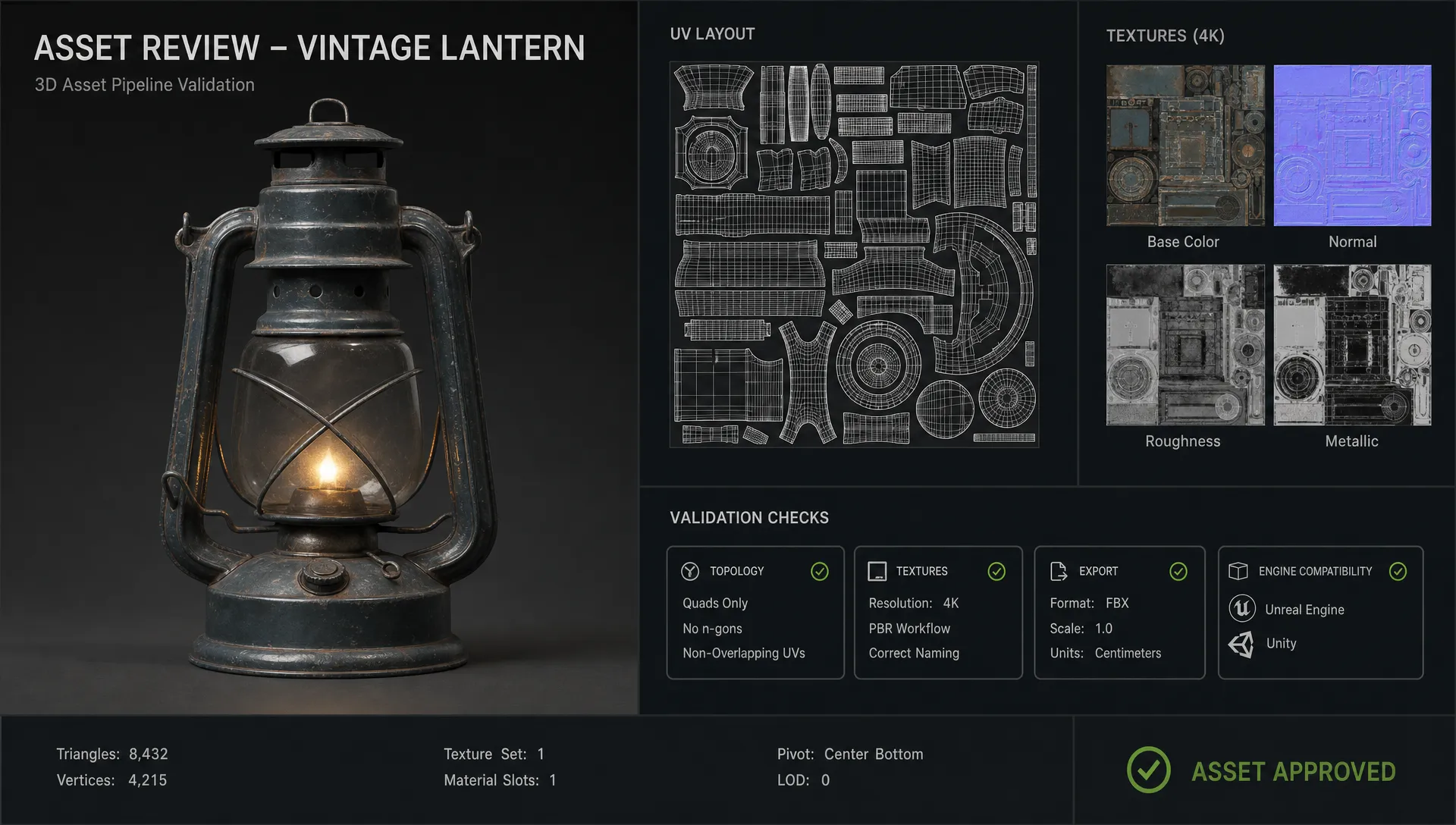
Engine compatibility: test in the environment that matters
A production-ready asset is only ready when it works in its destination environment. This sounds obvious, but many AI 3D workflows stop at the DCC preview stage.
In Unity, teams should confirm import scale, material mapping, texture compression, normal orientation, prefab setup, colliders, LOD groups, and target platform performance. Mobile, desktop, VR, and WebGL builds have very different constraints.
In Unreal Engine, teams should validate material instances, collision, LODs or Nanite suitability, lightmap requirements, skeletal mesh needs, and packaging behavior. An asset can look correct in the viewport but still create performance or build issues.
For web and e-commerce viewers, test GLB or glTF files in the actual viewer. Browser performance, texture size, lighting assumptions, and AR behavior can change how the asset appears to customers.
For 3D printing, import the STL or 3MF into the slicer. Check manifold errors, wall thickness, inverted normals, supports, scale, and fragile details. A printable asset is not the same as a renderable asset.
Governance: the missing layer in most AI 3D pipelines
The more AI-generated 3D assets a team creates, the more important governance becomes. Without governance, teams accumulate files with unclear prompts, unknown model versions, inconsistent rights checks, missing approvals, and uncertain technical quality.
For enterprise teams, this is not a minor operational issue. CMOs need brand consistency. Art directors need creative control. Application managers need secure, manageable systems. Game developers need predictable technical standards. Legal and compliance teams need traceability.
A governed AI 3D workflow should track:
- Source prompt, image, scan, or brief
- Tool or model used for generation
- Version history and reviewer comments
- Rights, usage, and compliance status
- Technical validation status
- Export formats and target environments
- Approval state and final asset location
This is where Virtuall’s role is different from a standalone generator. As a Creative AI OS, the Creative AI OS is designed to control how AI runs across studios, workflows, and tools. Teams can define the rules, orchestrate generation steps, preserve studio context through mood boards, manage reviews and approvals, and keep assets connected to production pipelines.
In other words, Meshy and Tripo can help create candidate assets. Virtuall helps make AI asset creation operational at scale.
A practical blueprint for production-ready 3D workflows with AI
Here is a compact workflow pattern that works across many studios and content teams.
First, define the output class. Is this asset a game prop, product model, environment piece, character concept, AR object, or 3D print? Assign technical requirements before generation.
Second, generate candidates in Meshy, Tripo, or another suitable model. Use prompts, images, and references that reflect the approved art direction. Keep the generation stage exploratory.
Third, review creatively. Choose candidates based on silhouette, proportion, style fit, and production potential. Reject assets that would require more cleanup than manual modeling.
Fourth, move the selected asset into Blender or another DCC tool. Clean geometry, retopologize, rebuild UVs, validate textures, correct scale, and prepare materials.
Fifth, export to the target environment. Use FBX, GLB, OBJ, USDZ, STL, or 3MF based on the next tool and final delivery need.
Sixth, test in the destination. Import into Unity, Unreal Engine, a web viewer, a product configurator, or a slicer. Validate performance and appearance where the asset will actually be used.
Seventh, approve and store. Capture metadata, version history, compliance status, review notes, and final files in the asset system. This is the step that turns a successful experiment into a reusable production process.
Virtuall can support this blueprint by turning it into a repeatable, governed workflow with team context, approval gates, asset tracking, and multi-model orchestration.
Frequently Asked Questions
Can Meshy or Tripo create final production-ready 3D assets? They can create strong starting points and, in some cases, assets that need only light cleanup. For professional game, e-commerce, or print pipelines, teams should still validate topology, UVs, textures, scale, export settings, and target environment compatibility.
What is the best export format for AI-generated 3D models? It depends on the destination. FBX is common for game engines and DCC exchange, GLB or glTF is strong for web and e-commerce 3D, OBJ is useful for simple static mesh transfer, USDZ is common for some AR workflows, and STL or 3MF is used for 3D printing.
Do AI-generated 3D models need retopology? Often, yes. AI meshes can have dense or uneven geometry. Retopology makes the asset easier to animate, optimize, bake, render, import into engines, or prepare for manufacturing.
How should teams use Blender with AI 3D tools? Blender works well as a cleanup and validation hub. Teams can import generated assets, inspect topology, rebuild UVs, refine materials, bake maps, correct scale, and export to Unity, Unreal Engine, web formats, or print workflows.
How does Virtuall differ from Meshy and Tripo? Meshy and Tripo focus on generating 3D assets quickly. Virtuall focuses on operating creative AI at scale, with governance, workflow orchestration, context memory, collaboration, asset management, and integrations across professional pipelines.
Turning AI 3D generation into a reliable studio system
AI can dramatically speed up 3D creation, but production value comes from the workflow around the model. Meshy and Tripo help teams explore and prototype faster. Blender, Unity, Unreal Engine, web viewers, and slicers reveal whether the asset is truly usable. The Creative AI OS provides the operating layer for teams that need consistency, compliance, approvals, and repeatable production standards.
If your studio is ready to move from AI 3D experiments to governed, production-ready workflows, Virtuall can help you define the rules, orchestrate the tools, and scale creative AI with control.
Related reading
Further reading: Before cleanup begins, choose the right generation method with Blender Python vs AI 3D Generators.