Operating System AI: How It Fits Into Your Creative Tech Stack
Operating system AI explained: where it fits in your creative tech stack, from governance and workflows to multi-model image, video, and 3D at scale.
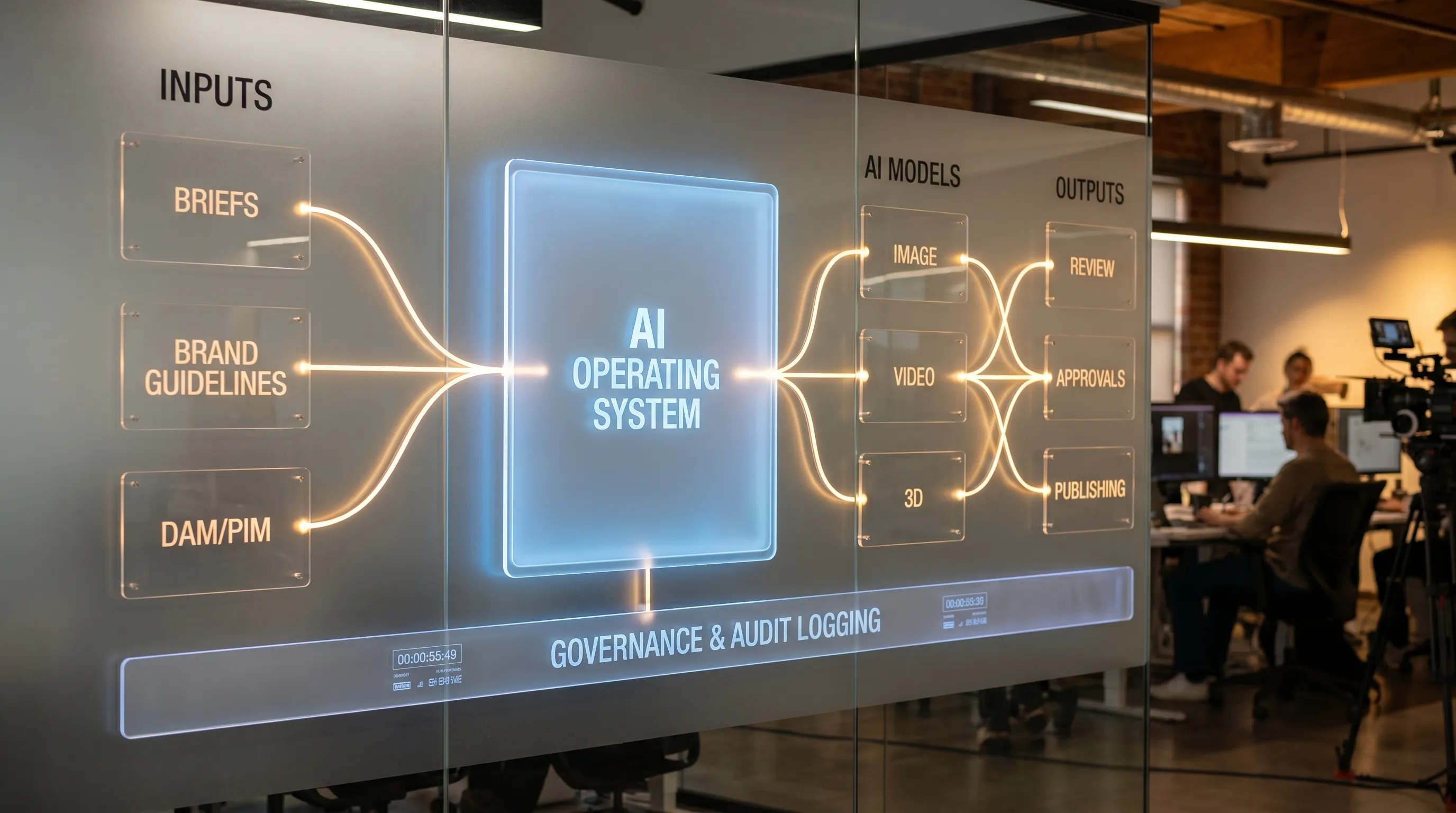
Creative teams are adopting more AI models than ever, but the hardest part is rarely the prompt. It is keeping brand intent consistent across teams, routing work through reviews, managing rights and approvals, and ensuring every output is traceable and compliant. That is where an operating system AI approach fits: it sits above models and tools to standardize how creative AI is used across your stack.
This article breaks down what “operating system AI” means in practice, where it plugs into a modern creative tech stack (DAM, DCC, PIM, game pipelines, MLOps), and how to evaluate it for enterprise-scale creative production.
What “operating system AI” means for creative production
In creative operations, an AI model is like an engine. A tool (a single app) is like a vehicle. An AI operating system is the traffic system, driving rules, and logistics layer that makes thousands of vehicles move predictably and safely.
Practically, an operating system AI layer focuses on:
- Governance: who can use which model, with what data, under what rules.
- Orchestration: turning creative intent into repeatable workflows (brief to iterations to approvals).
- Context: preserving brand and studio intent across prompts, teams, and time.
- Integration: connecting AI generation to your existing tools and repositories.
- Compliance and auditability: proving what happened, when, and why.
This matters because most enterprises now run “multi-model” creative AI, a mix of vendor APIs, internal models, and specialized tools for image, video, audio, and 3D. Without an operating layer, teams often end up with inconsistent outputs, duplicated work, shadow IT, and governance gaps.
Why an operating system AI is showing up in creative tech stacks now
Enterprise creative stacks used to be largely linear: brief, create, review, publish. AI makes it probabilistic and highly iterative, which increases the number of versions, decisions, and risk points.
Here are the forces pushing companies toward an operating system AI layer:
1) Creative AI is now multi-format, not just images
Teams are generating and adapting content across:
- Images (product, lifestyle, key art)
- Video (short-form variations, localized edits)
- 3D (models, materials, scene variations)
- Audio (VO drafts, sound design iterations)
A single-point solution rarely covers all formats well, so orchestration becomes the missing connective tissue.
2) Consistency is a business requirement, not a preference
For CMOs and brand leaders, inconsistency creates real costs: rework, slower campaigns, and uneven brand perception. For studios and game teams, inconsistency breaks pipelines and forces manual cleanup.
An operating system AI approach reduces “variance” by encoding standards (style, tone, composition constraints, format specs) into templates and workflows.
3) Governance and compliance are moving from policy docs to enforced controls
AI governance is shifting from “we told people what to do” to “the system prevents risky behavior.” Many organizations are aligning with risk management frameworks such as the NIST AI Risk Management Framework and preparing for regulatory expectations such as the EU AI Act.
For creative AI, governance commonly includes:
- Model access control (approved models only)
- Prompt and asset logging
- Data boundaries (what can be uploaded, where inference runs)
- Review and approval requirements before publishing
Where an operating system AI fits in your creative tech stack
An operating system AI layer generally sits between your inputs (briefs, brand guidelines, product data, existing assets) and your outputs (approved, production-ready assets), while integrating with the tools your teams already use.
A reference architecture (what connects to what)
| Stack layer | Typical systems | What the operating system AI should do here |
|---|---|---|
| Strategy and planning | Campaign briefs, Jira/Asana, product roadmaps | Turn briefs into structured generation requests and track status across iterations |
| Brand and creative standards | Brand guidelines, style guides, mood boards | Persist intent and context so outputs stay on-brand across teams and time |
| Source of truth for assets | DAM, MAM, repositories | Ingest, tag, version, and route generated assets back to the right destination |
| Product and commerce data | PIM, CMS, SKU catalogs | Use structured product data to generate accurate variants and reduce manual errors |
| Creation tools | DCC tools, editing suites, 3D tools | Integrate so creators can generate, review, and iterate without leaving their environment |
| Model layer | Multiple AI providers, internal models | Orchestrate model selection, enforce safe defaults, and keep outputs consistent |
| Review and approvals | Legal, brand, studio review | Enforce approval workflows, annotate assets, and capture decision history |
| Compliance and audit | Audit logs, policy rules | Provide traceability across prompts, assets, versions, and users |
If your current setup relies on individuals “choosing the right tool” each time, you have a toolchain. If your setup encodes rules, context, and workflows that scale, you are moving toward an operating system AI.
The capabilities that matter most (and why)
Not every platform uses the same terminology, but the evaluation criteria are usually consistent across enterprise creative teams.
AI governance controls (the non-negotiable for enterprise)
Governance is the difference between AI experimentation and AI operations. In practice, look for:
- Policy-based access to models and workflows
- Clear ownership and admin controls (who can publish templates, who can approve)
- Audit logs that connect user, input assets, prompts, model used, and outputs
- Controls that match your infrastructure needs (for example, EU-based processing requirements)
If your application managers cannot explain “how we prevent risky usage,” the stack is not enterprise-ready.
Workflow orchestration (how you turn creativity into throughput)
Orchestration is how work moves from brief to outputs at scale. Strong orchestration typically includes:
- Repeatable workflows for common tasks (campaign variants, localization, seasonal refresh)
- Automated routing to review steps (brand, legal, studio lead)
- Pipeline tracking that shows what is blocked and why
The goal is not to remove creative judgment. The goal is to make judgment happen at the right checkpoints, without chaos.
Generation blueprints and studio context memory
In creative production, “prompting” is not a one-time act. It is a reusable specification.
A blueprint should capture the ingredients that make outputs repeatable:
- The intent (what success looks like)
- Constraints (do not change logo, preserve product proportions, match lighting style)
- Format specs (aspect ratios, frame rates, poly budgets where relevant)
- References (mood boards, existing assets, approved examples)
Context memory (for example, mood boards and studio context) reduces relearning and prevents drift across teams, regions, and agencies.
Multi-model content generation across image, video, and 3D
Most enterprises will not standardize on one model. You want the freedom to use the best model per task while keeping consistent governance and workflow rules.
This is particularly important for game developers and 3D teams, where pipelines may require:
- Consistent naming and versioning conventions
- Format exports that fit engine or DCC requirements
- Review loops for geometry, materials, and style consistency
Collaboration tools that match how studios actually work
AI outputs are not “done” when they are generated. They become production assets when they are reviewed, annotated, approved, and traceable.
Look for collaboration features that support:
- Review workflows and approvals
- Content annotation (feedback in context)
- Hand-offs between roles (Art Director, Producer, Legal, Brand)
Integration with DCC, DAM, and PIM via plugins and API
If your operating layer cannot connect to the rest of the stack, it becomes another silo.
At minimum, enterprise buyers typically need:
- API access for automation and custom integrations
- Plugin-based integrations for creative tools (where creators already work)
- Connectivity to systems of record (DAM, PIM, CMS)
Common implementation patterns (what works in real teams)
Different organizations adopt an operating system AI layer differently, based on their risk tolerance and maturity.
Pattern A: Central governance, distributed creation
A central team defines approved models, templates, and policy rules. Individual studios or regions create content within those guardrails. This is common for global brands and multi-studio environments.
Pattern B: Studio-led adoption for a single pipeline first
A game studio or creative department starts with one repeatable workflow (for example, key art variants, 3D prop ideation, marketing renders), proves value, then expands.
Pattern C: Agency or partner co-production with shared governance
When agencies produce content for an enterprise brand, an operating system AI can enforce brand rules and approval chains without forcing every partner into the same toolset.
A practical evaluation checklist (questions to ask in demos)
Use these questions to determine if a platform is truly an operating system AI layer or simply a generation interface.
| Area | Questions that reveal maturity |
|---|---|
| Governance | Can we restrict models by team, project, region, or data sensitivity? Can we export audit logs? |
| Compliance | Where does inference run? Can we meet data residency requirements? What is the traceability story? |
| Orchestration | Can we define multi-step workflows with reviews and approvals? Can we track pipeline status? |
| Consistency | How do templates, blueprints, and context persist across time and teams? |
| Multi-model | Can we route tasks to different models without rewriting workflows? |
| Integration | Do you have plugins or APIs for DCC, DAM, PIM, and other enterprise systems? |
| Production readiness | What controls ensure outputs meet format and quality specs before delivery? |
How Virtuall maps to the operating system AI approach
Virtuall positions itself as a Creative AI operating system designed to help studios and teams control, orchestrate, and scale AI-powered content creation across image, video, and 3D. Based on the product description, the platform focuses on the core needs that typically define an operating layer:
- AI governance controls to define and enforce rules
- Workflow orchestration to move from generation to review and approvals
- Multi-model content generation across formats (including 3D)
- Generation blueprints (templates) and studio context memory (mood boards) to keep outputs consistent
- Team collaboration (review workflows, approvals, content annotation)
- Asset management and pipeline tracking to operationalize production
- Compliance, including EU-based infrastructure and inference
- Integrations via plugins and API with creative tools (DCC, PIM, DAM, and more)
Virtuall also mentions Nyx, its intelligence layer, which orchestrates multiple AI models and keeps intent and context across studios and teams. If you are evaluating platforms, that “intent continuity” is often the difference between isolated experiments and scalable production.
What success looks like after adoption (metrics that matter)
For enterprise stakeholders, adoption should translate into measurable outcomes. Common metrics include:
- Cycle time: time from brief to approved asset
- Revision count: how many rounds to hit brand-acceptable output
- Reuse rate: how often templates and approved context are reused across teams
- Compliance confidence: ability to answer who generated what, using which inputs and models
- Throughput: assets delivered per week per team (with quality maintained)
For creative leadership, one of the strongest signals is reduced “brand drift” across regions and partners while maintaining creative flexibility.
Frequently Asked Questions
What is an operating system AI in a creative context? An operating system AI is an operating layer that governs and orchestrates how AI is used across creative teams, tools, and models, with repeatable workflows, context, and auditability.
How is an operating system AI different from a prompt tool or a single AI app? A single AI app helps individuals generate content. An operating system AI standardizes generation across teams by enforcing policies, templates, approvals, integrations, and consistent context across multiple models.
Do we still need a DAM if we adopt an AI operating system? In most enterprise stacks, yes. The operating system AI typically integrates with your DAM as the source of truth for storage, metadata, and distribution, while adding orchestration and governance for AI creation.
Why does multi-model support matter for enterprise creative teams? Different models excel at different tasks (image, video, 3D, style control, speed). Multi-model support lets you choose the best model per workflow while keeping the same governance, approvals, and audit trail.
How do compliance and data residency affect creative AI? They determine where data is processed and how outputs are logged and controlled. If you have regulatory or contractual obligations, you may need specific infrastructure choices and traceability to prove compliant usage.
Put an operating system AI layer to work in your stack
If your teams are already using AI but struggling with consistency, approvals, and governance, an operating system AI approach can be the missing layer that turns experimentation into production.
The Creative AI OS is built for operating creative AI at scale, with governance controls, workflow orchestration, multi-model generation across image, video, and 3D, plus collaboration and compliance designed for enterprise needs. Explore Virtuall at virtuall.pro to see how it can fit into your creative tech stack without forcing you to abandon the tools your teams rely on.