Operating Systems Based on Artificial Intelligence Explained
Operating systems based on artificial intelligence explained: key components, governance, and real-world use for enterprise creative teams.

AI is no longer “a tool someone tries in a browser tab.” In enterprise environments, it is becoming a production capability that must be managed, governed, and integrated like any other critical system. That is why you are seeing a new category emerge: operating systems based on artificial intelligence.
This article explains what an AI-based operating system is (and is not), how it differs from traditional operating systems and “AI platforms,” and what enterprise creative teams should look for when they evaluate one.
What is an operating system based on artificial intelligence?
A traditional operating system (Windows, macOS, Linux) manages hardware resources and provides consistent services for applications: identity, permissions, storage, networking, processes.
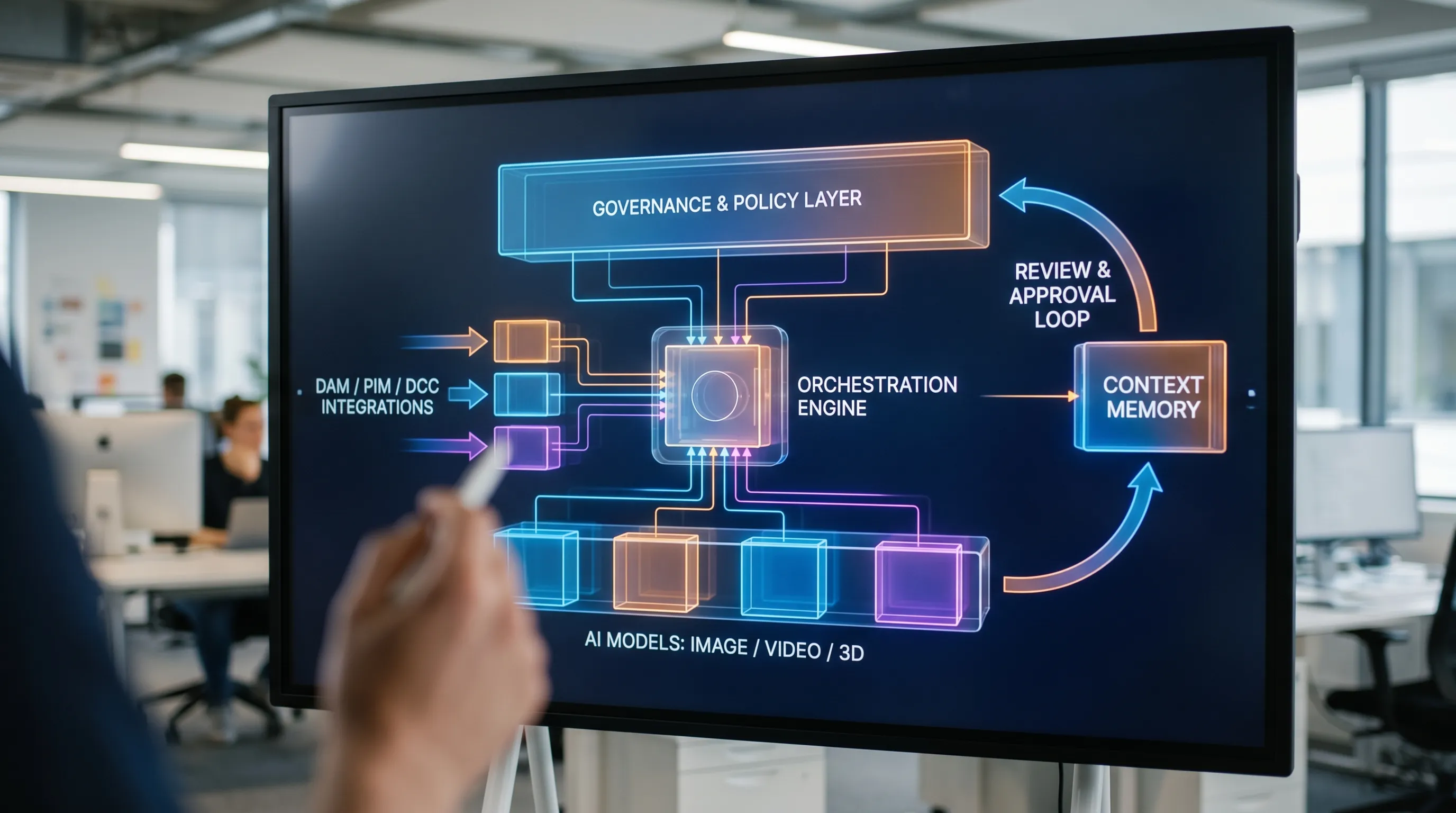
An operating system based on artificial intelligence applies the same idea to AI production. It becomes the “control plane” that:
- Orchestrates AI models and tools across teams and workflows
- Enforces rules, policies, and brand constraints
- Preserves context so outputs stay consistent over time
- Tracks assets, versions, approvals, and provenance
- Provides enterprise governance, security, and compliance
In other words, it is not “one model.” It is the system that decides how AI runs across your studio or organization.
Why this category exists now
Three trends pushed AI into “OS territory”:
1) The model landscape became multi-model by default
Modern creative pipelines often rely on different models for different tasks: image generation, video, audio, 3D, upscaling, inpainting, captioning, tagging, localization. Teams need a reliable way to route work to the right engine, with the right settings, without every person reinventing the stack.
2) Enterprise risk moved from hypothetical to operational
As soon as AI output ships to customers, risks become concrete:
- IP and licensing exposure
- Data leakage from prompts, uploads, or connectors
- Regulatory obligations (especially in the EU)
- Brand inconsistency at scale
Frameworks like the NIST AI Risk Management Framework (AI RMF) reflect this shift: organizations need governance that is systematic, not ad hoc.
3) Creative teams need repeatability, not “cool demos”
A demo can be impressive and still be unusable in production. Creative and marketing organizations need:
- Consistent outputs across campaigns, markets, and channels
- Review, approvals, and audit trails
- Collaboration between creative, legal, and operations
- Integrations with existing tools (DAM, PIM, DCC, APIs)
An AI OS is designed for repeatable, policy-compliant production.
AI OS vs AI platform vs traditional OS
Many products use similar vocabulary, but they are not the same category. Here is a practical comparison.
| Category | Primary purpose | What it manages | Where it lives in your stack | Typical failure mode |
|---|---|---|---|---|
| Traditional OS | Run apps on devices and servers | CPU, memory, storage, permissions | Endpoints, servers, cloud | Secure but not aware of creative intent or AI risk |
| “AI model” | Generate outputs | A single model’s inference behavior | API or app | Great results, inconsistent governance |
| AI platform | Provide tools for building/using AI | Some workflows, datasets, evaluation | Team-level | Fragmentation across departments |
| AI-based operating system | Run AI production consistently at scale | Policies, orchestration, context, approvals, provenance | Org-level control plane | Without it, teams drift into shadow AI and inconsistency |
If your biggest problems are “which model is best,” you might only need an evaluation layer. If your biggest problems are “how do we control and ship safely across teams,” you are already in AI OS territory.
Core building blocks of an AI-based operating system
An AI OS typically includes several layers. You can use these as a checklist when assessing vendors or building internally.
Governance and policy controls
This is the equivalent of identity and access management for AI. Common capabilities include:
- Who can use which models, for which tasks
- Approved prompt patterns and disallowed instructions
- Brand and legal guardrails (for example, restricted terms or visual constraints)
- Audit logs of requests, outputs, and approvals
For regulated environments, governance should map to your internal controls and to external expectations (for example, the direction of travel set by the EU AI Act).
Workflow orchestration
Orchestration is where “AI output” becomes “production output.” Instead of one-off generations, teams need repeatable flows:
- Ingest assets or product data
- Generate variants based on defined templates
- Route for review (creative, brand, legal)
- Export to downstream systems
This is also where latency, throughput, and cost controls typically live.
Multi-model routing across modalities
Enterprises increasingly require images, video, audio, and 3D. A creative AI OS should support multi-model generation and be able to route tasks to the right engines while preserving intent.
The key point is not “how many models,” it is whether your system can keep outputs consistent when different models, settings, and teams are involved.
Context memory for consistency
In production, context is everything: campaign goals, product lines, brand voice, visual references, style constraints.
A strong AI OS maintains studio context memory (for example, mood boards, references, and constraints) so that:
- New team members do not reset quality back to zero
- Outputs remain consistent across weeks and quarters
- Campaign variants look like a cohesive system, not random generations
Collaboration, review, and approvals
In enterprise creative operations, quality is a process. Look for:
- Annotation and feedback loops
- Structured reviews and approvals
- Versioning and traceability
This is where CMOs and Art Directors typically see the fastest value: fewer last-minute surprises and more predictable throughput.
Asset management and pipeline tracking
An AI OS increasingly overlaps with how work is tracked:
- Asset lifecycle and metadata
- Pipeline states (generated, reviewed, approved, published)
- Links between source inputs, prompts, outputs, and final deliverables
This matters for both operational efficiency and auditability.
Integrations (plugins and APIs)
No enterprise wants a new silo. The AI OS should integrate with your existing stack (DAM, PIM, DCC tools, creative suites, internal APIs). Integration depth is often the difference between a pilot and a production rollout.
How an AI OS runs a creative workflow (example)
To make this concrete, imagine a global product launch with localized creative needs.
A well-designed AI OS can:
- Apply a generation blueprint (template) that encodes brand rules and required outputs (formats, aspect ratios, naming conventions)
- Pull product attributes from your systems of record (where applicable)
- Generate image variants and short video cutdowns using approved models
- Keep visual intent consistent using shared context (mood boards, references)
- Route assets into a review workflow with annotations and approvals
- Export production-ready files into your DAM or publishing pipeline
The result is not just “more content.” It is controlled scale.
What different enterprise stakeholders care about
AI OS value is cross-functional. The purchase decision often depends on whether each stakeholder’s “non-negotiables” are covered.
For CMOs
- Brand consistency across channels and regions
- Faster campaign iteration without losing control
- Reduced operational friction between creative and compliance
For Art Directors and Creative Leads
- Creative intent preserved through context, references, and repeatable templates
- Review workflows that match how teams actually work
- Predictable quality, not constant prompt tinkering
For Application Managers and IT
- Security model, access controls, and audit logs
- Integration patterns (APIs, plugins) and maintainability
- Infrastructure location and compliance posture
For Game Developers and 3D teams
- Support for 3D and multi-modal pipelines
- Collaboration and asset traceability
- Ability to standardize generation approaches across teams
Buying criteria: what to evaluate before you commit
Most failed AI rollouts fail for predictable reasons: governance gaps, lack of integration, unusable workflows, or inability to maintain consistency.
Here are evaluation criteria that map well to real enterprise deployments.
1) Governance depth (not just “admin settings”)
Ask whether you can define and enforce rules across:
- Models and tools
- Teams and roles
- Projects and clients
- Data types (what can be uploaded, retained, exported)
2) Workflow realism
If a platform cannot reflect your actual review and approval process, it will be bypassed. Look for a system that fits production, not experimentation.
3) Context handling
Test whether the system can keep style and intent stable across:
- Multiple contributors
- Multiple campaigns
- Multiple modalities (image to video to 3D)
4) Integration readiness
Ask for concrete integration approaches (APIs, plugins) rather than vague promises. Integration is where “value” becomes “adoption.”
5) Compliance and data residency
This is especially important for EU-based teams and industries with strict requirements. Ensure you can explain, at audit time, where data is processed and under what controls.
A note on “AI OS” beyond creative
While this article focuses on creative production, the AI OS concept is also spreading into other business functions.
For example, sales enablement and customer service teams increasingly use controlled AI simulations to improve performance. If you are exploring that side of enterprise AI, tools like Scenario IQ’s AI roleplay training show how orchestration, feedback loops, and analytics can turn AI into a repeatable operating capability for people, not just content.
Where Virtuall fits
Virtuall positions itself as a Creative AI operating system for studios and teams that need to control, orchestrate, and scale AI-powered content creation across image, video, and 3D, with enterprise-grade governance and compliance.
Based on the product description, key pillars include:
- AI governance controls
- Workflow orchestration
- Multi-model content generation across modalities
- Generation blueprints (templates)
- Studio context memory (mood boards)
- Collaboration tooling (reviews, approvals, annotation)
- Asset management and pipeline tracking
- Compliance with EU-based infrastructure and inference
- Integrations via plugins and API
Virtuall also includes Nyx, its intelligence layer designed to orchestrate multiple models while keeping intent and context across studios and teams.
Frequently Asked Questions
Is an operating system based on artificial intelligence the same as an AI model? No. A model generates outputs. An AI-based operating system governs how models are used across teams, workflows, and tools, with repeatability, controls, and traceability.
Do we need an AI OS if we already have a DAM, PIM, or creative suite? Often yes, because those systems manage assets and production steps, but they typically do not govern multi-model AI generation, context memory, and AI-specific policy enforcement.
What is the biggest risk of scaling AI without an AI OS? Inconsistent quality and uncontrolled usage (shadow AI). That leads to brand drift, wasted spend, and higher legal and compliance exposure.
How do we evaluate whether an AI OS can handle enterprise compliance? Look for governance controls, audit logs, access management, data residency options, and clear documentation of where processing happens and how data is protected.
Can an AI OS support images, video, and 3D in one pipeline? The category is moving in that direction. The key is whether the system can orchestrate multiple models and keep intent consistent across modalities.
Next step: operationalize creative AI (without losing control)
If your organization is moving from AI experiments to production, the most important shift is adopting a system that can enforce rules, preserve context, and integrate into real creative workflows.
Explore Virtuall at virtuall.pro to see how a Creative AI OS can help you scale production-ready image, video, and 3D outputs with governance and compliance built in.