AI Tools and Platforms Every Creative Ops Team Should Review
Review the AI tools and platforms creative ops teams need for governed, scalable image, video, and 3D production workflows.
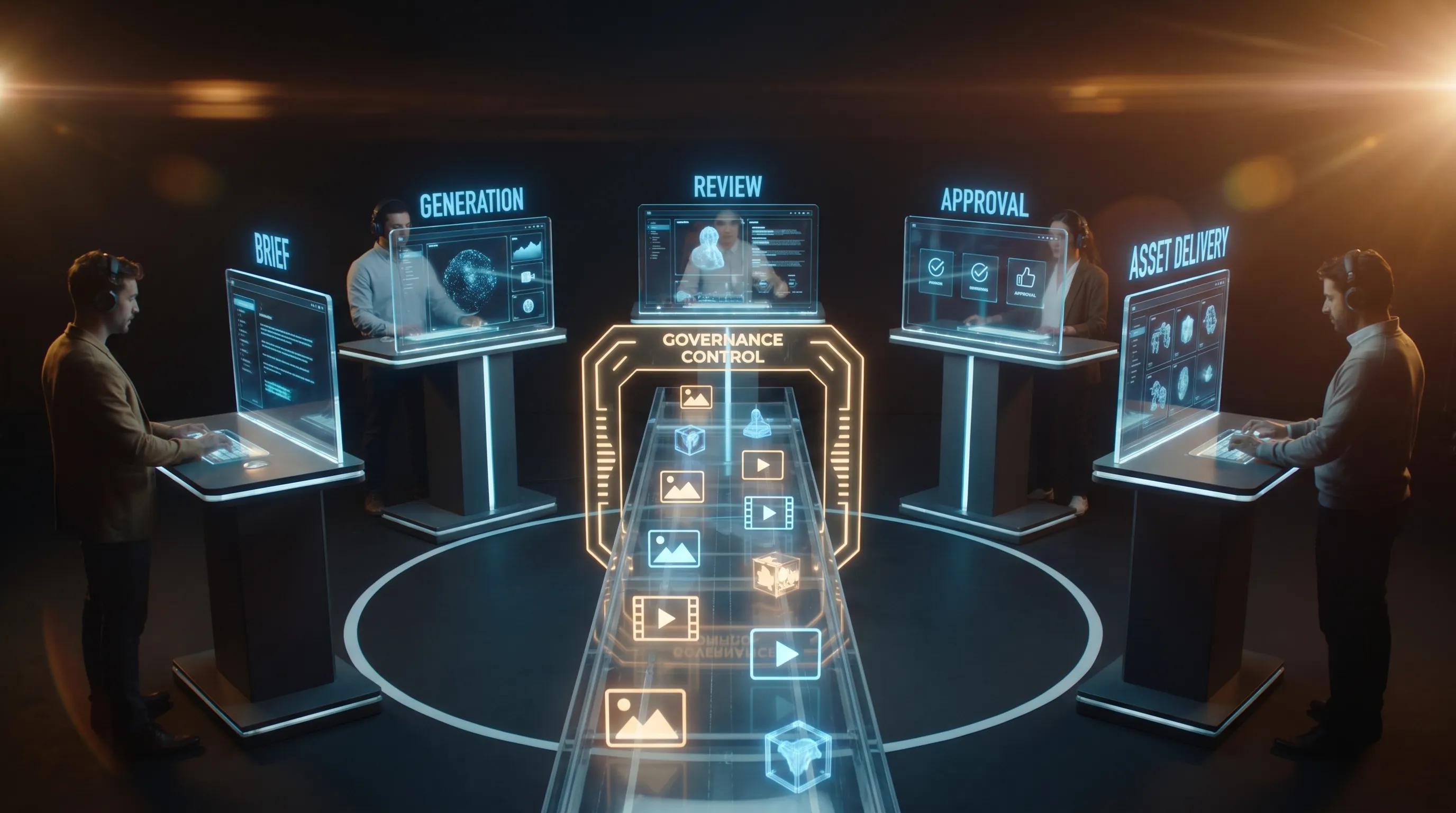
Creative AI has moved from isolated experiments into the operating core of modern content production. A creative ops team is no longer just asking, “Which AI tool can make the best image?” The better question is, “Which AI tools and platforms can help us produce more assets, maintain brand control, protect rights, integrate with our stack, and keep humans in the loop?”
That distinction matters. A single impressive generation does not equal a scalable creative workflow. Enterprise teams need repeatable outputs, clear approvals, model governance, asset traceability, and workflows that connect to the systems their studios already use.
This guide breaks down the categories of AI tools and platforms every creative ops team should review in 2026, with practical criteria for CMOs, art directors, application managers, and game developers.
What creative ops teams need from AI in 2026
Generative AI has matured quickly, but adoption has created a new operational challenge. Teams can now generate concepts, images, videos, copy, audio, and 3D assets faster than ever. The bottleneck is no longer creation alone. It is coordination, review, compliance, and production readiness.
McKinsey estimated that generative AI could add trillions of dollars in annual economic value across industries, with marketing and sales among the major areas of potential impact. That upside is real, but only if organizations can operationalize AI responsibly rather than leaving it scattered across disconnected experiments. The full value comes when AI supports the content supply chain, from brief to delivery.
For creative ops, that means evaluating platforms across four dimensions:
| Evaluation area | Why it matters | What to look for |
|---|---|---|
| Creative quality | AI outputs must be useful, not just impressive | Brand consistency, controllability, editable outputs, production formats |
| Workflow fit | Tools must support how teams actually work | Briefing, generation templates, review workflows, approvals, annotations |
| Governance | Enterprise AI needs rules, rights, and auditability | Access controls, model policies, data residency, usage logs, legal review paths |
| Integration | AI should connect to the existing creative stack | DAM, PIM, DCC, project management, APIs, plugins, asset metadata |
The following categories are not all interchangeable. Some are point tools for specific creative tasks. Others are operating layers that coordinate multiple tools, models, and workflows. A strong AI stack usually includes both.
1. Foundation model platforms
Foundation model platforms are the underlying AI engines that power text, image, video, audio, code, and multimodal generation. These include general-purpose model providers as well as specialized creative model ecosystems.
For creative teams, foundation models can support ideation, concept development, style exploration, prompt expansion, copy variations, synthetic imagery, video drafts, and automated asset metadata. For application managers, they also become infrastructure choices that affect cost, security, latency, and integration complexity.
The most important thing to understand is that no single model is best for every creative job. One model might be strong at product-background generation, another at cinematic motion, another at text rendering, and another at 3D asset ideation. Creative ops teams should therefore avoid locking their entire workflow around a single model unless there is a strong governance or cost reason to do so.
When reviewing foundation model platforms, ask:
- Can the model be used through an enterprise API?
- What are the data usage and retention terms?
- Can teams control which models are allowed for specific workflows?
- Does the platform support multimodal inputs, such as images, video, and text together?
- Are outputs commercially usable under the vendor’s terms?
- Can the model be routed through a governed workflow rather than used directly by individuals?
Foundation models are powerful, but they are not a creative operations system by themselves. They need policies, templates, context, approvals, and integrations to become reliable in production.
2. Creative AI operating systems
A Creative AI operating system is the orchestration layer that helps teams control how AI runs across models, studios, workflows, and tools. This category becomes important when a team moves beyond experimentation and starts using AI across campaigns, content pipelines, product visuals, game assets, or localization workflows.
This is where platforms like Virtuall fit. The Creative AI OS is built to help teams operate creative AI at scale across image, video, audio, and 3D workflows. Instead of treating each model or prompt as an isolated activity, it provides governance controls, workflow orchestration, generation blueprints, studio context memory through mood boards, asset management, pipeline tracking, and collaboration features such as reviews, approvals, and annotations.
For enterprise teams, the operating layer matters because it lets creative leaders define the rules. Which models can be used? Which brand context should guide generation? Which outputs require approval? Which assets can move into production? Which workflows need EU-based infrastructure and inference? These are not small operational details. They are what separate safe, repeatable AI production from scattered tool usage.
Virtuall also includes Nyx, the intelligence layer of its Creative AI OS. Nyx orchestrates multiple industry-leading AI models and keeps intent and context across studios and teams. That matters because creative quality often depends on continuity. A campaign, product universe, or game world needs a shared visual language, not a random series of disconnected prompts.
| Need | Point AI tool | Creative AI operating system |
|---|---|---|
| Generate a single image or clip | Strong fit | Also possible, but not the main value |
| Standardize repeatable workflows | Limited | Strong fit |
| Manage approvals and collaboration | Often limited | Strong fit |
| Govern model usage and compliance | Varies widely | Core requirement |
| Connect AI to DAM, PIM, DCC, or APIs | Sometimes available | Core requirement |
| Preserve studio context across teams | Usually manual | Built into the operating model |
If your team is already testing several AI tools, this category should be reviewed early. It can prevent the common problem of tool sprawl, where every team finds a different AI app and no one can track what was made, approved, or reused.
3. Image generation and editing platforms
Image generation remains one of the most mature areas of creative AI. It is valuable for campaign concepting, mood boards, product visualization, storyboarding, ecommerce content, social variations, packaging ideas, and art direction exploration.
Tools in this category include model-based image platforms, design-suite AI features, fine-tuned brand image generators, and editing tools that support inpainting, outpainting, background replacement, style transfer, and image expansion. Popular platforms vary in their strengths. Some are excellent for artistic exploration, others are better suited for enterprise-safe commercial workflows, and others are designed for teams that need custom models or API-driven generation.
For CMOs, image AI can increase the volume and speed of visual experimentation. For art directors, it can widen the creative territory before production begins. For application managers, the key is whether these tools can be governed, integrated, and audited.
Review image tools against criteria such as:
- Brand consistency across many outputs
- Prompt control and reusable generation templates
- Ability to use approved references and mood boards
- Editing depth, including masks, layers, and region-specific changes
- Output resolution and file format support
- Commercial usage terms and model training policies
- Content provenance and labeling support
Image generation should not be evaluated only by “best-looking output.” In production, the better platform is often the one that produces controllable, reviewable, legally usable assets that fit your brand system.
4. Video and motion generation platforms
Video AI is advancing quickly, but creative ops teams should approach it with a production mindset. Short AI-generated clips can be useful for animatics, previz, social ideas, product motion tests, game cinematic concepts, and campaign mood exploration. However, long-form consistency, character continuity, precise brand control, and legal review remain important constraints.
Platforms in this category include text-to-video, image-to-video, video editing AI, generative motion tools, and AI-assisted post-production features. Teams may review providers such as Runway, Pika, Luma, Google Veo, OpenAI Sora, Adobe Firefly Video, and other enterprise or specialized tools as the market evolves.
The practical review question is not “Can this make an impressive clip?” Many tools can. The better question is “Can this support the kind of motion asset our team actually needs?”
Look closely at:
- Shot control, camera direction, motion consistency, and prompt adherence
- Ability to maintain character, product, or environment continuity
- Support for storyboards, references, and brand context
- Maximum duration, resolution, aspect ratios, and export formats
- Rights, indemnity terms, data handling, and review controls
- Integration with editing, approval, and asset management workflows
For enterprise marketing teams, video AI can accelerate early creative development and increase variant production. For game studios, it can help with cinematic ideation and previsualization. In both cases, final usage should pass through the same creative, legal, and brand checks as any other production asset.
5. 3D, game asset, and spatial content platforms
3D generation is especially relevant for game developers, product visualization teams, virtual production studios, ecommerce brands, and teams building AR or spatial experiences. AI can help turn prompts, sketches, or reference images into 3D concepts, meshes, textures, materials, or environment ideas.
This category is exciting, but it requires careful review. A 3D asset that looks good in a preview is not necessarily ready for a game engine, product configurator, or production pipeline. Creative ops teams should involve technical artists, 3D leads, and pipeline engineers when evaluating these platforms.
Key criteria include:
- Mesh quality, topology, UVs, scale, and polygon count
- PBR material support and texture quality
- Rigging, animation compatibility, and cleanup requirements
- File formats such as FBX, OBJ, glTF, USD, and USDZ
- Compatibility with Blender, Maya, Houdini, Unreal Engine, Unity, and internal tools
- Rights, training data transparency, and asset reuse policies
- Batch generation and API support for high-volume pipelines
For game studios, AI-generated 3D can be valuable in concepting, grayboxing, prop ideation, environment exploration, and rapid prototyping. For production assets, the review standard should be stricter. The platform must fit the technical constraints of the project, not just produce a visually attractive model.
6. DAM, PIM, DCC, and creative stack integrations
AI tools become far more valuable when they connect to the systems creative teams already use. For enterprise organizations, that usually means a mix of DAM platforms, PIM systems, DCC tools, project management software, review tools, cloud storage, and internal APIs.
This is where many AI pilots fail. A team generates hundreds of assets, but the outputs sit outside the approved asset library. Metadata is missing. Rights are unclear. Versions are hard to track. Approved assets cannot be pushed into ecommerce, campaign management, game production, or localization workflows without manual effort.
Creative ops should review whether AI platforms can connect to:
- DAM systems for asset storage, metadata, rights, and reuse
- PIM systems for product data, variants, and ecommerce content
- DCC tools used by designers, video teams, 3D artists, and technical artists
- Review and approval tools for legal, brand, and stakeholder signoff
- Project management and pipeline tracking systems
- Internal APIs, plugins, and automation workflows
For application managers, integration is often the deciding factor. A creative AI tool that looks great in a demo but cannot connect to your stack may create more operational overhead than value. A slightly less flashy platform with strong APIs, governance, and workflow fit may be the better long-term choice.
7. Governance, provenance, and compliance platforms
Creative AI governance is not only a legal concern. It is a production concern. Teams need to know which assets were AI-generated, which model was used, which references informed the output, who approved it, and whether it can be used in a specific market or channel.
The regulatory environment is also becoming more mature. The EU AI Act creates new obligations for AI systems, and organizations operating in or selling to European markets should track its requirements with legal counsel. The NIST AI Risk Management Framework is also a useful reference for teams building internal AI risk practices.
Creative ops teams should also watch content provenance standards such as C2PA, which supports content credentials and digital provenance. Provenance will not solve every rights question, but it can help organizations track how assets were created and modified.
When reviewing governance capabilities, prioritize:
- Role-based access and permission controls
- Approved model lists and restricted model policies
- Data residency and infrastructure requirements
- Audit logs for prompts, generations, edits, approvals, and downloads
- Asset lineage, metadata, and provenance support
- Human review steps for high-risk or externally published content
- Clear vendor terms around training data, customer data, and commercial use
Governance should not be treated as a blocker. Done well, it makes creative AI adoption easier because teams know what is allowed, what requires review, and what can safely move into production.
8. Workflow automation and creative operations analytics
The final category is not purely generative, but it is essential. Creative ops teams need automation and analytics to understand whether AI is actually improving throughput, quality, and cost efficiency.
Workflow automation can route briefs, trigger generation workflows, assign reviews, notify stakeholders, move approved assets into a DAM, and create structured records for compliance. Analytics can show which workflows are saving time, which outputs are being rejected, which models are used most often, and where human review is slowing down delivery.
The most useful metrics are practical and tied to the creative supply chain:
| Metric | What it shows | Why it matters |
|---|---|---|
| Cycle time per asset | Time from brief to approved output | Measures speed improvement |
| Approval rate | Share of AI outputs accepted after review | Measures usefulness and brand fit |
| Rework rate | How often outputs need manual correction | Identifies quality or prompt issues |
| Cost per approved asset | Total platform and labor cost per usable output | Connects AI usage to business value |
| Model usage by workflow | Which models are used for which tasks | Supports governance and optimization |
| Asset reuse rate | How often generated assets or templates are reused | Measures scalability and consistency |
For CMOs, these metrics connect AI to business outcomes. For art directors, they reveal which workflows improve creative quality rather than just speed. For application managers, they help rationalize the tool stack. For game developers, they show where AI supports production versus where it creates cleanup work.
A practical scorecard for reviewing AI tools and platforms
Before approving a new AI platform, creative ops should use a structured scorecard. This prevents teams from being swayed by a polished demo that does not reflect real production needs.
| Criterion | Suggested weight | What to inspect |
|---|---|---|
| Production quality | 20% | Output fidelity, editability, consistency, file formats, technical readiness |
| Governance and compliance | 20% | Access controls, audit trails, model policies, data terms, provenance |
| Workflow fit | 15% | Briefing, templates, reviews, approvals, collaboration, annotations |
| Integration | 15% | DAM, PIM, DCC, APIs, plugins, project management, asset metadata |
| Brand and context control | 15% | Mood boards, references, style memory, generation blueprints, reusable prompts |
| Scalability and cost | 10% | Usage limits, batch workflows, latency, compute cost, enterprise support |
| Vendor maturity | 5% | Roadmap, security posture, documentation, support, implementation approach |
The scorecard should be tested against real work, not generic prompts. Use actual briefs, approved brand assets, product constraints, channel requirements, and review processes. If the platform cannot handle your real workflow, it is not ready for your production stack.
How to build your shortlist
A good AI shortlist should reflect your operating model. A global CPG brand, a game studio, a fashion retailer, and an internal creative agency may all need different tools, even if they are evaluating the same categories.
Start by mapping where AI can create the most operational leverage. Common high-value use cases include campaign concepting, ecommerce image variants, product scene generation, localization, video ideation, 3D prototyping, and brand-compliant content scaling.
Then run a controlled pilot with a small number of vendors. Compare output quality, review effort, integration complexity, governance readiness, and user adoption. Do not rely only on creative preference. In enterprise environments, the winning platform is the one that creative, legal, IT, security, and operations teams can all support.
A balanced shortlist often includes:
- A model access strategy for core generation capabilities
- Specialized point tools for image, video, or 3D use cases
- A Creative AI operating system to orchestrate workflows, context, governance, and integrations
- DAM, PIM, and DCC integration paths to connect outputs to production
- Governance and provenance practices to keep AI usage compliant and traceable
This approach gives creative teams room to explore while giving the organization enough structure to scale responsibly.
Frequently Asked Questions
What are AI tools and platforms for creative ops? They are software systems that help creative teams generate, edit, manage, review, approve, and deliver AI-assisted content. They can include image generators, video tools, 3D platforms, foundation models, workflow systems, governance tools, and Creative AI operating systems.
How should an enterprise team choose between point tools and an AI operating system? Point tools are useful for specific tasks, such as generating an image or video clip. An AI operating system is more useful when teams need repeatable workflows, governance, approvals, shared context, and integrations across multiple models and creative tools.
Are AI-generated creative assets production-ready? Sometimes, but not automatically. Production readiness depends on the use case, quality standards, rights, file formats, technical requirements, and approval process. Teams should validate outputs through the same creative, legal, and technical review steps used for traditional assets.
Why does governance matter for creative AI? Governance helps teams control which models are used, how data is handled, who can approve outputs, and whether assets can be used commercially. It reduces risk and gives creative teams clearer rules for safe adoption.
Can AI tools support 3D and game development workflows? Yes, AI can help with concepting, prototyping, environment ideas, texture generation, and some asset creation. However, game-ready assets still need technical review for topology, optimization, rigging, materials, engine compatibility, and performance constraints.
What should creative ops measure during an AI pilot? Measure cycle time, approval rate, rework rate, cost per approved asset, asset reuse, user adoption, and integration effort. These metrics show whether AI improves the content supply chain, not just whether it creates impressive samples.
Move from AI experiments to governed creative operations
The best AI tools and platforms are not simply the ones that generate the most eye-catching output. They are the ones that fit your creative workflows, protect your brand, support compliance, integrate with your stack, and help teams produce consistent work at scale.
If your studio is ready to move from scattered AI pilots to governed creative AI production, Virtuall is built for that shift. It helps teams orchestrate multi-model generation across image, video, audio, and 3D, define governance controls, preserve studio context, manage assets, and connect AI workflows to the broader creative pipeline.
Creative AI is becoming part of the operating model for modern content teams. The earlier you define the rules, workflows, and platforms behind it, the easier it becomes to scale with confidence.