An Artificial Intelligence Operating System Example for Studios
Explore an artificial intelligence operating system example for studios, showing how AI governance, workflows, models, and assets scale.
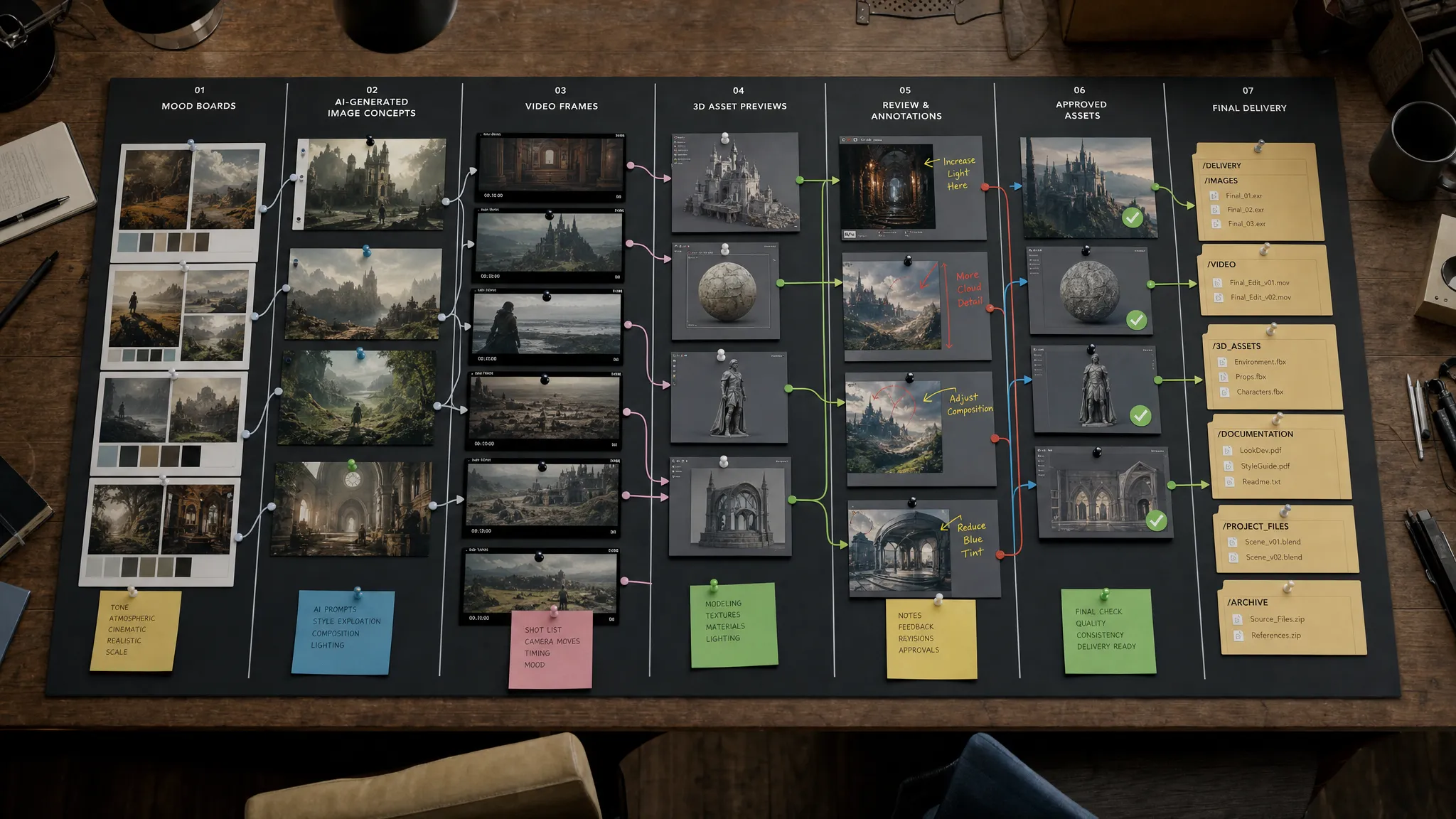
Studios are no longer asking whether AI can generate an image, a video clip, a texture, a product mockup, or a 3D concept. The harder question is whether AI can be controlled well enough for production.
That is where an artificial intelligence operating system example becomes useful. For a studio, an AI operating system is not another prompt box or a single generative model. It is the layer that defines how AI is used across teams, tools, models, reviews, assets, and compliance requirements.
In practical terms, it helps a creative organization move from isolated AI experiments to repeatable AI-powered production. The goal is simple: keep the speed and optionality of generative AI, while preserving brand standards, artistic direction, legal guardrails, and workflow discipline.
Why studios need an AI operating layer
Creative teams already have sophisticated production environments. A campaign may involve a CMO, brand team, art director, 3D artists, game developers, external agencies, application managers, and legal reviewers. Each team has its own tools, deadlines, formats, and approval paths.
When AI enters that environment as a collection of disconnected tools, the problems appear quickly. One team uses one image model, another uses a different video model, prompts are copied into spreadsheets, brand references are stored in random folders, and approvals happen outside the production pipeline. The studio may gain speed in experimentation, but lose control in delivery.
For enterprise studios, this is especially risky. The cost of inconsistent outputs is not just creative rework. It can affect brand equity, IP safety, data governance, regional compliance, asset traceability, and production timelines.
An AI operating system gives the organization a shared way to answer key operational questions:
- Which models can be used for which type of work?
- What creative context should every generation follow?
- Who can generate, edit, approve, and export assets?
- Where are AI-created assets stored and tracked?
- How do outputs move into DCC, DAM, PIM, marketing, or game production pipelines?
- What policies and compliance requirements apply before content is released?
This is why the operating system concept matters. It turns AI from a collection of tools into a managed creative infrastructure.
What an AI operating system means in creative production
An AI operating system for studios does not replace macOS, Windows, Blender, Photoshop, Maya, Unreal Engine, a DAM, or a PIM. Instead, it sits across the creative stack and coordinates how AI is used inside that stack.
Think of it as a control and orchestration layer. It governs who can use AI, routes work through approved workflows, connects multiple models, maintains creative context, tracks assets, and gives teams a consistent production process.
This aligns with the broader direction of enterprise AI governance. The NIST AI Risk Management Framework emphasizes governance, mapping, measuring, and managing AI risks. For studios, those principles need to be translated into creative operations: briefs, references, models, rights, approvals, outputs, and delivery formats.
| AI OS layer | Studio problem it solves | Practical example |
|---|---|---|
| Governance controls | AI use becomes inconsistent or risky | Define which users, teams, models, and workflows are approved |
| Studio context memory | Creative intent is lost between prompts and tools | Reuse mood boards, art direction, brand rules, and campaign references |
| Workflow orchestration | AI tasks happen outside the production pipeline | Route briefs, generations, reviews, annotations, and approvals in sequence |
| Multi-model generation | One model cannot handle every creative need | Use different AI models for image, video, 3D, or audio tasks |
| Generation blueprints | Teams reinvent prompts and formats each time | Standardize repeatable templates for campaign assets or product renders |
| Asset management | Outputs disappear into local folders | Store, version, and track AI-generated assets as production objects |
| Integrations | AI outputs do not fit existing tools | Connect to DCC, DAM, PIM, and internal systems through plugins or APIs |
The value is not that every task becomes automated. The value is that every AI-assisted task becomes easier to manage, repeat, review, and scale.
A practical artificial intelligence operating system example for a studio
Imagine a game studio preparing a seasonal launch. The team needs key art, character variations, store assets, short-form video concepts, social media crops, 3D prop explorations, and localized campaign visuals.
Without an AI operating system, each team might generate assets independently. Marketing may produce social visuals in one AI tool. The art team may explore character concepts in another. A 3D team may test props elsewhere. Legal and brand teams may only see the results late in the process. By then, the work may be visually impressive but misaligned with the art bible, rating requirements, or regional campaign rules.
With an AI operating system, the same initiative can run as a governed production loop.
The studio captures creative context once
The art director defines the campaign mood, visual pillars, approved references, character constraints, color palette, environment style, and forbidden directions. Instead of relying on scattered prompt notes, that context becomes a reusable studio memory.
For example, a mood board can preserve the difference between gritty sci-fi and clean futuristic luxury. That distinction matters. Two prompts may use similar words, but an art director's visual context determines whether the output feels on-brand.
For CMOs and brand leaders, this protects consistency across channels. For art directors, it keeps AI from flattening the style into generic output. For application managers, it reduces the risk of teams building unofficial AI processes outside approved systems.
Blueprints turn creative intent into repeatable production
Next, the studio uses generation blueprints. These are templates for recurring creative tasks, such as hero key art, product render variations, environment exploration, paid social crops, teaser video concepts, or 3D asset ideation.
A blueprint can define the required inputs, approved context, output format, review step, and usage rules. The team does not need to rebuild the process for every request. The operating system makes the process repeatable.
This is particularly valuable for enterprise content operations. A global launch rarely needs one image. It may need hundreds of variations across regions, placements, formats, and audiences. Repeatability becomes the difference between a successful AI pilot and a scalable AI production model.
Orchestration routes the work to the right model and workflow
Different creative tasks require different AI capabilities. A still image exploration, a video concept, a 3D object, and an audio variation should not necessarily be handled by the same model or workflow.
An AI operating system can orchestrate multiple models while preserving the same creative intent. In Virtuall, for example, Nyx acts as the intelligence layer of the Creative AI OS, orchestrating multiple industry-leading AI models while keeping context and intent across studios and teams.
This model-agnostic approach matters because creative AI changes quickly. Studios should not have to rebuild their production process every time a new model becomes useful. The operating system should let the organization adopt better capabilities without losing governance, memory, and workflow control.
Reviews and approvals stay inside the production process
AI does not remove the need for human judgment. It increases the volume of possible outputs, which makes review discipline even more important.
In a studio operating model, generated assets move into review workflows where stakeholders can annotate, compare, approve, reject, or request changes. An art director can flag visual drift. A brand manager can check campaign alignment. Legal can review sensitive usage concerns. Production leads can decide which assets are ready to enter the next stage.
The important shift is that review is not an afterthought. It is part of the AI workflow itself.
Approved assets move into the existing pipeline
Once approved, assets need to go somewhere useful. For a marketing team, that may be a DAM or campaign management system. For commerce, it may involve a PIM. For 3D and game production, it may involve DCC tools or internal pipelines.
The AI operating system should track the asset, preserve its context, and connect it to the next system of record. That is how AI-generated content becomes production-ready instead of remaining a promising file in someone's downloads folder.
What makes this an operating system instead of just an AI tool?
The distinction matters because many teams already have access to AI tools. The issue is not access. The issue is operational control.
| Single AI tool | AI operating system for studios |
|---|---|
| Generates output from individual prompts | Coordinates AI across briefs, teams, models, and approvals |
| Usually depends on one model or provider | Can orchestrate multiple models for different creative tasks |
| Stores context inconsistently | Maintains reusable studio context such as mood boards and style direction |
| Leaves governance to individual users | Applies policies, permissions, and workflow rules centrally |
| Produces files that may need manual organization | Tracks assets, versions, annotations, and pipeline status |
| Works well for experimentation | Supports repeatable, governed production at scale |
A studio does not need an AI operating system because AI tools are weak. It needs one because AI tools are powerful. The more content AI can produce, the more important it becomes to decide how that content is generated, reviewed, stored, and used.
Governance is where the AI OS earns its name
For enterprise teams, governance cannot be separated from creativity. If AI is used to generate campaign content, product visuals, 3D concepts, or video assets, the organization needs clear controls around data, users, models, approvals, and outputs.
This is not only a legal concern. It is also a creative quality concern. Governance helps a studio prevent unauthorized model usage, inconsistent styles, duplicated work, unapproved exports, and unclear ownership of outputs.
Organizations building formal AI management practices may also look to standards such as ISO/IEC 42001, which focuses on AI management systems. A creative AI operating system does not replace internal governance programs, but it can make those programs operational inside day-to-day production.
For studios working in regulated or multinational environments, infrastructure decisions also matter. EU-based infrastructure and inference, when required by the organization, can support stronger alignment with regional compliance strategies. The key is that compliance should not be bolted on at the end. It should be part of how AI runs from the start.
How Virtuall maps to this studio operating system model
Virtuall is designed as a Creative AI operating system for teams that need to operate creative AI at scale. Rather than treating image, video, 3D, and audio generation as disconnected activities, it gives studios a way to control, orchestrate, and govern AI-powered content creation across formats.
The platform combines AI governance controls, workflow orchestration, multi-model content generation, generation blueprints, studio context memory through mood boards, collaboration tools for reviews and approvals, content annotation, asset management, and pipeline tracking.
For application managers, the integration layer is especially important. Creative AI needs to fit the systems a studio already depends on, including DCC, PIM, DAM, and other production tools. The Creative AI OS supports this direction through plugins and API-based connectivity.
For art directors, the key value is preserving intent. AI can generate many options, but a studio still needs outputs that reflect the right visual language. Mood boards, blueprints, approvals, and context-aware orchestration help reduce drift.
For CMOs, the benefit is scale with consistency. Campaign teams can accelerate production without turning every channel into a separate AI experiment. For game developers and content teams, the benefit is a more structured path from concept exploration to usable production assets.
How to evaluate whether your studio needs an AI OS
A studio may not need a full operating layer for small experiments. But once AI touches brand, client work, product visuals, 3D pipelines, paid media, or enterprise workflows, the case becomes stronger.
A useful readiness check is to ask:
- Are multiple teams already using AI tools in different ways?
- Do you need consistent outputs across campaigns, brands, regions, or titles?
- Are prompts, references, and approvals hard to track?
- Do AI-generated assets need to move into DAM, PIM, DCC, or production systems?
- Do legal, security, or compliance teams need more visibility into AI usage?
- Are you trying to scale AI beyond pilots without losing creative control?
If the answer is yes to several of these, the challenge is no longer just content generation. It is AI operations.
The studios that succeed with AI will not be the ones that generate the most random variations. They will be the ones that build the clearest operating model: the right context, the right controls, the right workflows, the right models, and the right review process.
Frequently Asked Questions
What is an artificial intelligence operating system for studios? An artificial intelligence operating system for studios is a control layer that governs, orchestrates, and tracks AI-powered creative work across teams, models, workflows, assets, and compliance requirements.
How is an AI operating system different from a generative AI tool? A generative AI tool usually creates outputs from prompts. An AI operating system manages the broader production environment, including context, permissions, model routing, reviews, approvals, asset storage, and integrations.
Does a creative AI OS replace artists or art directors? No. Its role is to support creative teams by making AI use more consistent, repeatable, and governable. Human direction, judgment, review, and taste remain central to the process.
Why does model orchestration matter for studios? Different models are better suited to different tasks, such as images, video, 3D, or audio. Orchestration lets teams use the right model for the job while keeping the same creative context and governance rules.
Is an AI operating system only for enterprise studios? Enterprise studios have the strongest need because of scale, compliance, and workflow complexity. However, growing game studios, agencies, and advanced creator teams can also benefit once AI becomes part of recurring production.
Bring creative AI under studio control
AI can accelerate creative production, but only if teams can trust the process behind the output. A studio-grade AI operating system helps creative organizations preserve intent, manage risk, and scale production without fragmenting workflows.
If your team is ready to move from AI experiments to governed creative operations, explore the Virtuall Creative AI OS and see how studios can control, orchestrate, and scale AI-powered content creation across image, video, 3D, and more.