AI Tools for Game Development Teams in 2026
Explore AI tools for game development in 2026, from concept art and 3D assets to QA, governance, and enterprise-ready pipelines.
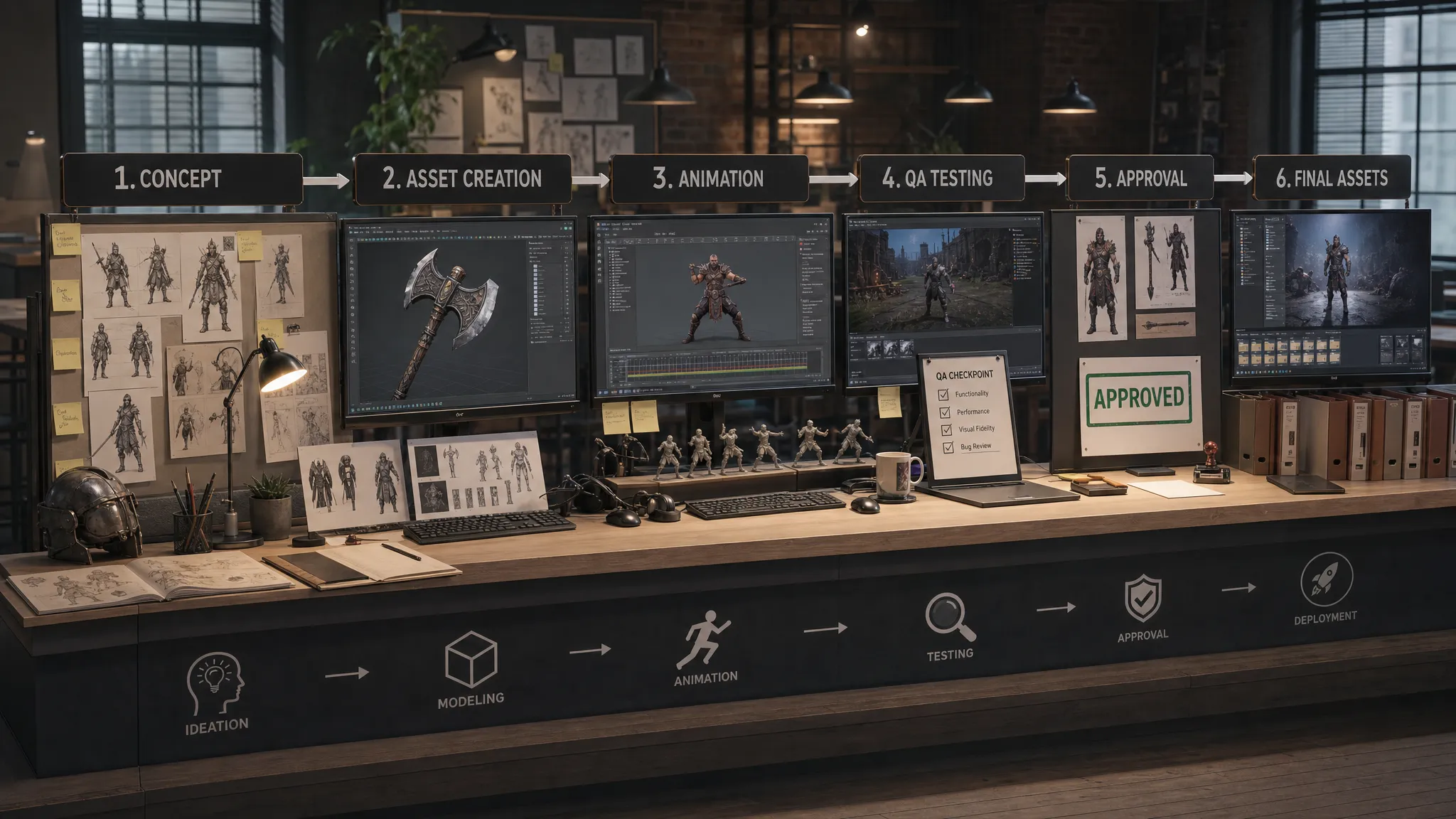
Game production in 2026 has moved beyond asking whether AI can generate a single image, prop, or line of dialogue. The harder question is whether a game development team can use AI repeatedly, safely, and consistently across a real pipeline.
For a solo creator, a prompt tool can be enough to explore an idea. For a studio, especially an enterprise team, AI touches art direction, asset management, legal review, localization, QA, build pipelines, and brand consistency. That makes the choice of AI tools for game development less about novelty and more about operating control.
The most effective teams are not replacing creative judgment with automation. They are using AI to compress iteration loops, create more options, standardize repetitive production tasks, and let specialists spend more time on the work that requires taste, technical direction, and game feel.
What changed for game development teams in 2026
The AI tooling landscape has matured quickly. In 2023 and 2024, many studios experimented with standalone generators for concept art, NPC dialogue, code suggestions, and prototype assets. By 2026, the conversation has shifted toward production readiness.
Three changes matter most.
First, game teams now need multi-format AI workflows. A single title may involve 2D concept art, 3D models, video references, animation previews, audio, marketing assets, and localization. Tools that only generate one output type can still be useful, but they often create handoff friction unless they connect to the rest of the pipeline.
Second, compliance has become a core requirement. The EU AI Act and other emerging governance frameworks have pushed enterprises to document how AI is used, which models are approved, where data is processed, and how outputs are reviewed. This is especially important for studios handling licensed IP, unreleased game concepts, player data, or confidential production assets.
Third, consistency has become more valuable than one-off quality. A stunning AI-generated character exploration is not enough if the next twenty outputs ignore the established style guide. Teams need systems that preserve context across projects, departments, and production stages.
The main categories of AI tools for game development
There is no single best AI tool for every game team. A mobile studio prototyping casual game mechanics has different needs from an AAA studio producing cinematic assets, live-service content, or franchise marketing material.
A practical stack usually combines specialized tools with an orchestration layer that keeps work connected, governed, and traceable.
| Tool category | Best use in game production | Primary users | Key enterprise requirement |
|---|---|---|---|
| Concept and visual ideation | Mood boards, character directions, environment studies, marketing explorations | Art directors, concept artists, creative leads | Style consistency, rights review, approved model access |
| 3D asset generation and acceleration | Props, environment objects, variants, blockouts, texture ideas | 3D artists, technical artists, level designers | DCC compatibility, topology quality, asset tracking |
| Animation and video AI | Motion references, cinematic previews, animatics, trailer concepts | Animators, cinematic teams, marketing teams | Review workflows, versioning, editorial control |
| Code and scripting assistants | Gameplay prototypes, editor tools, debugging support, documentation | Game developers, tools engineers, technical designers | Secure code handling, repository policies, human review |
| QA and testing AI | Bug triage, test case generation, regression support, gameplay telemetry analysis | QA teams, producers, developers | Traceability, integration with issue trackers, reliability |
| Audio, dialogue, and localization AI | Placeholder voice, localization drafts, NPC dialogue variants, accessibility text | Narrative teams, localization managers, audio teams | Licensing, performer rights, localization QA |
| Governance and orchestration platforms | Workflow control, model routing, approvals, context memory, pipeline visibility | Producers, application managers, studio leadership | Permissions, compliance, integrations, auditability |
The highest return usually comes from connecting these categories instead of treating them as isolated experiments.
Where AI fits across the game production pipeline
Pre-production and creative direction
Pre-production is often where AI delivers the fastest visible value. Teams can explore visual directions, generate mood board variations, test character silhouettes, and create environment studies before committing to expensive production paths.
For art directors, the challenge is not generating more images. It is keeping exploration inside a coherent creative frame. A useful AI workflow should support approved references, style boundaries, project-specific context, and review checkpoints. Otherwise, teams risk creating attractive outputs that do not fit the game.
AI can also help narrative and design teams pressure-test ideas earlier. Dialogue variations, quest summaries, faction descriptions, item naming, and lore drafts can all move faster when AI is used as a structured ideation partner. However, final narrative ownership should remain with writers and creative leads, especially when tone, cultural nuance, or franchise canon matters.
Production art and 3D assets
3D generation is one of the most exciting areas for game development teams, but it also requires careful evaluation. A model that looks good in a preview may still fail production checks if it has poor topology, unusable UVs, bad scale, excessive polycount, or unclear licensing.
In 2026, the most practical use cases are often acceleration rather than full automation. AI can support prop variants, reference meshes, blockouts, texture exploration, and rapid visual options. Technical artists and 3D leads then decide what can be refined, rebuilt, optimized, or discarded.
For enterprise studios, the important question is whether AI-generated assets can move into existing pipelines. Teams should evaluate support for DCC tools, digital asset management systems, naming conventions, metadata, review states, and engine requirements. Without that connection, AI assets may become another unmanaged folder of experiments.
Animation, cinematics, and video references
AI video and animation tools can help teams create animatics, cinematic previsualization, marketing concepts, and movement references. This is valuable when teams need to align directors, animators, producers, and stakeholders before investing in final animation.
The risk is mistaking a convincing preview for production-ready animation. Games require responsiveness, technical constraints, retargeting, blending, and engine integration. AI-generated motion may be useful as reference, but it still needs animator judgment and technical validation.
Video AI is also useful outside core game production. Marketing teams can test campaign directions, create trailer storyboards, and explore social-first variants before committing to final shoots or cinematic renders.
Code assistance and technical workflows
AI coding assistants are now common across software teams, and game development is no exception. They can help developers write boilerplate, explain unfamiliar code, draft editor scripts, generate unit tests, and document internal tools.
For game teams, the key is guardrails. Code suggestions should not bypass architecture decisions, security policies, repository rules, or performance requirements. Studios should define where AI coding tools are allowed, how generated code is reviewed, and whether proprietary source code can be sent to external services.
This is where AI governance becomes practical, not theoretical. The NIST AI Risk Management Framework is a useful reference for thinking about AI systems in terms of governance, mapping, measurement, and risk management.
QA, testing, and live operations
QA teams can use AI to cluster bug reports, summarize reproduction steps, generate test cases, and analyze large volumes of player feedback. In live-service environments, AI can help teams identify sentiment patterns, recurring complaints, or content issues faster.
That said, AI should support QA judgment rather than replace structured testing. Games contain emergent behavior, platform-specific problems, performance edge cases, and gameplay feel issues that require experienced testers. The best AI tools reduce administrative load so QA specialists can spend more time finding and explaining the issues that matter.
Why teams need an AI operating layer, not just more tools
As soon as multiple departments use AI, tool sprawl becomes a production risk. One team uses a public image generator, another uses a code assistant, a third experiments with 3D assets, and marketing uses separate video tools. Each tool may be useful on its own, but the organization can lose visibility into prompts, assets, approvals, licensing, and model usage.
An AI operating layer solves a different problem from a single generator. It defines how AI runs across the studio.
For game development teams, that means answering questions such as:
- Which models are approved for which types of work?
- Can confidential IP be used as input, and under what conditions?
- Who can generate, edit, approve, or publish AI-assisted assets?
- How is project context preserved across teams?
- Where are outputs stored, reviewed, and tracked?
- How do AI workflows connect to DCC tools, PIM, DAM, game engines, and production systems?
This is where platforms like Virtuall become relevant for enterprise teams. Virtuall is positioned as a Creative AI operating system for controlling, orchestrating, and scaling AI-powered content creation across images, video, audio, and 3D. Its focus on governance controls, workflow orchestration, generation blueprints, studio context memory through mood boards, review workflows, approvals, annotation, asset management, and pipeline tracking addresses the operational side of AI adoption.
For application managers and studio technology leaders, this distinction matters. The question is not only whether a model can create a useful output. It is whether the studio can make that output repeatable, compliant, reviewable, and compatible with production.
Virtuall's Nyx intelligence layer also reflects a broader 2026 trend: teams do not want to be locked into one model for every creative task. They need orchestration across multiple industry-leading AI models, while maintaining intent and context across studios and teams.
How to evaluate AI tools for game development in 2026
A good evaluation process should involve creative leads, developers, producers, legal or compliance teams, IT, and security. If only one group chooses the tool, another group may block it later.
Start with the workflow, not the model demo. A polished demo can hide gaps in governance, rights management, integration, or asset quality. Ask what the tool will do inside your actual pipeline.
| Evaluation area | Questions to ask | Why it matters |
|---|---|---|
| Creative control | Can teams use approved references, style guides, and templates? | Keeps outputs aligned with the game vision |
| Governance | Are permissions, approved models, and usage policies configurable? | Reduces legal, security, and brand risk |
| Data handling | Where is data processed and stored? Can sensitive assets be protected? | Critical for unreleased IP and enterprise compliance |
| Production quality | Are outputs usable beyond a preview? Can they be edited by artists? | Prevents AI experiments from slowing production |
| Integrations | Does the tool connect to DCC, DAM, PIM, APIs, or internal systems? | Avoids disconnected asset silos |
| Collaboration | Are review, approval, annotation, and versioning supported? | Helps teams move from exploration to approved work |
| Traceability | Can teams track prompts, models, versions, and asset lineage? | Supports audits, rights review, and debugging |
| Scalability | Can the system support multiple projects, teams, and regions? | Matters when AI moves from pilot to studio-wide adoption |
For rights and provenance, teams should also watch standards such as C2PA, which focuses on content authenticity and provenance. Standards alone do not solve every legal question, but they point toward more transparent asset histories, which are increasingly important for enterprise creative operations.
A practical rollout plan for studios
The safest way to adopt AI tools for game development is to begin with controlled, measurable workflows. Avoid launching AI across the entire studio without clear policies, because uncontrolled adoption can create hidden risks and inconsistent habits.
A phased rollout works better.
| Phase | Focus | Example success signal |
|---|---|---|
| Pilot | One team, one workflow, limited asset types | Faster concept iteration without policy violations |
| Controlled expansion | Add more roles, review steps, and approved templates | Outputs are consistently reviewed and stored correctly |
| Pipeline integration | Connect AI workflows to asset systems and production tools | Less manual handoff between ideation and production |
| Studio scale | Standardize governance, reporting, and model access | Multiple teams use AI with shared rules and visibility |
Pre-production is usually the easiest starting point because the cost of iteration is lower. Concept exploration, mood boards, environment references, and marketing previsualization can create clear value without immediately touching final in-game assets.
After that, studios can expand into 3D workflows, localization support, QA summarization, and production tracking. The right sequence depends on the bottleneck. If art direction is slow, start with visual ideation. If QA is overloaded, test AI-assisted bug triage. If teams are already using unauthorized tools, prioritize governance first.
Common mistakes to avoid
One common mistake is treating AI as a department-level shortcut rather than a studio-level capability. If teams adopt tools independently, leadership may discover too late that assets have unclear provenance, models were not approved, or confidential references were uploaded to services that do not meet policy.
Another mistake is measuring only generation speed. Faster output is useful, but speed without approval, editability, and consistency can create rework. The better metric is cycle time from idea to approved asset, document, test case, or production decision.
A third mistake is excluding artists and developers from tool selection. The people who will use AI every day understand where it helps and where it creates friction. Successful studios involve them early, then give them clear guardrails rather than vague restrictions.
Finally, do not assume AI outputs are production-ready by default. Even strong tools require human direction, technical validation, and review. The best results come from combining AI acceleration with experienced creative and engineering judgment.
Frequently Asked Questions
What are the best AI tools for game development teams in 2026? The best tools depend on the workflow. Most teams need a mix of concept generation, 3D acceleration, code assistance, QA support, localization tools, and an orchestration layer that manages governance, approvals, and pipeline integration.
Can AI generate production-ready game assets? Sometimes, but not automatically. AI can accelerate references, variants, textures, blockouts, and draft assets. Production teams still need to validate topology, optimization, licensing, style fit, and engine compatibility.
How should enterprise studios manage AI compliance? Studios should define approved tools and models, control access, document data handling, track asset lineage, and require human review for sensitive work. Governance should be built into workflows rather than handled after assets are created.
Will AI replace game artists or developers? AI is more useful as an acceleration layer than a replacement. It can reduce repetitive tasks and expand exploration, but final decisions about gameplay, art direction, narrative, performance, and quality still require skilled professionals.
Why is orchestration important for game AI workflows? Orchestration helps teams coordinate models, prompts, project context, approvals, assets, and integrations. Without it, AI adoption can become fragmented, inconsistent, and difficult to audit.
Bringing AI into game production with control
In 2026, AI tools for game development are becoming part of the production stack. The studios that benefit most will not be the ones using the most tools. They will be the ones that connect AI to creative intent, governance, collaboration, and production systems.
If your team is moving from AI experimentation to scalable creative operations, the next step is to define how AI should run across your studio. The Creative AI OS from Virtuall is designed for teams that need controlled, compliant, production-oriented AI workflows across image, video, audio, and 3D content.