Building Creative Workflow Integration Ecosystems That Scale
Learn how creative workflow integration ecosystems connect AI, DAM, collaboration and production tools to scale enterprise content operations.
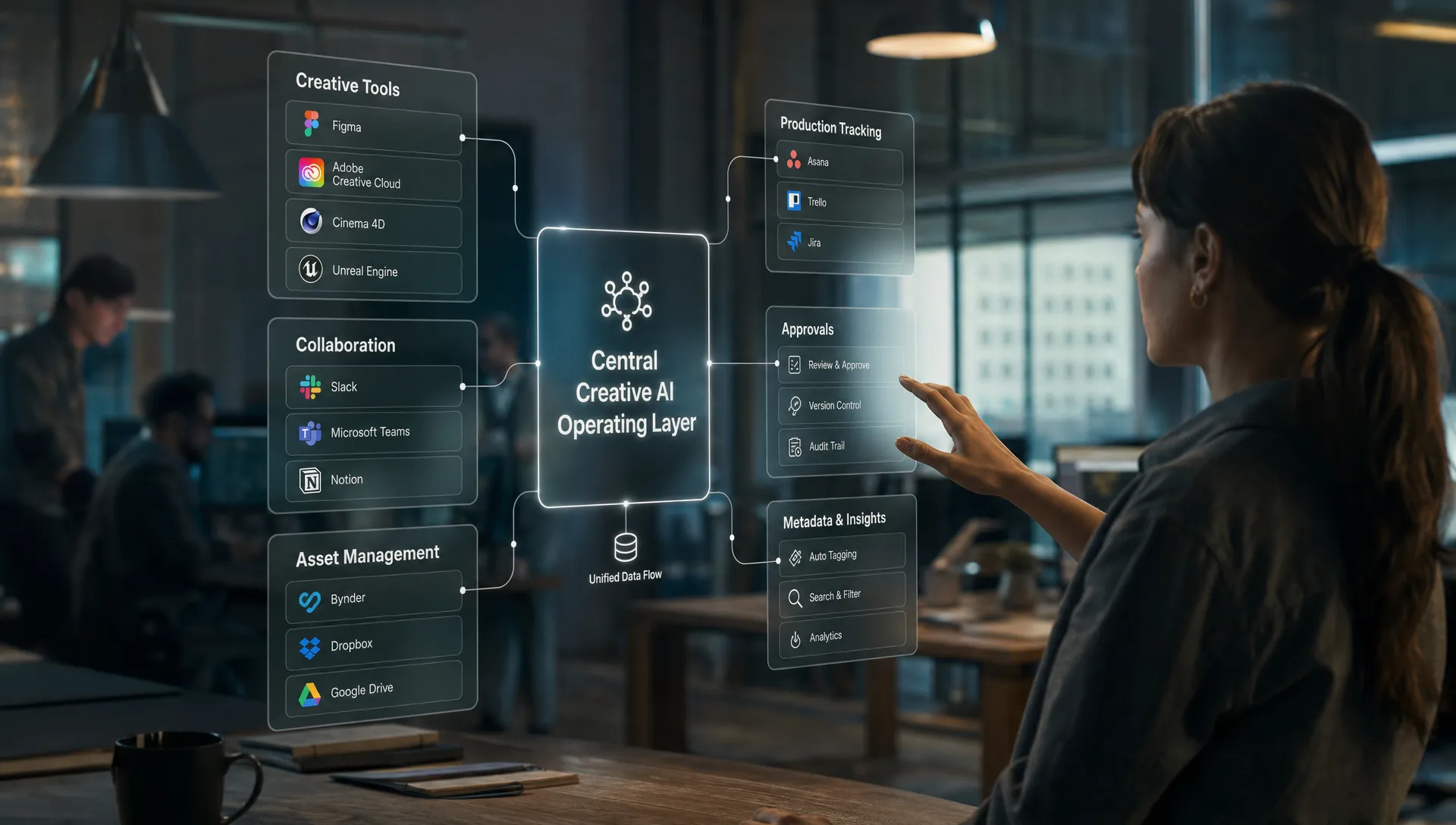
Creative teams are no longer integrating a single design tool with a task board. They are connecting AI models, DCC applications, review rooms, DAMs, PIMs, game engines, production trackers and publishing channels. For enterprise studios, the hard part is not making one tool talk to another. It is keeping creative intent, governance and delivery status intact as work moves through the stack.
That is why scalable creative workflow integration ecosystems matter. They turn a collection of tools into a controlled production environment where assets, approvals, metadata, model instructions and team decisions move together.
For CMOs, this means faster campaign output without losing brand control. For art directors, it means creative consistency across markets and formats. For application managers, it means fewer fragile one-off automations. For game developers and 3D teams, it means production context can survive across DCC tools, engines, rendering pipelines and asset libraries.
What a creative workflow integration ecosystem actually is
A creative workflow integration ecosystem is the connected operating layer between the systems a creative organization already uses. It is not just a workflow automation script, a project management board or an asset library. It is the architecture that coordinates how creative work is requested, generated, reviewed, versioned, governed, stored and delivered.
In a mature ecosystem, the integration layer connects four types of systems:
| Layer | Role in the ecosystem | Common systems involved | Scaling question |
|---|---|---|---|
| Creation | Where creative work is made or generated | Adobe Creative Cloud, Figma, Blender, Maya, Unreal Engine, Unity, AI models | Can artists work in familiar tools while the workflow remains controlled? |
| Collaboration | Where feedback, review and decisions happen | Slack, Microsoft Teams, Frame.io, Miro, review portals | Can approvals and comments become production signals, not disconnected conversations? |
| Asset and data management | Where assets, metadata and product context live | DAM, PIM, MAM, CMS, brand portals | Can every asset retain its rights, variants, usage rules and lineage? |
| Production tracking | Where work status and dependencies are managed | ShotGrid, ftrack, Jira, Asana, custom trackers | Can teams see what is blocked, approved, ready or live across the pipeline? |
This ecosystem should do more than pass files from one platform to another. It should carry context: who requested the asset, which campaign or product it belongs to, which brand rules apply, which AI model or template was used, which version was approved and where the final output can be published.
If your organization is still defining the operating layer for AI production, Virtuall's article on the Creative OS blueprint for repeatable AI production explains why teams need a structured layer above individual tools.
Why point-to-point integrations break as production grows
Point-to-point integrations are tempting because they solve immediate pain. A file lands in a folder, a Slack message is triggered, a task moves to review or a generated image is pushed into a DAM. These automations can be useful, but they often become brittle when creative volume increases.
The first issue is hidden context. A file transfer does not automatically explain why an asset exists, which prompt created it, whether it follows legal constraints or which approval path it needs. Without this information, people have to reconstruct intent manually.
The second issue is inconsistent governance. Creative AI introduces variables that traditional production pipelines were not built to manage, including model selection, prompt reuse, reference assets, synthetic media disclosure, data residency and usage rights. If these controls live in scattered tools, enforcement depends on individual discipline.
The third issue is format complexity. A campaign may need static images, product renders, short video cuts, 3D variants, thumbnails, social crops, marketplace assets and localized versions. A general automation tool may route files, but it will not necessarily understand previews, dependencies, render states, 3D materials, version trees or review annotations.
The fourth issue is operational visibility. Leaders need to know how much work is in flight, where reviews are delayed, which assets are ready for launch and which requests are consuming AI resources. A set of isolated integrations rarely provides that end-to-end view.
This is where creative workflow integration ecosystems differ from basic automation. They are designed around production logic, not only system connectivity.
Comparing the main tool categories in a creative stack
A scalable integration ecosystem does not replace every tool. It clarifies what each category should own and how deeply it should integrate with the rest of the stack.
| Tool category | What it is best at | Deep integration to look for | Where it falls short alone |
|---|---|---|---|
| Creative suites and DCC tools | Authoring, editing, layout, motion, 3D modeling and look development | Plugins, panels, export presets, shared libraries, API access and support for production formats | They are usually not designed to coordinate governance, approvals and cross-team production logic |
| Collaboration apps | Fast feedback, discussions, alerts and stakeholder visibility | Event triggers, threaded comments, approval signals, identity mapping and review status sync | They can become noisy if they are treated as the system of record |
| DAM, MAM and PIM systems | Asset storage, metadata, rights, product data, renditions and distribution control | Metadata mapping, version sync, taxonomy alignment, usage rights and automated ingestion | They manage finished or managed assets well, but do not always orchestrate creation |
| Production tracking platforms | Scheduling, dependencies, shot or asset status, assignments and delivery milestones | Task status sync, review rounds, asset dependency mapping and pipeline events | They track work, but may not understand AI model context or creative generation rules |
| General project management tools | Task coordination, team planning and operational reporting | Webhooks, forms, automations, dashboards and identity sync | They are rarely built for media-specific versions, previews, annotations, renders and creative lineage |
| Creative AI operating systems | AI orchestration, workflow rules, governance, generation templates and multi-format production | Model routing, plugins, API connections, review workflows, asset management and compliance controls | They need a clear integration strategy to fit cleanly into the existing enterprise stack |
For example, a design team may keep Adobe tools for detailed image work, Figma for interface concepts, a DAM for approved campaign assets and Jira for production tasks. A game studio may rely on Maya, Blender, Unreal Engine, Perforce, ShotGrid and custom build tools. The goal is not to force every team into one interface. The goal is to connect the systems so the workflow behaves like one controlled production environment.
For 3D-heavy teams, standards also matter. The Alliance for OpenUSD promotes Universal Scene Description as an open framework for 3D scene interchange, which is relevant when assets need to move between DCC applications, renderers and engines without losing structure.
Automation use cases that prove whether the ecosystem scales
Useful automation in creative operations is not about removing people from the process. It is about making the right work appear in the right place with the right context, then routing decisions back into the pipeline.
The strongest orchestration use cases usually fall into a few patterns.
- Asset intake and routing: A campaign request, product brief or game asset requirement enters the system, then gets routed based on format, market, priority, product line, licensing rules or skill requirements.
- Generation and variation workflows: Approved prompts, templates, references and brand rules are applied to produce image, video, 3D or audio variations without each creator rebuilding the setup from scratch.
- Review and approval loops: Stakeholders annotate assets, approve variants or request changes, and those decisions update task status, asset metadata and downstream publishing readiness.
- Publishing and delivery coordination: Approved assets are transformed, named, tagged and sent to the right DAM, CMS, store page, ad platform, e-commerce system or game content pipeline.
- Cross-system status sync: The ecosystem keeps collaboration apps, production trackers and asset libraries aligned so teams do not chase the same update in multiple places.
These patterns are especially valuable when the same creative idea has to become many production outputs. A retailer might need one hero concept adapted into marketplace images, social clips, local-language banners and product detail page media. A game studio might need a creature concept to become reference boards, sculpting tasks, texture variants, animation notes, engine-ready previews and marketing renders.
Many of these workflows overlap with the practical patterns in Virtuall's guide to creative automation examples for production teams, but the integration ecosystem is the broader architecture that keeps those automations reliable at scale.
Specialized media-production workflows versus general project management
General project management tools are useful, but creative production has requirements that go beyond task lists and due dates. The difference becomes obvious when AI-generated and multi-format assets enter the pipeline.
| Capability | Specialized media-production workflow need | General project management limitation |
|---|---|---|
| Version lineage | Track asset versions, prompt versions, references, approvals and output variants | Often tracks task history, not detailed creative lineage |
| Visual review | Support frame, region, scene or asset-level annotations | Comments may be separated from the exact visual change |
| Media transformation | Generate crops, formats, render outputs, previews or derivatives | Usually depends on external tools for media processing |
| Rights and compliance | Preserve usage rights, model governance, provenance and market-specific restrictions | Compliance fields may be custom and inconsistently enforced |
| 3D and video dependencies | Track renders, shots, rigs, materials, scenes, sequences and engine-ready assets | Dependencies may be too generic for production pipelines |
| AI orchestration | Route work across models, templates, human review and approved output destinations | Often lacks model context, prompt governance and generation memory |
For a marketing department, this distinction affects brand consistency and launch readiness. For a game studio, it affects whether a character, prop, environment or cinematic asset can move through concept, modeling, texturing, review and engine implementation without broken context. For application managers, it affects integration maintainability because media-specific workflow states cannot always be forced cleanly into generic task fields.
The better approach is to keep general project management where it adds value, such as planning, reporting and team coordination, while letting a media-aware operating layer manage creative generation, asset context, approvals and handoff logic.
Governance has to be built into the workflow, not added later
Creative AI changes the governance problem because the production process now includes model behavior, training data concerns, prompts, generated outputs and synthetic media policies. If governance only happens at final review, teams discover problems too late.
A scalable ecosystem should apply rules at multiple points. Before generation, it can restrict which models, references or templates are available for a brand, product category or region. During production, it can record prompts, generation settings, asset lineage and reviewer decisions. At delivery, it can enforce metadata requirements, approved destinations and usage restrictions.
This matters more as regulation and corporate AI policies mature. The European Commission's overview of the AI Act makes clear that organizations using AI systems need to think about risk, transparency and accountability. Creative teams may not all operate in high-risk AI categories, but enterprise governance teams still expect traceability, policy controls and documentation.
Provenance is another important area. The C2PA specification provides a technical framework for content credentials and provenance metadata. Not every workflow needs the same level of provenance today, but creative leaders should design integration ecosystems that can carry this information when the business requires it.
Governance should not feel like a separate compliance tax for artists. The best systems make the compliant path the easiest path: approved templates, controlled reference libraries, automated metadata, structured review and clear handoff rules.
Architecture principles for scalable creative workflow integration ecosystems
Building a scalable ecosystem starts with architectural discipline. Before adding more tools or automations, teams should decide which system owns which type of truth.
A DAM may own approved final assets and usage rights. A PIM may own product attributes. A production tracker may own task state and dependencies. A collaboration app may own discussion, but not final approval logic. A creative AI operating layer may own generation context, workflow rules, model orchestration and AI governance.
From there, use these principles to guide implementation:
- Integrate around the workflow, not the org chart: Map the path from request to delivery, then connect the tools that matter at each stage.
- Preserve context as metadata: Treat prompts, references, model choices, approvals, rights and target channels as production data, not side notes.
- Keep creators in their tools: Use plugins, panels and APIs so artists can work in familiar environments while the workflow layer tracks progress.
- Design human checkpoints deliberately: Automate routing and formatting, but keep art direction, brand approval and sensitive decisions visible.
- Avoid making chat the system of record: Collaboration apps are excellent for notifications and discussion, but final decisions should sync back to governed workflow states.
- Plan for format diversity: Image, video, audio and 3D assets have different review, storage, transformation and publishing requirements.
- Measure the pipeline: Track cycle time, revision loops, approval delays, failed handoffs and asset reuse so the ecosystem improves over time.
The practical outcome is a stack where creative teams can move faster without creating a new layer of operational chaos. Instead of asking people to remember the process, the ecosystem carries the process for them.
Where Virtuall fits in the ecosystem
The Creative AI OS is built for teams that need creative AI to operate across real production environments, not as a set of isolated experiments. As a Creative AI operating system, it helps studios and enterprise teams control, orchestrate and scale AI-powered content creation across image, video, 3D and audio workflows.
The platform is designed around the core needs of a scalable ecosystem: AI governance controls, workflow orchestration, multi-model content generation, generation blueprints, studio context memory through mood boards, review workflows, approvals, content annotation, asset management, pipeline tracking and integrations with creative tools through plugins and API.
Nyx, Virtuall's intelligence layer, orchestrates multiple industry-leading AI models and keeps intent and context across studios and teams. That is especially important when production depends on more than one model, more than one team or more than one output format.
Virtuall also supports enterprise requirements such as EU-based infrastructure and inference, which can matter for organizations with strict compliance and data residency expectations. For teams trying to make AI usable in production, these controls are not optional. They are part of making creative workflow integration ecosystems dependable.
For collaboration specifically, Virtuall's article on AI-enabled creative collaboration explores how shared context and structured review help enterprise teams move beyond fragmented AI usage.
A practical roadmap for implementation
A scalable ecosystem does not need to arrive as a big-bang transformation. Most teams get better results by starting with one high-value production flow and expanding from there.
Start by choosing a workflow with clear business value, such as campaign localization, product asset generation, game concept-to-3D handoff or video variant production. Map the current process honestly, including manual steps, approval delays, duplicate uploads, naming problems, disconnected comments and compliance checks.
Next, define the source of truth for each major object: brief, asset, product data, approval status, prompt, reference material, final output and publication destination. This step prevents future integrations from fighting over ownership.
Then connect the minimum systems required to make the workflow reliable. In many organizations, that means a creative tool, a DAM or asset library, a collaboration or review system, a production tracker and a creative AI orchestration layer. Only after that foundation works should the team add more channels, formats or automation rules.
Finally, measure operational outcomes. Faster generation is useful, but it is not the only metric. Track fewer manual handoffs, fewer rejected assets, faster approvals, better reuse, improved brand consistency and clearer audit trails. Those are the signals that the ecosystem is actually scaling.
Frequently Asked Questions
What is a creative workflow integration ecosystem? It is a connected operating layer that coordinates creative tools, AI models, collaboration apps, DAM systems, production trackers and publishing destinations so assets and context move through production reliably.
Which systems should enterprise creative teams integrate first? Start with the systems involved in your highest-volume or highest-risk workflow. For many teams, that means connecting the creative authoring tool, DAM, review process, production tracker and AI orchestration layer before expanding into publishing channels.
How is this different from using a project management tool? Project management tools are useful for planning and task visibility, but specialized media-production workflows also need asset lineage, visual review, format transformation, AI governance, rights metadata and production-ready handoff.
Why does AI governance belong inside the workflow? AI governance needs to influence which models, templates, references and outputs are allowed before work reaches final review. Embedding governance into the workflow reduces rework and makes compliance easier to prove.
Can a DAM be the center of the ecosystem? A DAM can be the source of truth for approved assets, metadata and rights, but it usually should not be responsible for every part of creative generation, review, AI orchestration and production tracking. The ecosystem works best when each system has a clear role.
Build the integration layer your creative stack is missing
Creative teams do not need more disconnected tools. They need a reliable operating layer that keeps AI generation, review, asset management, governance and production tracking aligned.
Virtuall helps studios and enterprise teams operate creative AI at scale across image, video, 3D and audio workflows. If your team is ready to move from AI experiments to production-ready creative operations, Virtuall can help you build the ecosystem to support it.