Game Assets AI Pipelines Need Before Production Begins
Build game assets AI pipelines before production with governance, style rules, asset specs, review gates and integration planning.
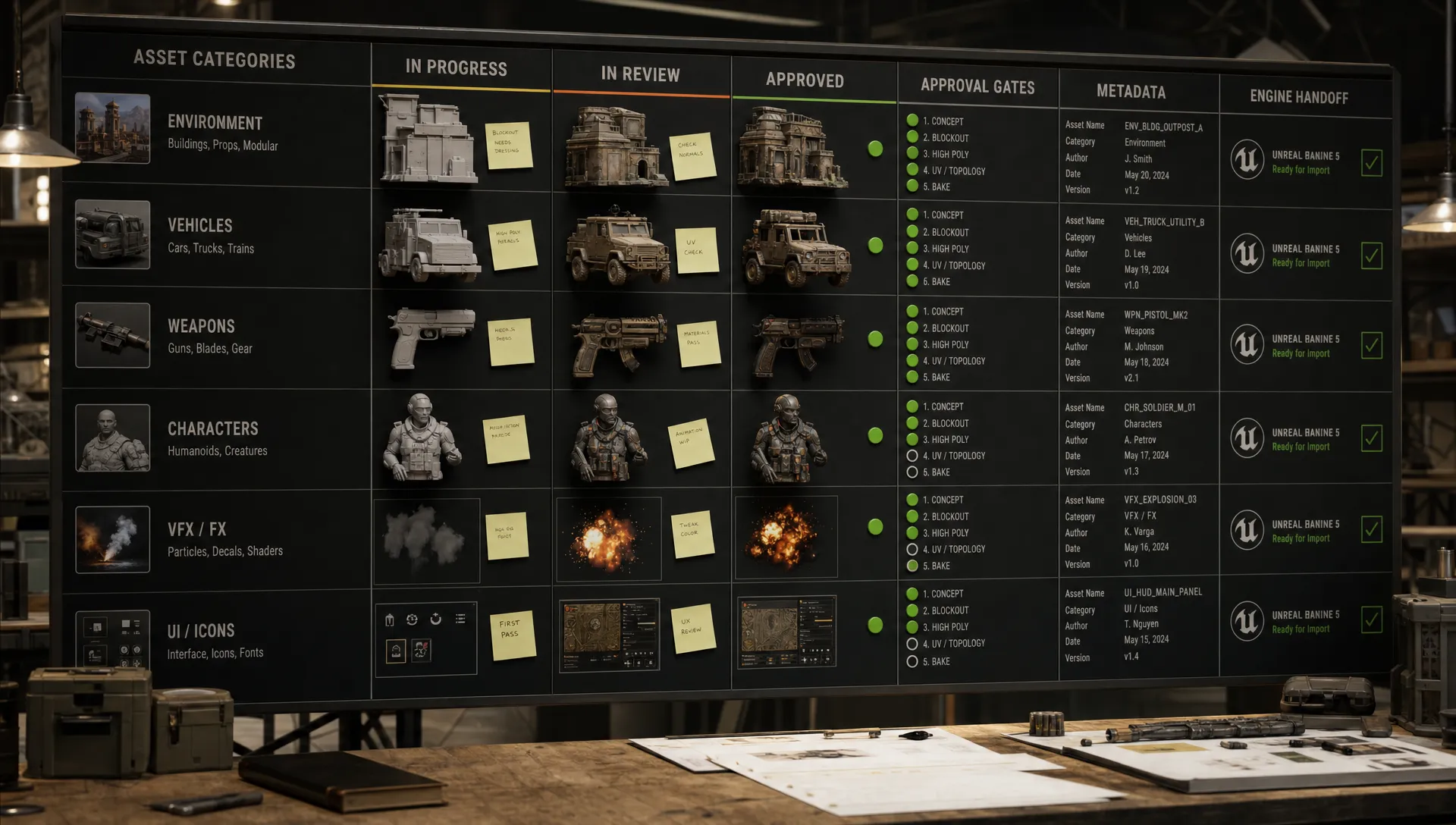
AI can shorten game asset production cycles, but it also exposes every weak point in a studio's operating model. If prompts, model choices, style references, rights checks and engine constraints are decided after production begins, teams usually pay for it through rework.
A game assets AI pipeline should be treated as production infrastructure, not a collection of experiments. Before a single asset enters a sprint, art directors, producers, technical artists, legal teams and application managers need a shared operating model: what can be generated, which references can be used, how outputs are reviewed, where assets live and how they move into the engine.
This guide focuses on what needs to exist before production starts. It is not a tool ranking and it is not a prompt-writing checklist. It is the pre-production foundation that lets AI support production rather than destabilize it.
Why AI pipelines for game assets must be ready early
In traditional game production, teams can sometimes absorb a loose briefing phase because asset specifications become clearer as concept art, blockouts and technical tests mature. AI changes that dynamic. A single artist can generate hundreds of variations in a day, which means inconsistency, uncertain rights status and off-spec files can spread quickly.
The main risk is not bad output. Bad output is easy to discard. The bigger risk is plausible output that looks useful, gets shared, influences decisions and later fails a rights review, style review or technical art pass. At enterprise scale, that creates traceability problems across DCC tools, DAM systems, game engines and marketing pipelines.
The pipeline should answer five questions before production begins:
- Who is allowed to generate which asset types?
- Which inputs, references and model configurations are approved?
- What metadata must follow every generated asset?
- Which review gates decide if an output can move forward?
- How does the final asset reach the engine, DAM or downstream workflow?
These are operational questions, not creative restrictions. Clear boundaries help creative teams move faster because they remove uncertainty from repetitive decisions.
The pre-production inputs every game assets AI pipeline needs
The best AI pipelines start with a compact set of shared inputs. Each input should be owned, versioned and easy to update when the project changes.
| Pipeline input | Why it matters | Typical owner |
|---|---|---|
| Asset taxonomy | Keeps generated work organized by asset class, purpose and production status | Producer or asset manager |
| AI-ready style guide | Translates art direction into reusable visual rules for AI generation | Art director |
| Rights-cleared reference library | Prevents unapproved source material from entering prompts, mood boards or training contexts | Legal, brand or creative operations |
| Technical target specs | Aligns outputs with engine budgets, file formats, topology needs and texture rules | Technical art lead |
| Model and tool policy | Defines approved models, APIs, plugins and fallback options | Application manager |
| Metadata schema | Captures provenance, version, reviewer, prompt context and usage rights | Pipeline or DAM owner |
| Review workflow | Sets approval gates for art direction, compliance, technical quality and final publishing | Creative operations |
| Integration plan | Connects AI output to DCC tools, DAM systems, PIM systems, build pipelines or engines | Pipeline engineering |
This table looks simple, but it changes how teams work. Instead of treating AI generation as an isolated creative step, it makes generation part of an auditable production system.
1. Asset taxonomy and naming rules
A pipeline cannot govern assets it cannot classify. Before production begins, define the asset classes AI is allowed to touch. For a game studio, that may include concept thumbnails, props, weapons, environment modules, characters, textures, UI icons, cinematics, marketing renders, animation references, sound variations or 3D blockouts.
Each class should have its own lifecycle. A concept image does not need the same technical validation as a rigged character. A marketing key visual may require stricter brand and legal checks than an internal exploration sketch. Treating all AI output the same slows teams down and creates false confidence.
A practical naming convention should include the project, asset class, asset name, version, status and intended use. Metadata should go further by recording the model used, generation blueprint, prompt context, approved references, creator, reviewer, timestamp and rights status. That information should move with the asset, not sit in a separate spreadsheet that becomes outdated within a week.
The goal is to make every generated file answer three basic questions: what is it, where did it come from and is it allowed to move forward?
2. Art direction that AI can actually use
AI pipelines struggle when style direction is written only for human interpretation. A strong art bible may describe tone, influences and mood, but AI systems need more structured inputs: approved visual references, composition patterns, camera rules, color palettes, material cues, proportions, lighting constraints and negative examples.
For example, a fantasy RPG prop guide might define silhouette weight, material aging, ornament density and acceptable asymmetry. A stylized racing game might define rim highlights, simplified reflections, decal rules and shape language. These details can become generation blueprints that artists reuse instead of rewriting prompts from scratch.
This is where consistency becomes an operational asset. If the same style logic is available across concept, image, 3D and video generation, teams are less likely to create assets that look impressive but belong to a different game. For a deeper look at art consistency, Virtuall has a dedicated guide on how to create AI game assets that match your art style.
The style guide should also define what AI should not do. Negative constraints are often more useful than extra adjectives. If the world avoids photorealistic skin, modern synthetic fabrics, polished chrome or symmetrical ornamentation, those exclusions should be built into reusable templates and review criteria.
3. Rights, provenance and compliance boundaries
Rights management needs to be in place before generation begins, not added as a final checkpoint. Every studio should decide which inputs are approved for AI workflows, which are prohibited and which require special review. That includes internal concept art, licensed references, marketplace assets, public domain material, brand assets, actor likenesses and user generated content.
The U.S. Copyright Office AI initiative has repeatedly emphasized human authorship when assessing copyright questions around AI-assisted work. In Europe, the EU Artificial Intelligence Act also increases pressure on organizations to understand how AI systems are used, documented and governed. Game studios do not need to turn every artist into a lawyer, but they do need traceable decisions.
A rights-aware pipeline should capture:
- Approved source references and their license conditions
- The model, version and generation settings used for each output
- Human edits, review decisions and rejection reasons
- Usage status, such as internal only, approved for production or approved for marketing
- Retention rules for discarded generations and experimental outputs
This documentation protects the studio and helps producers make faster decisions. If an asset cannot prove its origin or permitted use, it should not enter production folders. Virtuall has covered this operational problem in more depth in its article on how to govern AI-generated assets before they spread.
4. Technical target specs for each asset class
AI output often looks production-ready before it is technically usable. A 3D creature may have appealing form but poor topology. A texture set may look rich but lack consistent naming, channel packing or resolution rules. A cinematic image may satisfy mood direction but fail aspect ratio, safe area or localization needs.
Technical target specs should be written before production begins and attached to each asset class. They do not need to remove creative judgment. They simply tell artists and AI systems what game-ready means in context.
| Asset class | Pre-production spec to define | Review focus |
|---|---|---|
| Character models | Scale, rigging requirements, topology expectations, material slots and LOD strategy | Deformation, silhouette, animation readiness and performance |
| Environment modules | Grid rules, snapping points, modular dimensions, collision needs and naming | Reuse, layout compatibility and engine assembly |
| Props and weapons | Poly budget targets, pivot placement, texture sets, damage variants and interaction states | Readability, usability and gameplay clarity |
| Materials and textures | Resolution tiers, channel packing, tiling behavior, color space and naming | Consistency, memory use and shader compatibility |
| UI and icon assets | Safe areas, export sizes, transparency rules, localization space and contrast | Readability, accessibility and platform compliance |
| Cinematic or marketing visuals | Aspect ratios, approved characters, logo rules, disclosure rules and usage rights | Brand accuracy, legal status and campaign fit |
Open standards can help teams avoid unnecessary friction. For example, glTF 2.0 is widely used for efficient 3D asset transmission, while many larger pipelines also evaluate USD-based workflows for scene composition and interchange. The specific format matters less than the agreement: the AI pipeline must know the target before outputs are generated, reviewed or handed off.
5. Model and tool orchestration rules
Most enterprise teams will not rely on one model. A mature pipeline may use one model for ideation, another for image refinement, another for 3D generation, another for texture work and another for video or animation previews. Without orchestration rules, artists are forced to make ad hoc choices that are hard to reproduce.
Before production begins, define which models and tools are approved for each task. Also define what happens when a model changes, when a vendor updates terms, when a plugin fails or when an output needs to be regenerated six months later. Reproducibility matters for patches, DLC, localization, sequels and live operations.
This is also where application managers become critical. They need to understand security, permissions, API access, DCC integrations, DAM handoffs and procurement constraints. A tool that delights artists during a demo may still be unusable if it cannot support access controls, data residency, audit trails or integration with existing systems.
The governance discipline described in the controls you need before you ramp production applies directly to game assets AI pipelines. Scaling is not only about generating more content. It is about knowing that every generation follows the right rules.
6. Review gates and human accountability
AI does not remove approval work. It changes where approval work happens. If a studio waits until final asset review to catch style drift, rights uncertainty or technical incompatibility, AI simply produces rework faster.
Pre-production should define review gates that match the risk level of each asset class. A background prop for an internal prototype may need a light review. A hero character used in a global campaign needs art direction, technical, legal, brand and marketing approval.
| Gate | Decision being made | Who should be involved |
|---|---|---|
| Generation approval | Is this asset type allowed to use AI for this project? | Producer, art director and application manager |
| Style pass | Does the output fit the art bible and project context? | Art director or lead artist |
| Rights pass | Are references, inputs and usage permissions acceptable? | Legal, brand or creative operations |
| Technical pass | Can the asset be optimized, integrated and maintained? | Technical artist or pipeline lead |
| Final publish | Can the asset enter the build, DAM or campaign workflow? | Production owner and relevant approvers |
Human accountability should be explicit. The pipeline should record who approved an output and what they approved it for. Approval for internal mood exploration is not the same as approval for game integration or public marketing.
7. Asset management and integration planning
AI outputs should not live in personal folders, chat threads or disconnected generation galleries. Before production starts, decide where raw generations, selected candidates, work in progress files and final approved assets will live. The storage structure should mirror the asset lifecycle.
Versioning is especially important. A model-generated prop may be edited in Blender, textured in Substance 3D, optimized by a technical artist, reviewed in engine and exported to a DAM for marketing. If each stage creates a separate file with weak naming or missing provenance, the studio loses the ability to explain which version is approved.
Integration planning should cover DCC tools, DAM systems, PIM systems, game engines, review platforms and build pipelines. It should also define what metadata travels through plugins or APIs and what must be locked at publish time. For enterprise teams, this is where creative AI becomes part of the studio operating system rather than a side workflow.
A practical checklist before production greenlight
Before a game assets AI pipeline moves from pilot to production, the team should be able to confirm the following:
- Asset classes are defined, named and mapped to production stages.
- The art bible has been translated into reusable AI-ready generation blueprints.
- Reference libraries are rights-cleared and separated from prohibited or uncertain material.
- Technical target specs exist for each asset class that AI can produce or influence.
- Approved models, tools, plugins and APIs are documented by use case.
- Metadata captures prompt context, model details, source references, approvals and rights status.
- Review gates are assigned to real roles with clear approval meanings.
- Generated assets can move into DCC tools, the engine, DAM or downstream systems without losing context.
- Rejected or experimental assets have retention rules.
- Quality metrics track rework, approval time, style consistency and technical pass rates.
This checklist is not bureaucracy for its own sake. It is what lets creative teams experiment safely, producers forecast work more accurately and technical teams avoid preventable cleanup.
How Virtuall supports game assets AI pipelines
The Creative AI OS is built for teams that need to operate creative AI at scale across image, video, 3D and audio workflows. For game studios and enterprise creative teams, the challenge is rarely one generation at a time. The challenge is controlling how AI runs across people, tools, reviews and production requirements.
With the Creative AI OS, teams can define governance controls, orchestrate multi-model generation, use generation blueprints, manage studio context through mood boards, support collaboration with reviews and approvals, track pipelines and connect with creative tools through plugins and APIs. Virtuall also supports compliance needs through EU-based infrastructure and inference, which can matter for teams with strict data, vendor and regulatory requirements.
Nyx, Virtuall's intelligence layer, orchestrates multiple industry-leading AI models while preserving intent and context across studios and teams. That matters because production consistency depends on more than a good prompt. It depends on rules, memory, approvals, asset management and repeatable workflows.
Frequently Asked Questions
What is a game assets AI pipeline? A game assets AI pipeline is the governed workflow that takes AI-assisted asset creation from request to approved output. It includes prompts, models, references, metadata, review gates, technical specs, storage and integration with production tools.
What should be prepared before using AI for game assets? Prepare an asset taxonomy, AI-ready art direction, rights-cleared references, technical target specs, approved tools, metadata rules, review workflows and integration paths into your engine or asset management systems.
Can AI-generated game assets go directly into production? Some low-risk assets may move quickly, but most AI-generated assets still need human review, technical cleanup and rights validation. Production use should depend on the asset class, project risk and approval status.
Who should own an AI asset pipeline in a studio? Ownership is usually shared. Art directors own style, producers own delivery, technical artists own engine readiness, application managers own tooling and legal or creative operations own rights and compliance rules.
How do you keep AI-generated assets consistent across a game? Consistency comes from structured style guides, approved references, reusable generation blueprints, shared context, review gates and clear rejection criteria. Individual prompting skill helps, but repeatable systems matter more.
Build the pipeline before the volume arrives
AI can help game teams explore faster and produce more, but scale without structure creates its own production debt. The right time to define governance, art rules, rights controls, review gates and integration paths is before production begins.
If your studio is preparing to operationalize creative AI across game assets, Virtuall gives teams a controlled way to orchestrate generation, preserve context, manage approvals and keep outputs aligned with production requirements.