Should Your Studio Create Its Own AI Model?
Should your studio create its own AI model? Compare custom training, fine tuning and governed workflows before investing in creative AI.
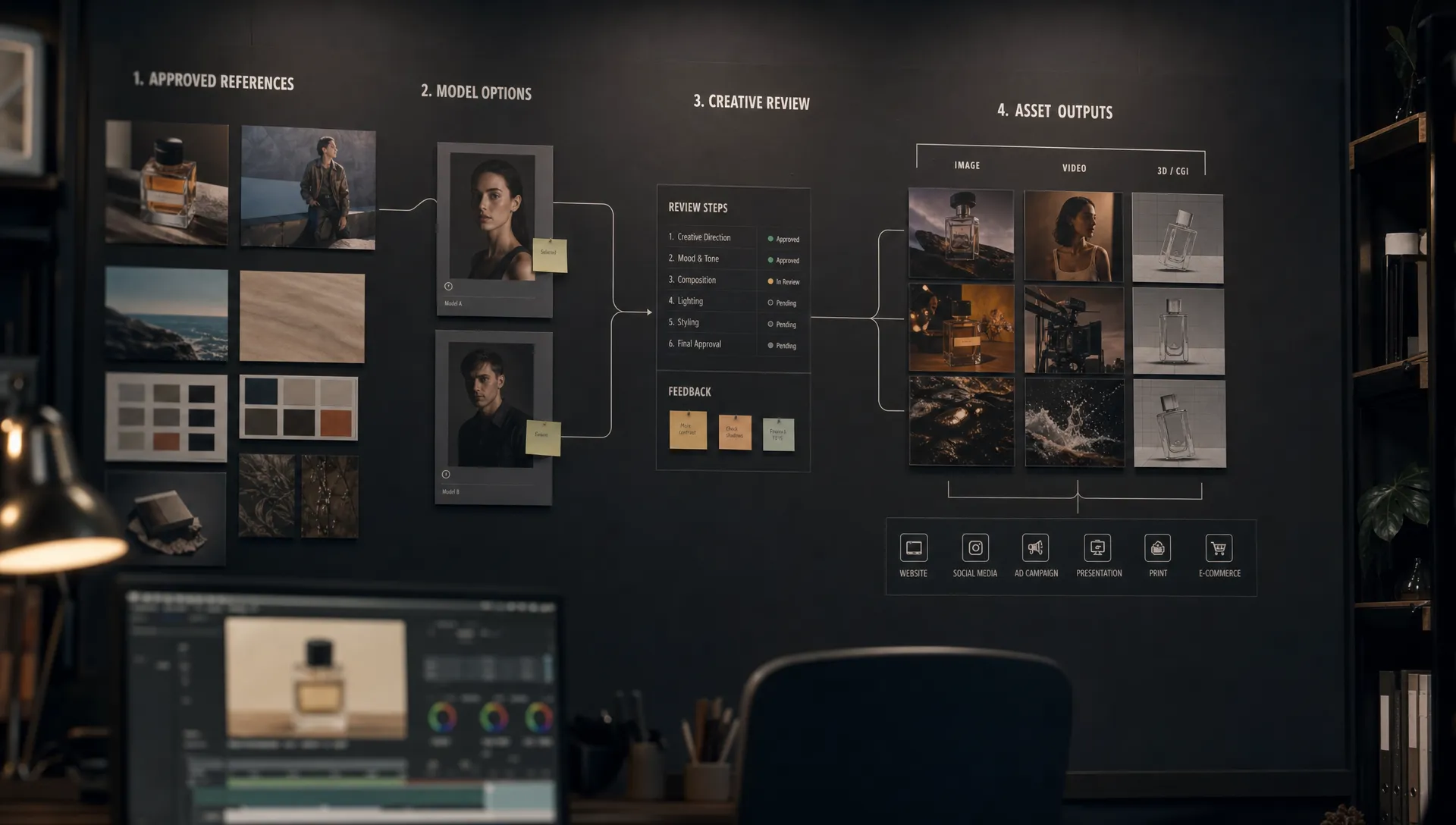
By 2026, most creative studios have already tested generative AI. The harder question is no longer whether AI can produce useful creative output. It is whether your studio should create its own AI model, or whether better orchestration, governance and context control will deliver the same result with less risk.
For enterprise teams, the answer depends on what problem you are really trying to solve. A CMO may want brand consistency across markets. An art director may want repeatable visual language without flattening creative taste. An application manager may be focused on security, integration and auditability. A game developer may need asset variants that respect engine constraints and production pipelines.
All of those needs are valid. None of them automatically require training a model from scratch.
The practical decision is not “custom AI or no custom AI.” It is: what should your studio own, what should it govern and what can safely be handled by existing models?
What does it mean to create your own AI model?
Studios often use the phrase “create our own AI model” to describe several different things. Some are lightweight and practical. Others require research teams, large volumes of licensed data, evaluation infrastructure and ongoing compute budgets.
Before making a business case, align everyone on the level of ownership you mean.
| Ownership level | What the studio owns | Best fit | Main caution |
|---|---|---|---|
| Prompt templates and generation blueprints | Approved instructions, parameters and workflow rules | Repeatable campaign assets, product shots and concept variations | Does not change the underlying model behavior |
| Studio context memory | Brand references, mood boards, approved assets and production context | Consistency across teams, markets and asset families | Needs strong asset governance to avoid messy context |
| Fine-tuned model or adapter | A model behavior shaped by curated studio data | Recurring styles, characters, products, environments or asset types | Requires clean, rights-cleared data and ongoing testing |
| Private model deployment | A controlled environment for a chosen model | Security, latency, compliance and integration needs | The model may still be similar to what others can access |
| Model trained from scratch | Architecture, weights, training data and full development process | Very large studios with strategic AI research needs | Expensive, slow and operationally demanding |
For most creative organizations, “own AI” should not start with a foundation model. It usually starts with a controlled system around models: approved context, repeatable blueprints, review workflows, permissions, traceability and integration into production tools.
That distinction matters because a model is only one part of the creative AI stack. The studio still needs to decide who can use it, what data it can see, which outputs can be published, how assets are reviewed and where records are stored.
Good reasons to create your own AI model
Creating a custom model can make sense when there is a clear production advantage that cannot be achieved through model selection, prompting, reference control or workflow orchestration.
The strongest reason is a distinctive visual or asset language that your studio repeats at scale. A gaming studio with a proprietary creature style, a fashion brand with consistent product imagery or an entertainment company with recurring environments may benefit from fine-tuning or custom adapters if the base models cannot reliably follow the required look.
Another valid reason is workflow efficiency. If a team generates thousands of similar assets every month, even small gains in consistency, review speed and regeneration accuracy can matter. A custom model may reduce prompt complexity and manual correction when the task is narrow enough.
Security and compliance can also be a driver, especially when unpublished campaigns, licensed characters, product designs or customer data are involved. In that case, the need may be less about creating a unique model and more about running approved models in a controlled environment with strict access, logging and data policies.
Finally, some technical creative workflows are hard to support with generic tools. Game developers may need outputs that match engine constraints, modular asset rules or specific topology expectations. 3D and video workflows often require more than visual appeal. They require predictability across a pipeline.
When creating your own model makes sense
A custom model is worth considering when five conditions are true.
First, the output type is repeatable. Customization works best when the studio knows what it wants the model to produce again and again. If every request is novel, a general model plus strong creative direction may be more flexible.
Second, your data is proprietary, high quality and rights-cleared. A custom model is only as useful as the dataset behind it. Low quality exports, inconsistent naming, mixed styles, unapproved references and unclear rights can turn a model project into a compliance problem.
Third, the performance gap is measurable. “The model does not feel on brand” is not enough. Define evaluation criteria such as likeness, composition, material accuracy, product fidelity, prompt adherence, art direction fit, regeneration time and approval rate.
Fourth, the use case has enough value to justify ongoing operations. Model work does not stop at launch. You need versioning, testing, access controls, monitoring, cost management and a process for updating the model as brand rules or production needs change.
Fifth, the model fits into the existing studio workflow. If artists, producers, legal reviewers and asset managers have to leave their normal tools to use it, adoption will suffer. The model should connect to the pipeline, not become a separate island.
When not to create your own AI model
A studio should be cautious when the motivation is mostly symbolic. “We need our own model” can sound strategic, but model ownership does not guarantee better creative output, stronger governance or lower cost.
If your team is still experimenting across many formats, do not lock yourself into a narrow custom model too early. Image, video, 3D, audio and multimodal models evolve quickly. A model that looks impressive this quarter may be surpassed by another model before your internal project is fully operational.
You should also avoid custom training when the data foundation is weak. If nobody can confirm which assets are approved for training, which references are licensed or which outputs must never influence a model, the first investment should be governance and asset hygiene.
The same applies when you lack an evaluation process. Without benchmarks, you cannot tell whether a fine-tuned model is genuinely better than a well-orchestrated commercial model. You may end up paying for customization that only improves a demo, not production throughput.
The NIST AI Risk Management Framework is useful here because it frames AI risk around governance, mapping, measurement and management. That approach fits creative production well: define the use case, identify risks, measure performance and manage the system across its lifecycle.
The hidden costs of owning a model
The visible cost of creating a model is only part of the budget. Enterprise studios also need to account for the operating model around it.
| Cost area | What to evaluate before investing |
|---|---|
| Data preparation | Do you have approved, labeled, high quality assets with clear usage rights? |
| Legal and compliance review | Can you document training sources, access rules and usage restrictions? |
| Evaluation | Can you measure quality, brand fit, bias, safety and production readiness? |
| Infrastructure | Will you host, secure and scale the model, or rely on a managed provider? |
| Integration | Can the model connect to DCC tools, DAM, PIM, review systems and asset pipelines? |
| Change management | Will artists, producers and reviewers actually use the system in daily work? |
| Lifecycle management | Who handles versioning, regression testing, monitoring and deprecation? |
Regulatory pressure also makes documentation more important. The European Commission’s AI Act overview describes a risk-based regulatory framework for AI in the EU. Creative studios may not always operate in high risk categories, but enterprise buyers increasingly expect clear documentation, data controls and accountability from AI systems.
That is why the model itself should not be treated as the whole project. The real investment is the operating capability around it.
A practical decision matrix for studios
Use this matrix as a starting point when deciding whether to create your own AI model, fine-tune a model or rely on a governed multi-model setup.
| Studio need | Best starting point | Why |
|---|---|---|
| Fast exploration for campaigns or concepts | Governed access to multiple models | Flexibility matters more than ownership during ideation |
| Consistent branded variations across markets | Blueprints, context memory and review workflows | The workflow often solves the consistency problem before training is needed |
| Recurring character, product or environment generation | Fine-tuned model or adapter | Repetition and proprietary references can justify customization |
| Sensitive unreleased assets or confidential IP | Private deployment plus strict governance | Control, logging and data boundaries are the priority |
| Highly specialized 3D or game asset production | Custom pipeline, possibly with model customization | The output must fit technical constraints, not just look good |
| Enterprise-wide AI adoption across teams | Creative AI operating layer | Teams need permissions, orchestration, traceability and asset management |
The better question: where should ownership sit?
For many studios, the best answer is not to own every model. It is to own the creative operating layer that controls how models are used.
A single custom model can be powerful, but it can also become a bottleneck. Different tasks may need different models: one for product image fidelity, another for stylized concept art, another for video motion and another for 3D asset generation. The studio needs a way to route work to the right model while keeping creative intent, governance rules and production context intact.
This is where an AI operating layer becomes more valuable than model ownership alone. It can define which models are approved, preserve studio context, apply generation blueprints, manage reviews, track assets and enforce compliance policies across teams. For a deeper look at this architecture, Virtuall’s guide to using an AI control layer for multi-model AI explains why orchestration often matters more than any single model choice.
The key idea is simple: a model generates output, but a studio system governs production.
What this means for each stakeholder
For a CMO, the custom model question is about brand control and measurable efficiency. If AI output creates inconsistent brand expression, legal uncertainty or fragmented regional execution, the priority should be governance and approved workflows. A custom model may help later, but only if it improves quality and throughput against clear metrics.
For an art director, the question is about taste, repeatability and creative control. Fine-tuning can help preserve a visual language, but it should not replace direction, critique and iteration. The best systems give art directors ways to encode intent without forcing every artist into the same generic output.
For an application manager, the model is part of a broader enterprise system. Identity, permissions, audit logs, tool integrations, data residency, API access and lifecycle management matter as much as output quality. A model that cannot be governed is not ready for scaled deployment.
For a game developer, the decision is especially practical. AI output must respect downstream constraints: file formats, geometry, rigging, modular kits, texture standards, version control and engine performance. In many cases, custom pipelines and validation rules create more value than model training alone.
How to start without overcommitting
The safest path is to prove the need for customization before funding a full model initiative.
- Pick one repeatable asset family: Choose a use case with clear volume, clear owners and clear approval criteria, such as product angles, NPC concepts, background props or campaign variants.
- Audit the data: Confirm which references are approved, which assets are licensed, which files are high quality and which materials should never be used for training or generation context.
- Benchmark current models: Test leading models against the same briefs, references and success criteria before assuming a custom model is required.
- Add governance early: Define permissions, review steps, escalation rules, logging and output approval before scaling usage. Virtuall has a practical guide on how to build AI governance into studio workflows if your team is formalizing this process.
- Only customize when the gap is proven: If governed multi-model workflows still cannot hit the required quality, consistency or throughput, then fine-tuning or custom model development becomes easier to justify.
This approach avoids two common mistakes: buying scattered tools that nobody can govern and building a model before the studio knows what production problem it needs to solve.
Should your studio create its own AI model?
Yes, if the studio has a repeatable, high value creative use case, a strong proprietary dataset, clear rights, measurable evaluation criteria and the operational capacity to maintain the model over time.
No, if the main problem is inconsistent usage, weak governance, scattered tools, unclear approvals or lack of production integration. In those cases, a creative AI operating system will usually create value faster than custom training.
For most enterprise studios, the right sequence is: govern AI usage, orchestrate multiple models, preserve studio context, measure production outcomes and then decide whether a custom model is truly needed.
That sequence protects creative quality without overcommitting to a model strategy too early.
Frequently Asked Questions
Is creating your own AI model the same as fine-tuning? No. Fine-tuning adapts an existing model using curated data, while training a model from scratch means building the model weights through a much larger training process. Most studios that say they want to create their own AI model are usually considering fine-tuning, adapters or private deployment.
Does a custom AI model solve copyright and compliance concerns? Not by itself. A custom model still depends on the data used, the rights attached to that data, the way outputs are reviewed and the governance controls around usage. Compliance needs policies, documentation, access rules and auditability.
Should studios use one model for all creative AI work? Usually not. Image, video, 3D, audio and multimodal tasks often require different strengths. A governed multi-model setup lets teams use the right model for each job while keeping consistent rules and context.
How much data does a studio need to create its own model? There is no universal number. The required data depends on the base model, the output type, the level of consistency needed and the training method. Quality, rights clarity and relevance are often more important than raw volume.
What is the first step before building a custom model? Start with a focused production use case and benchmark existing models under controlled conditions. If approved models cannot meet clear quality, consistency or throughput targets, then customization becomes a more defensible investment.
Bring model decisions under studio control
If your team is debating whether to create its own AI model, start by controlling how AI runs across the studio. Virtuall helps creative teams orchestrate image, video, 3D and audio generation with governance controls, generation blueprints, studio context memory, review workflows, asset management and enterprise-ready integrations.
With Nyx, Virtuall’s intelligence layer, teams can coordinate multiple AI models while preserving intent and context across workflows. That gives studios a practical path: scale creative AI now, stay compliant and decide on custom models only when the production case is clear.
Explore how Virtuall helps studios operate creative AI at scale.