Intelligent Operating System: Requirements for Creative Pipelines
Learn the intelligent operating system requirements for creative pipelines: governance, orchestration, integrations, compliance, and scale-ready AI.
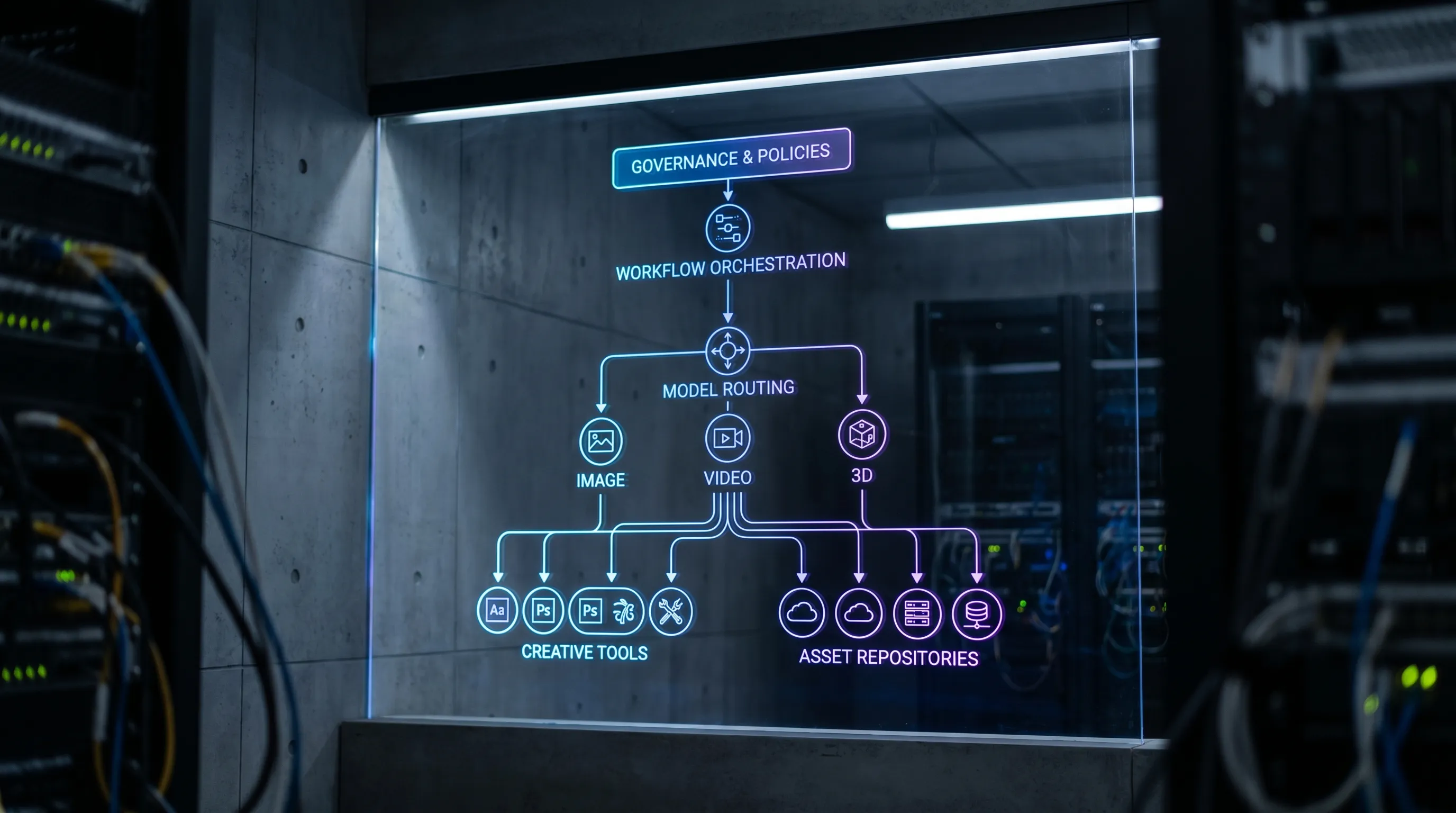
Creative teams are moving fast on AI, but most organizations still run it like a collection of disconnected tools. That works for experiments, not for production. As soon as AI touches brand assets, product imagery, marketing video, 3D renders, or game content, you need repeatability, approvals, auditability, and predictable quality.
An intelligent operating system for creative pipelines is the missing layer between “a prompt in a chat” and “production-ready outputs at enterprise scale.” This article breaks down the requirements that matter most (for CMOs, Art Directors, Application Managers, and Game Developers) and how to evaluate them.
Why creative pipelines need an intelligent operating system now
Creative pipelines already have operating constraints: brand rules, legal review, localization, IP provenance, security boundaries, deadlines, and tooling standards. AI adds new variables on top:
- Multiple models (image, video, audio, 3D) with different strengths, costs, and licensing terms
- Non-deterministic outputs that can drift from brand intent
- New compliance expectations around risk management and documentation (especially in the EU)
Two widely used reference points are worth keeping in mind when you define requirements:
- The NIST AI Risk Management Framework (AI RMF 1.0) emphasizes governance, measurement, and accountability across the AI lifecycle.
- The EU’s AI regulatory direction (including the EU AI Act) increases pressure on transparency, oversight, and risk-based controls for many AI use cases.
Even if your creative applications are not classified as “high risk,” enterprise procurement, legal, and security teams increasingly expect controls and traceability comparable to other production systems.
What an intelligent operating system means for creative production
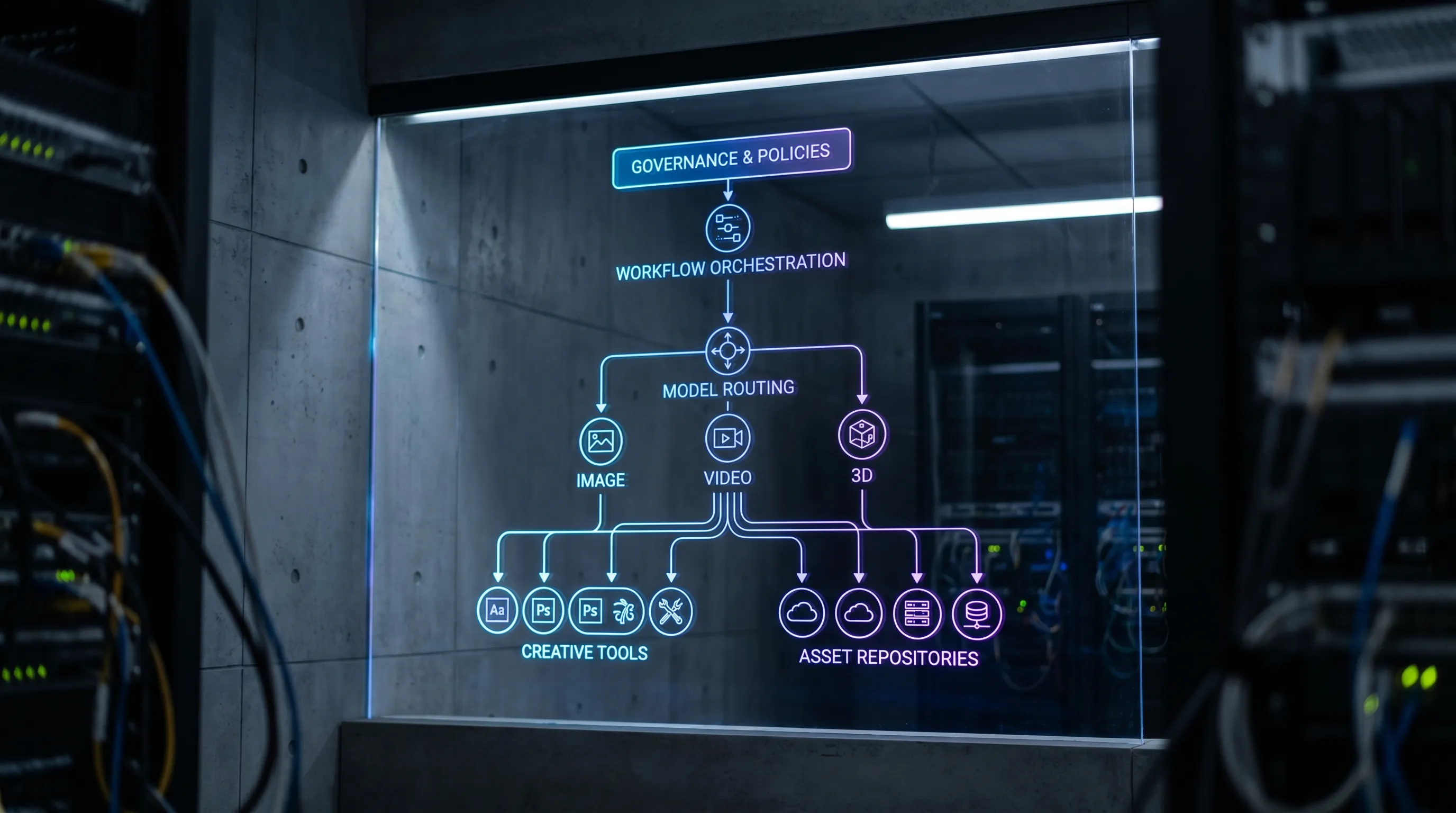
In creative operations, an intelligent operating system is best understood as a control plane for AI across your studio and toolchain. It should do three things consistently:
- Control: enforce policies, roles, approvals, and compliance constraints.
- Orchestrate: turn intent into repeatable workflows, not one-off generations.
- Scale: support many teams, brands, and content types without quality collapsing.
This is different from buying “an AI tool.” Tools generate. An operating system standardizes how generation happens across teams, and how outputs move through the pipeline.
Core requirements for an intelligent operating system in creative pipelines
The right requirements depend on your org, but most enterprise creative pipelines converge on the same set of needs. Use the checklist below as a baseline for RFPs, security reviews, and internal alignment.
| Requirement area | What “good” looks like | What breaks if it’s missing | Primary owners |
|---|---|---|---|
| Governance and policy control | Central rules for who can do what, with guardrails per brand, region, and use case | Shadow AI, inconsistent brand output, unapproved content shipping | App Manager, Security, Legal, CMO Ops |
| Workflow orchestration | Repeatable pipelines (generate, review, iterate, approve, publish) | Ad hoc work, rework, missed approvals, unpredictable throughput | Creative Ops, Art Director, PMO |
| Multi-model, multi-modal generation | One place to run image, video, audio, and 3D tasks, with routing by intent | Tool sprawl, inconsistent results, fragile handoffs | Studio Leads, Tech Art, App Manager |
| Templates and standardization | “Blueprints” for common tasks (product shots, variants, localized edits) | Reinventing prompts, quality variance between teams | Art Direction, Brand, Creative Ops |
| Context and memory | Persistent creative context (style references, mood boards, constraints) | Drift from brand intent, slower onboarding, duplicated effort | Art Director, Brand, Studio Leads |
| Collaboration and approvals | Review flows, annotation, versioning, clear sign-off | Compliance gaps, slow feedback loops, no accountability | Creative Ops, Legal, Brand |
| Asset management and traceability | Track source assets, generated variants, metadata, lineage | Lost files, unclear provenance, hard audits | DAM/PIM owners, Creative Ops |
| Integrations and extensibility | Plugins/API to connect DCC tools, PIM, DAM, game engines, storage | Manual export/import, brittle scripts, stalled adoption | App Manager, Pipeline TDs |
| Observability and reporting | Logs, run history, workflow status, performance and quality signals | No root-cause analysis, unclear ROI, stalled scaling | App Manager, Finance, Studio Leads |
| Security and compliance posture | EU/region alignment, access controls, isolation, data handling clarity | Procurement blocks, policy violations, data leakage risk | Security, Legal, IT |
| Production readiness | Outputs designed for downstream use (formats, consistency, handoffs) | “Cool demos” that cannot ship | Studio Leads, Game Dev, Post-Production |
Below is what each requirement means in practice.
1) Governance controls that match real studio risk
Creative AI governance should be more than “allowed or blocked.” Enterprise studios typically need governance across:
- People: role-based access, team boundaries, vendor access
- Work: which workflows are permitted for which brands, markets, and channels
- Models: which models can be used for which task types, based on quality, cost, and policy
- Data: what can be uploaded, stored, or reused, and under what retention rules
A practical requirement: ensure governance is configurable without engineering work every time a new brand guideline or legal constraint appears.
2) Workflow orchestration (the difference between experiments and production)
If you want AI to behave like a production system, it must run as a workflow. In creative pipelines, the workflow is where quality is created.
Look for orchestration that supports:
- Stages (brief, generate, refine, review, approve, deliver)
- Routing (who reviews what, and when)
- Iteration (feedback loops without losing context)
- Status visibility (what is blocked, what is ready, what needs input)
This is particularly critical for video and 3D, where downstream steps (compositing, rigging, engine import) amplify the cost of early mistakes.
3) Multi-model and multi-modal support without tool sprawl
Most enterprises will not standardize on a single model forever. Even within one quarter, your “best model” can change by:
- Content type (product stills vs campaign video vs stylized 3D)
- Geography and compliance constraints
- Cost-performance tradeoffs
- Vendor availability and roadmap
Your operating system should treat models as interchangeable components, while keeping workflows stable.
4) Templates and blueprints for consistent output
The fastest way to reduce variability is to stop relying on “prompt craft” as tribal knowledge.
Require a mechanism for reusable generation blueprints (templates) that capture:
- Inputs required (assets, angles, references, SKU data)
- Creative constraints (style, lighting, camera language, do-not-do rules)
- Output specs (resolution, aspect ratios, file types, naming conventions)
Blueprints make it possible to scale quality across teams, and they also shorten onboarding for new artists, freelancers, and satellite studios.
5) Studio context memory (to prevent drift)
Brand drift is the most common failure mode when AI scales. Teams start aligned, then outputs diverge by region, by agency, or by project timeline.
A strong requirement is persistent context, for example mood boards and style references that are attached to studios, brands, or campaigns. Context should survive across iterations and across team members so that intent stays consistent.
6) Collaboration that matches how creative sign-off actually works
Enterprise creative collaboration is not just comments in a thread. It includes:
- Clear ownership of approvals (creative, brand, legal, product)
- Annotation on outputs (visual callouts, change requests)
- Version control and audit trails (who changed what, when)
Without these, AI increases volume, but also increases risk of shipping unapproved content.
7) Asset management and provenance you can defend
When AI creates many variants, your asset system becomes the backbone. Requirements should cover:
- Linkage between source assets and generated outputs
- Metadata capture (prompt, blueprint version, model used, time, approver)
- Search and retrieval across variants
This matters for reuse, but also for governance, audits, and incident response when something goes wrong.
8) Integrations with your real toolchain (not a parallel universe)
An intelligent operating system should connect into the tools your teams already use:
- DCC tools (for artists)
- DAM/PIM systems (for marketing and product pipelines)
- Studio pipeline tools (tracking, task management, review)
- Game development tooling where relevant (engine import, asset conditioning)
Practically, require plugins and APIs so you can integrate in phases and avoid a disruptive “big bang” migration.

9) Observability: logs, run history, and pipeline tracking
Scaling AI without observability is like running a render farm with no queue visibility.
At minimum, require:
- Run history (what was generated, by whom, with what blueprint/model)
- Workflow status tracking (bottlenecks, pending approvals)
- Exportable reporting for operations and ROI analysis
Observability is also how you debug quality regressions, for example when a model update changes output characteristics.
10) Security and compliance alignment (especially for enterprise procurement)
Security and compliance needs vary by sector, but common enterprise requirements include:
- Clear data handling boundaries (uploads, storage, retention)
- Access control and least privilege
- Regional constraints (for example EU-based infrastructure expectations)
From a buyer perspective, your requirement should be: “We can explain where content and inference happen, and we can enforce policy.” That clarity often determines whether procurement signs off.
11) Production-ready outputs, not just generations
“Production-ready” should be defined by your downstream systems, not by the AI tool.
Examples of practical requirements:
- Output formats and naming conventions aligned with DAM/PIM ingestion
- Consistent aspect ratio families for omnichannel campaigns
- Repeatable style consistency across a whole set, not just a single hero image
For game developers and 3D pipelines, production-ready usually also implies predictable topology expectations, texture packaging conventions, or at least a controlled handoff into the next tool.
How to evaluate an intelligent operating system (questions that reveal the truth)
Vendor demos often over-index on generation quality. That matters, but the operating system value is in control and repeatability. These questions expose whether a platform is built for real creative pipelines:
- Can we enforce different rules by brand, region, and team?
- Can we standardize work through reusable blueprints, and version them?
- How does the platform preserve context (style references, mood boards, constraints) across iterations and collaborators?
- What does review and approval look like, and can we prove who approved what?
- How do integrations work (plugins, APIs), and what is the expected integration effort?
- What is logged for each output (model used, workflow stage, metadata), and can we export it?
- Where does inference run, and what compliance posture supports our procurement requirements?
If a platform cannot answer these clearly, it is likely a tool, not an operating system.
Where Virtuall fits for enterprise creative pipelines
The Creative AI OS is designed as a Creative AI OS to operate creative AI at scale across image, video, and 3D, with enterprise governance and compliance in mind.
Based on Virtuall’s product scope, teams typically look to it for:
- AI governance controls to define rules and stay compliant
- Workflow orchestration to move from ad hoc generation to production pipelines
- Multi-model content generation across image, video, audio, and 3D
- Generation blueprints (templates) to standardize outputs and reduce variability
- Studio context memory (mood boards) to keep intent consistent across teams
- Team collaboration tools (review workflows, approvals, annotation)
- Asset management and pipeline tracking for operational visibility
- EU-based infrastructure and inference to support compliance requirements
- Integrations via plugins and API into creative tools and enterprise systems (DCC, PIM, DAM, etc.)
Virtuall also includes Nyx, its intelligence layer that orchestrates multiple industry-leading AI models while keeping intent and context across studios and teams.
If your goal is to scale AI content production without losing brand control, compliance clarity, or pipeline reliability, these are the capabilities that typically separate “AI adoption” from “AI operations.”
Frequently Asked Questions
What is an intelligent operating system for creative pipelines? An intelligent operating system is a control and orchestration layer that standardizes how AI is used across creative workflows, enforcing governance, approvals, context, and integrations so outputs can ship reliably.
Why isn’t a single generative AI tool enough for enterprise creative teams? Single tools rarely provide enterprise governance, workflow orchestration, audit trails, or deep integrations. They can generate content, but they struggle to run end-to-end production processes.
What requirements matter most for CMOs and brand teams? Governance controls, context memory (to prevent brand drift), approval workflows, and reporting. These protect brand consistency while increasing throughput.
What requirements matter most for Application Managers and IT? Security posture, role-based access, integrations (API/plugins), observability, and compliance alignment, including clarity on where inference and data processing occur.
How do blueprints (templates) improve creative AI results? Blueprints capture repeatable inputs, constraints, and output specs so teams do not rely on individual prompt habits. This reduces variability and speeds up production.
How should game studios think about intelligent operating system requirements? Game pipelines need predictable handoffs, context preservation, version control, and integration with existing tooling. Multi-modal support (including 3D) and pipeline tracking become especially important at scale.
Operate creative AI with control, consistency, and compliance
If you are building an enterprise-grade creative pipeline, the biggest risk is scaling AI without governance, repeatability, and visibility. The Creative AI OS is built to operate creative AI at scale across image, video, and 3D, with workflow orchestration, governance controls, collaboration, and EU-based compliance support.
Explore Virtuall at virtuall.pro to see how a Creative AI OS can standardize your workflows and help your teams produce consistent, production-ready outputs.