Model Selection for Studios: When to Use Which GenAI Model
Model selection for studios: learn when to use which GenAI model for image, video, and 3D, balancing quality, control, cost, and compliance.
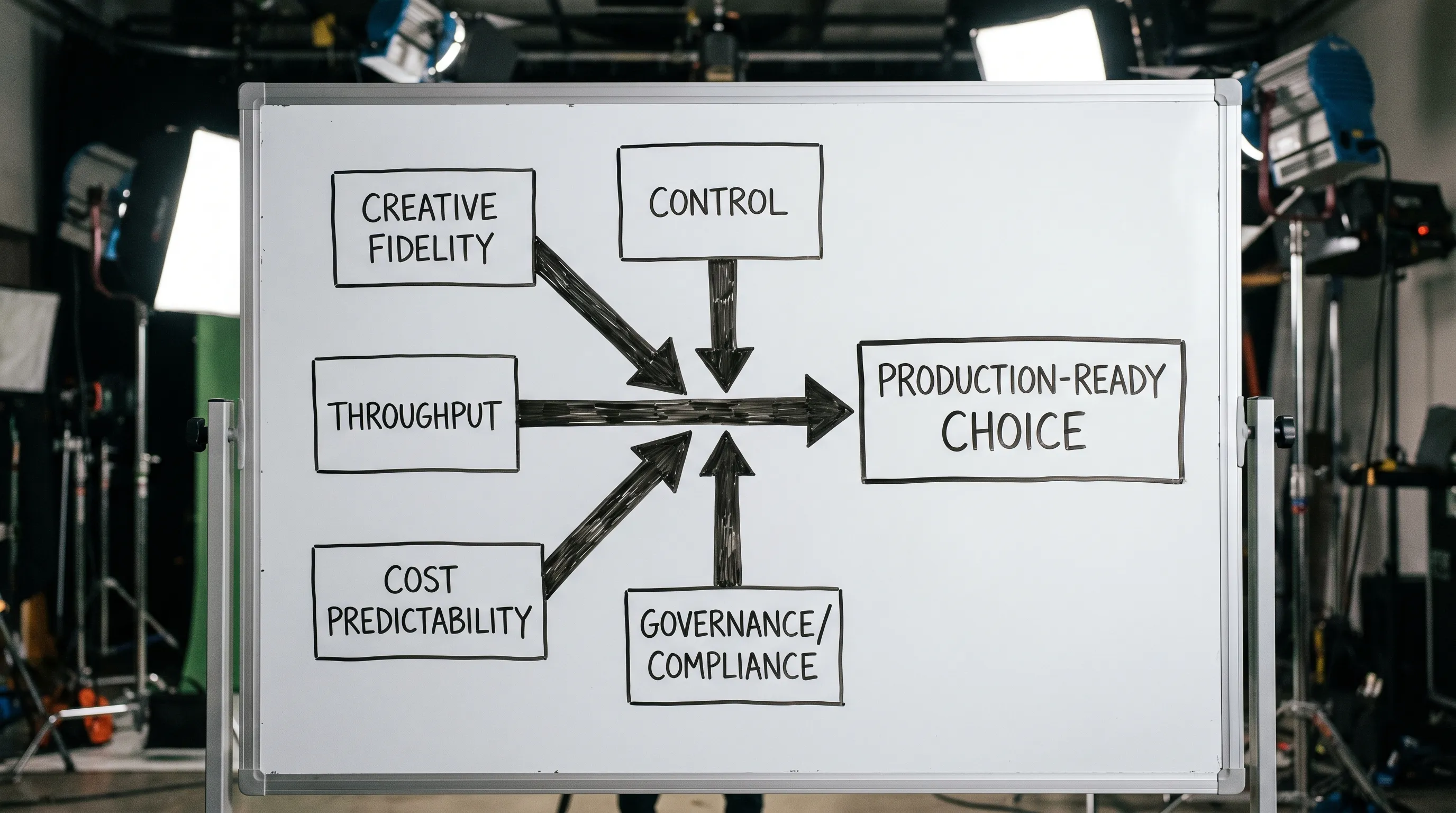
Model choice in a studio is rarely about “the best model.” It is about the best model for a specific production job, under real constraints: brand consistency, art direction control, turnaround time, legal risk, and toolchain compatibility.
In 2026, most teams face the same problem: model sprawl. Image, video, 3D, and audio tools are improving fast, but each model behaves differently, ships different safety and licensing terms, and fits different stages of the pipeline. This guide gives you a practical framework to decide when to use which GenAI model, and how to keep results consistent across teams.
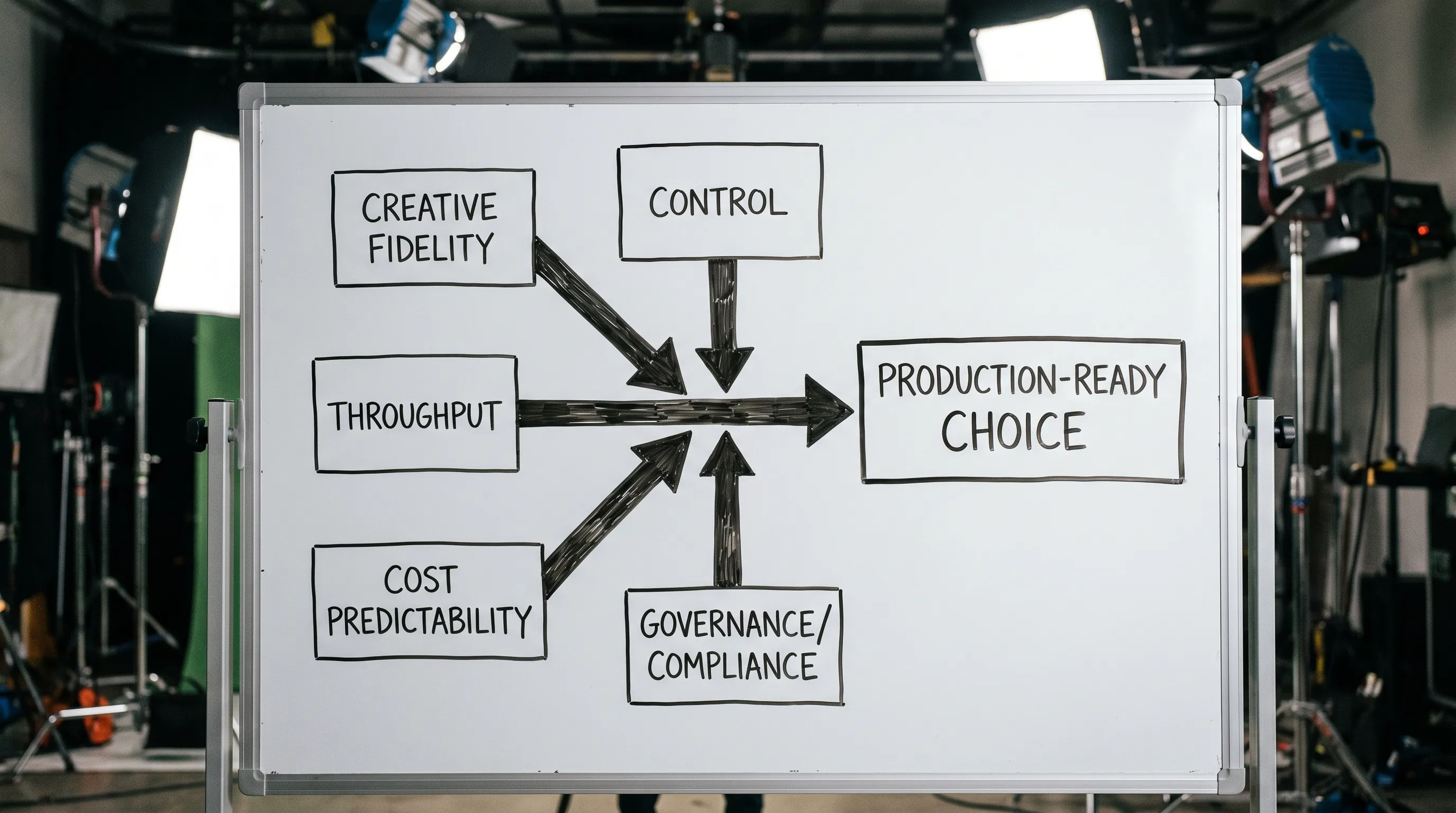
The 5 factors that matter in studio model selection
Studios often compare models on visual quality alone. That is necessary, but it is not sufficient. A production-ready choice usually comes down to five factors.
1) Creative fidelity (what you can get)
Ask:
- Does it hit your target style (brand, franchise, or art bible) reliably?
- Does it preserve identity across iterations (character, product, scene continuity)?
- Does it degrade gracefully when you push it (complex prompts, unusual angles, multiple subjects)?
2) Control (how precisely you can direct it)
Some models are excellent for exploration but weaker for art-directable outputs.
Control can include:
- Strong prompt adherence
- Reference handling (style refs, character refs, product refs)
- Composition constraints (pose, layout, camera)
- Editability (inpainting, outpainting, layer workflows)
3) Throughput and latency (how fast you can ship)
A model that is 10 percent better visually but 3x slower can be the wrong choice for high-variant production, localization, or daily content pipelines.
4) Cost predictability (how well you can budget)
Studios need to forecast cost per asset type (image, shot, turntable, 3D prop, audio line), including:
- Generation costs
- Iteration loops (how many tries until approved)
- Human time for cleanup and comp
5) Governance and compliance (what you can safely use)
For enterprises, governance is not optional. You need to understand:
- Data handling (what happens to prompts, uploads, and outputs)
- IP and licensing terms
- Auditability (who generated what, when, using which model and settings)
- Regional constraints (for example, EU data processing requirements)
A useful baseline framework for managing AI risk is the NIST AI Risk Management Framework (AI RMF), which many enterprises use as a reference for AI governance.
A practical taxonomy of GenAI models used in studios
Instead of memorizing individual model names, it helps to group models the way production teams actually use them.
General-purpose hosted models (closed models)
These are typically API or web-served models optimized for ease of use and fast iteration. They often excel at:
- Rapid ideation
- Strong general aesthetics
- “Good enough” outputs quickly
Tradeoffs can include:
- Less transparency on training data and internal behavior
- Limits on fine-tuning or deep customization
- More constraints on data residency and compliance, depending on vendor
Open-weight or self-hostable models (control-first)
These models are attractive when you need:
- Fine-tuning for a franchise, product line, or house style
- Repeatable outputs across a long production cycle
- More control over where inference runs and how data is handled
Tradeoffs:
- More operational overhead (deployment, monitoring, updates)
- More responsibility for safety filtering and governance
Task-specialized models (best-in-class for one job)
Studios increasingly combine specialized tools rather than forcing one model to do everything. Examples include:
- Image editing and inpainting focused models
- Video generation models optimized for motion consistency
- 3D generation models optimized for fast blockouts rather than final topology
The win is speed and quality for a narrow use case. The cost is pipeline complexity.
Multi-modal systems (pipeline-friendly)
Multi-modal setups, sometimes orchestrated via an internal platform, can preserve intent across steps:
- LLM for scripting and prompts
- Image model for concepts and keyframes
- Video model for motion and shot generation
- 3D model for layout, assets, and turntables
This is where orchestration matters, because your risk is inconsistency: different models interpret the same intent differently.
When to use which GenAI model (by studio task)
Below is a practical mapping of common studio tasks to model types that tend to fit best.
Image work: concept, marketing, and product visuals
Use a fast generalist image model when:
- You are exploring ideas, mood, composition, or themes
- You need lots of options for an art director review
- Minor inaccuracies are acceptable because the output is a starting point
Use a control-oriented image model (editing, references, fine-tunes) when:
- The subject must stay consistent (character, SKU, hero product)
- You must match a brand style guide or franchise look
- You need precise edits (inpainting, variations, background swaps)
Use a governance-friendly setup when:
- You are using proprietary references (product photos, unreleased concepts)
- You need a clear audit trail for approvals and asset provenance
Video work: storyboard, previsualization, and short-form production
Use a video model for storyboard and previs when:
- The goal is communicating timing, camera intent, and beats
- Visual polish is secondary to clarity
- You need quick iteration with directors and stakeholders
Use video models for final or near-final shots when:
- The model supports your required control (shot locking, character consistency, editability)
- You can afford the compute and iteration time
- You have a post workflow for compositing, color, stabilization, or VFX cleanup
Be stricter on governance for video when:
- Footage contains talent, client assets, or unreleased IP
- You need provenance and review gates across many stakeholders
For enterprises thinking about provenance, the C2PA specification is a widely cited effort for content authenticity and metadata.
3D work: blockouts, prototyping, and asset acceleration
3D generation is often most valuable when it saves time early.
Use 3D generation for blockouts and ideation when:
- You need fast spatial exploration (level layout, prop silhouettes)
- You want quick turntables to validate a design direction
- The output will be retopologized or rebuilt by artists
Use it for production acceleration (selectively) when:
- You have a clear cleanup pipeline (topology, UVs, baking, rigging)
- Your team can enforce technical requirements (polycount, naming conventions, LOD rules)
In many studios, the “right” model is the one that produces useful intermediate assets, not final meshes.
Audio and voice: scratch tracks and localization
Use GenAI audio for scratch and exploration when:
- You need temp VO for animatics
- You are iterating on pacing and dialogue
- You need quick multilingual drafts before final talent
Use stricter controls for final voice when:
- Likeness, permissions, and contractual rights matter
- You need consistent tone across a campaign
- You have to meet internal or regional compliance requirements
Quick selection table: model type by production goal
Use this as a first pass before you run a formal evaluation.
| Production goal | Best-fit model type | Why it fits | Watch-outs |
|---|---|---|---|
| High-volume ideation | Fast generalist hosted model | Low friction, quick variety | Style drift, limited repeatability |
| Brand-consistent images | Control-oriented / fine-tuned image model | Strong identity and style lock | Needs governance, tuning, and QA |
| Precise edits to existing assets | Image editing/inpainting model | Art-directable changes | Can introduce artifacts without skilled operators |
| Storyboards and previs | Video generation model tuned for speed | Communicates intent fast | Motion artifacts, continuity issues |
| Final marketing visuals | Controlled pipeline with approvals | Consistency and auditability | More process overhead |
| 3D prototyping | 3D blockout-focused model | Fast spatial iteration | Mesh cleanup, topology and UV work |
| Localization variants | High-throughput model + templates | Predictable outputs at scale | Brand and legal review gates needed |
A studio playbook for evaluating models (without slowing production)
Define “done” for each asset type
Studios often test models with vague prompts and subjective scoring. Instead, define acceptance criteria that match real deliverables:
- Resolution and format requirements
- Brand or franchise rules (for example, color palette, logo usage, character do and do not)
- Technical constraints (alpha, background removal needs, looping, aspect ratios)
- Post pipeline expectations (comp, grade, 3D rebuild)
Build a representative evaluation set
Pick a small but realistic set of tasks:
- 10 prompts that resemble your real briefs
- 10 reference assets you are allowed to use for testing
- 3 “hard mode” cases that usually break tools (multi-character scenes, reflective products, hands, text)
Then evaluate models against the same set.
Score with a decision matrix that includes governance
A practical scoring model uses weighted categories. Example categories:
- Fidelity to brief
- Consistency across variants
- Control and editability
- Speed and throughput
- Cost predictability
- Governance fit (data handling, audit trail, regional requirements)
You can keep the scoring simple (1 to 5), as long as it is consistent.
Decide at the workflow level, not the tool level
The most reliable approach in studios is usually a multi-model workflow:
- One model for exploration
- One model for controlled production outputs
- One model for edits and fixes
- One model for automation at scale (variants, localization)
This is also where orchestration and templates become critical, because you want repeatability even when multiple models are involved.
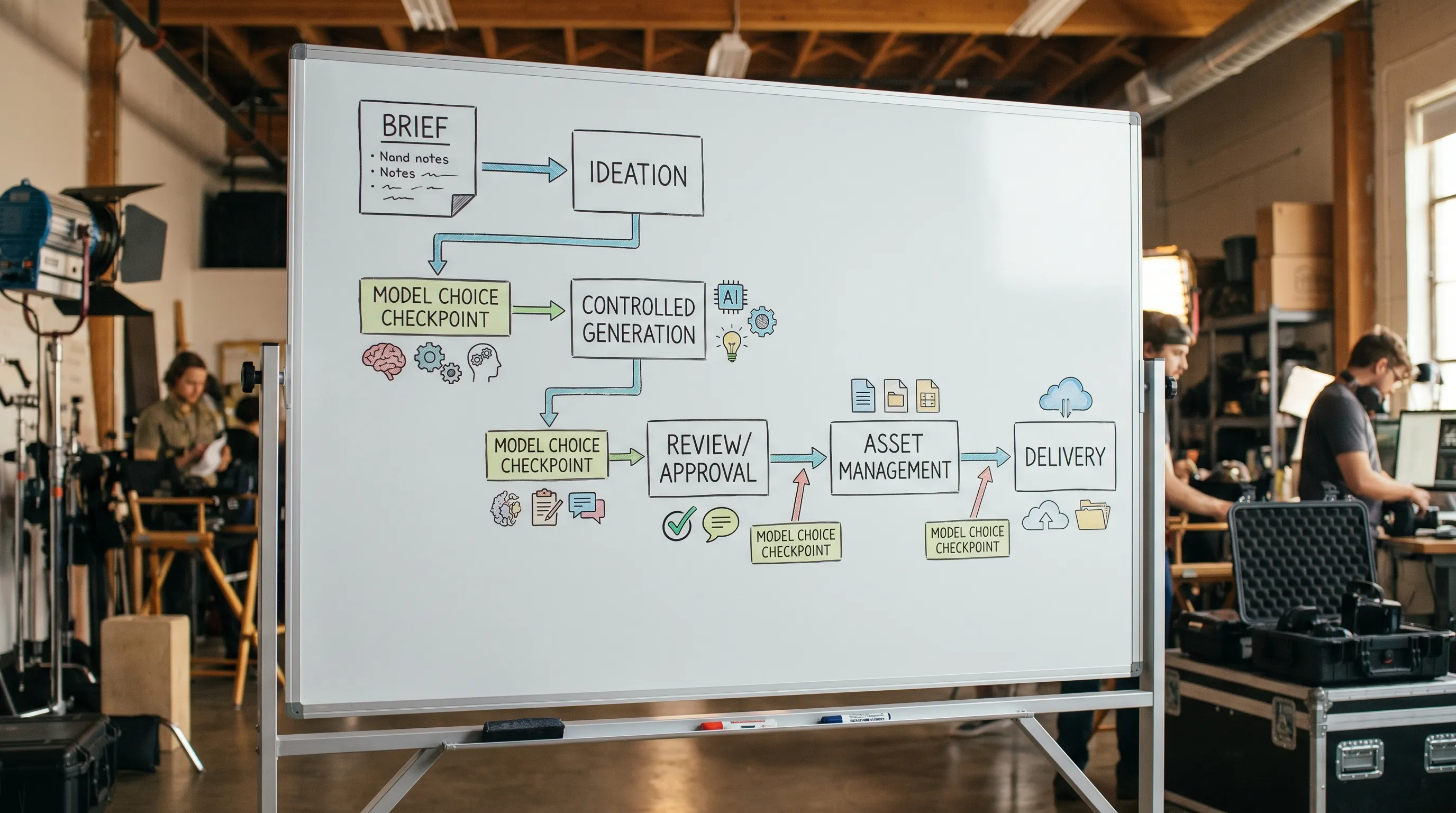
Governance: the difference between “cool demos” and production-ready AI
Enterprises often get stuck because they can generate content, but cannot operationalize it responsibly.
A production AI setup needs to answer:
- Who can use which models for which projects?
- Which inputs are allowed (public refs vs confidential assets)?
- How do you enforce brand rules consistently?
- How do you run approvals, annotate changes, and track versions?
This is the gap a Creative AI operating system is meant to close.
How The Creative AI OS supports model selection in practice (without locking you into one model)
Virtuall is positioned as a Creative AI OS for studios that need to scale image, video, and 3D generation with control. Based on the product information provided, teams use Virtuall to:
- Orchestrate multi-model generation across modalities, with Nyx coordinating intent and context across teams.
- Apply AI governance controls so the right people and projects use the right tools.
- Standardize outputs with generation blueprints (templates) and studio context memory (mood boards) to reduce style drift.
- Run review workflows, approvals, and content annotation so AI output fits real production review patterns.
- Manage outputs with asset management and pipeline tracking, keeping production organized from draft to delivery.
- Support enterprise needs with EU-based infrastructure and inference for compliance-oriented deployments.
- Integrate with existing creative ecosystems via plugins and API (DCC, PIM, DAM, and related tooling).
The key point is not that one model wins. The win is having a governed system where model choice is a controlled decision, not a personal preference per artist or team.
Common pitfalls (and how to avoid them)
Optimizing for “best looking” instead of “most controllable”
If you cannot reliably re-create a character, product, or composition, you will pay for it later in manual fixes. For production, controllability often beats raw aesthetics.
Ignoring review and approval cycles
If stakeholders cannot review outputs in a familiar way, adoption stalls. Choose models and workflows that support annotations, iterations, and clear sign-off.
Treating model risk as a legal problem only
Governance is operational. Even if legal approves a vendor, studios still need practical guardrails: who can upload what, how references are handled, and how outputs are tracked.
Failing to separate exploration from production
Many teams need two distinct modes:
- Exploration mode: fast, broad, low cost
- Production mode: controlled, consistent, auditable
Trying to use one setup for both usually disappoints.
Frequently Asked Questions
Is it better to standardize on one GenAI model for the whole studio? For most studios, no. A multi-model approach is more realistic, but it must be governed so outputs stay consistent and risks stay controlled.
What is the biggest factor in model selection for enterprise creative teams? Governance and repeatability. Visual quality matters, but enterprises typically win by ensuring consistent, compliant outputs across teams and projects.
When should we use open-weight models instead of hosted models? Consider open-weight options when you need deeper customization (fine-tuning), tighter control over data handling, or predictable long-term repeatability. Hosted models often win on speed and ease of use.
How do we test models without wasting weeks? Define acceptance criteria per asset type, use a small representative evaluation set, and score models with a weighted matrix that includes control, speed, cost, and governance fit.
How do we prevent style drift across campaigns and teams? Use standardized templates (generation blueprints), shared context (mood boards), and review gates. Consistency is usually a workflow and governance problem, not just a prompt problem.
Build a model stack that your studio can actually run
If your team is juggling multiple GenAI tools across image, video, and 3D, the hard part is not generating. It is operating: keeping intent consistent, enforcing rules, tracking assets, and staying compliant.
The Creative AI OS is built to help studios operationalize creative AI at scale with governance controls, workflow orchestration, and multi-model generation coordinated by Nyx. Explore Virtuall at virtuall.pro to see how a Creative AI OS can standardize production-ready results without forcing your studio into a single model.