5 Signs Your Creative AI Workflow Will Not Scale
Spot 5 signs your creative AI workflow will not scale, from tool sprawl to weak governance, and learn how enterprise teams fix them.
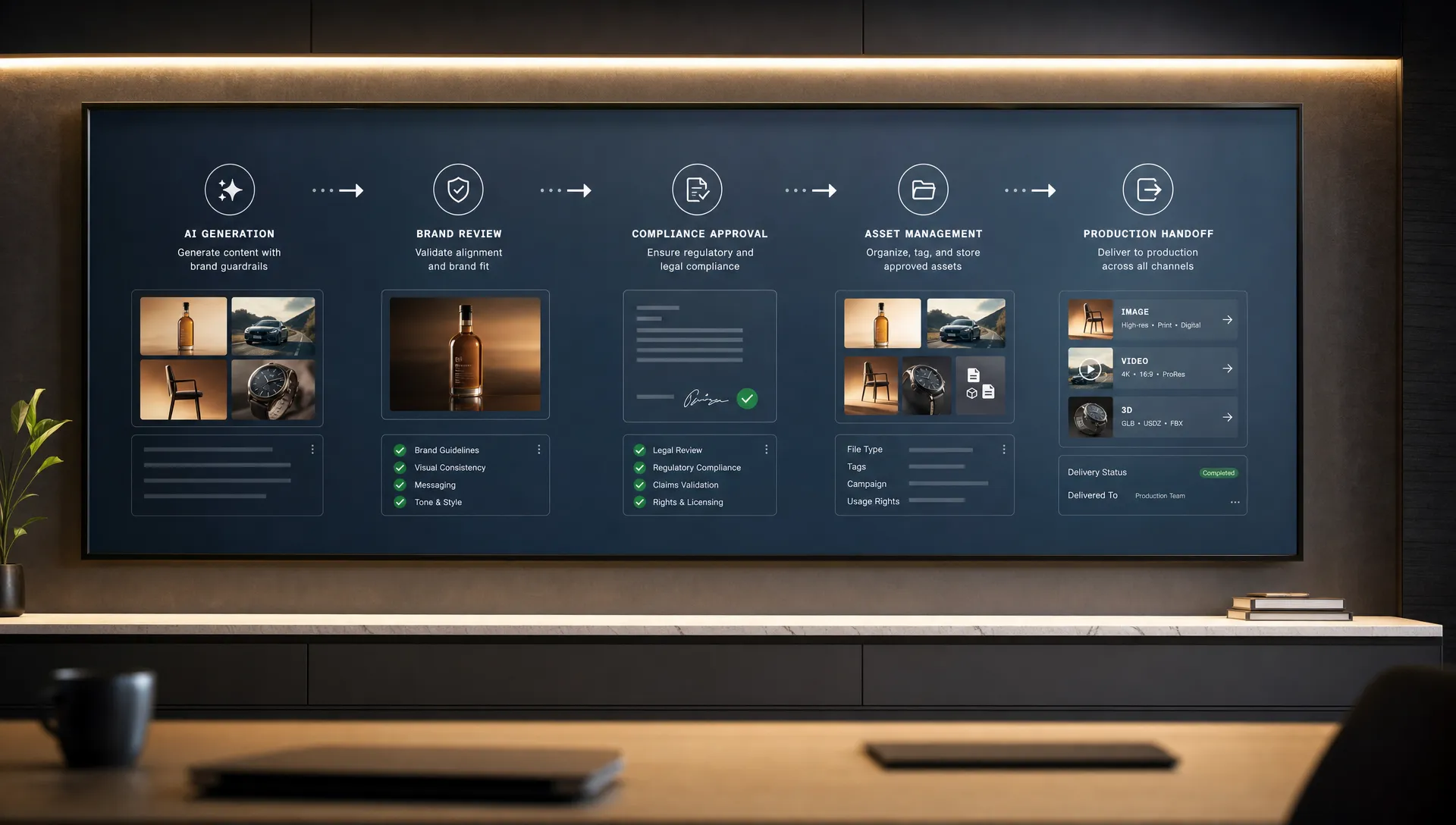
AI pilots are easy to make impressive. Scaling them across a studio, marketing organization, product team, or game production pipeline is much harder.
A single art director can coax a strong concept from a model. A small content team can generate a week of social variants. A game developer can prototype a prop or environment mood in minutes. But the moment the workflow touches brand governance, rights, approvals, localization, 3D constraints, DAM handoff, or multiple teams, the cracks appear.
A scalable AI workflow for creative teams is not just a better prompt library. It is an operating model that makes creative intent repeatable, keeps teams aligned, and gives the business enough control to trust the outputs in production.
If your creative AI workflow shows the signs below, it may work for experimentation, but it will not scale without changes.
What scaling a creative AI workflow really means
Scaling does not simply mean generating more assets. More output can actually create more rework if the workflow has no shared context, approval logic, or production standards.
For enterprise teams, a scalable creative AI workflow usually has five characteristics: repeatable quality, governed model usage, traceable decisions, production-ready output formats, and clear ownership. The difference between a pilot and a scalable system often looks like this:
| Pilot workflow | Scalable workflow |
|---|---|
| Prompts live in personal notes or chat threads | Generation patterns are documented as reusable blueprints |
| Teams choose models ad hoc | Models are selected by use case, risk, rights, and output needs |
| Reviews happen after export | Approvals and constraints are built into the workflow |
| Assets are manually renamed, resized, and transferred | Outputs follow production specs and connect to downstream tools |
| Compliance is handled case by case | Governance policies are embedded before production ramps |
The warning signs are often operational, not creative. Your team may be producing beautiful images, videos, or 3D concepts, while still building on a workflow that cannot survive enterprise scale.
1. Tool sprawl has become your operating model
The first sign is simple: your team has more AI accounts than process.
Marketing uses one generator for campaign visuals. The brand team uses another for mood exploration. The video team has a separate stack. A game team experiments with 3D and texture tools. Freelancers bring their own subscriptions. None of these decisions are necessarily wrong on their own. The problem is that the workflow depends on disconnected tools rather than an orchestrated system.
Tool sprawl becomes risky when nobody can answer basic operational questions. Which model was used for this asset? What prompt, reference, or style guide influenced it? Is the output cleared for this market, this channel, and this campaign? Can another team reproduce the same direction next month?
At small scale, people compensate with memory and manual coordination. At enterprise scale, that turns into duplicated work, inconsistent quality, unclear rights, and procurement headaches.
The fix is not always to force every team into one model. Creative work often benefits from multiple models, because image, video, audio, and 3D tasks have different strengths and constraints. The scalable move is to create an approved model and tool strategy. Define which tools are allowed for which use cases, what data can be used, how outputs are stored, and how work moves into review and production.
This is also where a broader scalable AI checklist for multi-team rollouts becomes useful. The goal is not tool consolidation for its own sake. The goal is control, orchestration, and repeatability.
2. Creative intent lives in prompts, chats, and individual memory
A creative AI workflow will not scale if its best results depend on one person who knows how to prompt the tool.
Prompt skill matters, but enterprise creative production cannot rely on hidden knowledge. If the art director is unavailable, does the campaign still follow the same visual system? If the game team changes contributors, can new artists generate assets that fit the world bible? If a regional marketing team adapts a global campaign, can they preserve the brand idea while localizing the execution?
Creative intent includes more than a text prompt. It includes mood boards, references, approved color systems, typography rules, camera language, character constraints, claims guidance, market restrictions, and examples of what not to do. In game development, it may also include scale, topology expectations, material direction, engine constraints, and narrative context.
When that context is scattered across slide decks, Figma comments, Slack threads, old campaign folders, and personal prompt documents, every generation starts from an incomplete brief.
A scalable workflow captures creative context in reusable structures. Teams should be able to define:
- The objective, audience, channel, and intended use of the asset
- The brand, style, composition, and reference constraints that should guide generation
- The negative constraints, such as off-brand aesthetics, prohibited claims, or unusable anatomy
- The production requirements, such as format, aspect ratio, metadata, language, or 3D specifications
This is why generation blueprints, shared mood boards, and studio context memory matter. They turn creative direction into a repeatable system without removing human taste. The best workflows still leave room for art direction, iteration, and surprise. They simply stop asking every team to rebuild the same context from scratch.
3. Approvals happen after generation instead of inside the workflow
Many AI workflows look fast because they measure only generation time. They ignore everything that happens after the first output appears.
If your team generates hundreds of assets before brand, legal, product, or creative review begins, the workflow is not actually efficient. It has only moved the bottleneck downstream. The result is familiar: large review batches, unclear feedback, version confusion, late compliance concerns, and expensive rework.
For a CMO, this creates brand and reputation risk. For an art director, it creates quality drift. For an application manager, it creates governance gaps. For a game developer, it can create a pile of exciting concepts that are not usable in the actual pipeline.
Governance expectations around AI are also becoming more formal. The EU AI Act entered into force in 2024 and introduced a risk-based framework for AI systems in the European Union. Not every creative use case carries the same obligations, and this is not legal advice, but the direction is clear: organizations need more traceability, accountability, and control over how AI is used.
A scalable workflow brings approvals earlier. Instead of reviewing only final outputs, teams define acceptable inputs, approved references, model boundaries, review roles, and decision gates. Creative review becomes part of the production flow, not a separate rescue mission at the end.
If you are preparing to increase volume, review the controls needed before ramping AI production. Controls are not bureaucracy when they are designed well. They are what allow creative teams to move faster without losing trust.
4. Outputs cannot move cleanly into production systems
A creative AI workflow that ends with a downloaded file is rarely enough for scale.
Enterprise production depends on handoff. Assets need to move into DAMs, PIMs, design tools, DCC tools, game engines, e-commerce systems, localization workflows, campaign builders, and approval platforms. If every asset requires manual renaming, resizing, tagging, conversion, or re-uploading, the team will hit a ceiling quickly.
This is especially visible in 3D and game workflows. A generated concept may look useful, but production teams still need to know whether it fits the engine, follows polygon and material expectations, supports the right file formats, and can be traced back to the brief. For video and image teams, the same issue appears as missing metadata, wrong aspect ratios, inconsistent naming, unclear usage rights, or lack of source context.
Production readiness is not a nice-to-have. It is the difference between AI-assisted ideation and AI-enabled production.
| Stakeholder | What breaks when output is not production-ready | What scalable workflows define upfront |
|---|---|---|
| CMO and brand teams | Campaign variants drift across markets and channels | Brand rules, usage rights, claims constraints, and channel specs |
| Art directors | Strong concepts become inconsistent executions | Style references, review gates, version history, and quality criteria |
| Application managers | AI tools sit outside enterprise systems | Access rules, integrations, metadata, auditability, and lifecycle management |
| Game developers | Concepts do not fit the asset pipeline | Format expectations, scale, materials, topology needs, and engine constraints |
The solution is to define output requirements before generation starts. This includes file formats, dimensions, naming conventions, metadata, version control, approval status, and destination systems. If AI work cannot connect to the rest of the creative stack, it will remain a side process.
5. No one owns AI operations across teams
The final sign is organizational. If everyone uses AI, but no one owns the operating model, the workflow will not scale.
Creative AI sits between departments. It affects brand, legal, IT, data, procurement, creative direction, production operations, and sometimes product development. When ownership is unclear, each team optimizes for its own needs. Creative teams prioritize speed and quality. IT prioritizes security and integration. Legal prioritizes risk. Marketing prioritizes campaign output. Game teams prioritize fit with the production pipeline.
All of those priorities are valid. They only become a problem when there is no shared operating model.
A scalable AI workflow needs clear ownership without centralizing every creative decision. The most effective approach is usually a cross-functional model where responsibilities are explicit.
| Role | Primary responsibility in a scalable creative AI workflow |
|---|---|
| Executive sponsor | Defines business goals, risk appetite, and investment priorities |
| Creative lead or art director | Owns quality standards, style direction, and creative acceptability |
| Creative operations lead | Designs workflow stages, handoffs, review processes, and production metrics |
| IT or application manager | Manages access, integrations, vendor evaluation, and system reliability |
| Legal and compliance | Defines usage policies, documentation needs, and risk boundaries |
| Asset or data owner | Clarifies rights, approved inputs, metadata, and storage rules |
The NIST AI Risk Management Framework is a useful reference for thinking about AI governance because it frames risk management around governing, mapping, measuring, and managing AI risks. Creative teams do not need to turn every campaign into a compliance project, but they do need a shared language for accountability.
Without ownership, AI adoption becomes a collection of local experiments. With ownership, it becomes a production capability.
A quick scorecard: will your creative AI workflow scale?
Use this as a simple diagnostic. If you answer no to two or more of these questions, your workflow probably needs operational work before you increase volume.
| Scalability question | Yes | No |
|---|---|---|
| Can another team reproduce a successful output using the same context and constraints? | ||
| Do you know which models and tools are approved for each creative use case? | ||
| Are brand, legal, and creative review gates built into the workflow before final export? | ||
| Do outputs include the formats, metadata, and status needed for downstream systems? | ||
| Is there a clear owner for AI governance, workflow design, and production operations? |
The point of the scorecard is not to slow experimentation. It is to identify the operational gaps that will become expensive once AI content volume increases.
How to fix the workflow before you scale
If these signs feel familiar, the next step is not to abandon AI. It is to move from experimentation to an operating model.
1. Map how work actually moves
Start with the current workflow, not the ideal one. Map how requests arrive, who writes prompts, where references come from, which tools are used, how outputs are reviewed, and where approved assets go. The hidden work is often where scale fails: manual tagging, undocumented feedback, repeated prompt rewriting, and late-stage format conversion.
2. Turn repeat work into governed generation patterns
Look for tasks that happen often: campaign resizing, product image variations, concept exploration, style exploration, localization, background generation, or 3D ideation. These are strong candidates for reusable blueprints. A blueprint should include the creative brief, model choice, constraints, review rules, and output requirements.
3. Orchestrate models rather than relying on one tool
Different creative tasks may need different models. Scalable teams define which model should be used for which job, then orchestrate that choice within a governed workflow. This prevents teams from improvising with unapproved tools while still allowing creative flexibility.
4. Connect AI production to approvals and asset systems
AI should not sit outside the production stack. The workflow should connect to review, approval, annotation, asset management, and downstream creative tools. This is where an operating layer becomes important.
The concept of a Creative AI OS is built around this need: one layer to govern, orchestrate, and scale AI-powered creative production across teams, tools, and formats. Virtuall approaches this through governance controls, generation blueprints, studio context memory, multi-model orchestration through Nyx, team review workflows, asset management, pipeline tracking, and integrations with creative systems through plugins and API.
The larger the organization, the more important this operating layer becomes. At small scale, people can coordinate manually. At enterprise scale, the workflow itself has to carry the rules.
Frequently Asked Questions
What makes a creative AI workflow scalable? A scalable creative AI workflow produces repeatable, governed, production-ready outputs across teams. It has approved models, reusable creative context, embedded review gates, clear ownership, and integrations with the systems where assets are stored, approved, and published.
When should a team move beyond standalone AI tools? Standalone tools are useful for experimentation, but teams should move beyond them when multiple departments need consistent outputs, shared governance, approval workflows, rights management, or integration with DAM, PIM, DCC, game, or marketing systems.
How can creative teams keep brand consistency when using AI? Brand consistency improves when teams capture creative direction as reusable context. This can include mood boards, approved references, style rules, negative constraints, generation blueprints, and review criteria that are applied before and during generation, not only after export.
Does scaling creative AI reduce human creativity? It should not. A strong workflow removes repetitive setup, manual handoff, and avoidable rework so creative teams can spend more time on judgment, taste, storytelling, and direction. The goal is not to replace art direction, but to make it repeatable across more work.
Is compliance really necessary for creative AI workflows? Yes, especially in enterprise settings. Compliance does not mean every creative experiment needs a legal review, but organizations should define approved tools, acceptable inputs, usage rights, documentation practices, and review gates before AI production reaches high volume.
Build a creative AI workflow that can grow
A workflow that works for one team, one campaign, or one prototype may not survive enterprise production. The warning signs are usually visible early: too many disconnected tools, context trapped in prompts, late approvals, weak production handoff, and unclear ownership.
If your organization is ready to move from AI experiments to controlled creative production, Virtuall helps teams operate creative AI at scale across image, video, audio, and 3D workflows, with governance, orchestration, collaboration, compliance, and production readiness built into the process.