The Top 10 Best Prompt Examples for Marketing Images in 2026
Updated for late 2026. The 10 best AI prompt examples for marketing images — product hero shots, lifestyle ads, social posts. With 2026 model notes (Imagen 4, Nano Banana 2, GPT-Image-2) and brand-consistent prompting patterns.
In today's visually-driven market, creating high-impact marketing imagery at scale is no longer a luxury, it's a necessity. The primary challenge lies in translating a clear marketing objective into a precise, effective AI prompt that delivers consistent, on-brand results. This guide demystifies that process, providing some of the best prompt examples for marketing images that will transform your campaigns from concept to conversion.
Updated for late 2026
The prompt patterns below have been re-tested against the current generation of image models — Google Imagen 4, Nano Banana 2, OpenAI GPT-Image-2, Flux 1.1 Pro, and Ideogram 3. Two things changed materially this year: (1) modern models reward structured prompts (subject → environment → lighting → camera → style) far more than long descriptive paragraphs; (2) brand-consistency is now a solved problem when you pair a base prompt with style references or a brand LoRA rather than restating brand attributes in every prompt. Where a prompt below benefits from a 2026 update, we've noted it inline.
Ready to start creating? If you have not generated anything already, you can try the Creative AI OS at the beginning of your journey. Try it for free and follow along with the prompts in this article. Our platform, VirtuallPRO, is designed to unify your entire creative workflow, making it easier than ever to generate, manage, and collaborate on stunning visual assets. Virtuall is committed to being a responsible, compliant, and safe enterprise option, ensuring your creative process is both innovative and secure.
This curated listicle will equip you with the strategic prompts, tactical insights, and replicable methods needed to master AI-powered visual creation. We will cover everything from product hero shots and lifestyle advertisements to viral social media content. For practical steps on how to effectively generate AI models for clothing with prompts, you can find detailed guidance that complements the techniques discussed here. Each example is broken down into actionable components, helping your team move beyond simple text-to-image generation and towards strategic, repeatable asset creation that drives real business outcomes.
Generate every prompt in this guide inside Virtuall — the Creative AI OS for governed, on-brand marketing visuals at scale.
1. Product Hero Shot
A product hero shot is a high-impact, single-focus image that showcases a product as the undisputed star. This prompt structure generates professional, studio-quality visuals with dramatic lighting and clean backgrounds, highlighting key product features. Foundational for e-commerce, landing pages, and brand portfolios, these images are essential for converting viewers into customers.

Prompt Example & Analysis
The goal is to create an image that feels premium and aspirational, much like the iconic product photography from Apple or Dyson. This requires precise control over lighting, materials, and composition.
Prompt:
Product hero shot of a sleek, minimalist silver smartphone with brushed gold trim, resting on a white marble surface, three-quarter view, studio lighting with a soft key light from the left, subtle reflections on the glossy screen, razor-sharp focus on the camera lens, clean composition, hyperrealistic, 8k --ar 16:9
Strategic Breakdown:
- Subject & Materials:
sleek, minimalist silver smartphone with brushed gold trimestablishes a premium aesthetic. Specifying finishes likebrushedandglossyis crucial for realism. - Lighting:
studio lighting with a soft key light from the leftmimics a professional photography setup, creating depth and avoiding harsh shadows. - Composition:
three-quarter view,clean composition, andrazor-sharp focus on the camera lensdirects the viewer's eye to a key feature, adding a layer of professional polish. - Technical Modifiers:
hyperrealistic, 8kand--ar 16:9guide the AI towards high-fidelity output in a standard widescreen format suitable for website banners.
Actionable Takeaways & Integration
To replicate this for your own products, focus on specificity.
Key Tactic: Always define the material, lighting setup, and camera angle in your prompt. Generic terms yield generic results. For instance, instead of "good lighting," use "soft box illumination" or "dramatic rim lighting."
Team Workflow in VirtuallPRO:
- Blueprint Creation: Save this prompt structure as a blueprint in your team's workspace. Your team can then quickly adapt it by changing only the product details (
silver smartphone) for different items. - Iterative Testing: Generate multiple variations by slightly altering the lighting (
key light from the right) or angle (low-angle shot). Use the shared workspace to compare versions and decide on the best direction. - Negative Prompts: Add
--no text, logos, blurry backgroundto refine the output and prevent unwanted elements from appearing. For a deeper dive into creating photorealistic visuals, you can explore the principles of high-quality 3D product rendering which share many similarities.
2. Lifestyle Advertisement
Lifestyle advertisements place products into authentic, relatable scenes that show how they fit into a customer's daily life. This prompt structure generates narrative-rich imagery connecting products to an aspirational way of living, making it highly effective for brand storytelling, social media marketing, and creating an emotional bond with your audience. Brands like Lululemon and Patagonia have perfected this by selling not just a product, but a feeling.
Prompt Example & Analysis
The objective is to create a scene that feels genuine and emotionally resonant, telling a story where the product is a natural part of the experience. It's about selling the outcome and the feeling, not just the features.
Prompt:
Lifestyle advertisement photo, a young woman with athletic build, mid-20s, laughing genuinely while listening to music on vibrant blue wireless headphones. She is jogging on a scenic coastal path during a golden hour sunset. Soft, warm light illuminates her confident expression. The ocean is softly blurred in the background, creating a beautiful bokeh effect. Photorealistic, captured with a 50mm lens, candid style --ar 3:4
Strategic Breakdown:
- Scene & Emotion:
laughing genuinely,jogging on a scenic coastal path, andgolden hour sunsetestablish a powerful, positive emotional context. The narrative is about freedom, joy, and wellness. - Character & Product Integration:
young woman with athletic build,mid-20smakes the scene relatable to the target demographic, whilevibrant blue wireless headphonesare naturally integrated into the activity. - Lighting & Atmosphere:
Soft, warm lightandgolden hourcreate an aspirational and visually appealing mood. Thebeautiful bokeh effectprofessionally isolates the subject and product. - Technical Modifiers:
Photorealistic, captured with a 50mm lensmimics professional photography, whilecandid styleensures the image doesn't feel like a stiff, posed advertisement.--ar 3:4is optimised for social media feeds like Instagram.
Actionable Takeaways & Integration
To create compelling lifestyle images, focus on building a believable world around your product.
Key Tactic: Define the emotional tone, the character's persona, and the environmental context. Instead of just "woman using headphones," specify "a confident woman finding her rhythm during a sunset jog."
Team Workflow in VirtuallPRO:
- Blueprint Creation: Save this lifestyle prompt structure as a blueprint. Your team can then create entire campaigns by swapping out details like
scenic coastal pathforbustling urban parkorserene mountain trail. - Iterative Testing: Use VirtuallPRO's collaborative workspace to generate variations based on different emotional cues (
peaceful and focusedvs.energetic and joyful) or times of day (crisp morning lightvs.golden hour). - Negative Prompts: Add
--no overly posed, fake smile, studio backgroundto ensure the AI prioritises authenticity and avoids a generic stock photo look. This is a crucial step for building brand trust.
3. Social Media Post (Square/Story Format)
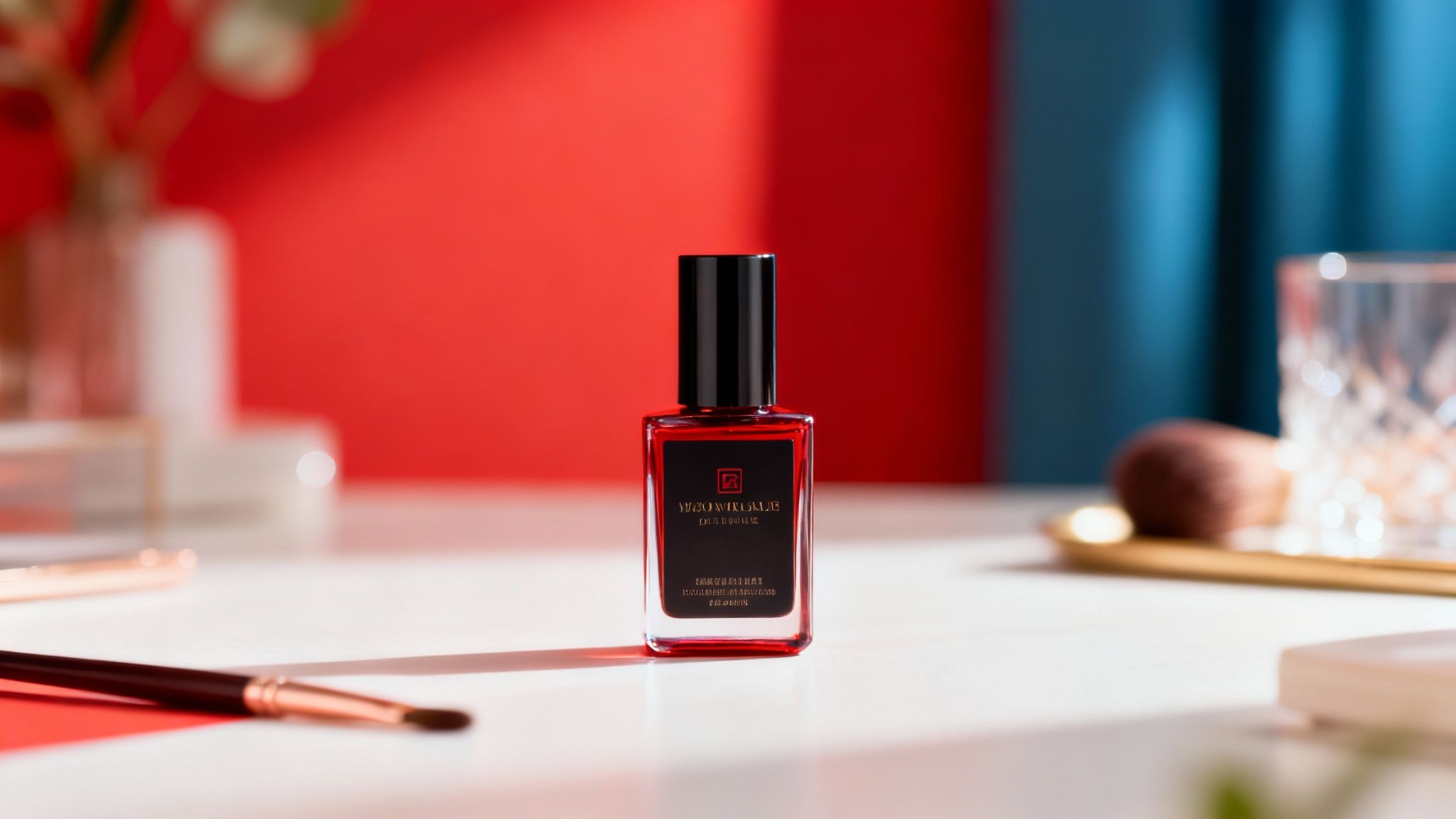
Platform-optimised vertical and square imagery is designed specifically for social media feeds, stories, and reels. These prompts generate fast-loading, attention-grabbing visuals sized for Instagram, TikTok, and Facebook. The composition works within platform constraints to drive immediate engagement through bold visuals and a clear focus, which is essential for capturing audience attention in a fast-scrolling environment.
Prompt Example & Analysis
The objective is to create a visually striking image that feels native to social platforms like Instagram. It needs to be clean, vibrant, and composed in a way that allows for potential text overlays for stories or ads, a common practice for brands like Glossier or Sephora.
Prompt:
Top-down flat lay of a glossy red nail polish bottle with a white cap, centrally placed on a minimalist pale pink background, surrounded by scattered white flower petals, soft and even lighting, bright and airy aesthetic, high detail, shot on a DSLR --ar 1:1
Strategic Breakdown:
- Subject & Aesthetic:
glossy red nail polish bottleandbright and airy aestheticclearly define the product and the desired mood. This combination appeals to beauty and lifestyle audiences. - Composition:
Top-down flat lay,centrally placed, andsurrounded by scattered white flower petalscreate a balanced and visually pleasing layout that is popular and effective on social media feeds. - Lighting:
soft and even lightingensures the product is well-lit without harsh shadows, making it look professional and appealing. - Technical Modifiers:
shot on a DSLRguides the AI towards a high-quality photographic look.--ar 1:1is critical for producing a perfect square image optimised for the Instagram grid.
Actionable Takeaways & Integration
To adapt this for your brand, focus on platform-specific formatting and aesthetic trends. These are some of the best prompt examples for marketing images because they are built for the context in which they will be viewed.
Key Tactic: Always specify the aspect ratio (
--ar 1:1for square,--ar 9:16for stories) and composition style (flat lay,eye-level candid shot) directly in the prompt. This removes guesswork and ensures the output is fit-for-purpose.
Team Workflow in VirtuallPRO:
- Blueprint Creation: Save this prompt as a "Social Media Square Post" blueprint. Your team can then modify the subject (
red nail polish) and background elements (flower petals) to quickly generate a month's worth of content for a campaign. - Batch Generation: Use VirtuallPRO to generate dozens of variations at once. Test different colours, props, and compositions to build a diverse content calendar efficiently.
- Refinement with Negative Prompts: Use
--no shadows, text, peopleto keep the focus purely on the product and maintain a clean aesthetic suitable for adding your own branded text later. For a complete guide on optimising your visuals, explore our deep-dive on the ideal Instagram post format.
4. Email Banner/Header
An email banner is a horizontally-oriented promotional image designed to capture attention in a crowded inbox. This prompt structure is engineered to generate eye-catching header imagery that clearly communicates offers or brand messages, often leaving space for text overlays. These visuals are crucial for email marketing campaigns, driving engagement and encouraging click-throughs to landing pages or product collections.
Prompt Example & Analysis
The objective is to create a visually appealing banner that feels both premium and inviting, suitable for a fashion or beauty brand's promotional email. The composition must be clean and uncluttered, leaving a clear area for marketing copy to be added later.
Prompt:
Email banner header for a spring collection sale, elegant flat lay of minimalist skincare products (serum bottle, cream jar, dropper) on a soft pastel pink textured background, soft natural morning light, clean composition with negative space on the right for text overlay, photorealistic, 4k, mobile responsive --ar 3:1
Strategic Breakdown:
- Subject & Theme:
spring collection sale, elegant flat lay of minimalist skincare productsimmediately sets the commercial context and aesthetic. This guides the AI to generate a scene that feels fresh and organised. - Lighting & Mood:
soft natural morning lightcreates a gentle, appealing atmosphere that complements the pastel colour scheme and avoids harsh, distracting shadows. - Composition for Utility:
clean composition with negative space on the right for text overlayis the most critical element. It explicitly instructs the AI to design the image for its final use case: as a background for text in an email template. - Technical Modifiers:
photorealistic, 4kensures high visual quality, while--ar 3:1creates the wide, narrow aspect ratio typical of email headers (similar to a 1200x400px or 1800x600px banner).
Actionable Takeaways & Integration
To adapt this for your campaigns, think about the final layout of your email first.
Key Tactic: Always specify where to leave negative space for text. Use phrases like "negative space on the left," "uncluttered area at the top," or "composition with copy space" to ensure the AI-generated image is usable.
Team Workflow in VirtuallPRO:
- Template Creation: Develop a blueprint prompt for your standard email banner. The core elements (
email banner header,negative space,--ar 3:1) remain constant, while the team only needs to update the theme (spring collection) and products. - A/B Testing Variations: In your shared workspace, generate multiple banner options for a single campaign. You could test different background colours (
soft pastel blue background) or product arrangements (products clustered on the left) to see which performs best with your audience. - Refinement with Negative Prompts: Use
--no text, words, logosto ensure the AI delivers a clean image, preventing it from generating placeholder text that interferes with the copy you'll add in your email marketing platform.
5. Carousel/Slide Advertisement
A carousel or slide advertisement is a multi-image format designed to tell a sequential story or showcase multiple product variations within a single, interactive ad unit. This prompt structure is crucial for generating a series of cohesive images that maintain visual consistency while highlighting different features, steps, or options. Hugely popular on platforms like Instagram and LinkedIn, these ads boost engagement by encouraging users to swipe through the content.
Prompt Example & Analysis
The objective is to create a visually consistent set of images for a skincare product carousel. Each image needs to stand on its own while contributing to a larger narrative, such as demonstrating product features or application steps, making it one of the best prompt examples for marketing images that require sequence.
Prompt:
Series of 5 images for an Instagram carousel ad. A luxury anti-ageing serum in a frosted glass bottle with a gold dropper. Image 1: Product hero shot on a pale pink marble background, soft natural light. Image 2: Close-up of the dropper dispensing a single, glistening drop of serum. Image 3: A macro shot of the serum's texture on a clean surface. Image 4: The bottle next to its elegant white and gold packaging. Image 5: The bottle with key ingredients (orchid extract, vitamin C) artfully arranged around it. Consistent soft lighting and colour palette across all images, minimalist aesthetic, hyper-detailed, 4k --ar 1:1
Strategic Breakdown:
- Narrative Arc: The prompt defines a clear five-part story:
Image 1: Product hero shot,Image 2: Close-up of the dropper,Image 3: A macro shot of the serum's texture,Image 4: The bottle next to... packaging, andImage 5: The bottle with key ingredients. This guides the AI to generate a logical sequence. - Visual Cohesion: The instruction
Consistent soft lighting and colour palette across all imagesis the most critical element. It ensures the carousel feels like a single, professionally organised campaign rather than a random collection of photos. - Platform Specificity:
--ar 1:1tailors the output for Instagram's square feed format, ensuring the images are perfectly optimised for the platform where the ad will run. - Detail & Quality:
frosted glass bottle,glistening drop, andhyper-detailedprovide the AI with specific textures and sensory details to render, enhancing the premium feel.
Actionable Takeaways & Integration
To build an effective carousel, you must think like a storyteller, planning each slide's purpose.
Key Tactic: Define the role of each image in the sequence directly in the prompt. Use numbered descriptions to map out the entire carousel, from the introductory shot to the final showcase.
Team Workflow in VirtuallPRO:
- Carousel Templates: Create and save this prompt structure as a "Skincare Carousel" or "Product Feature Showcase" template in VirtuallPRO. Your marketing team can then reuse this blueprint, swapping out product details and the narrative arc for different campaigns.
- Sequential Generation: Generate the entire image set in a single session within VirtuallPRO to help the AI maintain maximum context and visual consistency across the slides.
- Review & Annotation: Use VirtuallPRO's collaborative tools to have team members review the generated sequence. They can add annotations directly onto the images, suggesting re-arrangements or requesting a new variation for a specific slide, such as "Generate Image 3 again, but with more emphasis on the serum's shimmer."
6. User-Generated Content (UGC) Style
User-Generated Content (UGC) style prompts generate authentic, unpolished imagery that mimics customer-created content, testimonials, or influencer reviews. This approach builds trust and social proof by moving away from slick, professional photography towards visuals that feel real and relatable. Foundational for social media campaigns and testimonial sections, these images resonate with audiences seeking genuine brand connections and are highly effective for driving conversion through perceived authenticity.

Prompt Example & Analysis
The objective is to create an image that looks like a happy customer naturally using a product in their daily life, similar to content seen in campaigns by brands like Airbnb or Glossier. The key is to introduce subtle imperfections that signal authenticity.
Prompt:
UGC style photo, candid shot of a young woman with a genuine smile applying a pink lip gloss, sitting in a naturally lit bedroom, soft morning light from a window, slightly messy background with plants, casual clothing, minimal makeup, shot on a smartphone, warm colour cast, slight grain texture --ar 4:5
Strategic Breakdown:
- Style & Action:
UGC style photo, candid shotandgenuine smile applying a pink lip glossimmediately set the scene for an authentic, unposed moment. This is crucial for believability. - Setting & Lighting:
naturally lit bedroom, soft morning light from a windowcreates a realistic, everyday environment. Thewarm colour castadds to the inviting, non-studio feel. - Authenticity Cues:
slightly messy background,casual clothing, andminimal makeupare deliberate imperfections that strip away the polished look of a traditional ad, making the scene more trustworthy. - Technical Modifiers:
shot on a smartphoneandslight grain textureinstruct the AI to mimic the technical qualities of real user photos. The--ar 4:5aspect ratio is optimised for social media feeds like Instagram.
Actionable Takeaways & Integration
To create compelling UGC-style visuals, think like a customer, not a photographer. Embrace the imperfections that make an image feel real.
Key Tactic: Specify the camera type (
shot on a smartphone) and add texture cues (slight grain,soft focus) to avoid an overly clean, AI-generated look.
Team Workflow in VirtuallPRO:
- Blueprint Creation: Establish a UGC prompt blueprint in your shared workspace. Team members can easily swap out the person, product, and setting (
young woman,pink lip gloss,bedroom) to generate a high volume of diverse, authentic-looking content. - Iterative Testing: Generate variations by changing the time of day (
golden hour light) or the level of candidness (laughing). Compare these versions in VirtuallPRO to see which one best captures the desired authentic feel for your campaign. - Negative Prompts: Use
--no studio lighting, perfect composition, airbrushed skinto steer the AI away from a polished commercial aesthetic and maintain the raw, user-generated feel.
7. Seasonal/Holiday Promotional Campaign
A seasonal or holiday promotional campaign uses themed imagery to connect with consumers during specific times of the year, like Christmas, Black Friday, or summer. These prompts generate visuals infused with seasonal colours, motifs, and emotional contexts, capitalising on the heightened consumer engagement and spending associated with these events. This approach is fundamental for retail, e-commerce, and any brand aiming to create timely, relevant, and urgent marketing messages.
Prompt Example & Analysis
The objective is to create an image that feels festive and high-end, instantly communicating a "perfect gift" message. The prompt needs to combine product details with a rich, evocative holiday atmosphere, similar to campaigns from brands like Macy's or John Lewis.
Prompt:
Luxe Christmas marketing campaign image, premium skincare bottles with gold caps arranged elegantly on a bed of fresh snow, surrounded by pine cones and festive red ribbons, soft warm studio lighting, shallow depth of field, background of subtle bokeh Christmas lights, feeling of joyful gift-giving, photorealistic, 4K --ar 16:9
Strategic Breakdown:
- Theme & Atmosphere:
Luxe Christmas marketing campaign imageandfeeling of joyful gift-givingset the emotional tone and commercial purpose from the start. - Seasonal Elements:
on a bed of fresh snow,pine cones, andfestive red ribbonsare specific, iconic details that anchor the image firmly within the holiday theme. - Lighting & Mood:
soft warm studio lightingandbackground of subtle bokeh Christmas lightscreate a cosy, inviting, and magical atmosphere that enhances the festive mood. - Composition & Quality:
elegantly arranged,shallow depth of field,photorealistic, and4Kensure a polished, professional composition that focuses attention on the products while maintaining a high-quality aesthetic.
Actionable Takeaways & Integration
To adapt this for your campaigns, focus on tying the product to a specific seasonal emotion or event.
Key Tactic: Always specify the emotional context and iconic seasonal elements in your prompt. Instead of "holiday image," use "a cosy scene with twinkling warm lights and a feeling of family togetherness."
Team Workflow in VirtuallPRO:
- Blueprint Creation: Save this prompt as a "Christmas Campaign" blueprint. Your team can then adapt it annually by swapping the product (
premium skincare bottles) and slightly modifying the seasonal elements (holly berriesinstead ofpine cones). - Iterative Testing: Generate variations for different holidays by changing the core theme. For Valentine's Day, replace Christmas elements with
velvet red background, rose petals, and a romantic, soft glow. - Negative Prompts: Use
--no text, logos, peopleto keep the focus purely on the product and its festive environment, ensuring a clean and versatile marketing asset.
8. Product Comparison/Feature Showcase
Product comparison visuals directly address a buyer’s need for information by showing two or more items side-by-side. This prompt structure creates clear, educational images ideal for highlighting feature differences, before-and-after results, or old-versus-new models. These visuals are powerful tools for landing pages, competitive analyses, and social media content, helping to guide customer decisions and clearly articulate your value proposition.
Prompt Example & Analysis
The goal is to create a visually balanced comparison that makes the advantages of the new product immediately obvious. Consistency in lighting and perspective is key to ensuring a fair, easy-to-understand visual argument that focuses purely on the product's evolution.
Prompt:
Split-screen 50/50 vertical comparison shot, clean minimalist aesthetic. Left side: older model bulky white smartwatch from 2018. Right side: new ultra-thin black smartwatch with a vibrant edge-to-edge OLED display. Both watches are shot from the same front-facing angle under bright, even studio lighting against a neutral grey background, photorealistic, 4k --ar 16:9
Strategic Breakdown:
- Layout & Composition:
Split-screen 50/50 vertical comparison shotis a direct command to the AI, establishing the core structure for the comparison.Same front-facing angleensures a direct, apples-to-apples evaluation. - Subject & Differentiation:
older model bulky white smartwatchversusnew ultra-thin black smartwatch with a vibrant edge-to-edge OLED displayclearly defines the two subjects and their key distinguishing features. - Environment & Lighting:
bright, even studio lighting against a neutral grey backgroundremoves any distracting variables, forcing the viewer's focus onto the products themselves and their physical differences. - Technical Modifiers:
photorealistic, 4kpushes the AI to generate a high-quality, believable image, while--ar 16:9sets a standard aspect ratio for digital marketing assets.
Actionable Takeaways & Integration
To make your comparisons effective, focus on isolating the variable you want to highlight.
Key Tactic: Use layout commands like
split-screen,side-by-side, orbefore-and-afterto control the narrative. Always specify identicallightingandanglefor both subjects to create a fair and professional comparison.
Team Workflow in VirtuallPRO:
- Blueprint Creation: Establish a comparison blueprint in your workspace. Team members can then simply swap out the product descriptions (
older model...andnew ultra-thin...) for different products or feature updates. - Consistent Generation: Generate each product individually using an identical lighting and background prompt first. Then, combine them in a new prompt or using post-production tools to ensure maximum consistency.
- Annotation Layer: Use the generated image as a base in VirtuallPRO and add annotations. Create text callouts and arrows pointing to specific improvements like 'Thinner Profile' or 'Brighter Display' to guide the viewer’s attention and support your marketing claims.
9. Infographic-Style Visual
An infographic-style visual is a powerful marketing asset that transforms complex data, statistics, or processes into an easily digestible and shareable graphic. These prompts help generate designs that communicate information effectively using icons, typography, and organised layouts. Ideal for blog content, social media, and reports, these visuals position a brand as an authority and make dense information engaging.
Prompt Example & Analysis
The objective is to create a visually appealing and organised layout that can serve as a template for real data. The prompt focuses on establishing a clean, modern design language popularised by thought leaders like HubSpot and Statista.
Prompt:
Infographic about the "Future of Renewable Energy," modern flat design, using a colour palette of teal, navy blue, and orange, 5 sections organised vertically, each section with a clean custom icon (solar panel, wind turbine, water drop), clean sans-serif typography, minimalist layout, vector art style, white background, high detail --ar 2:3
Strategic Breakdown:
- Topic & Style:
Infographic about the "Future of Renewable Energy," modern flat designsets the theme and establishes a contemporary, clean aesthetic.Vector art styleensures sharp, scalable graphics. - Colour & Typography: Specifying a
colour palette of teal, navy blue, and orangeandclean sans-serif typographyensures brand consistency and readability. - Structure & Elements:
5 sections organised verticallyandeach section with a clean custom iconprovides the AI with a clear structural hierarchy, which is crucial for organising information. - Technical Modifiers:
--ar 2:3creates a vertical format, perfect for platforms like Pinterest or for embedding within a blog post, making this one of the best prompt examples for marketing images designed for content amplification.
Actionable Takeaways & Integration
To create effective infographics, focus on structural clarity and brand alignment in your prompt.
Key Tactic: Define the information hierarchy and visual language from the start. Prompting for a
top-to-bottom flow showing 5 key statisticsis far more effective than just asking for an "infographic."
Team Workflow in VirtuallPRO:
- Template Generation: Use this prompt structure to create a base infographic design. The AI-generated visual can serve as a template where your design team can later overlay precise data and text.
- Modular Blueprints: Create and save blueprints in VirtuallPRO for recurring report types, like "Monthly Marketing Stats" or "Annual Industry Report." This standardises the look and feel of your data visualisations.
- Refinement with Negatives: Use
--no complex gradients, 3D effects, photographyto maintain a clean, flat design style and ensure the output remains uncluttered and professional.
10. Video Thumbnail/Preview Frame
A video thumbnail is a high-impact static image designed to capture attention and drive clicks on platforms like YouTube, TikTok, and Instagram. These prompts generate dynamic, high-contrast thumbnails with a clear focal point and expressive elements, all optimised for visibility on small screens. A compelling thumbnail is one of the most critical factors for improving click-through rates and boosting video views.
Prompt Example & Analysis
The objective is to create an image that stops a user from scrolling, conveying emotion and intrigue instantly, much like thumbnails from top creators like MrBeast or MKBHD. This requires a focus on high-energy expressions, vibrant colours, and clean composition that leaves space for text overlays.
Prompt:
YouTube thumbnail, photorealistic, a young male gamer with a shocked and excited expression, eyes wide, pointing towards the camera, dramatic studio lighting with bright blue and pink rim lights, high contrast, clean dark background, space for text on the left, 8k, ultra-detailed --ar 16:9 --style raw
Strategic Breakdown:
- Subject & Emotion:
young male gamer with a shocked and excited expression, eyes wideimmediately establishes a powerful emotional hook, which is a proven tactic for increasing clicks. - Lighting & Colour:
dramatic studio lighting with bright blue and pink rim lights, high contrastcreates a visually striking image that stands out in a crowded feed. The use of complementary colours is a key strategy. - Composition:
pointing towards the cameraandspace for text on the leftare direct instructions that make the thumbnail feel interactive and ensure it is functionally designed for adding titles or logos later. - Technical Modifiers:
photorealistic,8k,--ar 16:9, and--style rawguide the AI to produce a high-fidelity image in the standard video format, with a less opinionated, more realistic base style.
Actionable Takeaways & Integration
To generate effective thumbnails, prioritise emotion and clarity. The image must communicate the video's core appeal in a fraction of a second.
Key Tactic: Always specify an emotional hook (
surprised,intrigued) and a colour strategy (high contrast,vibrant neon colours) in your prompt. The goal is to make the thumbnail "pop" against the platform's user interface.
Team Workflow in VirtuallPRO:
- Blueprint Creation: Save this prompt as a "Thumbnail-High-Emotion" blueprint in VirtuallPRO. Your team can quickly adapt it by changing the subject (
female scientist) or emotion (thoughtful and curious) to match different video topics. - Iterative Testing: Generate 5-10 variations by altering the lighting colours or character expressions. Use the shared workspace to A/B test which composition is the most eye-catching before finalising.
- Negative Prompts: Add
--no text, watermark, blurry faceto ensure the AI delivers a clean, professional image ready for your graphic designer to add custom text overlays. For dynamic content, exploring the capabilities of AI in motion graphics can offer even more engagement; you can find inspiration from the best AI video generators available today.
10-Point Comparison: Marketing Image Prompts
| Format (what it is) | Implementation Complexity 🔄 | Resource Requirements ⚡ | Expected Outcomes ⭐ / 📊 | Ideal Use Cases 📊 | Key Advantages & Tips 💡 |
|---|---|---|---|---|---|
| Product Hero Shot | Moderate — precise lighting, angle prompts | Moderate — high-fidelity renders, post-prod possible | Very high conversion; catalog-ready, product clarity | E‑commerce pages, landing pages, product catalogs | Maximizes conversions; specify lighting/materials and angles; version control for A/B tests |
| Lifestyle Advertisement | High — many elements, human models, mood control | High — complex scene generation, longer iterations | Strong emotional engagement and brand affinity | Brand storytelling, social campaigns, aspirational ads | Use detailed scene/tone descriptors; collaborate with teams for approvals |
| Social Media Post (Square/Story) | Low–Moderate — templated prompts, composition constraints | Low — fast batch generation, mobile-optimized files | High engagement; quick-to-iterate social content | Instagram/TikTok/Pinterest posts and stories | Specify aspect ratio and safe zones; batch-generate and A/B test variations |
| Email Banner / Header | Low — strict sizing and safe zones | Low — optimized small file sizes, template-ready | Improves open/CTR; consistent across clients when optimized | Promotional and transactional email campaigns | Specify exact dimensions and file-size limits; leave copy safe margins |
| Carousel / Slide Advertisement | High — maintain continuity across frames | Moderate–High — multiple consistent assets, longer production | Higher CTRs; effective narrative and multi-feature showcase | Multi-step product stories, comparisons, social carousels | Generate sequence in one workflow; define narrative arc and consistency rules |
| User-Generated Content (UGC) Style | Moderate — craft authentic imperfections without artifacts | Low — minimal production, scalable variations | Very high engagement and trust; social proof booster | Testimonials, influencer-style posts, community content | Include imperfection cues (warm tones, grain); mix with real UGC for authenticity |
| Seasonal / Holiday Campaign | Moderate — theme accuracy and timing planning | Moderate — many variations per holiday, calendar coordination | Drives urgency and seasonal sales peaks | Black Friday, Christmas, Valentine’s, back-to-school campaigns | Plan 8–12 weeks ahead; build holiday templates and track year-over-year performance |
| Product Comparison / Feature Showcase | High — precise matching, factual accuracy required | Moderate — matched lighting/angles, legal review for claims | Converts high-intent buyers; clarifies differentiation | Competitive ads, before/after, feature comparisons | Ensure visual parity and factual checks; annotate claims and involve legal review |
| Infographic-Style Visual | High — complex info hierarchy & accurate data | Moderate — design/data validation, possible post-editing | High shareability; thought-leadership and lead generation | Blog hero images, reports, Pinterest educational pins | Structure clear visual flow; fact-check data and use modular templates |
| Video Thumbnail / Preview Frame | Low–Moderate — expressive focal point and legibility | Low — quick generation, many rapid variants | Significant CTR uplift for video content | YouTube, Reels, TikTok preview images | Specify platform size/resolution and emotional hook; generate many variations for testing |
Unify Your Creative Workflow and Scale Your Visual Marketing
Throughout this guide, we have deconstructed ten distinct types of marketing images, moving far beyond surface-level templates to reveal the strategic architecture of truly effective AI prompts. From crafting the perfect hero shot to simulating authentic user-generated content, you now possess a detailed blueprint for generating precise, on-brand, and high-impact visuals. We have seen how minute adjustments to camera angles, lighting descriptors, and stylistic modifiers can completely transform an output from generic to exceptional.
The core lesson is one of control and intentionality. The best prompt examples for marketing images are not just about finding a magic combination of words; they are about understanding the 'why' behind each component. They are about translating a marketing objective, like increasing click-through rates on a social ad or conveying premium quality in an email banner, into a language the AI can execute flawlessly.
Key Takeaways for Immediate Application
To synthesise the insights from our examples, focus on these foundational pillars as you integrate AI into your creative process:
- Specificity is Your Superpower: Vague requests yield vague results. Instead of "a product photo", specify "a commercial product shot of a sleek, matte black wireless earphone case, resting on a dark marble surface, with a single, soft key light from the side creating a dramatic, high-contrast shadow." This level of detail eliminates ambiguity.
- Structure Your Prompts Methodically: Adopt a consistent structure for your prompts, such as [Subject] + [Setting/Context] + [Action/Pose] + [Artistic Style] + [Technical Modifiers]. This organised approach makes your prompts easier to debug, refine, and share with your team, creating a predictable foundation for creative exploration.
- Master Negative Prompts: The strategic use of
--noparameters is just as crucial as the positive descriptors. Use negative prompts to proactively remove unwanted elements like text, watermarks, distorted features, or clashing colours, ensuring your final images are clean, professional, and brand-compliant. - Iterate and Document: Your first generation is rarely your last. Treat prompting as an iterative cycle of generating, analysing, and refining. Crucially, document your successful "recipes", including the prompt, seed number, and any specific model settings. This creates an invaluable internal library of what works for your brand.
Beyond the Prompt: Creating a System for Scalable Excellence
Mastering these prompt examples is the first step towards creating a scalable, efficient, and highly effective visual marketing engine. The true power, however, lies in integrating this capability into a unified workflow. A great prompt is only as valuable as its ability to be repeated, refined, and shared across your team.
This is where a dedicated Creative AI OS becomes indispensable. A platform like VirtuallPRO allows you to move beyond isolated prompt engineering and build a centralised, collaborative system for visual production. By allowing you to generate, manage, and collaborate on all your visual assets, from 3D models to the final marketing images, you eliminate the bottlenecks that slow down creative teams.
Imagine a workflow where your best prompts are saved as shareable templates, feedback is annotated directly on generated images, and version control is seamless. This is how you transform a powerful tool into a strategic business advantage. You create a system for repeatable excellence that empowers every member of your team to produce on-brand assets quickly and consistently, all while maintaining the highest standards of safety and compliance that Virtuall is committed to.
The journey from a simple text prompt to a compelling marketing campaign is now shorter and more accessible than ever. By applying the detailed strategies outlined in this article, you are well-equipped to not only generate stunning visuals but also to build a more agile, creative, and data-informed marketing function. The future of creative production is here, and it's powered by structured, strategic prompting.
Ready to move from theory to production? Virtuall provides the integrated Creative AI OS your team needs to generate, manage, and collaborate on marketing visuals at scale. Turn the best prompt examples for marketing images into repeatable, brand-compliant assets by exploring our powerful tools and collaborative workspaces at Virtuall.