Choosing an AI Platform for Image, Video, and 3D
Choose the right AI image, video, and 3D platform with an enterprise checklist for governance, workflows, quality, and scale.
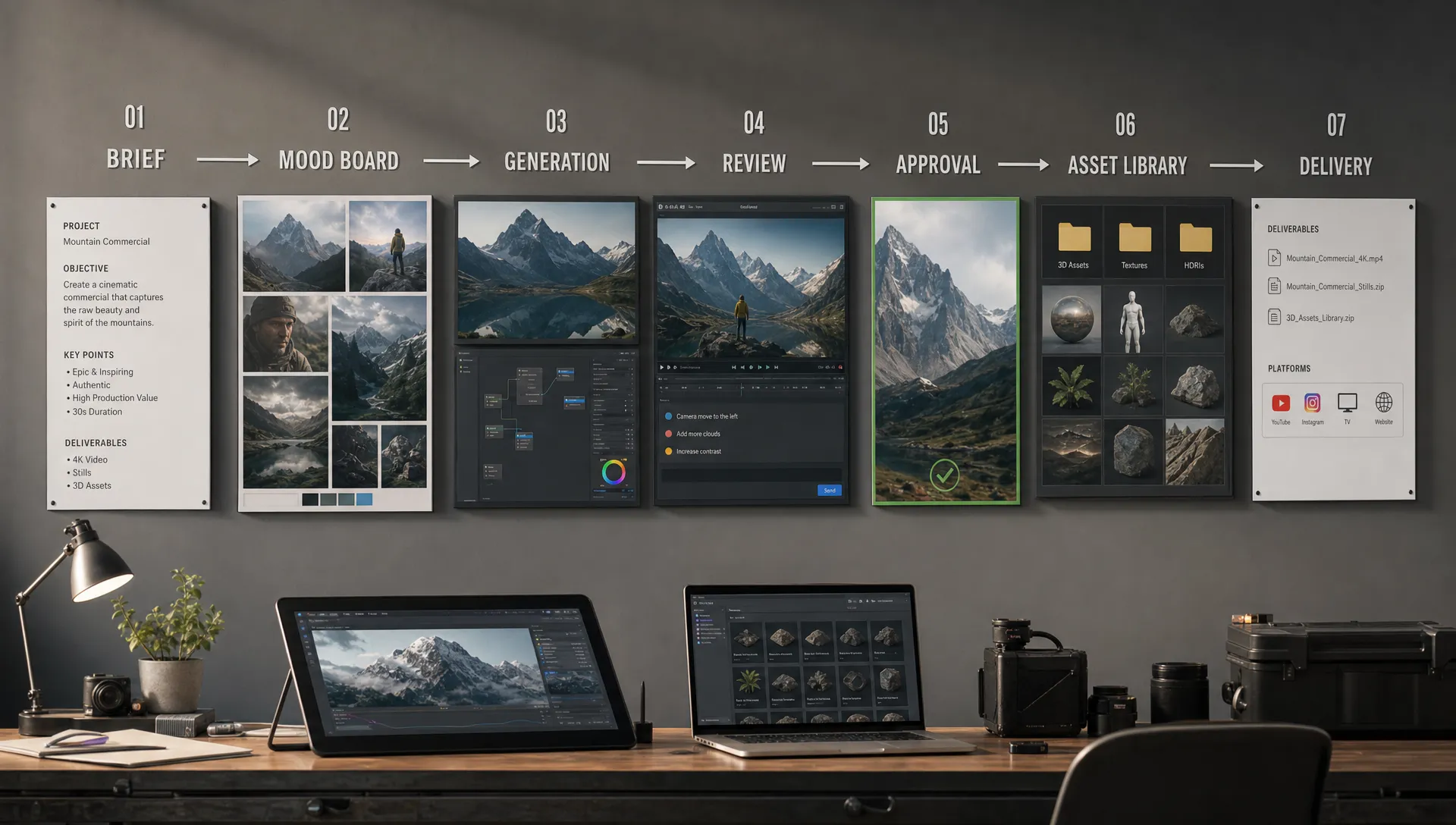
An AI platform for image, video, and 3D is no longer just a creative experiment. For enterprise teams, game studios, and high-volume content organizations, it is becoming part of the production stack: a place where brand intent, model selection, approvals, compliance, assets, and creative workflows meet.
That makes the buying decision more complex than choosing the model with the most impressive demo. A great image generator may not help your video team. A fast 3D tool may not fit your asset pipeline. A consumer-friendly interface may fail when your legal, security, and application teams ask how permissions, provenance, and model usage are controlled.
The right AI image, video, and 3D platform should help creative teams move faster without losing control. It should support experimentation, but also make it possible to repeat, review, approve, integrate, and scale work across real production environments.
Why the platform decision matters more in 2026
Creative AI has moved from isolated tests to operational use. Marketing teams want localized campaign visuals. Art directors want consistent concepts across multiple assets. Game developers want faster ideation for props, environments, textures, and 3D models. Application managers want systems that integrate with existing tools instead of creating another disconnected workflow.
The challenge is that image, video, and 3D generation do not behave like one simple software category. Each format has different production constraints. Images need brand consistency, rights clarity, and repeatable art direction. Video adds motion, timing, shot continuity, audio considerations, and review complexity. 3D adds topology, scale, geometry quality, UVs, textures, rigging needs, and compatibility with engines or DCC tools.
A point tool may be enough for one creator. At enterprise scale, the real question is different: can the platform help your organization govern creative AI across teams, workflows, and outputs?
This is where the distinction between generic enterprise AI and creative AI becomes important. If you need a deeper breakdown, Virtuall has covered how enterprise AI companies differ from creative AI platforms, especially when workflows involve art direction, asset production, and creative approvals.
Start with production use cases, not feature lists
Before comparing vendors, define what your organization actually needs to produce. This prevents the evaluation from becoming a model beauty contest.
For a CMO, the priority may be faster campaign production with brand-safe variations across markets. For an art director, it may be consistent visual language across concept images, short videos, and 3D references. For a game developer, it may be the ability to create usable 3D assets or production-ready references that move smoothly into Blender, Maya, Unity, Unreal Engine, or an internal pipeline. For an application manager, it may be governance, identity management, integrations, data handling, and long-term maintainability.
A useful first step is to classify use cases by business value and production complexity.
| Use case | Typical value | Platform requirement |
|---|---|---|
| Campaign image variations | Speed and volume | Brand controls, templates, approvals, asset management |
| Product visualization | Consistency and accuracy | Reference inputs, review workflows, DAM or PIM integration |
| Social video concepts | Faster iteration | Multi-model video generation, storyboard context, review tools |
| 3D concepting for games | Shorter pre-production | Image-to-3D or text-to-3D workflows, export compatibility, refinement options |
| Internal creative prototyping | Team productivity | Shared context, prompt history, collaboration, reusable workflows |
| Enterprise-wide AI rollout | Risk control and scale | Governance, permissions, compliance, auditability, integrations |
The goal is not to solve every use case on day one. The goal is to choose a platform architecture that can expand without forcing every team into a separate tool, policy, and asset repository.
What a true multimodal creative AI platform should cover
An AI image, video, and 3D platform should do more than provide access to multiple generation models. Model access is useful, but it is only one layer of a production-ready system.
The more strategic requirement is orchestration. Teams need a way to turn briefs, references, brand rules, mood boards, prompts, generated outputs, reviews, approvals, and final assets into a coherent workflow. Without that layer, creative AI becomes difficult to manage. Files scatter across personal accounts. Prompts disappear. Legal approval becomes manual. Results become inconsistent from one team to another.
A strong platform should cover four core layers.
Generation layer: The system should support the formats your teams actually use, including image, video, and 3D. Multi-model access matters because no single model is best for every creative task. A platform should help teams choose the right model for the job without creating chaos.
Context layer: Creative output depends on context. Brand guidelines, art direction, product references, style boards, previous campaigns, and project requirements should inform generation. If context lives outside the AI workflow, teams will spend too much time re-explaining the same intent.
Workflow layer: Professional creative work requires review, feedback, annotation, approvals, versioning, and handoff. The platform should fit how studios already operate, rather than forcing teams into a lightweight consumer workflow.
Governance layer: Enterprise adoption requires permissions, policy controls, model rules, data boundaries, compliance support, and traceability. The NIST AI Risk Management Framework is a useful reference for thinking about AI risk in terms of governance, mapping, measurement, and management.
Key evaluation criteria for an AI image, video, and 3D platform
When shortlisting platforms, evaluate them against the complete production lifecycle. The best choice is usually not the tool that wins one benchmark. It is the system that gives your teams the best balance of quality, control, speed, and integration.
| Evaluation area | Why it matters | Questions to ask |
|---|---|---|
| Modality coverage | Image, video, and 3D have different requirements | Does the platform support all formats you need today and in the next 12 to 24 months? |
| Multi-model orchestration | Different models excel at different tasks | Can teams access multiple models through one governed workflow? |
| Brand and style consistency | Enterprise outputs need repeatability | Can the platform preserve visual intent, references, and approved creative direction? |
| Governance controls | AI usage needs clear rules | Can admins define who can generate, with which models, under which policies? |
| Compliance posture | Legal and regulatory expectations are increasing | Where does processing happen, and how are data, rights, and approvals handled? |
| Collaboration | Creative work is reviewed by many stakeholders | Are annotation, approvals, versioning, and shared workspaces supported? |
| Asset management | Generated work must be found and reused | Can outputs, metadata, versions, and final assets be organized centrally? |
| Pipeline integration | AI must fit existing production systems | Are plugins, APIs, or integrations available for DCC, DAM, PIM, or other tools? |
| Output quality | Production teams need usable assets | Are exports suitable for downstream editing, rendering, or game engine workflows? |
| Scalability | Pilots and enterprise rollouts differ | Can the platform support multiple teams, roles, workflows, and governance needs? |
For many organizations, this table quickly reveals a gap. Some tools are excellent generators, but weak operating systems. Others are strong enterprise platforms, but not built for creative production. The right fit sits at the intersection.
Governance and compliance should be designed in from the start
Creative AI governance is not only an IT concern. It affects brand safety, intellectual property, client trust, procurement, and production quality.
At minimum, enterprise teams should understand how a platform handles user permissions, model access, data retention, regional infrastructure, approval trails, and acceptable use rules. If teams are working with client assets, unreleased products, game IP, or confidential campaign material, these questions become critical.
The regulatory environment also keeps evolving. The European Commission describes the EU AI Act as a risk-based framework for AI systems, with obligations depending on use case and risk level. Even when a creative workflow is not high-risk, organizations still need stronger internal controls as AI becomes embedded in production.
A mature platform should help teams answer practical questions such as: who generated this asset, what inputs were used, which model or workflow produced it, who approved it, and where can it be reused?
The Creative AI OS is built around this operating layer for creative AI. Its Creative AI OS includes AI governance controls, workflow orchestration, generation blueprints, studio context memory through mood boards, team review workflows, asset management, pipeline tracking, EU-based infrastructure and inference, and integrations through plugins and API. Nyx, Virtuall’s intelligence layer, orchestrates multiple AI models while preserving intent and context across studios and teams.
Image, video, and 3D quality require different tests
A common mistake is evaluating every platform with the same prompt and choosing the most visually impressive result. That approach can be useful for a first impression, but it is not enough for a production decision.
For image generation, test brand consistency, composition control, text rendering if needed, reference adherence, resolution options, editability, and approval workflows. For video, test temporal consistency, camera movement, shot continuity, prompt controllability, review cycles, and export formats. For 3D, test geometry quality, texture output, scale, mesh cleanliness, UV usability, polygon density, and compatibility with your downstream tools.
If 3D is central to your roadmap, include a practical import test. Generate or convert an asset, then move it into the tool where production actually happens. Check what breaks. Does the model import correctly? Are textures attached? Is the mesh usable? Can artists refine it without rebuilding from scratch? Does the asset work in your engine or rendering pipeline?
Teams exploring this area can use Virtuall’s practical guide to AI image to 3D model workflows to understand the steps involved, from preparing source images to refining generated outputs.
Integration is where pilots become production systems
A creative AI pilot can succeed even when the workflow is manual. Enterprise rollout cannot.
If your team has to download files from one tool, rename them by hand, upload them to a DAM, paste review notes into another system, and track approvals in a spreadsheet, the operational cost will eventually erase the speed gains. This is especially true for large studios, retailers, agencies, game teams, and brands with multiple markets or product lines.
When evaluating integrations, ask how the platform connects to the systems your teams already use. That may include digital asset management, product information management, DCC tools, game engines, project management systems, identity providers, or internal applications. API access matters for custom workflows, while plugins can reduce friction for artists and production teams.
The practical question is simple: can AI-generated work move through your existing pipeline with fewer manual handoffs, not more?
For a broader operational lens, Virtuall’s article on AI enterprise solutions that fit real studio operations explains why governance, orchestration, approvals, asset management, and integrations need to work together.
Compare platform types before committing
Not every organization needs the same level of platform maturity. The right choice depends on your scale, risk profile, creative complexity, and internal capabilities.
| Platform type | Best fit | Main limitation |
|---|---|---|
| Single-purpose generator | Individual creators or narrow tasks | Limited governance, collaboration, and pipeline fit |
| Model marketplace | Teams that want broad model access | May require extra process and policy layers |
| Creative suite add-on | Teams already standardized on one creative ecosystem | Can be less flexible across models, formats, or custom workflows |
| Custom internal build | Organizations with strong AI engineering teams | High maintenance burden and slower creative UX evolution |
| Creative AI operating system | Studios and enterprises scaling AI across teams | Requires thoughtful rollout and stakeholder alignment |
For a small team testing concepts, a point solution may be enough. For an enterprise studio producing campaigns, product visuals, videos, 3D assets, and localized variants, a creative AI operating system becomes more compelling because it centralizes control while allowing teams to keep working creatively.
A practical pilot plan for selecting the right platform
A good pilot should be narrow enough to finish, but realistic enough to reveal production issues. Avoid abstract demos. Use actual briefs, approved brand materials, real review stakeholders, and downstream tools.
A strong pilot can be structured around these stages:
- Define three to five representative use cases across image, video, and 3D.
- Select real source materials, such as brand guidelines, mood boards, product references, or game environment references.
- Identify success criteria before generating anything.
- Include creative users, technical owners, legal or compliance stakeholders, and production managers.
- Test the full path from brief to approved asset, not only the first generation step.
- Score both creative quality and operational fit.
- Document what must be integrated, governed, or customized before rollout.
The scoring model should reflect your organization’s priorities. A brand team may weight consistency and approval speed more heavily. A game studio may weight 3D pipeline compatibility. An application manager may weight security, identity, APIs, and governance.
Here is a simple weighted scorecard structure you can adapt.
| Criterion | Suggested weight | What to evaluate |
|---|---|---|
| Output quality | 20% | Visual quality, format readiness, editability, downstream usability |
| Workflow fit | 20% | Briefing, generation, review, approval, versioning, handoff |
| Governance and compliance | 20% | Permissions, policies, auditability, data handling, regional needs |
| Integration potential | 15% | APIs, plugins, DAM, PIM, DCC, pipeline compatibility |
| Creative consistency | 15% | Brand adherence, context memory, reusable templates, repeatability |
| Adoption experience | 10% | Ease of use, collaboration, training needs, stakeholder confidence |
The exact weights can change, but the principle should not: do not score the platform on output quality alone.
Common mistakes to avoid
The first mistake is treating image, video, and 3D as separate experiments forever. It may feel faster at the beginning, but it creates fragmented governance and inconsistent creative memory. Teams learn different tools, store assets in different places, and apply different rules.
The second mistake is ignoring approvals until after launch. Creative AI can generate many more options than traditional workflows, which makes review discipline more important, not less. Without structured approvals, teams can move faster in the wrong direction.
The third mistake is underestimating change management. Even the best platform will fail if artists, marketers, producers, and technical teams do not understand where it fits. Adoption improves when teams can see how AI supports their work instead of replacing their judgment.
The fourth mistake is choosing only for today’s strongest model. The model landscape changes quickly. A platform that can orchestrate multiple models and preserve workflow context is more resilient than a stack built around one model provider.
What the right choice looks like
The right AI image, video, and 3D platform should give creative teams more freedom and give the organization more control. Those goals are not opposites. In a mature setup, governance removes uncertainty, shared context improves quality, and workflow orchestration makes experimentation usable in production.
For enterprise teams, the platform should help answer five questions clearly:
- Can our teams create high-quality image, video, and 3D outputs in one governed environment?
- Can we preserve brand, project, and studio context across generations?
- Can we review, annotate, approve, and manage assets without leaving the production workflow?
- Can we integrate with the tools and systems we already depend on?
- Can we scale AI usage while staying compliant and consistent?
If the answer is yes, the platform is not just another generator. It becomes part of your creative operating model.
Frequently Asked Questions
What is an AI image, video, and 3D platform? An AI image, video, and 3D platform is a system that helps teams generate, manage, review, and integrate AI-created visual assets across multiple formats. For professional teams, it should also include governance, collaboration, workflow orchestration, and asset management.
Is one platform better than using separate tools for each format? For individual creators, separate tools can work well. For enterprise teams, one governed platform usually reduces fragmentation, improves consistency, and makes compliance easier because policies, approvals, and assets are managed in a shared environment.
How should a game studio evaluate a creative AI platform? A game studio should test more than visual quality. It should check 3D model usability, topology, texture handling, export formats, engine compatibility, concept iteration speed, review workflows, and how well the platform fits existing DCC and production pipelines.
Why does governance matter for creative AI? Governance helps organizations control who can use AI, which models are allowed, how assets are reviewed, where data is processed, and how outputs are tracked. This becomes essential when teams work with confidential products, licensed IP, client assets, or regulated markets.
What is the most important selection criterion? There is no single criterion for every organization. The best choice usually balances output quality, workflow fit, governance, compliance, integrations, and adoption. A platform that produces impressive demos but does not fit production workflows may create more work at scale.
Build a creative AI stack that can scale
Choosing an AI platform for image, video, and 3D is ultimately a decision about how your organization wants creative work to operate. If AI will remain a small experiment, a point tool may be enough. If AI is becoming part of your studio, brand, or production pipeline, you need a system designed for orchestration, governance, and repeatable creative output.
Virtuall is built for teams that want to operate creative AI at scale, with control across models, workflows, assets, and compliance. If your next step is moving from scattered experimentation to a governed creative AI operating model, Virtuall can help you define the rules, preserve creative context, and deliver production-ready results across image, video, and 3D.