How Creative Teams Use Generative AI Professionally
Learn how creative teams use generative AI professionally with governed workflows, human review, brand consistency, and scalable production.
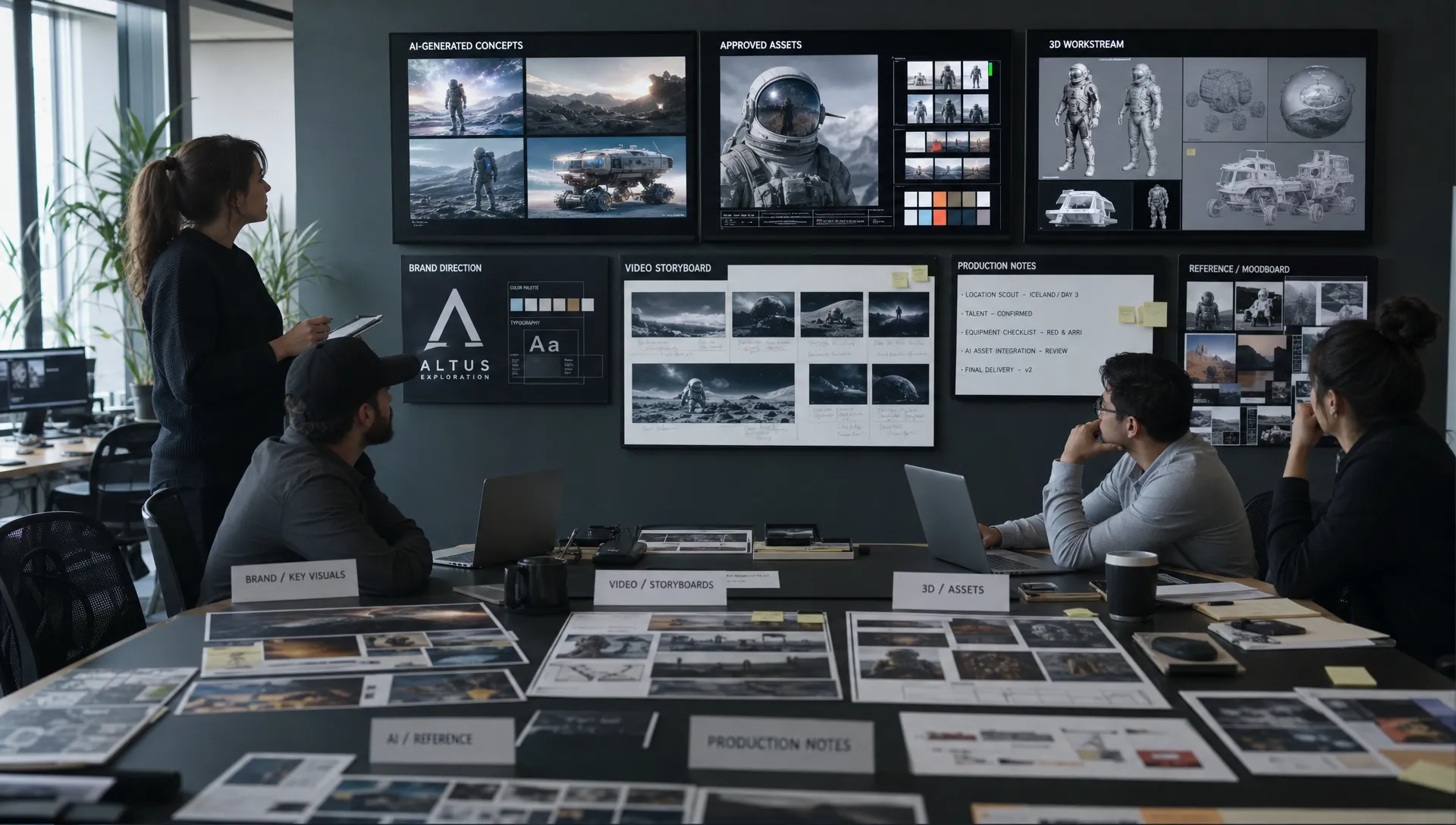
Generative AI has moved from experimental prompt play to a serious production capability. For creative teams, the question is no longer whether AI can produce impressive images, videos, copy directions, or 3D concepts. The question is whether it can do so reliably, securely, on-brand, and at the pace required by professional production.
That distinction matters. A single creator can tolerate a messy folder of experiments, inconsistent outputs, and unclear usage rights. An enterprise studio cannot. A CMO needs brand consistency across markets. An art director needs taste, intent, and visual coherence. An application manager needs safe integration with existing systems. A game developer needs usable assets and repeatable iteration, not isolated images that cannot enter a pipeline.
This is where professional generative AI for creative teams becomes less about “the best prompt” and more about operating model. The teams getting real value in 2026 are not simply adding more tools. They are designing workflows, governance, context, and review systems that make AI a dependable part of creative production.
Professional use starts with a production mindset
In consumer use, generative AI often begins with a blank prompt and ends with a surprising result. In professional creative work, the process starts much earlier. Teams define the brief, audience, brand rules, technical constraints, approval criteria, and intended channel before generation begins.
That shift changes the role of AI. It becomes a production engine guided by human intent, not a creative authority. The best teams treat AI as a powerful collaborator that can accelerate exploration, variation, and execution, while humans remain responsible for taste, strategy, rights, and final approval.
If you want the broader strategic foundation, Virtuall’s guide on what creative AI means as a coordinated production system is a useful companion. The key idea is simple: professional AI value comes from coordination, not isolated generation.
| Casual AI use | Professional AI use |
|---|---|
| One-off prompts | Structured briefs and reusable workflows |
| Personal style preferences | Brand systems, art direction, and legal constraints |
| Manual file handling | Connected asset management and pipeline tracking |
| Unclear review process | Human approvals, annotation, and version control |
| Output judged by novelty | Output judged by production readiness |
This mindset also helps teams avoid a common trap: confusing speed with quality. Generative AI can produce more options quickly, but professional teams need the right options, in the right format, with the right context, approved by the right people.
Where creative teams use generative AI today
Professional creative teams typically adopt AI across the full production lifecycle, not just at the final asset stage. The most mature teams use it to reduce friction between strategy, concepting, production, localization, and optimization.
Strategy and campaign exploration
Marketing and brand teams use generative AI to explore visual territories, campaign directions, content angles, and audience-specific messaging. This does not replace strategy. It helps teams make strategy more tangible earlier.
A CMO might use AI-generated creative routes to compare how a campaign idea feels across luxury, playful, technical, or sustainability-led visual systems. Instead of waiting days for rough mockups, stakeholders can align sooner on direction, risk, and tone.
Concept art and visual development
Art directors and concept artists use AI to expand the range of early exploration. They can test composition, lighting, color, environments, product styling, character silhouettes, or worldbuilding references before committing production resources.
The professional difference is control. A studio does not simply generate 200 random images and pick favorites. It uses mood boards, references, prompt structures, and review notes to preserve intent across iterations.
Production variation and adaptation
One of the strongest business cases is variation. Teams often need the same core idea adapted across formats, markets, seasonal campaigns, aspect ratios, platforms, or customer segments.
Generative AI can help produce variants faster, but only if the workflow protects brand consistency. That means defining what can change, such as background, prop, lighting, language, or framing, and what must stay fixed, such as logo usage, product shape, character identity, or campaign message.
Video, motion, and previsualization
For video teams, generative AI is often useful before final production. It can support storyboards, animatics, mood reels, camera direction, scene exploration, and rapid previsualization. In some cases, teams use it for production-ready motion assets, depending on quality requirements and legal constraints.
Professional teams are careful here because video introduces continuity, likeness, rights, and consistency challenges. Human review becomes especially important when generated motion affects brand trust, product accuracy, or regulated claims.
3D and game development workflows
Game developers and 3D teams use generative AI for ideation, blockouts, textures, environment references, props, character concepts, and rapid iteration. The value is not just asset creation. It is reducing the time between creative hypothesis and playable or reviewable material.
In professional game pipelines, however, generated content still needs technical validation. Topology, scale, texture resolution, rigging compatibility, engine requirements, and performance budgets matter. A beautiful asset is not production-ready unless it can work inside the game.
| Team role | Typical professional AI use | Success depends on |
|---|---|---|
| CMO | Campaign territories, market variants, brand consistency | Governance, brand rules, measurable performance |
| Art Director | Concept exploration, visual systems, creative review | Taste, context, approval workflows |
| Application Manager | Tool integration, access control, cost oversight | Security, interoperability, policy compliance |
| Game Developer | 3D ideation, environments, textures, iteration | Technical validation and pipeline fit |
A professional generative AI workflow from brief to approval
The most effective teams do not let every project reinvent the process. They build repeatable workflows that capture intent, guide generation, and make review traceable.
A practical workflow usually includes seven stages.
| Workflow stage | What happens | Professional control point |
|---|---|---|
| Brief intake | The team defines objective, audience, channel, format, and constraints | Clear acceptance criteria |
| Context setup | Brand assets, mood boards, references, and prior work are connected | Consistent creative memory |
| Generation plan | The team chooses models, templates, prompts, and output types | Approved creative and technical parameters |
| AI generation | Image, video, audio, or 3D outputs are produced and iterated | Model routing and cost control |
| Human review | Stakeholders annotate, compare, reject, or approve outputs | Art direction and compliance checks |
| Production handoff | Approved assets are exported or moved into DCC, DAM, PIM, or other tools | Correct format and metadata |
| Learning loop | Results, feedback, and reusable patterns are captured | Better future outputs |
This is why orchestration matters. If a team’s AI activity lives across disconnected accounts, prompt notes, downloads, and chat histories, learning disappears. If it lives in a coordinated workflow, the team can improve quality over time.
Virtuall’s practical guide to AI in creative production explores this shift from one-off generation to structured production pipelines in more depth.
The role of humans changes, but does not disappear
Professional generative AI works best when human responsibilities become clearer, not weaker. Instead of spending all their time producing first drafts manually, creative professionals spend more time directing systems, evaluating outputs, and protecting quality.
For art directors, this means translating taste into usable constraints. They define what “premium,” “playful,” “cinematic,” or “on-brand” means in visible terms. They curate references, reject weak directions, and ensure the final output has coherence rather than generic polish.
For CMOs, the role is to connect AI output to business outcomes. Faster content production only matters if it supports campaign performance, market relevance, and brand equity. AI can increase throughput, but leadership must decide which content deserves scale.
For application managers, the job is to make AI usable without creating operational risk. That includes permissions, integrations, vendor review, cost governance, auditability, and data protection. In many enterprises, this role determines whether creative AI remains a small experiment or becomes approved infrastructure.
For game developers, AI is most useful when it accelerates iteration without breaking the pipeline. Developers need outputs that can be tested, optimized, versioned, and integrated. Human technical judgment remains essential.
Governance is what makes generative AI enterprise-ready
Creative teams often adopt AI because of speed, but they scale it because of governance. Without governance, AI creates new risks: inconsistent brand expression, confidential data exposure, unclear usage rights, biased outputs, uncontrolled costs, and difficult audits.
Professional teams typically define policies in four areas.
- Data and confidentiality: What can be uploaded, referenced, trained on, or stored? Which client materials require special restrictions?
- Brand and creative standards: Which visual rules, claims, logos, characters, or product details must be protected?
- Legal and compliance review: What requires human approval before publication, especially for regulated industries or public campaigns?
- Model and vendor governance: Which models are approved for which use cases, and how are outputs tracked?
External standards can help. The NIST AI Risk Management Framework gives organizations a structure for mapping, measuring, managing, and governing AI risks. In Europe, the EU AI Act has also pushed enterprises to think more carefully about AI accountability, transparency, and risk classification.
For creative teams, governance should not feel like a brake. Done well, it becomes an accelerator because it gives people confidence to use AI within clear boundaries. Teams know which workflows are allowed, which assets need review, and which outputs can move into production.
This is especially important when AI activity grows from a few power users to multiple studios, brands, markets, and agencies. At that point, the organization needs an operating layer. Virtuall’s enterprise playbook on operating creative AI at scale explains the management disciplines needed when AI becomes part of the production system.
How professional teams evaluate AI outputs
A generated asset is not successful just because it looks impressive. Professional teams evaluate outputs against creative, legal, technical, and commercial criteria.
For example, a product campaign image might need to match the brand world, show the product accurately, respect usage rights, fit a paid media ratio, include enough negative space for copy, and export at the required quality. A 3D environment concept might need to support level design, art direction, engine constraints, and production planning.
Good teams make evaluation explicit. They use review workflows, annotations, approval gates, and documented reasons for rejection. This creates a feedback loop that improves future generations and reduces repeated mistakes.
Useful evaluation criteria include:
- Creative fit: Does the output reflect the brief, brand, and art direction?
- Production readiness: Is it usable in the required format, quality, resolution, or technical pipeline?
- Consistency: Does it preserve character, product, scene, or campaign continuity across variants?
- Rights and compliance: Is it approved for the intended use, market, and channel?
- Efficiency: Did AI reduce time, cost, or rework compared with the previous process?
This is also where teams should resist over-automation. Human review is not a sign of inefficiency. It is how professional teams protect meaning, trust, and quality.
Measuring the impact of generative AI professionally
Enterprise leaders need more than anecdotes. If AI becomes part of creative operations, teams should measure its impact in ways that reflect production reality.
The right metrics depend on the workflow, but common measures include cycle time, cost per approved asset, number of usable variants, review turnaround time, brand compliance issues, rework rate, and model spend by project or team.
| Metric | Why it matters |
|---|---|
| Time from brief to first review | Shows whether AI accelerates early exploration |
| Approval rate of generated outputs | Measures quality, not just quantity |
| Rework per asset | Reveals whether outputs are production-ready |
| Cost per approved asset | Helps compare model usage, labor, and tooling costs |
| Brand or compliance exceptions | Tracks risk reduction and governance effectiveness |
| Reuse of templates or blueprints | Shows whether the organization is learning over time |
This measurement discipline is particularly important for CMOs and application managers. Creative velocity is valuable, but only when it is sustainable. If every team uses different tools, stores assets in different places, and pays for models separately, the organization may gain speed while losing control.
Common mistakes when teams adopt generative AI
Many creative teams start with enthusiasm and then hit predictable friction. The issue is rarely that the technology cannot help. More often, the operating model is incomplete.
One mistake is giving everyone tool access without defining workflows. This leads to experimentation, but not repeatable value. Another is focusing only on prompts while ignoring context, approvals, asset management, and integration.
Teams also underestimate change management. Designers, producers, marketers, and developers may all have different expectations of AI. Some fear quality loss. Others expect instant automation. Professional adoption requires training, shared standards, and a clear explanation of where human judgment remains essential.
The healthiest approach is to start with a focused workflow, prove value, then scale. For example, a brand team might begin with campaign concept exploration, then expand into market adaptations. A game studio might start with environment mood boards, then test texture or prop workflows. A retail team might start with product imagery variants, then connect approved outputs to DAM or PIM systems.
Where a Creative AI OS fits
As AI usage grows, professional teams need more than individual generation tools. They need a way to control how AI runs across studios, workflows, models, and assets.
The Creative AI OS is built for that operating layer. As a Creative AI operating system, it helps teams orchestrate AI-powered content creation across image, video, audio, and 3D workflows while supporting governance, compliance, team collaboration, asset management, and production tracking.
For enterprise teams, the practical value is control. Generation blueprints can make successful workflows repeatable. Studio context memory, such as mood boards, can help teams preserve creative intent. Review workflows, approvals, and annotation can help teams move from generation to production decision-making. Integrations, plugins, and API access can support connection with existing creative tools, DAM, PIM, and production environments.
Nyx, the agent in the Creative AI OS, is designed to orchestrate multiple industry-leading AI models and keep intent and context across teams. That matters because no single model is best for every task. Professional teams need the flexibility to route work intelligently while maintaining consistent governance.
Frequently Asked Questions
How do creative teams use generative AI professionally? They use it inside structured workflows that include briefs, brand context, model selection, human review, approvals, asset management, and production handoff. The goal is not just to generate more content, but to create reliable, compliant, on-brand output.
Can generative AI replace creative teams? In professional environments, generative AI is usually most valuable as an accelerator and production collaborator. Humans remain responsible for strategy, taste, art direction, legal judgment, technical validation, and final approval.
What is the difference between consumer AI tools and professional creative AI workflows? Consumer tools are optimized for individual experimentation. Professional workflows require governance, repeatability, team collaboration, permissions, review gates, asset tracking, integration, and consistent output across brands, markets, and channels.
Which teams benefit most from generative AI? Marketing teams, art departments, game studios, product content teams, and production teams can all benefit. The strongest results usually come when AI supports a specific workflow, such as concept exploration, campaign adaptation, 3D ideation, or content localization.
What should enterprises check before scaling generative AI? They should review data policies, model approvals, copyright and usage rules, brand governance, integration needs, cost controls, and human approval processes. Scaling AI without these foundations can create operational and compliance risk.
Turn generative AI into a professional creative system
Generative AI becomes valuable at enterprise scale when it is controlled, repeatable, and connected to real production workflows. That requires more than access to models. It requires governance, context, orchestration, collaboration, and clear human decision-making.
If your team is ready to move from AI experiments to production-ready creative operations, Virtuall gives studios and enterprises a Creative AI OS for operating image, video, audio, and 3D generation at scale, with the controls needed to stay consistent and compliant.