Mastering Prompt Engineering for Creative Production
Unlock the power of prompt engineering for your creative team. This guide covers techniques for image, 3D, and video, and how to build scalable AI workflows.

Prompt engineering is far more than just writing a few words and hitting ‘enter’. It's the first critical step in any responsible, studio-grade, AI-powered creative workflow.
As a visual creative, the best way to understand the power of a well-crafted prompt is to experience it firsthand. If you haven't generated an AI asset before, you can try our Creative AI OS at Virtuall for free. VirtuallPRO offers a safe and compliant environment to explore what's possible.
Going Beyond Prompts in Creative Production
Think of a single prompt as a director's first idea. It sets the scene, describes the characters, and nails down the mood. That brief is essential, but it doesn't make a blockbuster film on its own.
Bringing a complex creative vision to life takes a lot more. It needs orchestration, careful asset management, and solid governance to make sure every shot, scene, and final cut is consistent, on-brand, and meets a high standard of quality. This is where professional creative production begins.
This guide isn’t about treating prompt engineering as a neat little trick. We see it as the foundation of a much larger, more structured production system. For many creative teams, the initial buzz of AI generation quickly fades into frustration. Scattered tools, unpredictable results, and zero version control can turn exciting experiments into costly, dead-end projects.
The Challenge of Scaling Creative AI
Many studios hit a wall when they try to fit generative AI into their existing pipelines. These challenges usually arise because they treat prompting as a one-off task instead of part of a managed, compliant system.
Does this sound familiar?
- Inconsistent Outputs: Different team members use slightly different prompts and get visuals that are off-brand or clash with each other, wrecking campaign cohesion.
- Lack of Repeatability: Trying to recreate that perfect style or asset from a month ago feels impossible without a system for versioning prompts and settings.
- Poor Governance: With no oversight, teams risk creating content that breaks brand guidelines or even legal and compliance rules.
- Inefficient Workflows: Creatives waste hours switching between different AI models and tools, manually tracking assets, and trying to guess how they got that one great result.
This ad-hoc approach just doesn't scale. To go from one-off images to reliable, high-volume production, studios need a system that offers control, scalability, and brand safety.
This is exactly the gap a Creative AI OS like VirtuallPRO is built to fill. It gives you a unified system for orchestration and governance, turning prompt engineering from an unpredictable art into a reliable, studio-grade science.
This guide will show you how to build the infrastructure needed for professional AI production. We're moving beyond the basics to give you the control needed to produce consistent, high-quality creative work at scale—all from one governed, safe workspace.
How Prompt Engineering Works in a Creative Context
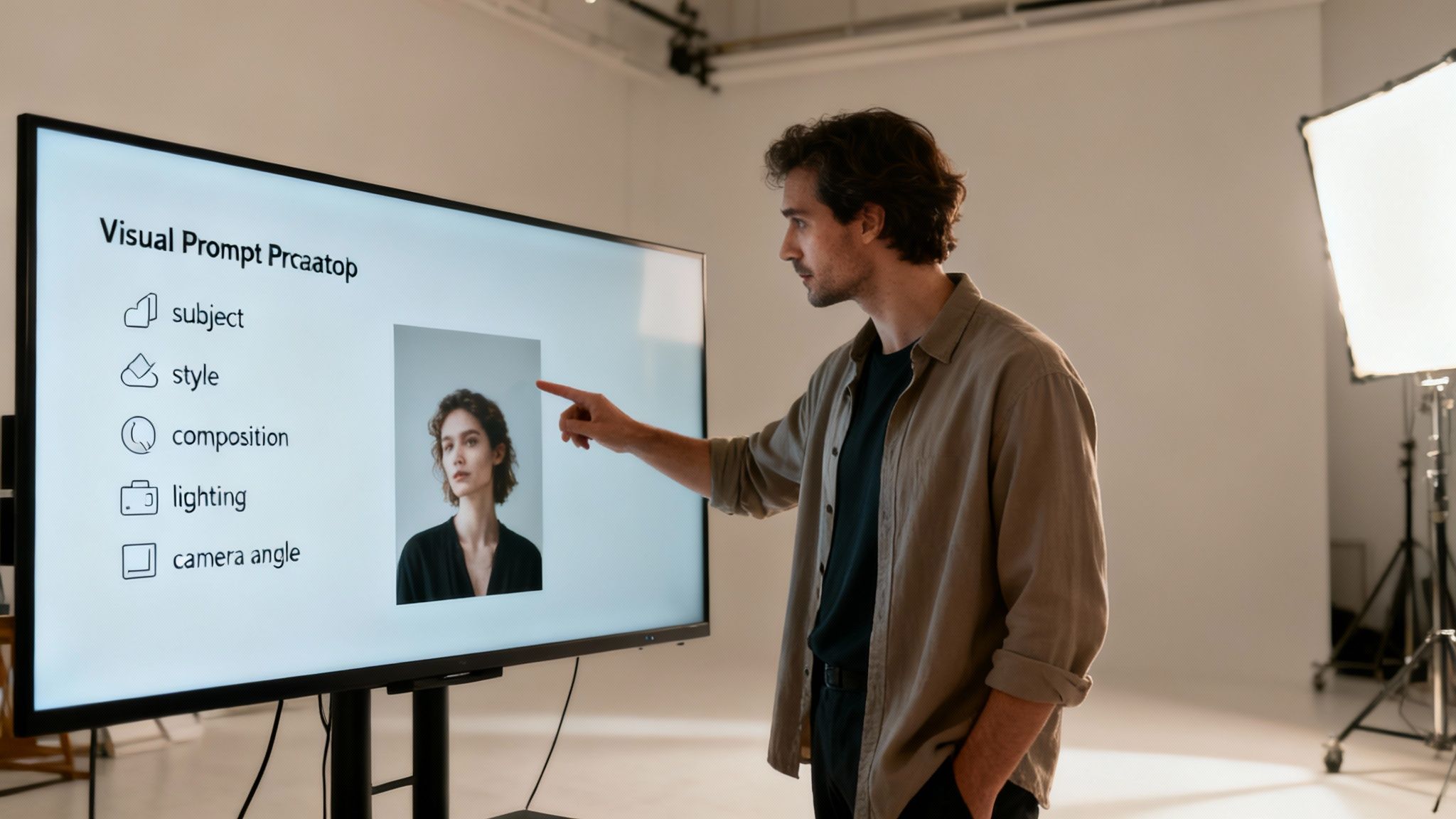
Let’s break down prompt engineering in a way that actually makes sense for visual creatives. Forget the jargon for a second. Think of yourself as an art director. Your job is to brief a team of incredibly talented digital artists—the AI models—who happen to be very, very literal.
Your prompt is your creative brief. A vague brief gets you vague, off-target results. A sharp, detailed brief? That gets you exactly what you envisioned, and sometimes, something even better. This responsible back-and-forth is the heart of creative prompt engineering.
The Anatomy of a Powerful Visual Prompt
A great visual prompt isn't just a simple description. It's a structured set of instructions that guides the AI across a few key creative pillars. Nailing these components gives you direct control over the final output, whether it’s an image, a video clip, or a 3D asset.
A solid prompt usually weaves together these elements:
- Subject: The main focus. This is your "who" or "what," described with rich, specific adjectives. Instead of "a car," think "a vintage 1960s Italian sports car, candy apple red."
- Style: The artistic direction. This could be a reference to an art movement ("in the style of the Hudson River School"), an artist ("inspired by the work of Zaha Hadid"), or a visual vibe ("cyberpunk neon aesthetic").
- Composition: How the scene is arranged. Pull terms from photography and film, like "wide-angle shot," "dutch angle," or "symmetrical framing" to control the layout.
- Lighting: The mood and atmosphere. Words like "dramatic backlighting," "soft morning light," or "studio Rembrandt lighting" have a massive impact on the final image's feel.
- Technical Parameters: These are the nuts and bolts. For an image, it might be "8k resolution, photorealistic." For a 3D model, it could be "clean topology, PBR textures, rendered in Octane."
The goal of prompt engineering isn't just to describe what you see in your head. It's to deconstruct your creative vision into clear, unambiguous instructions that an AI model can execute perfectly.
Adapting Prompts for Different Creative Formats
As you jump between creating images, videos, and 3D models, your prompting strategy needs to adapt. The core principles are the same, but the specific language changes based on what each format needs.
For instance, an image prompt might lean heavily on composition and artistic style. A neat trick is to work backwards—feeding an image to an AI to see what words it uses to describe it. You can learn more about this in our guide to mastering image-to-prompt techniques. This helps you build a vocabulary the AI understands intuitively.
For a video prompt, you need to add instructions about motion and time. You’d throw in phrases like "slow panning shot from left to right" or "character walking forward confidently" to direct the animation.
And for 3D, the focus shifts again to technical specs. You’re thinking about geometry ("low-poly model"), materials ("matte finish"), and rendering engines—details that are critical for getting an asset ready for a production pipeline.
Understanding these distinctions is everything. It lets you think strategically and apply the right vocabulary to get your vision across, no matter what you're creating.
Making Creative AI Predictable and High-Quality
Knowing what makes a good prompt is one thing. Turning that knowledge into a reliable, studio-grade production pipeline is what separates the pros from the hobbyists.
Anyone can get lucky with a one-off amazing result. But a structured approach to prompt engineering is what delivers consistent, high-quality assets at scale. It’s the shift from creative gambling to a controlled, repeatable, and safe system.
The goal is to refine outputs with purpose, systematically kill unwanted elements, and—most importantly—be able to recreate your successes on demand. Without that, scaling creative AI is just a dream.
The Core Moves for Professional Prompting
To turn a creative brief into a predictable asset, studios lean on a few key techniques. These aren't secrets; they're the fundamentals for gaining control over AI generation. And they're built right into a Creative AI OS like VirtuallPRO.
- Iterative Prompting: Think of this as refining, not restarting. You get a promising result and make small, deliberate tweaks. Change the lighting from "soft morning light" to "dramatic golden hour lighting" and see how the AI responds. You’re guiding it, step-by-step, closer to your vision.
- Negative Prompts: Telling the AI what you don't want is just as powerful as telling it what you do. If you're generating a clean product shot and the AI insists on adding people in the background, a simple negative prompt like
--no peoplecan fix it instantly. It's your "do not include" list. - Seed Numbers: Every AI-generated image starts with a randomiser. The seed number is that starting point. By saving and reusing the seed from a great result, you can lock in its core composition and style. This is a game-changer for creating variations while keeping everything visually consistent.
Master these three techniques, and you've built a foundation for quality and predictability. It’s how you ensure that asset #1 and asset #100 both meet the same high standard and align with the project's vision.
From Messy Prompts to Structured Engineering
The difference between a freelancer messing around with AI and a studio delivering a global campaign comes down to methodology. One is chaotic and impossible to scale; the other is systematic and built for professional work.
This is where a solid process, supported by effective creative workflow management software, makes all the difference. It provides the guardrails for consistency and collaboration.
Just look at the difference.
Ad-Hoc Prompting vs Structured Prompt Engineering
| Aspect | Ad-Hoc Prompting | Structured Prompt Engineering (with VirtuallPRO) |
|---|---|---|
| Consistency | All over the place. Outputs are often off-brand and vary wildly from one to the next. | High. Templates and style tuning keep a cohesive brand aesthetic across every single asset. |
| Repeatability | Almost zero. Recreating a specific look is pure guesswork. | High. Seed numbers and version-controlled prompts give you perfect reproducibility. |
| Efficiency | A time sink. Creatives waste hours on trial-and-error and manual fixes. | Fast. Iterative prompting and negative prompts refine outputs quickly, saving production time. |
| Collaboration | Non-existent. Prompts are stuck on local machines, making it impossible to share winning formulas. | Built-in. A central library of prompts and Blueprints lets the whole team build on past successes. |
| Governance | None. A free-for-all that increases the risk of creating off-brand or unsafe content. | Strong. Built-in guardrails and approval flows ensure all content is brand-safe and compliant. |
Ultimately, you want to stop chasing accidental wins and start engineering intentional outcomes.
This disciplined practice of prompt engineering is what lets studios turn AI from a cool toy into a reliable engine for professional-grade creative production at scale.
Orchestrating Creative AI Workflows Across Your Team
Scaling creative AI from one designer to a whole production team is where most studios get stuck. The very freedom that makes generative AI so exciting for an individual becomes a source of chaos and brand risk when you try to scale it. This is where orchestrating your workflow becomes non-negotiable.
When every creative on the team uses their own prompts and methods, you lose all control. A campaign needing 50 consistent assets can quickly spiral into a mess of clashing styles. A brilliant prompt from last month gets lost in a Slack thread, impossible for anyone else to find or replicate. This lack of a central system is a huge barrier to producing professional work at scale.
To get around this, smart studios are shifting their focus. Instead of just chasing individual prompt engineering skills, they're building a shared, intelligent system for the whole team. The goal is to set team-wide standards that guarantee consistency, repeatability, and brand safety in every single AI-generated asset.
Building a Library of Prompt Blueprints
First things first: stop treating prompts like disposable one-liners. Think of them as reusable assets—or as we call them in Virtuall, "Blueprints."
A Blueprint is so much more than a text prompt. It's a production-ready template that locks in a specific style, a campaign look-and-feel, or a certain type of asset.
This completely changes how your team works. Instead of starting from scratch, a designer can just grab the pre-approved Blueprint for the "Autumn 2024 Fashion Campaign" or "Cyberpunk Game Asset Pack." The core style, colour palette, and crucial negative prompts are already baked in, making sure everyone's output is aligned from the get-go.
A shared library of Blueprints gives you a few major wins:
- Guaranteed Consistency: Everyone starts from the same brand-approved foundation. No more guesswork.
- Increased Speed: It slashes the time wasted on trial-and-error prompting.
- Knowledge Sharing: The team's best prompting tricks are captured and made available to everyone.
This simple diagram shows the iterative process of turning a good prompt into a great, reusable asset.
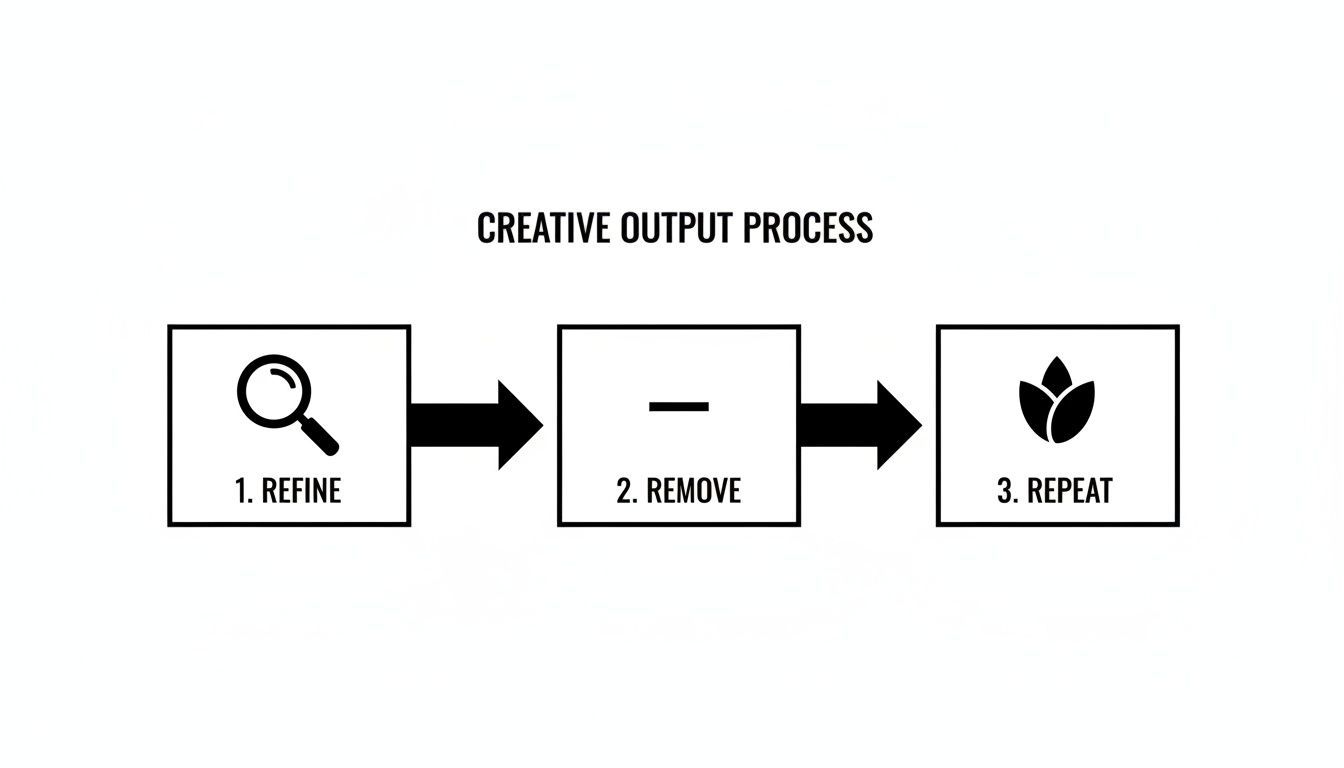
This loop—refine what works, remove what doesn't, and repeat your successes—is exactly how you build a powerful library of creative Blueprints.
Version Control and Governance in AI Production
Once you have a library, you need to manage it. Just like with code or design files, your prompts need version control.
A prompt that worked perfectly with last month's AI model might spit out something totally different after a model update. Without a way to track these changes, you can quickly lose the ability to reproduce a specific visual style.
This is where a Creative AI OS like VirtuallPRO becomes essential. It gives you the structure for true AI orchestration. Inside a collaborative workspace, your creative director can manage and update the official Blueprints. When a better version of the "Product Shot Blueprint" is ready, they can push it out to the whole team, ensuring everyone is using the latest and most effective version.
This screenshot shows how a centralized platform provides the interface for managing these creative assets and workflows.
The dashboard view gives your team a single source of truth, with shared access to projects, models, and assets.
Governance isn't about killing creativity. It's about providing the guardrails that let your team create safely and consistently. It's what makes sure every asset is on-brand, legally compliant, and up to standard.
The AI Art Director in VirtuallPRO, Nyx, acts as this governance layer. It understands the creative goal behind a Blueprint and pulls in the right AI models to get the job done, all while sticking to the rules you've set.
This elevates your team from relying on individual talent to running an intelligent system built for repeatable and governed creative production. By centralising your prompt engineering efforts, you build a powerful, compounding asset for your entire studio.
Advanced Prompt Strategies for Image Video and 3D
Once you've nailed the basics, you can unlock a whole new level of creative control. Advanced prompt engineering isn't about writing longer prompts—it's about speaking the AI's language with the nuance of a seasoned art director.
This means you have to think differently about how you describe a static image versus a dynamic video or a production-ready 3D model. Each format has its own set of rules, and mastering them is the key to getting professional-grade results every time.

Elevating Image Generation
For images, advanced control comes from layering instructions and using other visuals as a guide. Techniques like multi-prompting let you blend concepts with incredible precision, while weighting allows you to tell the AI which parts of the prompt matter most.
Another game-changing technique is image-to-image prompting. Instead of starting from scratch, you feed the AI a reference—a rough sketch, a photo, or even a previous generation—and tell it what to change. It's perfect for keeping a character's look consistent while dropping them into a new scene. You can explore how various AI Image Generators handle these more complex inputs to produce truly unique visuals.
Example Evolution:
- Basic Prompt:
a red car- Advanced Prompt:
cinematic photo of a 1960s vintage sports car, rosso corsa red paint, gleaming chrome details::1.5, studio lighting with soft shadows, clay model render, octane, 8k --style raw
See the difference? The advanced prompt nails down the era, exact colour, material finish, lighting, and render style. The output is predictable and studio-quality.
Directing Motion in Video
Prompting for video adds time and motion to the mix. Your instructions need to go beyond describing a static scene; you have to direct the action, the camera work, and the flow from one shot to the next. The real challenge is keeping everything consistent.
Advanced video prompting comes down to a few key things:
- Specifying Kinematics: Be specific with your action words. Instead of
a bird, trya hummingbird hovering gracefully, wings beating in slow motion. - Controlling the Camera: Think like a cinematographer. Add terms like
slow dolly zoom in,crane shot ascending, orhandheld shaky-cam footageto control the viewer’s perspective. - Ensuring Consistency: To keep a character looking the same across different scenes, use a seed image or lock in a specific seed number combined with a consistent description.
This approach transforms you from a spectator into a director, letting you choreograph the AI's output, frame by frame.
Building 3D Assets with Precision
For 3D designers, good prompt engineering is about generating assets that are ready for a real production pipeline. Looks are important, but technical correctness is what really matters.
An advanced 3D prompt has to speak to the format's unique needs.
- Topology: Specify the mesh density. Using terms like
clean quad topologyorlow-poly model for game engineensures the asset is optimised and actually usable. - Texturing and Materials: Get detailed about surfaces. A great prompt includes specifics like
realistic PBR textures, brushed metal material, subtle surface scratchesto guide the material creation. - Lighting and Rendering: Define the scene's lighting. Instructions like
three-point lighting rigorrendered with global illuminationhelp you get a final look that matches your project.
By layering these technical details onto your creative description, you turn the AI from a concept artist into a technical artist—one that delivers assets ready to drop right into your workflow. That's how AI becomes a genuinely productive tool for a modern creative studio.
Why Studios Need an AI Production Infrastructure
Getting good at prompt engineering is a great start, but it's only one piece of the puzzle. If you’re a professional studio trying to grow, relying on individual prompting skills alone creates a serious bottleneck. You end up with inconsistency, no real governance, and a ton of wasted effort that holds back your creative output.
Think of it this way: you can’t give every musician in an orchestra different sheet music and expect a symphony. You need a conductor—a system that aligns every artist towards a single, cohesive vision. The future of creative AI isn’t about individual talent; it’s about building a safe, compliant production infrastructure to support that talent.
The Shift from Prompts to Production Systems
The cracks in an ad-hoc approach start to show as soon as your team expands. Without shared resources, people duplicate work, and styles diverge. There's no straightforward way to version control your best prompts or enforce brand guidelines, which opens you up to quality issues and compliance headaches.
This is the exact problem a Creative AI OS like VirtuallPRO was built to fix. It acts as the central nervous system for your entire AI production line.
A production system isn't about boxing in creativity. It’s about building the structure that lets it scale. It provides the orchestration, compliance, and unified workspace needed to turn individual sparks of genius into a reliable creative engine.
This systematic approach is becoming non-negotiable. The global prompt engineering market hit USD 505.43 million in 2023 and is expected to explode to USD 6,703.84 million by 2034. That growth isn’t just about writing better prompts—it’s driven by the enterprise need for sophisticated orchestration and governance, as highlighted by Fortune Business Insights.
Building Your Creative AI Foundation
To take on ambitious creative projects, studios need to think bigger and scale their operations with a robust AI-powered XR infrastructure. A real production system gives you the tools to orchestrate everything, making sure every asset meets brand and safety standards. It’s the only sustainable way to weave AI into a professional pipeline.
When you adopt a platform built for modern, secure, and brand-safe production, you're moving beyond simple generation. You're building a repeatable, scalable, and governed process that elevates your whole team's output. To learn more about the systems that power this, have a look at our guide on understanding cloud as a service models.
We invite you to see the difference for yourself. Stop hitting the limits of individual prompting and discover what a true Creative AI OS can do for your studio. Try VirtuallPRO for free and start building the future of your creative production today.
Got Questions About Prompt Engineering?
Stepping into AI-driven creative work often brings up a few practical questions. If you're wondering how to make prompt engineering work for your studio without causing chaos, you're in the right place. Here are a few common queries we hear.
How Do I Keep AI-Generated Content On-Brand?
This is a huge one. When everyone on the team is writing their own prompts, brand consistency quickly falls apart. The key is to move away from one-off prompts and toward a centralised, compliant system.
Platforms like VirtuallPRO solve this with what we call “Blueprints.” Think of them as reusable templates that lock in your approved styles, colour palettes, and brand elements. This way, every single piece of content generated by your team starts from the same on-brand foundation. It’s about shifting from random experimentation to a governed, repeatable workflow.
What’s the Difference Between Prompt Engineering and AI Orchestration?
It's a great question, and the distinction is important. Prompt engineering is the art of writing a specific instruction for a single AI model to get a single output.
AI orchestration, on the other hand, is the bigger picture. It’s about managing the entire creative workflow from start to finish. This means coordinating multiple AI models, handling assets, versioning your prompts, and making sure everything stays on track and compliant. The AI Art Director in VirtuallPRO, Nyx, acts as that orchestration layer, handling all the background complexity so your team can just focus on the creative idea, not the technical mechanics.
Should My Team Master One AI Model or Use Several?
While getting really good at one model has its benefits, the AI space is moving incredibly fast. Today's best model might be yesterday's news tomorrow. A far more durable and responsible strategy is to use a platform that connects you to the best model for whatever job you're doing.
A Creative AI OS like VirtuallPRO gives you access to multiple leading models through a single, simple interface. This means your team can tap into the unique strengths of each model for image, video, or 3D work without having to learn a dozen different tools. It future-proofs your workflow and guarantees you're always using the best tech for the task at hand.
Ready to move beyond messy, one-off prompts and build a fully orchestrated, studio-grade production system? See what a true Creative AI OS can do for your team's control, consistency, and scale.
Try VirtuallPRO for free and see the difference.