What an Operating System Using Artificial Intelligence Does
Learn what an operating system using artificial intelligence does for governance, workflows, compliance, and scalable creative production.
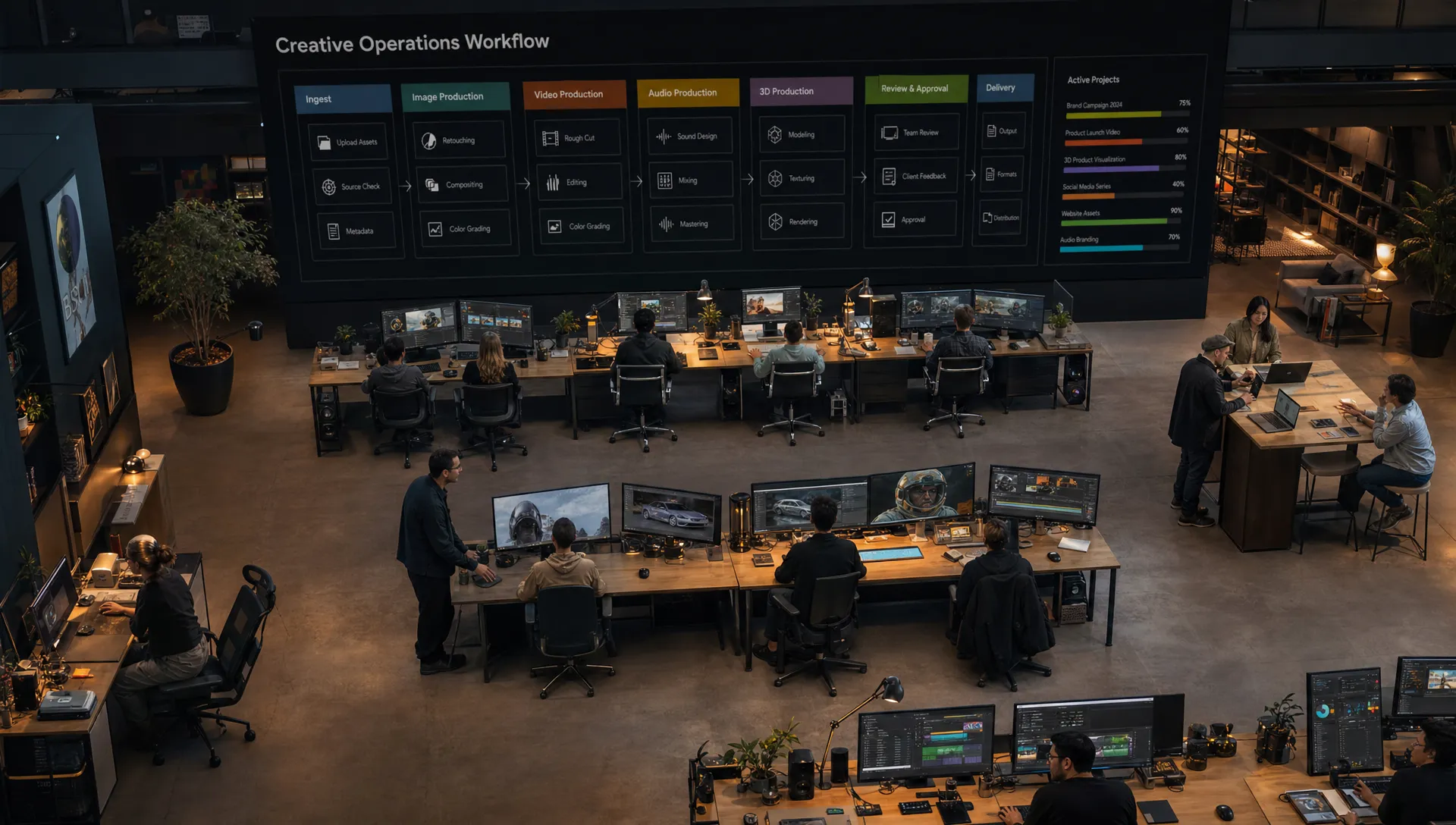
Most teams do not need another AI tool. They need a way to make many AI tools work together safely, consistently, and at production speed.
That is what an operating system using artificial intelligence does. It acts as the managed layer between people, models, workflows, data, policies, and production tools. Instead of asking every person to choose the right model, write the right prompt, remember the brand rules, save the right asset version, and route work to the right approver, the system coordinates those steps.
For creative organizations, this matters because AI adoption often starts with experimentation but breaks down at scale. A CMO may want more campaign variations. An art director may want style consistency. An application manager may need governance and integrations. A game developer may need usable outputs across image, video, audio, and 3D pipelines. An AI operating system helps these groups work from the same controlled foundation.
The short answer: it turns AI into an operational layer
A traditional operating system manages hardware, applications, permissions, files, and user interactions. An AI operating system does something similar for AI-powered work. It manages how intelligence is applied across tasks, teams, and tools.
It does not have to replace your laptop OS, your creative software, your DAM, or your production pipeline. In enterprise settings, it usually sits above and between existing systems. It helps decide which AI capabilities should be used, under which rules, with which context, and how outputs should move through review and delivery.
If you want a more foundational breakdown of the category, Virtuall has a deeper guide to operating systems based on artificial intelligence. This article focuses on the practical question: what does such a system actually do once it is inside a creative or enterprise workflow?
It understands intent and preserves context
The first job of an AI operating system is to keep work grounded in intent. A single prompt is rarely enough for professional output. Teams need campaign goals, product information, style references, brand constraints, audience segments, legal restrictions, format requirements, and production history.
Without a system layer, that context lives in scattered places: briefing documents, mood boards, Slack threads, spreadsheets, DAM folders, art direction decks, and individual memory. The result is predictable. Different team members get different outputs from the same model because they provide different context.
An operating system using artificial intelligence helps centralize and reuse that context. For example, a studio could define the visual direction for a campaign once, then apply it across product shots, social variations, video concepts, and 3D asset exploration. The goal is not to remove creative judgment. The goal is to make sure every AI-assisted step starts from the right creative and operational foundation.
For enterprise teams, context preservation is also a risk control. It reduces the chance that people upload the wrong source material, generate off-brand concepts, or produce assets that cannot be used because rights, regions, or review requirements were ignored.
It orchestrates models, tools, and workflows
AI work is no longer limited to one model or one text prompt. A single production task might involve image generation, video generation, 3D model creation, audio, upscaling, background removal, editing, metadata tagging, and quality control.
An AI operating system coordinates these steps. It can route a task to the right model or tool based on the desired output, workflow stage, policy rules, and available integrations. This is especially important because creative teams often need model flexibility. One model may be strong for ideation, another for photorealism, another for stylized game assets, and another for motion.
Workflow orchestration also helps teams move beyond one-off generations. Instead of manually repeating the same process for every SKU, scene, banner, or localization, teams can build repeatable flows. In creative AI, these are often described as templates, recipes, or generation blueprints. They make it easier to reproduce successful production patterns without starting from scratch each time.
For application managers, orchestration is one of the most important capabilities. It means AI can be connected to existing tools and processes rather than becoming a disconnected side channel. Virtuall’s article on how an operating system AI fits into a creative tech stack explores this integration angle in more detail.
It enforces governance before work reaches production
Enterprise AI cannot rely on good intentions alone. Teams need rules for who can use which models, what data can be used, which workflows require review, where inference happens, what gets logged, and how assets are approved.
An operating system using artificial intelligence helps enforce those rules inside the workflow. That matters because governance added after generation is often too late. If teams have already created, shared, edited, or published non-compliant assets, the risk has already entered the business.
Governance can include practical controls such as:
- Role-based access to AI capabilities and workflows
- Approved models, prompts, datasets, and brand references
- Review and approval steps for sensitive outputs
- Audit trails for generated assets and decisions
- Usage rules for confidential, licensed, or regulated material
- Regional infrastructure and data handling requirements
This aligns with the broader direction of AI risk management. The NIST AI Risk Management Framework emphasizes governance, mapping, measuring, and managing AI risks. In Europe, the EU AI Act has also increased the need for structured AI oversight, with obligations phased in over time.
The practical takeaway is simple. If AI is part of production, governance should be part of production too.
It makes output more consistent and production-ready
One of the biggest gaps between AI experimentation and AI operations is consistency. A creative team can generate an impressive image once, but the enterprise challenge is producing hundreds or thousands of assets that match brand standards, technical specs, campaign intent, and review requirements.
An AI operating system improves consistency by standardizing how work is initiated, generated, reviewed, stored, and reused. It can help teams apply the same creative context across multiple outputs, preserve version history, and route assets through the right approval process before they enter downstream systems.
This is particularly valuable for creative teams working across markets, channels, or product lines. A CMO may want faster personalization. An art director may want to protect the creative idea. A studio lead may want fewer manual bottlenecks. A system layer helps these goals coexist.
| Production challenge | Without an AI operating system | With an AI operating system |
|---|---|---|
| Brand consistency | Depends on individual prompts and memory | Uses shared context, templates, and approved references |
| Model selection | Chosen manually by each user | Routed through controlled workflows and approved tools |
| Compliance | Checked after assets are created | Built into permissions, review steps, and audit trails |
| Collaboration | Scattered across chats, files, and ad hoc feedback | Managed through reviews, annotations, and approvals |
| Scaling output | Repetitive manual prompting | Repeatable generation blueprints and orchestration |
| Asset reuse | Hard to trace and organize | Stored with metadata, lineage, and workflow history |
It connects creative people with technical systems
The value of an AI operating system is not only technical. It is organizational. It gives different teams a shared way to work with AI while preserving their responsibilities.
For a CMO, the system supports scale, speed, and brand control. It can help marketing teams increase creative variation without losing oversight of messaging, approvals, and campaign alignment.
For an art director, the system supports creative continuity. Instead of rewriting direction for every generation, the team can work from shared visual references, mood boards, and production rules. This helps AI serve the art direction rather than dilute it.
For an application manager, the system supports governance, integration, and operational reliability. AI becomes easier to manage when usage, permissions, data flow, and tool connections are visible and controllable.
For a game developer, the system can support asset exploration across formats such as images, video, audio, and 3D. The important point is not just generation, but whether the outputs can move into a real pipeline with review, iteration, and traceability.
This is why creative AI infrastructure increasingly looks less like a single tool and more like an operating layer. It must serve human creativity, technical systems, and business governance at the same time.
It tracks work from prompt to approved asset
AI production creates a new kind of operational question: where did this asset come from?
In a manual workflow, teams can usually trace source files, briefs, edits, and approvals. In AI workflows, that traceability can disappear unless it is designed into the system. A generated asset may involve a prompt, reference images, model versions, style settings, edits, review comments, and final export requirements.
An AI operating system helps preserve that chain. This is useful for quality control, reuse, compliance, and team learning. If an output is successful, teams can understand which context and workflow produced it. If an output is rejected, teams can see where it went wrong.
Traceability also supports better asset management. Generated content should not live only in personal download folders. It should be organized, annotated, versioned, and connected to the relevant project or campaign. For enterprise creative operations, that connection is what turns AI output into a manageable asset.
It reduces tool sprawl
AI tool sprawl is one of the most common signs that an organization has moved from experimentation to operational complexity. Different teams adopt different tools. Some use consumer apps. Some use enterprise platforms. Some use plugins. Some build internal workflows. The result can be powerful but difficult to govern.
An operating system using artificial intelligence does not necessarily eliminate every specialized tool. In many cases, specialized tools are still valuable. The operating system provides the control layer that makes them manageable. It defines how tools are accessed, which workflows are approved, what data can be used, and how outputs return to the production environment.
This is especially important in studios where creative freedom and operational discipline must coexist. The system should not make every team work identically. It should define the boundaries that allow teams to move quickly without creating unnecessary risk.
What it should not be expected to do
An AI operating system is not magic infrastructure. It will not automatically fix unclear strategy, weak creative direction, poor data hygiene, or missing governance policies. It also should not be treated as a replacement for human review.
The best systems make expert teams more effective. They provide structure, context, automation, and controls. Humans still define taste, strategy, storytelling, and accountability.
It is also important not to confuse an AI operating system with a single assistant or chatbot. An assistant can be useful for interaction, but an operating system must manage the broader environment: workflows, permissions, models, context, assets, integrations, and compliance. The assistant may be one interface into the system, but it is not the whole system.
What to evaluate before adopting one
Before investing in an AI operating system, enterprise teams should define the operational problem they are trying to solve. The right evaluation criteria depend on whether the priority is brand consistency, creative scale, compliance, pipeline integration, or multi-format production.
Useful questions include:
- Can the system enforce governance at the workflow level, not only through policy documents?
- Does it support multiple AI models and content formats rather than locking teams into one generation path?
- Can creative context such as style, mood, product information, and campaign direction be preserved across work?
- Does it integrate with the tools your teams already use, including creative applications, DAM, PIM, and production systems?
- Are review, annotation, approval, and asset management part of the workflow?
- Can the organization track how outputs were created and approved?
- Does the infrastructure meet your compliance, regional, and data handling requirements?
These questions help separate serious operational systems from simple generation interfaces. For teams moving from pilots to scaled production, that difference becomes critical.
Where Virtuall fits
Virtuall's Creative AI OS is built for teams that need to operate creative AI at scale. It is designed to help studios and enterprises control how AI runs across workflows, tools, and production formats including image, video, audio, and 3D.
The core idea is that creative AI should be orchestrated, governed, and connected to production, not scattered across isolated prompts and disconnected tools. The Creative AI OS supports governance controls, workflow orchestration, generation blueprints, studio context memory, collaboration workflows, asset management, pipeline tracking, integrations, and EU-based infrastructure and inference.
Virtuall also includes Nyx, the intelligence layer of the Creative AI OS, which orchestrates multiple AI models while helping preserve intent and context across studios and teams. For a broader view of this operating layer, you can explore how Virtuall frames the Creative AI OS for enterprise production.
Frequently Asked Questions
What does an operating system using artificial intelligence do? It coordinates AI models, tools, workflows, permissions, context, and outputs so teams can use AI in a controlled and repeatable way. In creative production, it helps turn AI from isolated generation into an operational capability.
Is an AI operating system the same as an AI assistant? No. An assistant is usually an interface for asking questions or completing tasks. An AI operating system is broader. It manages workflows, governance, integrations, assets, model orchestration, and production context.
Does an AI operating system replace creative teams? No. It supports creative teams by handling structure, orchestration, repeatability, and governance. Human teams still define strategy, taste, brand direction, narrative, and final approval.
Why do enterprises need an AI operating system instead of individual AI tools? Individual tools can be useful for experimentation, but enterprises need consistency, compliance, traceability, collaboration, and integration. An AI operating system provides the managed layer required to scale AI safely.
What should creative teams look for in an AI operating system? They should look for governance controls, multi-model support, workflow orchestration, reusable templates, shared creative context, review and approval tools, asset management, integrations, and compliance-ready infrastructure.
Bringing AI under operational control
An operating system using artificial intelligence does more than generate content. It gives organizations a way to direct, govern, repeat, and scale AI-powered work across teams and tools.
For creative enterprises, that operating layer is becoming essential. The question is no longer whether teams can create impressive AI outputs. The question is whether they can create the right outputs, under the right rules, with the right context, at the speed and scale the business requires.
If your studio or enterprise is ready to move from AI experimentation to governed creative production, Virtuall provides a Creative AI OS built for orchestration, compliance, and production-ready creative workflows.